
إزالة الخلفية بنقرة واحدة
استخدم التجزئة المدعومة بالذكاء الاصطناعي لإزالة الخلفيات فورًا وافهم متى تكون نتائج النقرة الواحدة كافية.
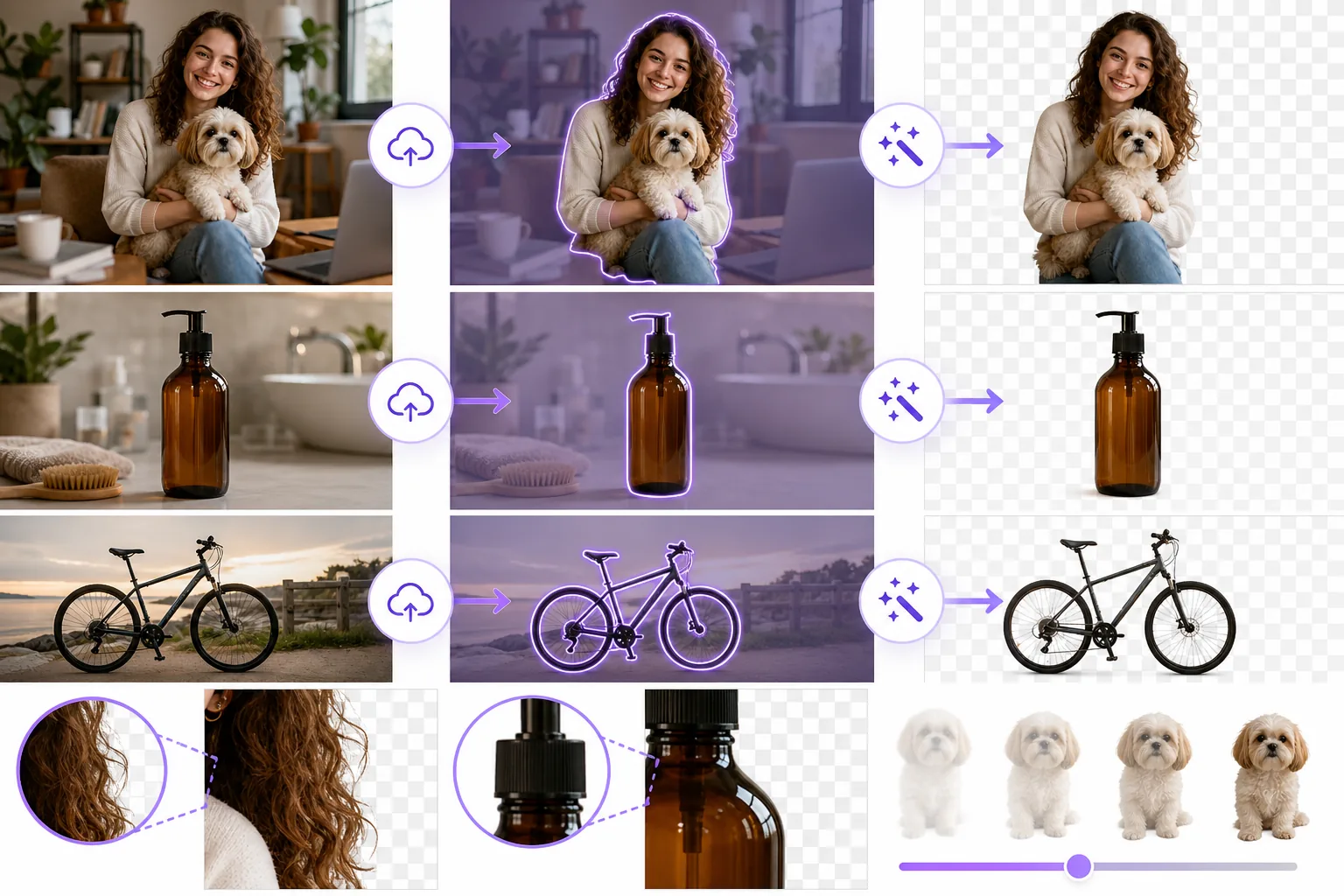
Lesson context before the long read
Review the result preview above, then scan the learning objectives below before reading the full lesson. Updated 2026-05-17.
Example visual uses an existing public asset: /content-images/one-click-background-removal-academy.webp.
Learning Objectives
- 1ارفع صورة وطبّق إزالة الخلفية بنقرة واحدة في Magic Eraser
- 2قيّم ما إذا كانت النتيجة التلقائية جاهزة للنشر أم تحتاج إلى تنقيح
- 3اضبط حساسية الكشف للتعامل مع المواضيع منخفضة التباين
كيف تعمل إزالة الخلفية بنقرة واحدة
تعتمد إزالة الخلفية بنقرة واحدة على نماذج التجزئة الدلالية التي تميّز موضوع المقدمة عن الخلفية في أجزاء من الثانية. ارفع صورتك إلى Magic Eraser، وانقر زر إزالة الخلفية، فيحلّل الذكاء الاصطناعي الإطار بأكمله لإنتاج قصاصة نظيفة. يتعامل النموذج مع مجموعة واسعة من المواضيع تشمل الأشخاص والمنتجات والحيوانات والمركبات دون أي تتبّع يدوي. وبالنسبة للصور جيدة الإضاءة ذات التباين الواضح بين الموضوع والخلفية، تكون نتيجة النقرة الواحدة جاهزة للنشر غالبًا.
أفضل الممارسات للحصول على نتائج نظيفة بنقرة واحدة
بعد أن يولّد الذكاء الاصطناعي قصاصته، كبّر الصورة لفحص الحواف بنسبة 100%. ابحث عن المناطق التي تتسرب فيها الخلفية إلى الموضوع أو التي تُقص فيها التفاصيل الدقيقة مثل الشعيرات الشاردة بقوة مفرطة. إذا كان الشكل الخارجي العام صحيحًا ولا تحتاج سوى مناطق حواف صغيرة إلى العمل، فانتقل إلى درس تنقيح الحواف. أما إذا كانت أجزاء كبيرة من الموضوع مفقودة، فجرّب ضبط شريط حساسية الكشف قبل التصحيح اليدوي. وتساعد زيادة الحساسية في المشاهد منخفضة التباين مثل منتج أبيض على طاولة رمادية فاتحة.
التعامل مع الحواف الصعبة بالإزالة التلقائية
تعمل الإزالة بنقرة واحدة على أفضل وجه عندما يشغل الموضوع جزءًا كبيرًا من الإطار ويكون منفصلًا بشكل معقول عن الخلفية باللون أو السطوع. والصور الملتقطة بعمق ميدان ضحل تطمس الخلفية بشكل طبيعي، ما يمنح الذكاء الاصطناعي إشارة فصل قوية. إذا كانت صورك المصدرية ذات إضاءة وتكوين متشابهين باستمرار، فيمكنك الوثوق بنتيجة النقرة الواحدة في سير العمل بالدفعات دون فحص كل صورة على حدة، رغم أن فحص عيّنة بشكل عشوائي يُنصح به دائمًا.
Key Takeaways
- ✓توفّر التجزئة الدلالية قصاصات فورية للصور جيدة الإضاءة وعالية التباين
- ✓افحص الحواف دائمًا بتكبير 100% لتقرر ما إذا كان التنقيح ضروريًا
- ✓زِد حساسية الكشف للمواضيع منخفضة التباين على خلفيات متشابهة الألوان