
Twitter/X 标题照片
设计一张在每台设备和每种模式下都精致出众的标题图片。此模板可精确处理 Twitter 所要求的 1500×500px 尺寸,考虑到个人资料图片的重叠区域,确保关键内容永不被遮挡,并保证您的横幅在深色模式和浅色模式下都美观大方。
免费试用此模板Social Media template preview
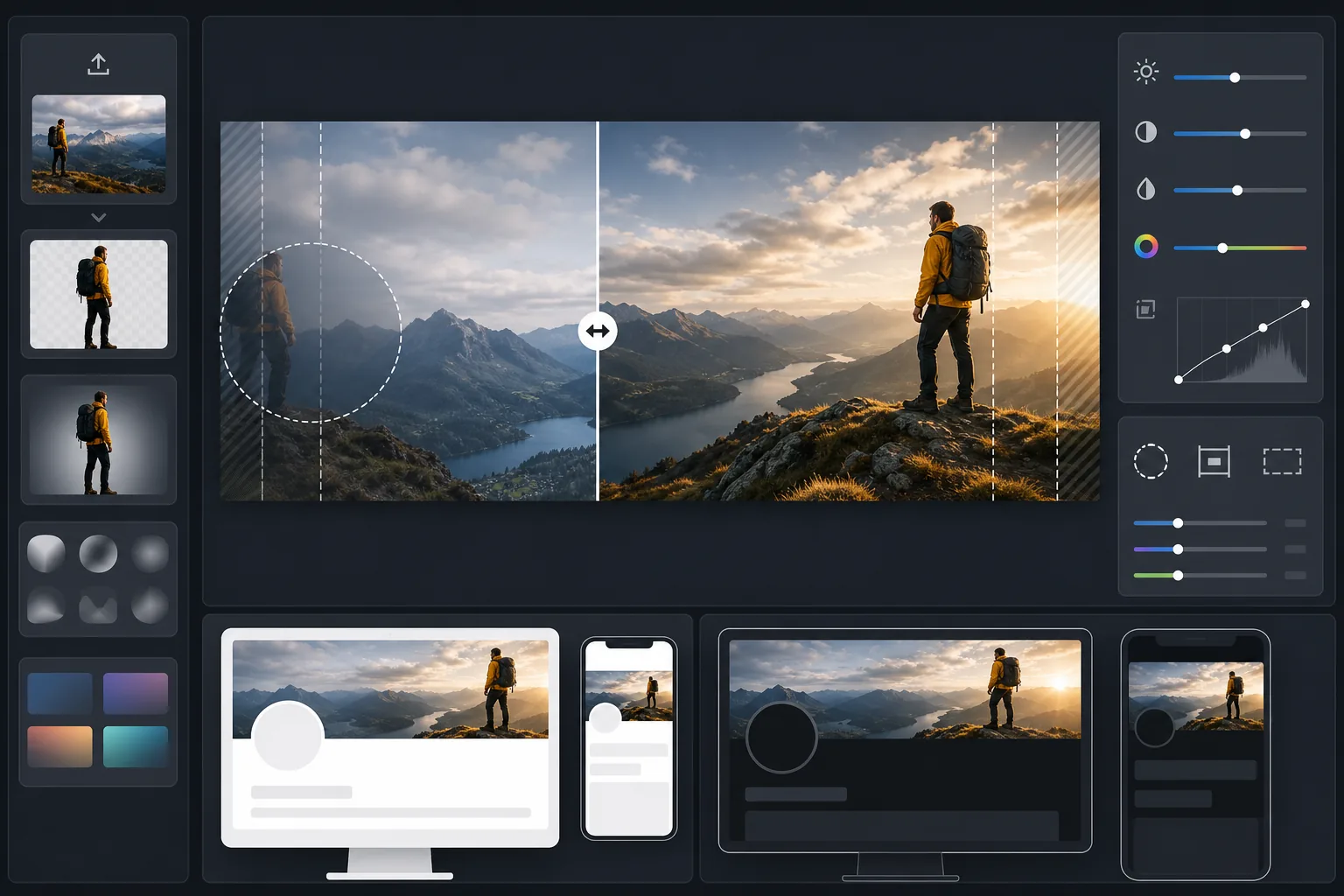
此模板的功能
将您的照片处理为 Twitter/X 所要求的精确 1500×500px 横幅尺寸,并通过智能裁剪将人脸和关键内容保留在可见的安全区域内。Background Eraser 可抠出主体以获得干净的构图,而 AI Enhance 则针对粉丝将看到的深色和浅色模式背景优化对比度和色彩。
模板设置
| 输出尺寸 | 1500×500px(3:1 Twitter/X 标题比例) |
| 安全区域 | 保留左侧 25% — 避免在桌面端和移动端与个人资料图片重叠 |
| 边缘融合 | 向深色或浅色柔和渐隐(随模式自适应) |
| 色彩优化 | 针对深色模式(#15202B)和浅色模式(#FFFFFF)对比度进行双重测试 |
| 文件格式 | 92% 质量的 JPEG(低于 Twitter 的 5MB 上传上限) |
| 文本安全区域 | 居中 50% 水平条带 — 避免在移动端被上下裁剪 |
如何使用此模板
上传您的源图片
请使用横向的照片或图形。宽幅全景照、城市风光和水平构图效果最佳。模板会裁剪为极端的 3:1 宽高比,因此请避免高大的主体或垂直居中的内容。
将关键内容放置在安全区域
模板将左侧 25% 标记为个人资料图片重叠区域,将外侧边缘标记为移动端裁剪区域。您最重要的视觉内容应位于横幅的右中部区域。
针对深色和浅色模式优化
AI Enhance 会调整对比度,使横幅在深色模式近乎纯黑的背景和浅色模式纯白背景下都不会出现生硬的边缘。边缘融合会营造平滑过渡,而非生硬截断。
导出并上传
下载优化后的 1500×500px JPEG,并直接上传到 Twitter/X。文件尺寸经过调整,可远低于 5MB 上限,同时在 retina 显示屏上保持清晰细腻的细节。
获得最佳效果的专业技巧
- ✓在最终确定前,请同时在手机和桌面端预览您的标题 — Twitter 在移动端会更激进地裁剪上下边缘,每个边缘大约裁掉 10%。
- ✓避免将文字或人脸放在左下象限,桌面端的个人资料图片、名称和简介会叠加在该处。
- ✓沿横幅边缘使用同时与 #15202B(深色模式)和 #FFFFFF(浅色模式)形成对比的颜色 — 中等色调的蓝色、绿色和暖灰色在两种环境下都表现良好。
- ✓如果使用含人物的照片,请将其放置在画面右侧三分之一处,以便在左侧个人资料图片旁仍然可见。
常见问题
个人资料图片究竟在何处重叠?
+
在桌面端,您的圆形个人资料图片会与标题左下角重叠,大约覆盖横幅最左侧 20% 区域中下方的 60%。在移动端,重叠情况类似但略有偏移。模板的安全区域同时考虑了两种布局。
我的标题在深色模式下好看吗?
+
好看。模板会针对深色模式背景(#15202B)和浅色模式背景(#FFFFFF)同时测试您的横幅。边缘融合确保在两种模式下都能平滑过渡,从而避免未优化标题所呈现的刺眼生硬边缘效果。
如果 Twitter 更改标题尺寸怎么办?
+
1500×500px 规格自 2017 年以来一直保持稳定,并在更名为 X 后依然如此。如果尺寸发生变化,我们会更新模板。当前输出也可干净利落地缩小到任何更小的横幅尺寸。
Related templates
More social media templates for your workflow.
Instagram 优化的方形裁剪模板,分辨率为 1080×1080 像素。干净的背景、鲜艳的色彩以及在提要中脱颖而出的清晰细节。
YouTube 横幅模板,尺寸为 2560×1440 像素,带有安全区指南。干净的背景去除创作者照片、设备感知布局和品牌一致的频道艺术。
Facebook 封面照片模板,桌面分辨率为 820×312 像素,移动设备裁剪为 640×360 像素。使用适当的安全区域来清洁品牌图像,以实现个人资料图片重叠和 CTA 按钮放置。
通过自然的皮肤平滑、背景清理、灯光校正和微妙的颜色分级来增强约会个人资料照片,使其看起来真实而不经过过滤。
创建令人惊叹的 Pinterest 图钉图像,具有干净的背景、最佳的 2:3 垂直尺寸、鲜艳的色彩增强和图钉就绪的构图。
使用干净的背景、大胆的主题框架和优化的 9:16 垂直尺寸来创建引人注目的 TikTok 视频封面照片,以实现个人资料网格的一致性。