
房地产平面图
将扫描或拍摄的平面图转换为干净、专业的图纸,适用于 MLS 房源、房产宣传册和虚拟看房集成。此模板可去除纸质图纸上的污渍、阴影和折痕,锐化墙线和尺寸标注,并标准化视觉风格,使您房源组合中的每张平面图看起来都保持一致。
免费试用此模板Real Estate template preview
此模板的功能
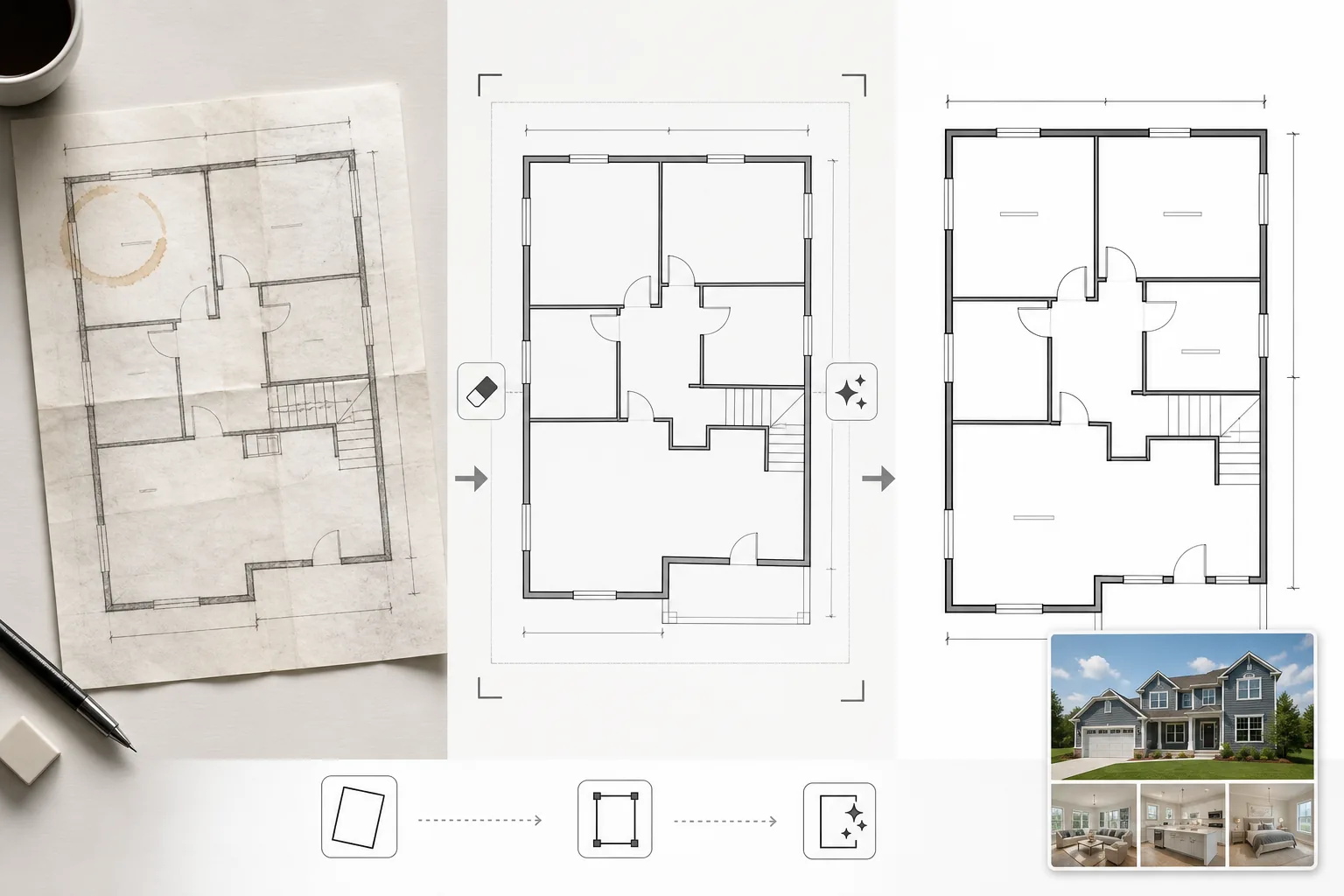
清理从纸质蓝图拍摄、从过时 CAD 软件导出或以低质量扫描的平面图图像。Magic Eraser 可去除纸质图纸手机照片中的咖啡渍、铅笔标注、折痕和阴影瑕疵。AI Enhance 可锐化墙线、门的开合方向和尺寸文字,使其在缩小用于网页显示或印刷在宣传册上时仍清晰可辨。对于以倾斜角度拍摄而非平面扫描的平面图,会校正其透视。背景色被标准化为干净的白色,墙线被加深至一致的粗细,使房源中所有图纸呈现统一的外观。
模板设置
| 背景清理 | 去除污渍、折痕、阴影,并标准化为干净的白色 |
| 线条增强 | 锐化并加深墙线至一致的粗细 |
| 文字清晰度 | 增强尺寸标签、房间名称和测量标注 |
| 透视校正 | 将拍摄的图纸校正为真正的俯视视图 |
| 输出分辨率 | 3000×2000px(横向)或自定义以匹配原始宽高比 |
如何使用此模板
上传您的平面图图像
上传扫描、拍摄或数字平面图。此模板可处理用手机相机拍摄的纸质图纸、平板扫描、PDF 导出和建筑软件的屏幕截图。倾斜角度手机照片的透视失真会自动校正。
去除瑕疵和污渍
Magic Eraser 可识别并去除咖啡渍、铅笔痕迹、折痕、扫描仪条纹以及光照不均造成的阴影渐变。背景被标准化为干净的白色,同时保留所有建筑线条和标注。
增强线条和文字
AI Enhance 可锐化墙体轮廓、门弧、窗户符号和楼梯标记。尺寸文字和房间标签经过增强以提高可读性。线条粗细经过标准化,使较粗的外墙和较细的内部隔墙具有一致的视觉层次。
导出用于房源和打印
下载高分辨率的清理后平面图,用于 MLS 上传、房产宣传册和虚拟看房叠加层。标准化的视觉风格确保您所有房源的所有平面图看起来都专业且一致。
获得最佳效果的专业提示
- ✓拍摄纸质平面图时,请将其放在平整的表面上,并在均匀光照下从正上方直接拍摄。透视校正可处理适度的角度,但接近俯视的起始点可产生最清晰的效果。
- ✓拍摄前请从图纸上取下便利贴和回形针。AI 可以擦除这些,但粘合剂残留和回形针阴影有时会留下需要额外清理的淡淡痕迹。
- ✓对于多层房产,请单独处理每一层并使用相同的增强设置。这可确保墙线粗细、文字大小和背景色调在各层之间保持一致,实现连贯的房源呈现。
常见问题
这能将草图转换为专业平面图吗?
+
此模板清理并增强现有的平面图图纸——它不会从头生成建筑平面图。墙体和房间形状清晰绘制的草图可以被清理和锐化,但手绘曲线和不均匀的线条仍将保持手绘特征,只是更干净而已。
尺寸文字会被准确保留吗?
+
是的。增强功能可锐化现有的尺寸标签而不改变数字。如果原始文字太模糊无法辨认,AI 会尝试恢复可读性,但无法保证严重退化文字的准确性——请始终对照源文档核实尺寸。
处理后我可以添加房间标签吗?
+
是的。干净的白色背景和清晰的线条使您可以使用任何图像编辑器或房源软件轻松叠加房间标签、家具图标或颜色编码。
Related templates
More real estate templates for your workflow.
适用于 MLS 挂牌的专业房地产照片模板。类似 HDR 的增强、天空替换、杂物消除以及色彩校正,让房产照片销售得更快。
通过垂直线校正、天空替换、去除车辆和行人以及黄金时段调色,提升建筑外观照片,适用于房源展示和作品集。
通过房间增亮、杂乱消除、Color correction 和广角镜头畸变修复来改变 Airbnb 和度假租赁照片,以提高预订率。
通过房间增亮、杂乱消除、材料纹理锐化以及饰面和织物的色彩准确渲染来增强室内设计作品集照片。
通过天空替换、财产边界突出显示、色彩鲜艳度 Boost 以及消除房地产和土地调查的干扰来增强无人机航空摄影。
用逼真的家具、装饰和灯光对空房间进行虚拟布置。帮助买家直观感受居住空间,无需实际布置成本。