
全家福清理
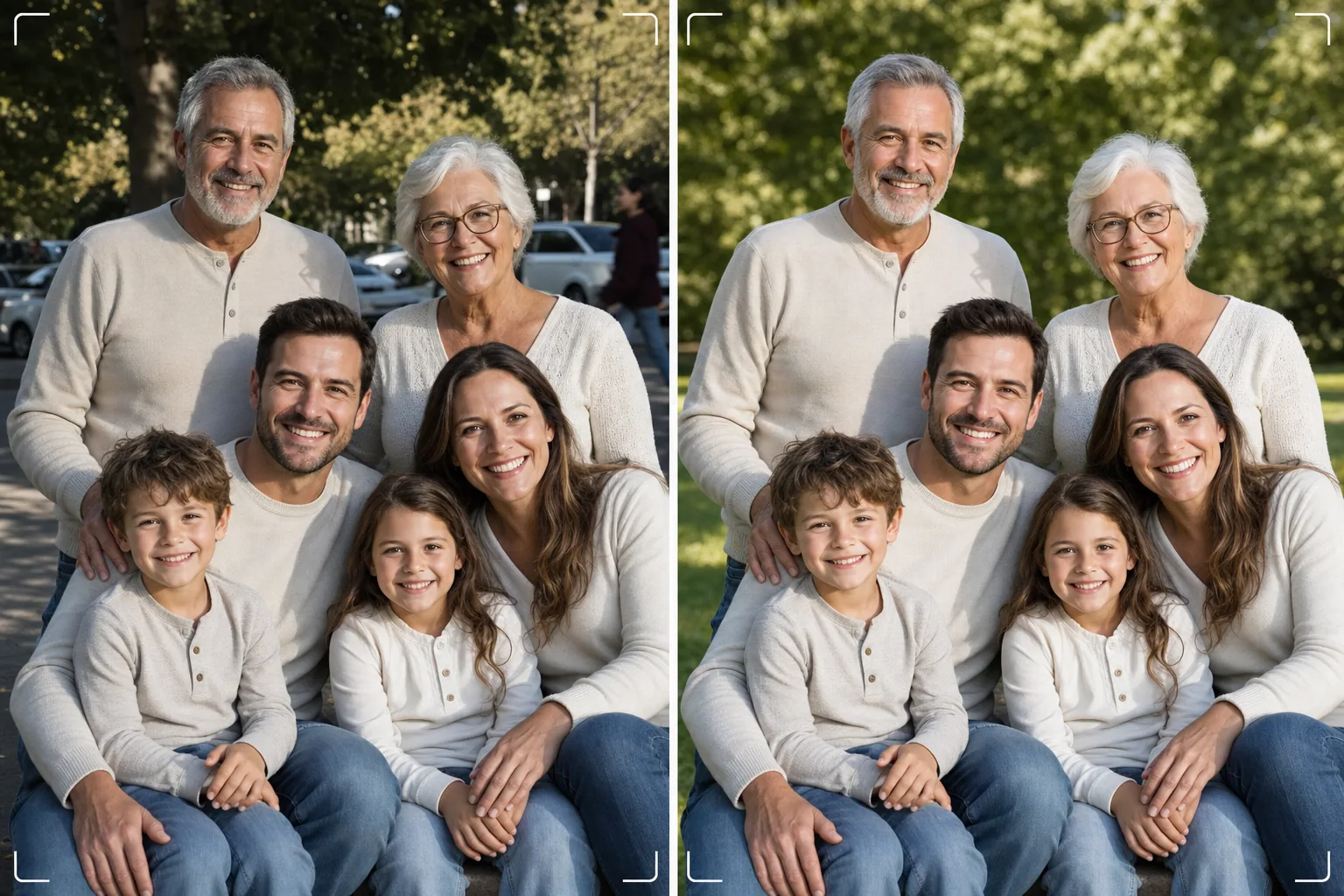
无需拍上百次即可获得完美的全家福。此模板可消除背景干扰,校正整个群体的光照不均,自然减少每张脸上的瑕疵,并清理那些让一张好的合影无法成为绝佳作品的小缺陷。
免费试用此模板Portrait template preview
此模板的功能
解决全家福的普遍难题——让每个人在同一帧画面中都呈现最佳状态。Magic Eraser 可去除乱入的路人、垃圾桶、出口标识、电线、停放的车辆以及其他破坏原本不错的合影构图的干扰物。AI Enhance 可校正部分家庭成员处于阴影中而其他人处于直射阳光下时产生的光照不均,让每个人达到一致且讨喜的曝光。自然的皮肤平滑可减少每张脸上的瑕疵、黑眼圈和泛红,同时不会让任何人显得像经过人工修图。最终成果便是你将大家聚在一起时所设想的那张全家福。
模板设置
| 背景清理 | 自动检测并去除干扰物(人物、标识、物体) |
| 曝光平衡 | 所有对象光照均匀(阴影填充 + 高光恢复) |
| 皮肤增强 | 逐脸自然减少瑕疵(保留独特特征) |
| 色彩校正 | 混合光照合影中统一的白平衡 |
| 锐化 | 人脸感知锐化(优先处理眼睛和笑容) |
| 输出分辨率 | 长边 6000px(300 DPI 下最大可墙面打印至 20×13 英寸) |
如何使用此模板
上传全家福
上传在家庭聚会、节日、团聚或人像拍摄时拍摄的合影。此模板可处理 2 到 30 人的群体。为获得最佳效果,请选择最多人面带愉悦表情看向镜头的那一帧——模板会修复背景和光照,但无法改变面部表情或闭着的眼睛。
去除背景干扰物
Magic Eraser 可识别并去除家庭群体身后的陌生人、扰乱画面的标识、垃圾、车辆及其他不需要的元素。AI 会自然地重建背景,填补被去除物体后方的草地、天空、墙壁或地面。
平衡光照并增强面部
AI Enhance 可校正家庭成员之间的曝光差异——再也不会出现一半人在阴影中、一半人在阳光下眯眼的情况。每张脸都会获得单独的瑕疵减少和细微的眼部提亮,同时保留每个人独特的特征和自然外观。
导出以打印或分享
可按长边 6000px 下载用于大幅墙面打印,或按 2000px 下载用于社交媒体和电子节日贺卡。模板以 sRGB 输出用于屏幕显示,或以 Adobe RGB 输出用于专业打印。提供多种裁剪比例(4:5、5:7、8:10)以适配常见相框尺寸。
获得最佳效果的专业技巧
- ✓连续快速拍摄三到五张。选择最多人睁着眼睛且表情自然的那一张——模板会处理其余一切,但表情和睁眼状态在事后无法更改。
- ✓将家人安排在开阔的阴影处——树荫下或建筑物的背阴侧——而非阳光与阴影交错的地方。这能为模板提供光照均匀的起点,从而产生最自然的增强效果。
- ✓对于大型群体(十人或以上),请将人员排成错落的几排,较高的成员站在后排。这种自然的层次能营造纵深感,并确保每张脸都清晰可见。模板可以提亮因距离光源较远而略显偏暗的后排面孔。
常见问题
这能修复闭着的眼睛或不好的表情吗?
+
不能。模板可增强光照、去除干扰物并平滑皮肤,但无法改变面部表情、睁开闭着的眼睛或重新调整人物位置。请在上传前选择表情最佳的那一帧——模板会让该帧呈现绝佳效果。
大型团聚群体怎么办?
+
此模板可处理约 30 人以内的群体。对于非常庞大的群体,由于画面中脸部尺寸较小,单独的面部增强会更加细微,但背景清理和光照校正在任何群体规模下都完全有效。
我可以从全家福中移除某个人吗?
+
可以,Magic Eraser 能从群体中移除特定的人。选择你想移除的人,AI 会重建其身后的背景。当该人位于群体边缘而非夹在其他人中间时,效果最佳。
Related templates
More portrait templates for your workflow.
适合年龄的学校肖像修饰模板。自然的瑕疵去除、一致的背景和年鉴标准输出,并对整个班级进行批处理。
工作室品质的宠物肖像模板。处理毛皮边缘,去除皮带和处理程序,替换背景,并锐化狗、猫和其他动物的眼睛。
天然皮肤修饰模板,可去除瑕疵,同时保留毛孔和纹理。即使是灯光,也没有塑料外观——只是相机上的皮肤更好。
通过柔和的暖色调、温和的皮肤平滑、去除道具和干扰以及用于公告和墙壁艺术的可打印尺寸来增强新生儿和婴儿照片的效果。
使用温和的皮肤平滑、柔和的发光照明、背景简化和暖色调分级来修饰孕妇照片,打造永恒的孕妇肖像外观。