
每次都呈现完美的活动照片
婚礼和活动照片捕捉到了无可替代的时刻,但出口标志、流浪的客人和杂乱的场地可能会破坏照片的效果。 Magic Eraser 让摄影师和策划者无需花费数小时的手动编辑即可提供完美的图像。
Last updated
为什么活动专业人士选择 Magic Eraser
活动场地是不可预测的——电源线蜿蜒穿过过道,餐饮工作人员出现在仪式镜头中,紧急出口标志在每个背景中闪闪发光。 Magic Eraser 消除了这些干扰,因此每张交付的照片看起来都是有意而精致的。夫妇们花费数月的时间来选择他们的供应商,而投资组合图像是这些决定中最有影响力的因素。您的作品集中的每张照片都代表您品牌的能力。确保每张图像不受场地干扰并以最佳状态呈现,直接影响查询量和预订率。
婚礼和活动专业人士的主要优势
提供完美的活动图像,捕捉每一次庆祝活动的魔力。
完美的仪式照片
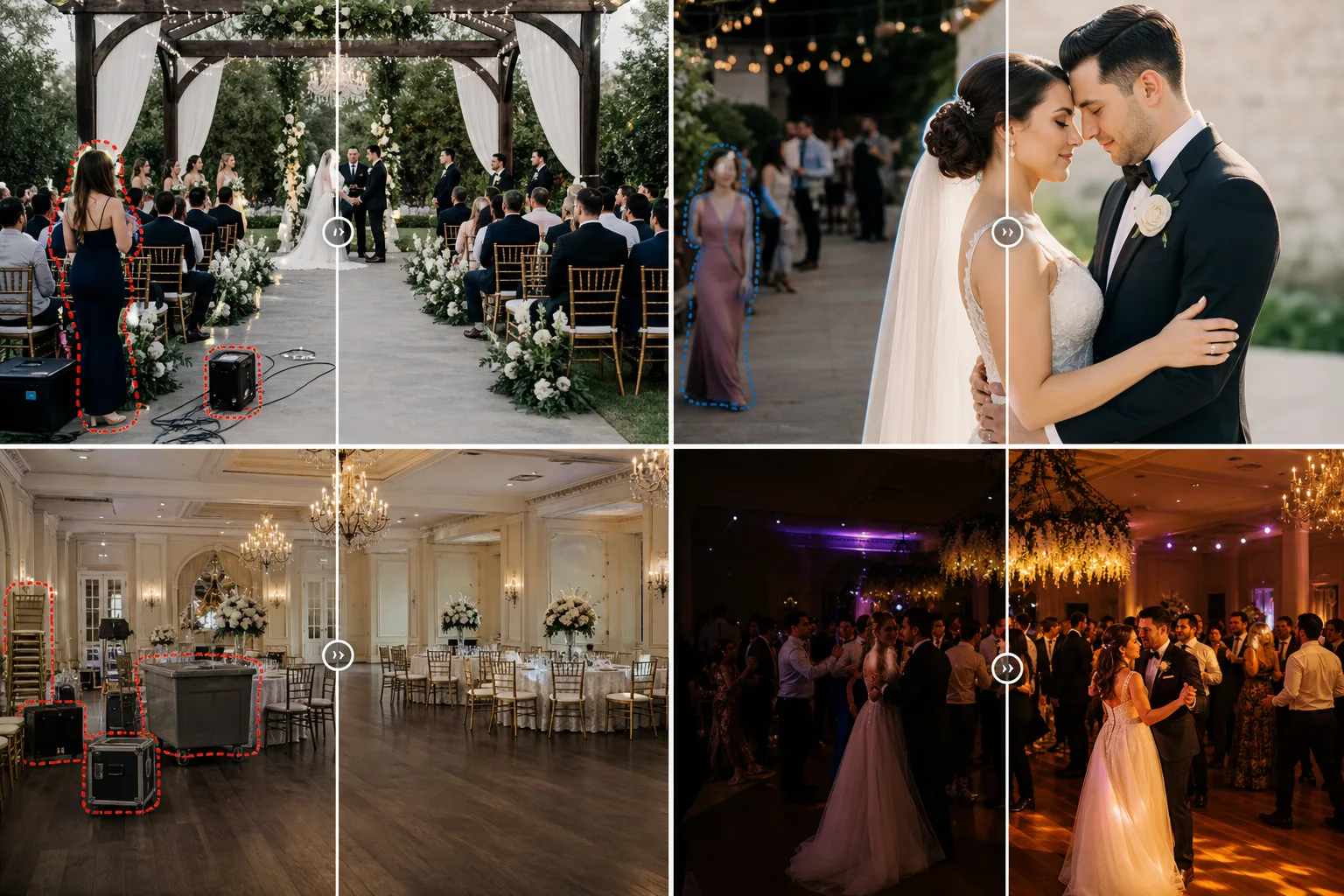
从仪式和招待会照片中删除出口标志、配电板、电缆和其他会场干扰因素,让焦点集中在新人及其宾客身上。
更快的图库交付
通过批量删除数百张照片中常见的干扰因素,缩短活动画廊的周转时间。提前几天向客户交付精美的专辑。
场馆营销资产
活动场地可以用干净、整洁的照片来展示他们的空间,帮助情侣想象他们自己的庆祝活动,而无需考虑之前活动的剩余装饰。
投资组合就绪亮点
通过消除杂乱的背景、增强照明并确保每张展示图像都符合您的专业标准,快速为您的网站组合准备最佳的活动照片。
社交媒体当日预览
在活动期间或活动结束后立即编辑和分享精彩图像。快速的移动编辑让您可以发布精美的内容,同时参与度最高。
一致的跨供应商协作
当多名摄影师、摄像师和策划者贡献内容时,请确保所有共享图像具有一致的专业品质,以进行协调营销。
常见用例
婚礼清理
从仪式和祭坛镜头中移除出口标志、灭火器、过道中的流浪客人以及场地设备,以获得干净、浪漫的构图。
接待处照片增强
通过移除杂乱舞池和餐桌镜头的餐饮车、堆叠的椅子和 AV 设备来清理宴会厅图像。
企业活动摄影
通过去除抓拍照片中的挂绳、名牌以及清理营销材料的舞台布景来美化会议和庆典照片。
宾客照片传送
在将个人客人肖像和集体照片交付给客户之前,快速清理和增强它们,消除照片轰炸和背景干扰。
供应商合作展示
通过按照相同的专业标准编辑每个供应商提供的照片,与花店、餐饮服务商和策划者创建一致、高质量的共享作品集。
Magic Eraser 活动工具
| Tool | How It Helps |
|---|---|
| 物体移除 | 立即从仪式和接待照片中删除出口标志、灭火器、电源线和流浪客人。 |
| Background Eraser | 将情侣、婚礼派对或主题演讲者从繁忙的场地背景中隔离出来,以获得特色英雄图像。 |
| 人工智能填充 | 在移除的物体后面重建场地墙壁、花卉布置和餐桌布置,以获得自然的效果。 |
| 图像增强器 | 通过自动亮度、颜色和清晰度校正来拯救光线昏暗的接待照片和晚间活动。 |
它是如何运作的
上传
直接从相机胶卷或编辑工作流程上传仪式照片、招待会照片或集体肖像。
编辑
消除干扰——出口标志、不速之客、场地混乱——Magic Eraser 会通过 AI 精准消除它们。
出口
下载清晰、高分辨率的图像,供客户图库、相册、社交媒体或打印。
常见问题解答
Magic Eraser 可以从婚礼合影中删除人物吗?
+
是的。您可以从集体照或背景照片轰炸中删除个人。 AI自然地填充了周围场馆环境。
编辑后的照片是否符合婚礼相册所需的质量?
+
绝对地。 Magic Eraser 保留全分辨率和色彩保真度,使编辑后的照片适合大幅面打印和高级相册。
编辑完整婚礼图库的速度有多快?
+
每张照片需要几秒钟的时间来编辑。大多数摄影师使用 Magic Eraser 对婚礼中的 20-50 张关键图像进行有针对性的修复,从而大大减少后期处理时间。
Magic Eraser 可以处理多人合影吗?
+
是的。有选择地消除背景干扰,同时保留画面中的每个人。人工智能自然地重建大群体背后的复杂区域。
它适用于弱光接收照片吗?
+
绝对地。图像增强器使黑暗的接待处和舞池照片变亮,从昏暗的场地照片中恢复细节和色彩。
我可以编辑供应商提供的照片吗?
+
是的。 Magic Eraser 适用于任何 JPEG 或 PNG 图像,无论来源如何。清理来自花店、餐饮服务商和其他供应商的照片,以获得一致的视觉故事。
More Industries
See how Magic Eraser helps professionals in other industries.
摄影师花费数小时进行后期制作,消除干扰、修饰肖像和完善背景。 Magic Eraser 加速您的编辑工作流程,以便您可以更快地向客户提供精美的图像,而不会牺牲质量。
Magic Eraser 可帮助房地产经纪人和摄影师移除干扰物体、减少视觉杂乱并优化房产照片。请检查每项编辑并遵守当地列表平台的披露规则,确保图像准确呈现房产。
网上购物者通过图像来判断产品。 Magic Eraser 删除杂乱的背景,消除分散注意力的元素,并创建适合市场的产品照片,以建立买家信任并提高转化率。
社交媒体发展迅速,您的视觉效果也需要跟上。 Magic Eraser 帮助创作者、营销人员和品牌消除干扰、交换背景和润色图像,使每篇帖子在 Instagram、TikTok 和 Twitter 的拥挤动态中脱颖而出。
令人胃口大开的图片可以带动订单和客流量。 Magic Eraser 帮助餐厅、咖啡馆和食品品牌清理食品摄影、消除餐桌杂乱,并增强菜单、外卖应用和社交媒体营销的菜肴展示。
从造型手册到产品页面,时尚品牌需要大规模的完美视觉效果。 Magic Eraser 帮助设计师、造型师和时尚营销人员去除背景、修饰模特照片并创建精美的平面布局,以展示每件服装的最佳状态。
旅游营销的生死取决于图像。 Magic Eraser 帮助酒店、旅游运营商和目的地营销人员消除地标上的人群、清理酒店照片并增强风景照片,从而将浏览者转变为预订者。
从年鉴肖像到校园营销,教育机构需要干净、专业的图像。 Magic Eraser 帮助学校、学院和电子学习平台消除照片中的干扰,增强校园形象,并为每位观众创造精美的视觉效果。