
推销外观的时尚形象
从造型手册到产品页面,时尚品牌需要大规模的完美视觉效果。 Magic Eraser 帮助设计师、造型师和时尚营销人员去除背景、修饰模特照片并创建精美的平面布局,以展示每件服装的最佳状态。
Last updated
为什么时尚专业人士选择Magic Eraser
时尚随着潮流的速度而变化,您的照片编辑也应该如此。 Magic Eraser 让您无需昂贵的修饰服务即可制作画册质量的图像 - 在干净的背景上隔离服装,消除平铺上的皱纹,并确保每个产品镜头都适合电子商务。时尚零售周期需要速度。新系列每周推出,潮流响应内容需要当天周转,数百个 SKU 的视觉一致性将优质品牌与商品卖家区分开来。 Magic Eraser 为创意团队提供了他们所需的速度,同时又不影响时尚买家所期望的注重细节的质量。
时尚品牌的主要优势
制作产品画册品质的产品图像,展示您的设计并推动销售。
完美的服装展示
去除服装照片中的绒毛、皱纹和背景干扰物,以便买家专注于设计、面料和合身性。在客户接触产品之前,干净的图像就传达了质量。
快速产品目录制作
通过删除和交换背景,将单张照片拍摄成完整的造型册,在整个系列中创建一致的白色或生活方式设置,而无需重新拍摄。
市场就绪的平铺
创建符合 ASOS、Nordstrom 和 Farfetch 等时尚市场图像标准的干净的平铺和幽灵人体模型产品图像。
季节性收集周转
只需数小时而不是数天即可编辑和发布新的收藏照片。快速周转让您可以按计划推出季节性投放项目,而不会出现后期制作瓶颈。
影响者内容再利用
通过消除杂乱的背景、增强照明和标准化图像质量,清理影响者和用户生成的内容,以便在您的官方品牌渠道上使用。
具有成本效益的大规模内容
降低包含数百或数千个 SKU 的大型目录中的每张图像编辑成本。人工智能支持的批处理取代了手动修饰,所需时间和成本仅为一小部分。
常见用例
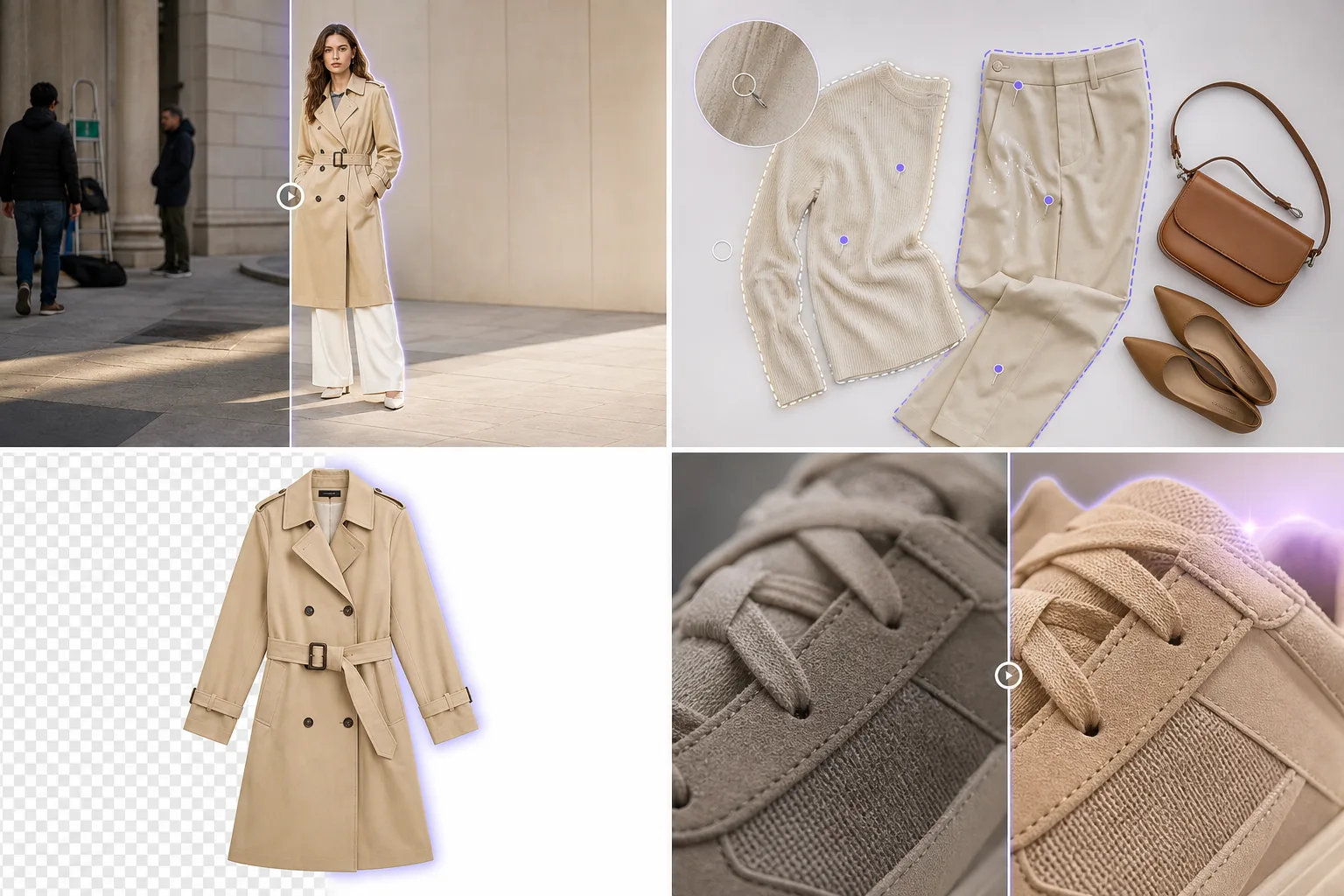
造型手册和广告拍摄
通过消除交通锥、旁观者和其他干扰时尚故事的环境干扰物来清理现场镜头。
平躺摄影
擦除头顶服装照片中的绒毛、折痕、表面缺陷和造型别针,以创建杂志品质的平铺图像。
模型修饰
从模特照片中去除杂乱的毛发、服装标签和衣柜故障,同时保留自然的皮肤纹理和织物细节。
电子商务产品页面
将服装隔离在白色或透明背景上,以便在 Shopify 商店、批发门户和市场渠道中保持一致的产品列表。
配饰和鞋类细节镜头
以更高的清晰度和干净的背景捕捉手袋、鞋子、皮带和配饰的精美细节,让工艺不言而喻。
Magic Eraser 时尚工具
| Tool | How It Helps |
|---|---|
| 物体移除 | 擦除造型剪辑、可见标签并设置缺陷,使每张照片看起来都可以发布。 |
| Background Eraser | 将服装和配饰隔离在产品页面、产品线表和批发目录的干净背景上。 |
| 人工智能填充 | 用精心设计的纹理(大理石、混凝土、织物)取代杂乱的背景,以补充系列美学。 |
| 图像增强器 | 增强面料纹理和色彩清晰度,同时保留人工复核步骤,确保屏幕和印刷中的服装颜色尽量接近实物。 |
它是如何运作的
上传
上传您拍摄的照片 - 来自任何相机或智能手机的模型照片、平面图或细节特写。
编辑
去除背景、消除瑕疵并提高颜色准确性以匹配真实的服装外观。
出口
下载适合您的在线商店、PDF 型录、社交媒体或新闻资料袋的精美图片。
常见问题解答
Magic Eraser 可以处理蕾丝和流苏等详细的服装边缘吗?
+
是的。由人工智能驱动的 Background Eraser 可检测精细的织物边缘,包括蕾丝、流苏、网布和透明材料,生成干净的切口,保留服装细节。
增强后颜色准确吗?
+
图像增强器会在尽量保留自然色彩的同时提高清晰度和锐度。用于电商发布前,请在校准光线下将最终图片与实物服装对照检查。
我可以在一次会话中编辑整个集合吗?
+
是的。批处理允许您在整个产品图像集合中应用背景去除和增强,保持一致性,同时节省数小时的编辑时间。
Magic Eraser 可以创造幽灵人体模型效果吗?
+
虽然 Magic Eraser 擅长背景去除和清理,但幽灵人体模型效果需要去除人体模型并重建服装内部。 Background Eraser 有效地处理第一步。
它适用于纺织品特写和细节镜头吗?
+
是的。 Magic Eraser 在清理和增强过程中保留精细的织物纹理和缝合细节,这对于向在线购物者传达材料质量至关重要。
我可以将其用于造型手册和广告活动图像吗?
+
绝对地。消除位置干扰、交换背景并增强模型镜头,以便在您的造型手册、网站、社交渠道和批发产品线表中使用。
More Industries
See how Magic Eraser helps professionals in other industries.
摄影师花费数小时进行后期制作,消除干扰、修饰肖像和完善背景。 Magic Eraser 加速您的编辑工作流程,以便您可以更快地向客户提供精美的图像,而不会牺牲质量。
Magic Eraser 可帮助房地产经纪人和摄影师移除干扰物体、减少视觉杂乱并优化房产照片。请检查每项编辑并遵守当地列表平台的披露规则,确保图像准确呈现房产。
网上购物者通过图像来判断产品。 Magic Eraser 删除杂乱的背景,消除分散注意力的元素,并创建适合市场的产品照片,以建立买家信任并提高转化率。
社交媒体发展迅速,您的视觉效果也需要跟上。 Magic Eraser 帮助创作者、营销人员和品牌消除干扰、交换背景和润色图像,使每篇帖子在 Instagram、TikTok 和 Twitter 的拥挤动态中脱颖而出。
令人胃口大开的图片可以带动订单和客流量。 Magic Eraser 帮助餐厅、咖啡馆和食品品牌清理食品摄影、消除餐桌杂乱,并增强菜单、外卖应用和社交媒体营销的菜肴展示。
旅游营销的生死取决于图像。 Magic Eraser 帮助酒店、旅游运营商和目的地营销人员消除地标上的人群、清理酒店照片并增强风景照片,从而将浏览者转变为预订者。
从年鉴肖像到校园营销,教育机构需要干净、专业的图像。 Magic Eraser 帮助学校、学院和电子学习平台消除照片中的干扰,增强校园形象,并为每位观众创造精美的视觉效果。
汽车买家从网上开始,列出的照片就是您的陈列室。 Magic Eraser 帮助经销商和私人卖家消除反光、清理地块背景并增强车辆图像,使每个列表看起来都适合陈列室并进行试驾。