
How to remove a price sticker from a photo
学习如何使用 Magic Eraser How to remove a price sticker from a photo。免费 AI 工具的简单分步指南。支持网页、iOS 和 Android。
Last updated
立即尝试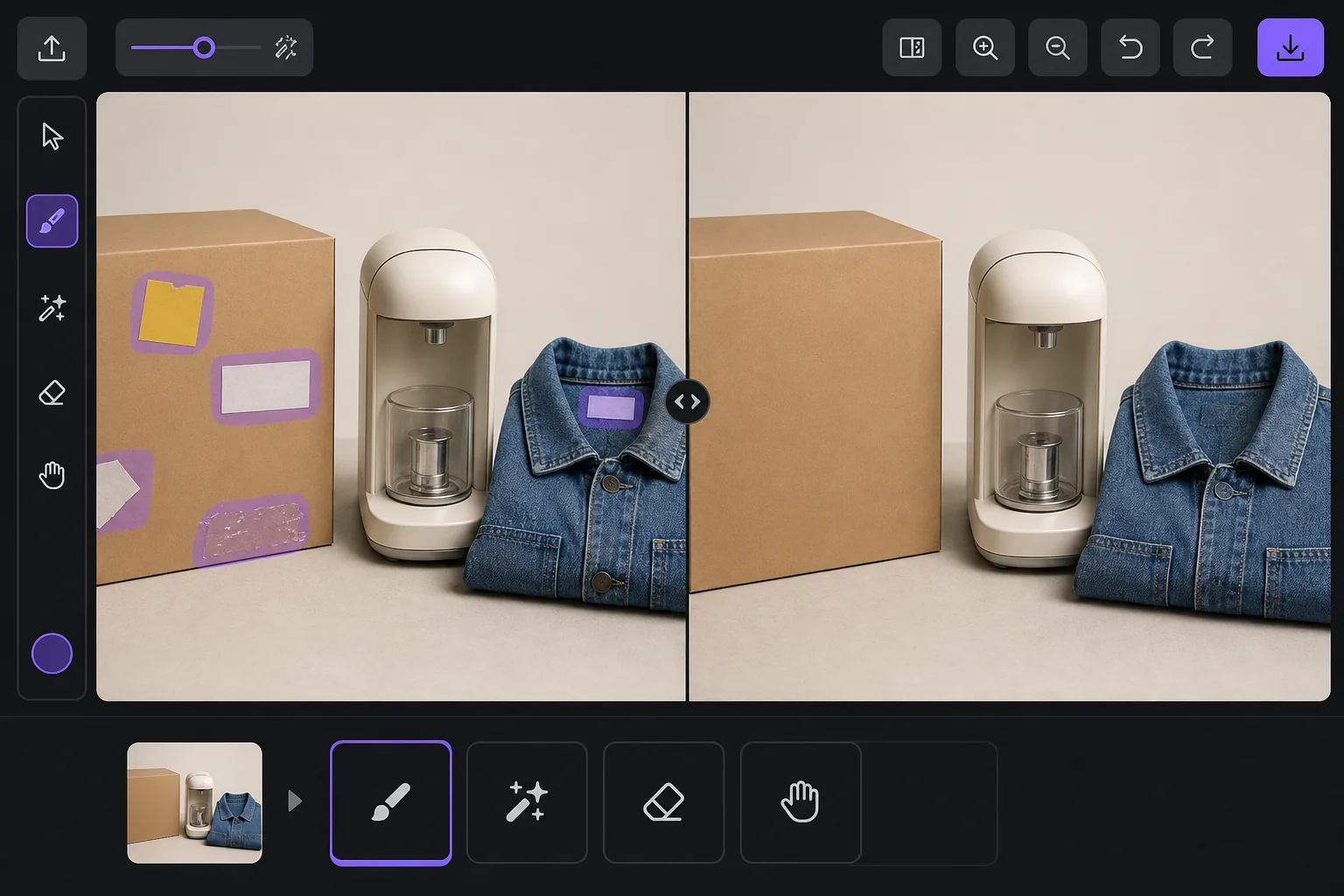
Why a visible price sticker hurts your resale listing — Magic Eraser
A price tag in a listing photo quietly works against you. Buyers see the original retail or clearance price and anchor their offer below it, so a leftover $4.99 yellow sticker can cost you more than five dollars in negotiation. It also signals the item came from a closeout bin or was already returned once, which lowers perceived condition even when the product is genuinely good. And some platforms care: marketplaces and their image guidelines generally want a clean product shot, and a barcode or store tag clutters the main image where buyers decide in a half-second whether to tap. Peeling a sticker off physically often leaves adhesive residue, a torn label, or a faded rectangle where the box was protected from light — so the photo problem survives the physical one. Removing it in the photo is the faster fix. A price sticker is rendered onto the image pixels just like any other object, so it replaces whatever box art, fabric, or surface sat behind it. Magic Eraser's AI brushes the sticker away and generates a plausible reconstruction of that hidden area from the surrounding pixels. Be clear on what that means: over a flat colored box or a plain surface the result is usually seamless, but the AI is synthesizing what was likely there, not recovering literal hidden detail — so printed text or a logo that sat entirely under the sticker is invented, not restored.
Before you start
分步教程
Start with 上传照片. The result preview above and tips below use this guide's existing content; no separate before-and-after proof is assumed.
- 1
上传照片
在网页、iOS 或 Android 上打开 Magic Eraser。拖放您的 JPEG、PNG、HEIC 或 WebP 照片。无需账户即可开始。
- 2
选择工具和区域
选择合适的工具并标记需要处理的区域。AI 会自动分析并在几秒内应用更改。
- 3
下载结果
预览结果并下载编辑后的照片。导出为高质量 PNG 或 JPEG 格式。
最适合
- eBay and Facebook Marketplace sellers cleaning price tags off secondhand items before listing
- Resellers and thrift flippers removing clearance and markdown stickers that anchor buyers low
- Hiding barcode and store-inventory labels stuck to product boxes and packaging
- Removing price gun tags and plastic fasteners from clothing and accessory photos
- Erasing adhesive residue or the faded outline left after a sticker was peeled off by hand
获得最佳效果的技巧
Whenever you can, peel the sticker off the real item and photograph the actual surface — a true photo always beats a reconstruction, and it spares you any question about whether the listing image is accurate. Use the eraser for what's left behind: adhesive gunk, a torn corner, or the sun-faded rectangle a long-stuck tag protected. Keep your edits honest about the product itself. Removing a price tag or barcode is fine, but don't erase genuine flaws a buyer needs to see — scratches, stains, or damage belong in the listing, and most marketplaces treat a doctored condition photo as grounds for a return or a policy strike. Reconstruction quality tracks the background: a sticker on a flat single-color box vanishes cleanly, while one sitting across detailed printed artwork, a logo, or a model number is the hardest case, because the AI has to guess at text it can't see. If part of the hidden label is still visible elsewhere on the item, photograph that angle instead. Finally, shoot a little wider than the sticker so there's plenty of surrounding surface for the AI to sample from — tightly cropped tags leave it less to work with.
常见问题
- How to remove a price sticker from a photo功能是免费的吗?
- 是的,Magic Eraser 允许您在每日免费额度内How to remove a price sticker from a photo。升级到 Pro 可获得无限处理和高分辨率导出。
- How to remove a price sticker from a photo需要多长时间?
- 只需几秒钟。Magic Eraser 的 AI 快速处理照片——大多数结果在上传后立即可用。
- 可以在手机上使用吗?
- 是的,Magic Eraser 可在 iOS、Android 和所有网页浏览器上使用。您可以在设备间自由切换。
- 图片质量会下降吗?
- 不会,Magic Eraser 保持原始照片质量。AI 智能处理以保留细节和清晰度。