
Remove Decorative Emoji Overlays From a Photo
学习如何使用 Magic Eraser 去除表情符号叠加层。免费 AI 工具的简单分步指南。支持网页、iOS 和 Android。
Last updated
立即尝试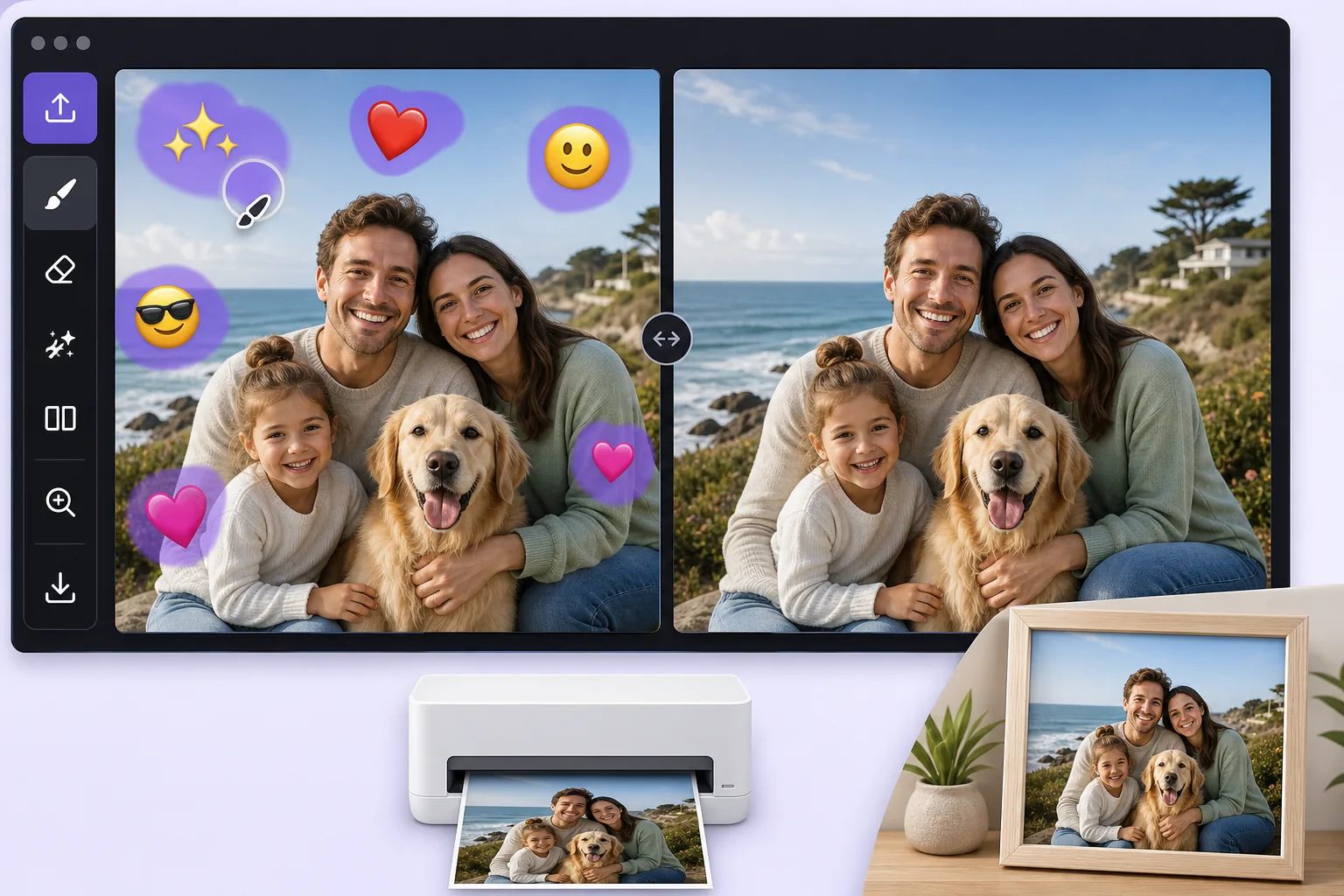
Turn a fun, sticker-covered photo into a clean print-ready image — Magic Eraser
We all decorate photos with emoji overlays for laughs, a crown on a birthday selfie, sunglasses on the dog, a string of hearts across a couple shot. The problem comes later, when you want to print that photo as a framed gift, submit it for a professional profile, or hand it to a client, and the cartoon stickers suddenly look out of place. Re-shooting is rarely an option, and the original un-stickered file is often long gone. Magic Eraser solves this by removing the decorative emoji overlay and using AI inpainting to fill the gap with a believable continuation of the surrounding scene. Be clear on what this does: the AI synthesizes a plausible reconstruction of the area an emoji was covering, it does not recover the literal original pixels that were hidden, and it cannot reveal a face or detail that the sticker concealed. For most decorative overlays, though, what was behind them is ordinary background, wall, sky, clothing, hair, so the result is clean enough to print or use professionally. It runs free on web, iOS, and Android with no watermark, so you can clean up a photo on your phone right after the fun and have a print-ready version in seconds.
Before you start
分步教程
Start with 上传照片. The result preview above and tips below use this guide's existing content; no separate before-and-after proof is assumed.
- 1
上传照片
在网页、iOS 或 Android 上打开 Magic Eraser。拖放您的 JPEG、PNG、HEIC 或 WebP 照片。无需账户即可开始。
- 2
选择工具和区域
选择合适的工具并标记需要处理的区域。AI 会自动分析并在几秒内应用更改。
- 3
下载结果
预览结果并下载编辑后的照片。导出为高质量 PNG 或 JPEG 格式。
最适合
- Cleaning a birthday or holiday selfie before ordering it as a framed print or photo gift
- Turning a fun, sticker-decorated headshot into a usable photo for a resume or LinkedIn profile
- Removing playful emoji a friend added before you reuse the shot in a client deck or brochure
- Stripping heart and sparkle overlays off a couple or wedding photo destined for a printed album
- Prepping a casually decorated product or pet photo for a professional listing or store catalog
获得最佳效果的技巧
Start from the largest version of the file you can find, the original camera roll image rather than a re-saved chat screenshot, because printing magnifies any softness in the reconstructed area. Emoji placed over flat, repeating backgrounds like a wall, sky, or solid shirt reconstruct most convincingly; an emoji sitting on top of a face or fine detail is harder, and the AI will invent a plausible fill rather than restore the true hidden feature, so treat those spots critically before printing. Work emoji-by-emoji on busy photos and review each erased patch zoomed in. If a result looks off, a slightly larger or smaller brush selection often gives the AI better context to rebuild the scene.
常见问题
- 去除表情符号叠加层功能是免费的吗?
- 是的,Magic Eraser 允许您在每日免费额度内去除表情符号叠加层。升级到 Pro 可获得无限处理和高分辨率导出。
- 去除表情符号叠加层需要多长时间?
- 只需几秒钟。Magic Eraser 的 AI 快速处理照片——大多数结果在上传后立即可用。
- 可以在手机上使用吗?
- 是的,Magic Eraser 可在 iOS、Android 和所有网页浏览器上使用。您可以在设备间自由切换。
- 图片质量会下降吗?
- 不会,Magic Eraser 保持原始照片质量。AI 智能处理以保留细节和清晰度。