
如何用AI编辑房地产照片
带有专业编辑照片的房地产列表销售速度提高了 32%,价格也更高。 Magic Eraser 的人工智能可以处理最具影响力的房地产照片编辑:消除混乱、替换暗淡的天空、修复灯光以及清理内部和外部镜头。
Last updated
立即编辑列表照片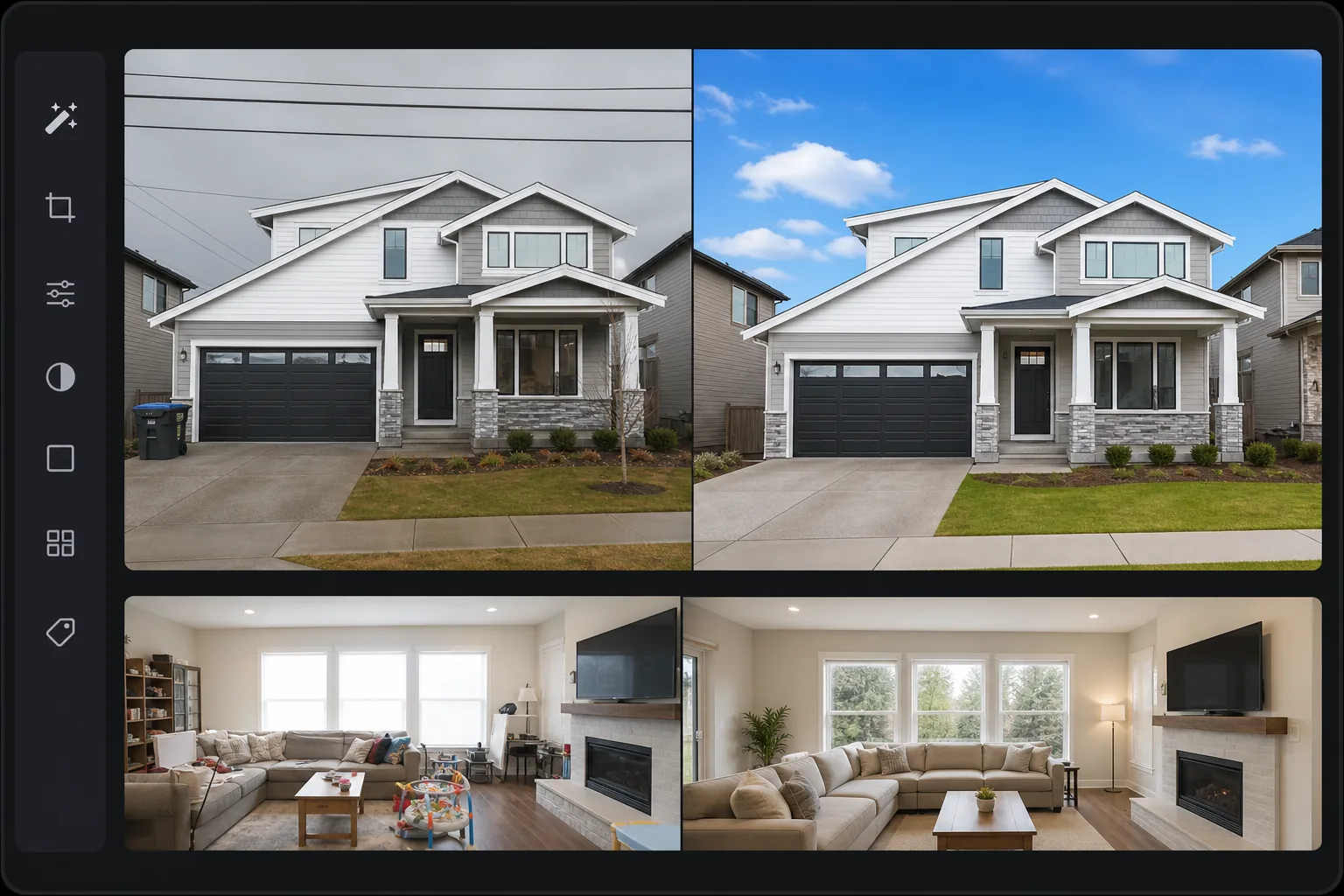
为什么房地产照片编辑对销售很重要
想要修整房产照片,只需在网页端、iOS 或 Android 上打开 Magic Eraser,上传你的房源照片,然后做好对房产照片最关键的几项处理:清除杂物和私人物品、替换灰暗或阴天的天空,并调整亮度让室内和窗外景物都清晰可见。完全免费,无需注册。请坚持行业通行的修图标准——这些调整改变的是房产的呈现方式,而不是它的本质。增加房间、隐藏缺陷或篡改真实状况都属于虚假陈述,所以修图务必只做表面美化,并保持诚实。 美国房地产经纪人协会报告称,97% 的买家首先在网上进行搜索,房源照片是他们点击浏览还是滚动浏览的主要因素。专业的房地产照片编辑改变了人们对房产的看法——去除妨碍买家在空间中看到自己的个人物品,用蓝天取代阴天,使外观更具吸引力,纠正窗户爆裂,使内部和外部都可见,并增强整体亮度和温暖度。专业编辑服务每张照片收费 5-15 美元,每个列表的照片数量很快就会增加到 30-50 张。 Magic Eraser 提供相同的核心编辑 - 杂乱消除、天空替换、照明校正、增强 - 无需每张照片的成本。
Before you start
只需三步即可编辑房地产照片
Start with 上传房源照片. The result preview above and tips below use this guide's existing content; no separate before-and-after proof is assumed.
- 1
上传房源照片
在 Web、iOS 或 Android 上打开 Magic Eraser。上传房产照片——内部、外部、天线。首先处理主图像(通常是正面外观),因为它决定买家是否点击进入列表。
- 2
应用有针对性的编辑
对于外部:用蓝天代替阴天,拆除电线和垃圾桶,用亮度/Color correction 增强路缘吸引力。对于室内装饰:移除个人物品(家庭照片、盥洗用品、宠物物品)、纠正窗户爆裂、增强房间亮度和温暖度。对于每张照片,确定影响最大的一两个编辑。
- 3
增强和导出
将 AI Enhancement 应用于全套照片以获得一致的质量 - AI 改善了所有照片的照明、色彩平衡和清晰度,以实现连贯的列表演示。以全分辨率导出以供 MLS 上传。大多数 MLS 系统接受长边尺寸为 2048 像素或更大的 JPEG。
最适合
- 房地产经纪人编辑自己的列表照片,无需外包给编辑服务
- 希望加快后期处理工作流程的地产摄影师
- Airbnb 和度假租赁房东创建吸引人的房源图像
- 物业管理公司在整个投资组合中保持一致的照片质量
- 需要专业外观的列表照片而无需专业摄影师的 FSBO 卖家
获得最佳结果的技巧
按影响优先进行编辑:对于大多数列表而言,正面外部的天空替换是影响最大的单一编辑。其次是清除室内杂物——重点清除那些妨碍买家将空间想象成自己的个人物品。窗户爆裂(窗户应显示外部视图的明亮白色矩形)是室内房地产照片中的常见问题 - 人工智能可以帮助平衡内部和外部曝光。为了使整个列表保持一致,请对所有室内照片应用相同的增强设置,以便房间亮度和色温从照片到照片都匹配。首先编辑英雄图像,然后用它来设置其余图像的质量标准。
常见问题
- 哪些房地产照片编辑效果最大?
- 外部英雄图像的天空替换、内部杂乱去除以及整体增强/亮度校正。这三项编辑解决了有关列出照片的最常见投诉。
- 我可以批量处理列表照片吗?
- 是的。增强和后台编辑可以批量处理。对象删除(杂乱、个人物品)是针对每张照片的,因为每张图像都有不同的要删除的项目。
- 编辑房地产照片是否道德?
- 行业标准的编辑——天空增强、照明校正、移除个人物品——是公认的做法,不会歪曲财产。消除结构缺陷、添加不存在的功能或改变房产的实际状况都属于歪曲事实。
- 房地产照片编辑是免费的吗?
- 是的。每个编辑工具都可以免费使用,但有每日使用限制。 Premium 取消了处理 30-50 张照片的完整列表集的限制。
- 我能用它做虚拟布置(virtual staging)吗?修过的图需要注明吗?
- Magic Eraser 最擅长清理和整理画面——移除现有家具和私人物品,而不是把逼真的家具渲染进一个空房间,后者由专门的虚拟布置工具来处理更合适。但无论用什么工具,注明规则都适用:许多 MLS 和当地法规都要求对经过布置或实质性改动的图片加以标注(例如标明“虚拟布置”),而且你绝不应把已知的缺陷修掉。拿不准时,就标注这是修过的图,并保留一份未修改的原图存档——诚实呈现既保护成交,也保护你自己。