
ภาพถ่ายผลิตภัณฑ์นาฬิกา
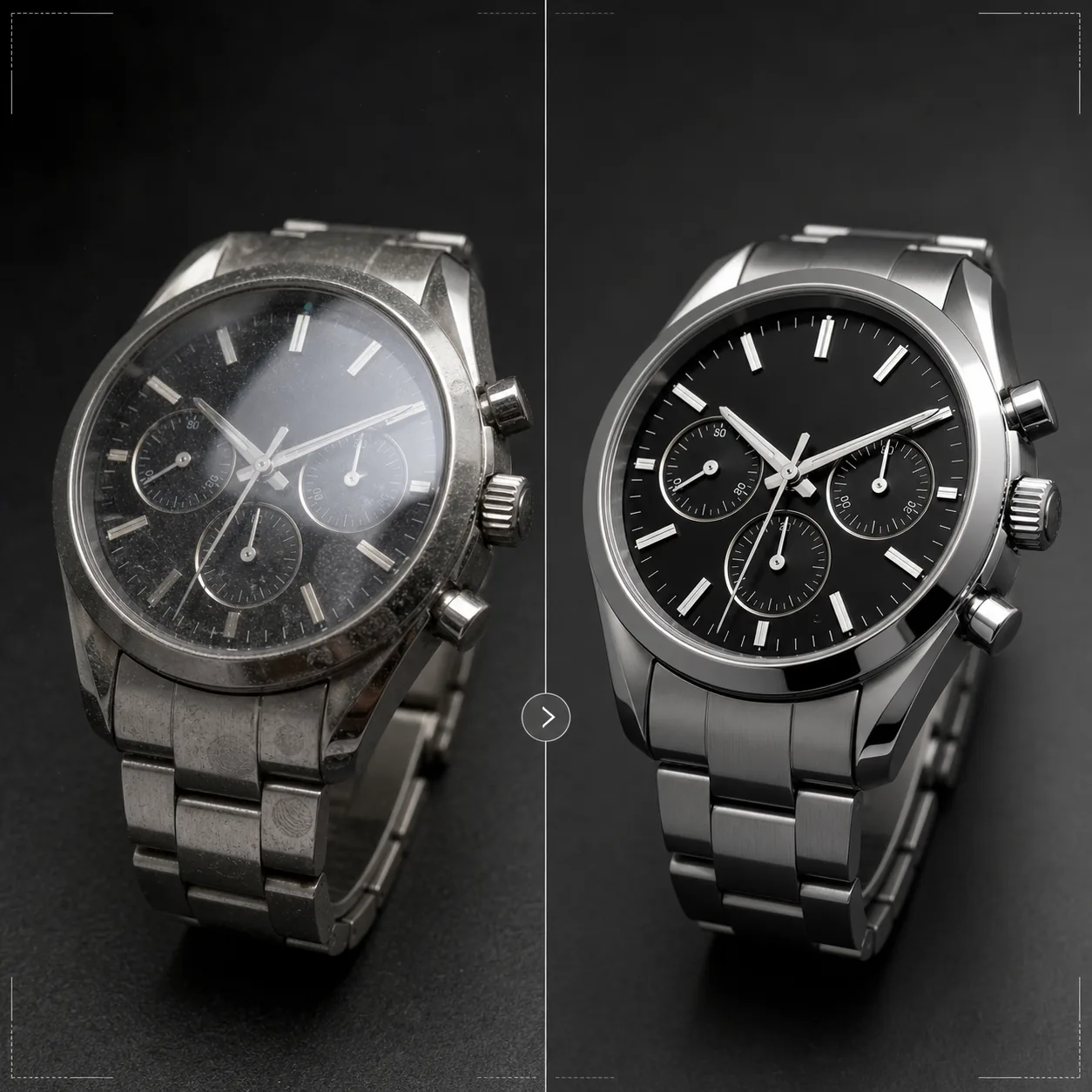
นำเสนอนาฬิกาด้วยความประณีตที่นาฬิกาสมควรได้รับ เทมเพลตนี้เพิ่มความคมชัดของรายละเอียดหน้าปัดและหลักชั่วโมง ควบคุมแสงสะท้อนบนกระจก เน้นพื้นผิวโลหะของสายและตัวเรือน ลบฝุ่นและรอยนิ้วมือออกจากพื้นผิวขัดเงา และเตรียมภาพให้พร้อมสำหรับรายการสินค้าอีคอมเมิร์ซระดับหรูและการใช้งานในแคตตาล็อก
ลองใช้เทมเพลตนี้ฟรีE-commerce template preview
เทมเพลตนี้ทำอะไรได้บ้าง
จัดการกับความท้าทายเฉพาะของการถ่ายภาพนาฬิกา ซึ่งรายละเอียดเล็กๆ น้อยๆ มีความสำคัญอย่างยิ่งต่อผู้ซื้อ หน้าปัดนาฬิกามีรายละเอียดที่ซับซ้อน — หลักชั่วโมง หน้าปัดย่อย ช่องวันที่ ข้อความที่พิมพ์ — ซึ่งต้องคมชัดอย่างที่สุดเพื่อให้ภาพสื่อถึงคุณภาพ เทมเพลตนี้ใช้ AI Enhance เพื่อเพิ่มความคมชัดให้องค์ประกอบของหน้าปัดอย่างเลือกสรร พร้อมคงความเป็นธรรมชาติของภาพโดยรวม Magic Eraser ลบอนุภาคฝุ่น รอยนิ้วมือบนตัวเรือนขัดเงา และรอยขีดข่วนเล็กๆ บนกระจกที่ปรากฏเมื่อขยายภาพ แสงสะท้อนบนกระจกถูกลดลงเพื่อให้มองเห็นหน้าปัดด้านล่างได้ชัดเจน และพื้นผิวโลหะบนตัวเรือนและสายถูกเน้นให้เห็นความแตกต่างระหว่างการขัดด้านกับการขัดเงาที่ผู้ซื้อนาฬิกาพิจารณาอย่างละเอียด
การตั้งค่าเทมเพลต
| การเพิ่มความคมชัดหน้าปัด | การเพิ่มรายละเอียดระดับไมโครอย่างเลือกสรร (หลักชั่วโมง เข็ม ข้อความ) |
| แสงสะท้อนบนกระจก | ลดแสงจ้าและแสงสะท้อนบนกระจกแซฟไฟร์/แร่ |
| พื้นผิวโลหะ | เน้นความแตกต่างระหว่างพื้นผิวขัดด้านและขัดเงา |
| การทำความสะอาดพื้นผิว | ลบฝุ่น รอยนิ้วมือ และรอยขีดข่วนเล็กๆ |
| ความละเอียดเอาต์พุต | 4000 × 4000 px (รายละเอียดมาโครสำหรับการดูแบบซูม) |
| พื้นหลัง | ขาวล้วน เข้มทึบ หรือไล่เฉดสี (มาตรฐานผลิตภัณฑ์ระดับหรู) |
วิธีใช้เทมเพลตนี้
อัปโหลดภาพนาฬิกาของคุณ
อัปโหลดภาพผลิตภัณฑ์ของนาฬิกา — ภาพสวมข้อมือ ภาพวางราบ หรือการจัดฉากในสตูดิโอบนหมอนหรือแท่นวาง รองรับภาพมาโครระยะใกล้ของหน้าปัดและมุมมองด้านข้างของตัวเรือนด้วย เพื่อผลลัพธ์ที่ดีที่สุด ถ่ายนาฬิกาที่ตำแหน่งเข็ม 10:10 ซึ่งเป็นมาตรฐานอุตสาหกรรมที่จัดกรอบโลโก้และสร้างองค์ประกอบที่สมดุลและสมมาตร
การเพิ่มความคมชัดของหน้าปัดและรายละเอียด
AI Enhance เพิ่มความคมชัดให้หน้าปัดอย่างเลือกสรร — หลักบอกชั่วโมง เข็ม หน้าปัดย่อย ช่องวันที่ และข้อความที่พิมพ์กลายเป็นคมชัดและอ่านง่าย จุดเรืองแสงบนหลักชั่วโมงถูกทำให้สว่างขึ้นเล็กน้อยเพื่อแสดงการมีอยู่ การปรับปรุงนี้เคารพระยะชัดลึกในภาพต้นฉบับของคุณ โดยคงความนุ่มนวลของบริเวณที่ตั้งใจเบลอไว้
การทำความสะอาดพื้นผิวและการควบคุมแสงสะท้อน
Magic Eraser ลบอนุภาคฝุ่นบนหน้าปัด รอยนิ้วมือบนตัวเรือนและสาย และรอยขีดข่วนเล็กๆ บนผิวกระจก แสงสะท้อนบนกระจกถูกลดลงเพื่อเผยให้เห็นหน้าปัดทั้งหมดด้านล่าง พร้อมคงแสงสะท้อนไว้พอที่จะสื่อถึงการมีอยู่ของกระจก — การลบแสงสะท้อนออกทั้งหมดทำให้นาฬิกาดูแบนอย่างไม่สมจริง
ส่งออกสำหรับรายการสินค้าหรือแคตตาล็อก
ดาวน์โหลดที่ 4000 × 4000 px สำหรับรายการสินค้าอีคอมเมิร์ซที่ซูมได้ หรือที่ความละเอียดสำหรับพิมพ์สำหรับแคตตาล็อกและโฆษณา ตัวเลือกพื้นหลังได้แก่ ขาวล้วนสำหรับรายการสินค้าบนมาร์เก็ตเพลส เข้มทึบสำหรับสุนทรียะของแบรนด์ระดับหรู และไล่เฉดสีสำหรับงานบรรณาธิการ
เคล็ดลับมืออาชีพเพื่อผลลัพธ์ที่ดีที่สุด
- ✓ถ่ายนาฬิกาโดยตั้งเข็มที่ 10:10 หรือ 10:08 — ตำแหน่งนี้จัดกรอบโลโก้แบรนด์ไว้ระหว่างเข็ม แสดงทั้งช่องวันที่และหน้าปัดย่อยอย่างชัดเจน และสร้างองค์ประกอบที่สมดุลทางสายตาซึ่งใช้กันทั่วทั้งอุตสาหกรรมนาฬิกา
- ✓ใช้เลนส์มาโครหรือโหมดถ่ายระยะใกล้เพื่อเก็บรายละเอียดหน้าปัดให้มากที่สุด เทมเพลตสามารถเพิ่มความคมชัดให้รายละเอียดที่มีอยู่ได้ แต่ไม่สามารถสร้างรายละเอียดที่ไม่ได้ถูกถ่ายไว้ — ภาพต้นฉบับความละเอียดสูงกว่าที่มีรายละเอียดหน้าปัดมากกว่าให้ผลลัพธ์ที่ดีกว่าอย่างมีนัยสำคัญ
- ✓สำหรับนาฬิกาสายโลหะ จัดมุมแสงเพื่อแสดงความแตกต่างระหว่างพื้นผิวขัดด้านและขัดเงา เทมเพลตเน้นความต่างนี้ แต่การเริ่มต้นด้วยความแตกต่างของพื้นผิวที่มองเห็นได้ให้ผลลัพธ์ที่สะดุดตาที่สุด
- ✓เช็ดนาฬิกาด้วยผ้าไมโครไฟเบอร์ทันทีก่อนถ่าย แม้ Magic Eraser จะลบฝุ่นและรอยนิ้วมือได้ แต่การเริ่มต้นด้วยความสะอาดหมายถึงการสร้างใหม่ด้วย AI น้อยลงและการรักษาพื้นผิวโลหะในบริเวณที่ทำความสะอาดได้แม่นยำขึ้น
เครื่องมือ
E-commerce workflow
Product photo hub
Use this template with the full ecommerce product photo workflow for marketplace backgrounds, cleanup, compression, resizing, and listing-ready exports.
View ecommerce product photo workflowคำถามที่พบบ่อย
เทมเพลตนี้แก้ภาพที่หน้าปัดถูกแสงสะท้อนบังได้ไหม
+
แสงสะท้อนระดับปานกลางสามารถลดลงได้เพื่อเผยรายละเอียดหน้าปัดด้านล่าง อย่างไรก็ตาม หากแสงสะท้อนแรงจนไม่เห็นรายละเอียดหน้าปัดเลยในภาพต้นฉบับ AI ไม่สามารถสร้างรายละเอียดที่ไม่เคยถูกถ่ายไว้ได้ เพื่อผลลัพธ์ที่ดีที่สุด ถ่ายโดยจัดตำแหน่งแหล่งกำเนิดแสงให้ลดแสงสะท้อนตรงบนกระจกให้น้อยที่สุด
ใช้ได้กับสมาร์ตวอตช์ไหม
+
ได้ หน้าจอสมาร์ตวอตช์จะถูกปรับปรุงด้วยองค์ประกอบอินเทอร์เฟซที่คมชัดขึ้นและรอยนิ้วมือบนกระจกที่ลดลง เทมเพลตรู้จักทั้งหน้าปัดอนาล็อกแบบดั้งเดิมและจอแสดงผลดิจิทัล และปรับวิธีเพิ่มความคมชัดให้เหมาะสม
แล้วสายและสายรัดนาฬิกาล่ะ
+
สายหนังจะได้รับการเพิ่มพื้นผิวที่แสดงลายและรายละเอียดรอยเย็บ สาย NATO และสายผ้าจะได้รับการเพิ่มความคมชัดของพื้นผิวอย่างละเอียดอ่อน สายโลหะจะได้รับการเน้นพื้นผิวขัดด้าน/ขัดเงา นาฬิกาทั้งเรือน — ตัวเรือน กระจก หน้าปัด และสาย — จะถูกจัดการเป็นผลิตภัณฑ์ที่สมบูรณ์
ทุกรายละเอียดมีความสำคัญเมื่อขายนาฬิกา
อัปโหลดภาพนาฬิกาและรับรายละเอียดหน้าปัดที่คมใส แสงสะท้อนที่ควบคุมได้ และคุณภาพภาพระดับเครื่องประดับสำหรับรายการสินค้าของคุณ
ลองใช้ฟรีRelated templates
More e-commerce templates for your workflow.
เทมเพลตพื้นหลังสีขาวบริสุทธิ์สำหรับภาพถ่ายผลิตภัณฑ์ Amazon, Shopify และการตั้งค่าที่พร้อมสำหรับตลาดกลางสำหรับรูปภาพผลิตภัณฑ์ที่สะอาดและเป็นมืออาชีพที่แปลง
เทมเพลตภาพถ่ายรายการที่ได้รับการปรับให้เหมาะสมที่สุดจาก Etsy แปลงภาพถ่ายไลฟ์สไตล์ให้เป็นพื้นหลังสีขาวสะอาดตาที่ 2000px ปรับปรุงรายละเอียดผลิตภัณฑ์ทำมือ และตรงตามหลักเกณฑ์รูปภาพของ Etsy
เทมเพลตภาพถ่ายรายการที่ได้รับการปรับให้เหมาะกับ eBay พื้นหลังสีขาวสำหรับรูปภาพแกลเลอรี การปรับปรุงเอกสารเงื่อนไข และเค้าโครงหลายมุมที่ตรงตามมาตรฐานรูปภาพของ eBay
เทมเพลตการถ่ายภาพเครื่องประดับระดับมืออาชีพสำหรับแหวน สร้อยคอ และนาฬิกา ควบคุมการสะท้อน เพิ่มความแวววาวของอัญมณี และส่งมอบภาพที่พร้อมสำหรับตลาดบนพื้นหลังที่สะอาดตา
เทมเพลตภาพถ่ายเฟอร์นิเจอร์ระดับมืออาชีพสำหรับรายการสินค้าในตลาดกลาง ขจัดความยุ่งเหยิงในห้อง แสดงมิติที่แท้จริง และนำเสนอชิ้นส่วนบนพื้นหลังที่สะอาดตาหรือในบริบทของห้องที่มีสไตล์
ทำความสะอาดภาพถ่ายแฟลตเลย์เสื้อผ้าด้วยการกำจัดรอยยับ การขจัดขุย พื้นหลังสีขาวบริสุทธิ์ และสีผ้าที่แม่นยำ พร้อมสำหรับ Shopify, Amazon และร้านค้าบูติก