
ภาพถ่ายผลิตภัณฑ์จิวเวลรี่
เปลี่ยนภาพถ่ายเครื่องประดับธรรมดาให้กลายเป็นภาพผลิตภัณฑ์ระดับมืออาชีพที่คู่ควรกับแคตตาล็อกหรูหรา เทมเพลตนี้รับมือกับความท้าทายเฉพาะตัวของการถ่ายภาพโลหะสะท้อนแสงและอัญมณีโปร่งแสง ทั้งควบคุมการสะท้อนที่ไม่ต้องการ เพิ่มความแวววาว และรับประกันการแสดงสีของอัญมณีที่แม่นยำ
ลองใช้เทมเพลตนี้ฟรีE-commerce template preview
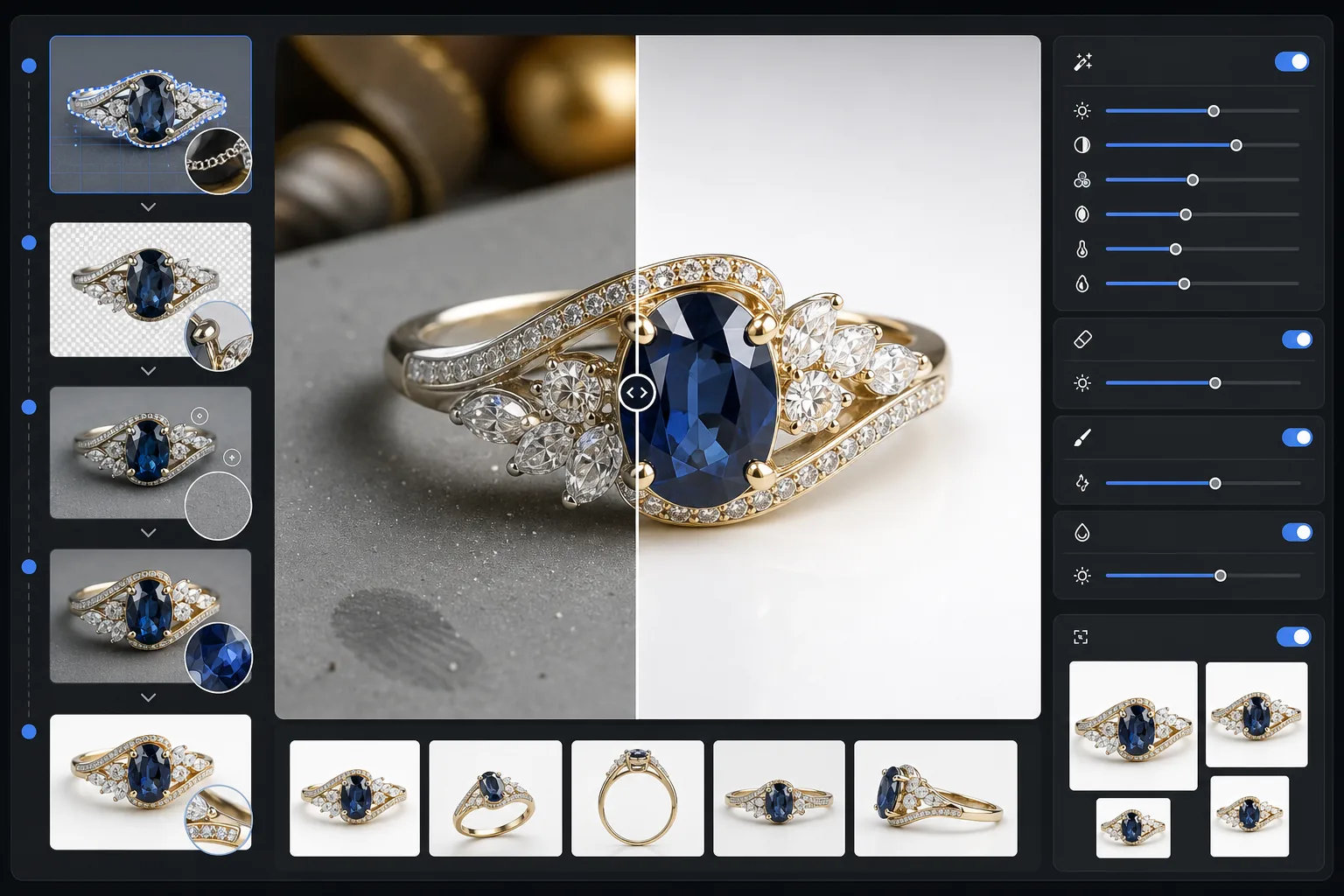
เทมเพลตนี้ทำอะไร
ลบพื้นหลังรกรุงรังออกจากภาพเครื่องประดับและแทนที่ด้วยพื้นผิวที่สะอาดตาไม่รบกวนสายตา จากนั้นการปรับปรุงด้วย AI จะเพิ่มความคมชัดของรายละเอียดเหลี่ยมมุม ปรับสมดุลไฮไลต์ของโลหะโดยไม่ให้สว่างเกินไป และคืนค่าสีอัญมณีที่แท้จริงซึ่งแสงในร่มมักทำให้เพี้ยน Magic Eraser ขจัดเม็ดฝุ่น รอยนิ้วมือบนโลหะ และการสะท้อนที่หลงเหลือซึ่งแทบจะเลี่ยงไม่ได้เมื่อถ่ายวัตถุสะท้อนแสงขนาดเล็ก
การตั้งค่าเทมเพลต
| พื้นหลัง | ขาวบริสุทธิ์หรือเทาไล่ระดับ (เลือกได้) |
| ขนาดไฟล์ส่งออก | 2400×2400px (ซูมความละเอียดสูงเพื่อรายละเอียดที่ละเอียดอ่อน) |
| การเพิ่มความแวววาว | ปานกลาง (รักษาความเปล่งประกายตามธรรมชาติโดยไม่เกิดแสงจ้าเทียม) |
| การควบคุมการสะท้อน | นุ่มนวล — ลดการสะท้อนแบบกระจกที่รุนแรงบนโลหะขัดเงา |
| ความแม่นยำของสี | sRGB ที่ปรับเทียบสำหรับอัญมณี (ปรับให้เหมาะกับมรกต ทับทิม ไพลิน เพชร) |
| การเพิ่มความคมชัดของรายละเอียด | ระดับมาโคร — เพิ่มความเด่นชัดของเหลี่ยมมุม หนามเตย และลวดลายสลัก |
วิธีใช้เทมเพลตนี้
ถ่ายภาพชิ้นงานเครื่องประดับของคุณ
วางชิ้นงานบนพื้นผิวด้านที่ไม่สะท้อนแสง ใช้แสงธรรมชาติแบบกระจายหรือไลต์บ็อกซ์เพื่อลดการสะท้อนที่รุนแรงบนโลหะ ถ่ายจากด้านบนเล็กน้อยในมุม 30-45 องศาเพื่อเก็บภาพด้านหน้าของอัญมณี
ลบพื้นหลัง
Background Eraser แยกเครื่องประดับออกจากพื้นผิวใดก็ได้ จัดการกับขอบที่ยุ่งยากซึ่งหนามเตยบาง สร้อยที่ละเอียดอ่อน และตะขอเล็กๆ บรรจบกับพื้นหลัง แม้แต่บนชิ้นงานที่สะท้อนแสงสูง
เพิ่มรายละเอียดและสีสัน
AI Enhance เพิ่มความคมชัดของขอบเหลี่ยมมุมและลวดลายสลักที่มองเห็นได้เมื่อซูม แก้ไขสีอัญมณีที่เพี้ยนจากแสงประดิษฐ์ และปรับสมดุลไฮไลต์ของโลหะให้ทองดูอบอุ่นและเงินดูเย็นตาโดยไม่มีจุดที่สว่างเกินไป
ทำความสะอาดและส่งออก
ใช้ Magic Eraser เพื่อกำจัดเม็ดฝุ่น รอยเปื้อนนิ้วมือ หรือการสะท้อนที่ไม่ต้องการบนพื้นผิวโลหะ ส่งออกที่ 2400px เพื่อความเข้ากันได้กับการซูมของตลาดออนไลน์และการแสดงรายละเอียดที่แม่นยำ
เคล็ดลับมืออาชีพเพื่อผลลัพธ์ที่ดีที่สุด
- ✓ถ่ายบนการ์ดสีเทากลางแทนสีขาว — ช่วยให้ AI แยกขอบได้สะอาดขึ้นบนชิ้นงานเงินและทองคำขาว
- ✓สำหรับชิ้นงานเพชรและอัญมณีใส ให้วางกระดาษขาวชิ้นเล็กไว้ใต้เม็ดอัญมณีเพื่อเก็บการส่องผ่านของแสงและประกายไฟ
- ✓ถ่ายภาพแหวนในแนวตั้งโดยใช้ขี้ผึ้งสำหรับพิพิธภัณฑ์หรือที่จับแหวน จากนั้นลบที่จับด้วย Magic Eraser เพื่อให้ดูเหมือนลอยอยู่
- ✓เก็บภาพหลายมุมของแต่ละชิ้นงานและประมวลผลเป็นชุดด้วยการตั้งค่าเทมเพลตเดียวกันเพื่อให้ได้ลุคแคตตาล็อกที่สอดคล้องกัน
เครื่องมือ
E-commerce workflow
Product photo hub
Use this template with the full ecommerce product photo workflow for marketplace backgrounds, cleanup, compression, resizing, and listing-ready exports.
View ecommerce product photo workflowคำถามที่พบบ่อย
ความแวววาวของเพชรของฉันจะดูเป็นธรรมชาติไหม
+
ใช่ การเพิ่มความแวววาวจะขยายการสะท้อนแสงที่มีอยู่แล้วซึ่งถูกบันทึกไว้ในภาพของคุณ แทนที่จะเพิ่มแสงจ้าเทียม ผลลัพธ์จะดูเหมือนภาพถ่ายในสตูดิโอที่จัดแสงอย่างมืออาชีพ และคงรูปแบบประกายไฟตามธรรมชาติของอัญมณีแต่ละเม็ดไว้
มันรับมือกับทองและแพลทินัมขัดเงาที่สะท้อนแสงสูงได้ไหม
+
ได้แน่นอน การตั้งค่าควบคุมการสะท้อนจะลดการสะท้อนแบบกระจกที่รุนแรงในขณะที่ยังคงความเงางามเฉพาะตัวของโลหะแต่ละชนิด ทองคงประกายอันอบอุ่นและแพลทินัมคงความเงาเย็นตาไว้โดยไม่มีจุดขาวที่สว่างเกินไป
พื้นหลังแบบใดเหมาะที่สุดสำหรับรายการเครื่องประดับหรูหรา
+
สีขาวบริสุทธิ์ตรงตามข้อกำหนดของตลาดออนไลน์ Amazon และ Etsy สำหรับเว็บไซต์ของคุณเองหรือการสร้างแบรนด์ระดับไฮเอนด์ ตัวเลือกสีเทาไล่ระดับจะเพิ่มมิติและความรู้สึกพรีเมียม ทั้งสองตัวเลือกรวมอยู่ในเทมเพลตนี้
ทำให้ภาพถ่ายเครื่องประดับของคุณขายได้
อัปโหลดภาพถ่ายแหวน สร้อยคอ สร้อยข้อมือ หรือนาฬิกาใดก็ได้ แล้วรับภาพผลิตภัณฑ์คุณภาพระดับแคตตาล็อกภายในไม่กี่วินาที ทุกเหลี่ยมมุม ทุกรายละเอียด นำเสนออย่างสมบูรณ์แบบ
ลองใช้ฟรีRelated templates
More e-commerce templates for your workflow.
เทมเพลตพื้นหลังสีขาวบริสุทธิ์สำหรับภาพถ่ายผลิตภัณฑ์ Amazon, Shopify และการตั้งค่าที่พร้อมสำหรับตลาดกลางสำหรับรูปภาพผลิตภัณฑ์ที่สะอาดและเป็นมืออาชีพที่แปลง
เทมเพลตภาพถ่ายรายการที่ได้รับการปรับให้เหมาะสมที่สุดจาก Etsy แปลงภาพถ่ายไลฟ์สไตล์ให้เป็นพื้นหลังสีขาวสะอาดตาที่ 2000px ปรับปรุงรายละเอียดผลิตภัณฑ์ทำมือ และตรงตามหลักเกณฑ์รูปภาพของ Etsy
เทมเพลตภาพถ่ายรายการที่ได้รับการปรับให้เหมาะกับ eBay พื้นหลังสีขาวสำหรับรูปภาพแกลเลอรี การปรับปรุงเอกสารเงื่อนไข และเค้าโครงหลายมุมที่ตรงตามมาตรฐานรูปภาพของ eBay
เทมเพลตภาพถ่ายเฟอร์นิเจอร์ระดับมืออาชีพสำหรับรายการสินค้าในตลาดกลาง ขจัดความยุ่งเหยิงในห้อง แสดงมิติที่แท้จริง และนำเสนอชิ้นส่วนบนพื้นหลังที่สะอาดตาหรือในบริบทของห้องที่มีสไตล์
ทำความสะอาดภาพถ่ายแฟลตเลย์เสื้อผ้าด้วยการกำจัดรอยยับ การขจัดขุย พื้นหลังสีขาวบริสุทธิ์ และสีผ้าที่แม่นยำ พร้อมสำหรับ Shopify, Amazon และร้านค้าบูติก
สร้างภาพถ่ายผลิตภัณฑ์ที่สอดคล้องกับข้อกำหนดของ Amazon ด้วยพื้นหลังสีขาวบริสุทธิ์ การแก้ไขแสงที่เหมาะสม และขนาดที่ปรับให้เหมาะสมสำหรับภาพรายการหลักและรอง