
ภาพถ่ายรายการ eBay
สร้างรายการ eBay ที่โดดเด่นในผลการค้นหาและได้รับความไว้วางใจจากผู้ซื้อ เทมเพลตนี้สร้างภาพแกลเลอรีพื้นหลังสีขาวที่สะอาดตา ปรับปรุงภาพรายละเอียดสภาพสำหรับสินค้ามือสอง และรับประกันว่าทุกภาพถึงขั้นต่ำ 500px ของ eBay พร้อมพื้นที่เผื่อสำหรับฟีเจอร์ซูม
ทดลองใช้เทมเพลตนี้ฟรีE-commerce template preview
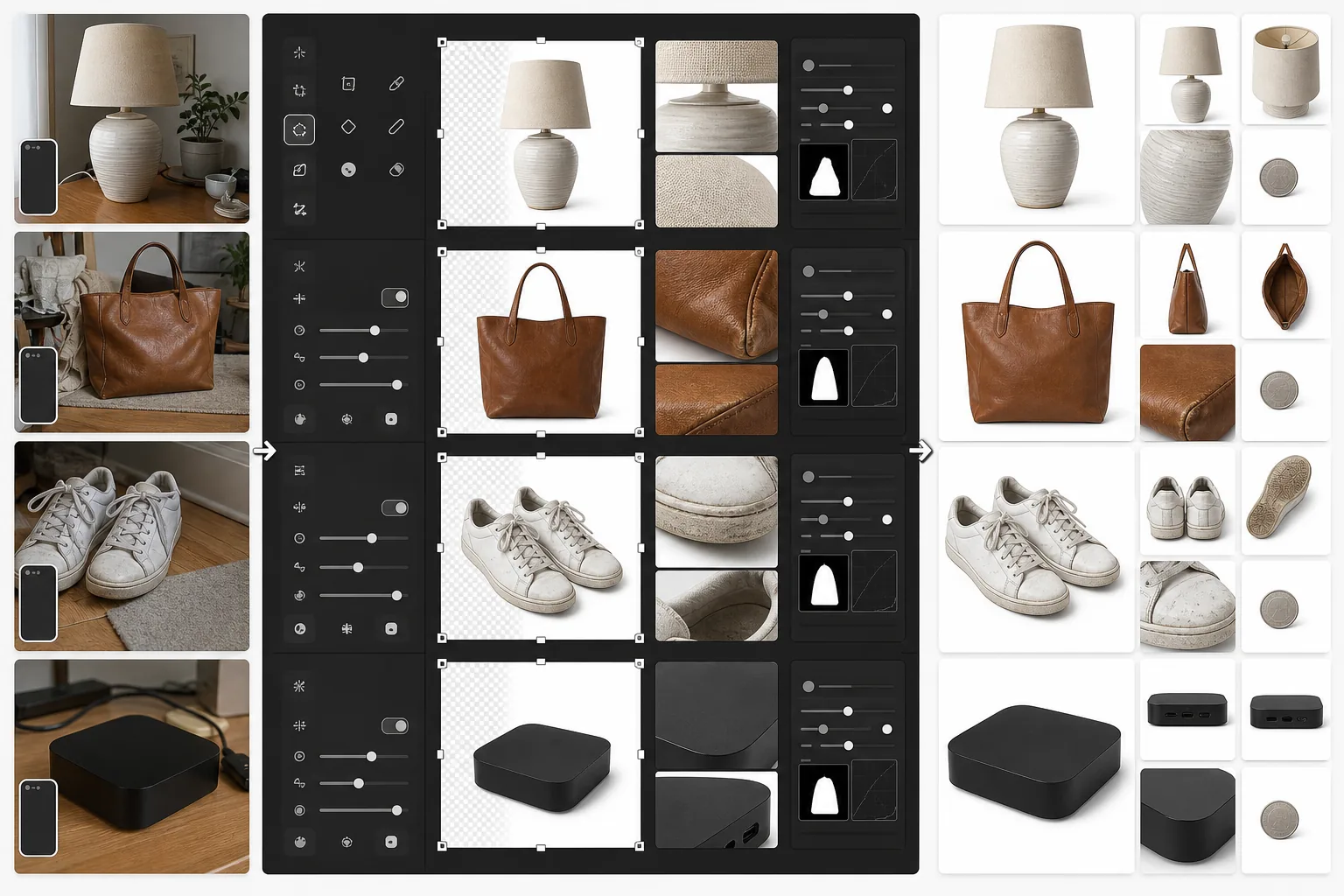
เทมเพลตนี้ทำอะไร
เตรียมภาพถ่ายสินค้าโดยเฉพาะสำหรับรายการ eBay ภาพหลักจะได้พื้นหลังสีขาวที่สะอาดตาเพื่อให้ทำงานได้ดีในผลการค้นหา eBay และการเรียกดูตามหมวดหมู่ ภาพรองจะได้รับการปรับปรุงเพื่อแสดงสภาพสินค้าอย่างชัดเจน — รอยขีดข่วน ร่องรอยการสึกหรอ ฉลาก และหมายเลขซีเรียลจะมองเห็นได้คมชัด Magic Eraser ลบความรกของพื้นหลังออกจากภาพสภาพโดยไม่กระทบกับตัวสินค้า
การตั้งค่าเทมเพลต
| ขนาดภาพหลัก | 1600×1600px (สี่เหลี่ยมจัตุรัส เกินขั้นต่ำ 500px ของ eBay) |
| พื้นหลัง (หลัก) | สีขาวบริสุทธิ์ (#FFFFFF) สำหรับภาพขนาดย่อของแกลเลอรี |
| โหมดรายละเอียดสภาพ | เพิ่มไมโครคอนทราสต์สำหรับรอยขีดข่วน ฉลาก และการสึกหรอ |
| รูปแบบไฟล์ | JPEG คุณภาพ 90% (ต่ำกว่าขีดจำกัด 12MB ของ eBay) |
| โปรไฟล์สี | sRGB (มาตรฐานเว็บ) |
| ลายน้ำ | ไม่มี (eBay ห้ามลายน้ำบนภาพรายการ) |
วิธีใช้เทมเพลตนี้
อัปโหลดภาพถ่ายสินค้าของคุณ
ถ่ายภาพสินค้าของคุณจากด้านหน้า ด้านหลัง ด้านข้าง และภาพระยะใกล้ของรายละเอียดสภาพใดๆ เช่น รอยขีดข่วน ป้าย หรือหมายเลขซีเรียล ใช้แสงธรรมชาติและหลีกเลี่ยงแฟลช ซึ่งอาจทำให้รายละเอียดจางและเกิดแสงสะท้อนบนพื้นผิวสะท้อนแสง
สร้างภาพแกลเลอรี
Background Eraser แยกสินค้าออกมาและวางบนพื้นหลังสีขาวบริสุทธิ์สำหรับภาพรายการหลัก อัลกอริทึมการค้นหาของ eBay ชื่นชอบภาพพื้นหลังสีขาว และภาพเหล่านั้นทำงานได้ดีกว่าอย่างมีนัยสำคัญในผลการค้นหา 'Buy It Now' และการประมูล
ปรับปรุงเอกสารสภาพ
สำหรับสินค้ามือสอง สินค้าปรับสภาพ หรือสินค้าวินเทจ AI Enhance ใช้การเพิ่มความคมชัดแบบไมโครคอนทราสต์ที่ทำให้รายละเอียดสภาพมองเห็นได้ชัดเจน — รอยถลอก คราบพาทินา ขนเม็ดของผ้า และเครื่องหมายรับรองความแท้ Magic Eraser ลบความรกของพื้นหลังออกจากภาพรายละเอียดโดยไม่แตะต้องสินค้า
ส่งออกชุดภาพถ่ายรายการของคุณ
ดาวน์โหลดภาพทั้งหมดที่ 1600×1600px eBay อนุญาตให้มีรูปภาพได้สูงสุด 24 รูปต่อรายการ — ใช้ชุดเต็มเพื่อความไว้วางใจของผู้ซื้อที่ดีที่สุดและอัตราการคืนสินค้าที่ต่ำที่สุด
เคล็ดลับระดับมืออาชีพเพื่อผลลัพธ์ที่ดีที่สุด
- ✓สำหรับภาพแกลเลอรีหลัก ถ่ายภาพสินค้าบนพื้นหลังที่ตัดกันใดก็ได้ Background Eraser จัดการส่วนที่เหลือ สินค้าสีเข้มบนพื้นผิวสีอ่อน (หรือในทางกลับกัน) ให้การตรวจจับขอบที่สะอาดที่สุด
- ✓บันทึกข้อบกพร่องทุกจุดในสินค้ามือสองด้วยภาพระยะใกล้ ภาพสภาพที่ปรับปรุงแล้วช่วยลดการคืนสินค้าแบบ 'สินค้าไม่ตรงตามคำอธิบาย' ซึ่งปกป้องคะแนนผู้ขายของคุณและทำให้รายการของคุณยังคงปรากฏให้เห็น
- ✓ใส่ภาพที่มีวัตถุทั่วไปเพื่อเปรียบเทียบขนาด — เหรียญข้างอุปกรณ์อิเล็กทรอนิกส์ขนาดเล็ก หรือปากกาข้างเสื้อผ้า ผู้ซื้อ eBay มักประเมินขนาดผิดจากภาพที่มีแต่สินค้า
- ✓ถ่ายภาพอุปกรณ์อิเล็กทรอนิกส์และของสะสมโดยให้หมายเลขซีเรียลและเครื่องหมายรับรองความแท้มองเห็นได้ชัดเจน การเพิ่มความคมชัดของรายละเอียดด้วย AI Enhance ทำให้สิ่งเหล่านี้อ่านได้แม้จากภาพถ่ายสมาร์ทโฟนที่ถ่ายในมุมเอียงเล็กน้อย
เครื่องมือ
E-commerce workflow
Product photo hub
Use this template with the full ecommerce product photo workflow for marketplace backgrounds, cleanup, compression, resizing, and listing-ready exports.
View ecommerce product photo workflowคำถามที่พบบ่อย
eBay กำหนดให้ใช้พื้นหลังสีขาวหรือไม่
+
eBay ไม่ได้กำหนดให้ใช้พื้นหลังสีขาวอย่างเคร่งครัด แต่อัลกอริทึมการค้นหาและการจัดอันดับ Best Match ชื่นชอบภาพหลักที่สะอาดตาบนพื้นหลังสีขาว รายการที่มีภาพแกลเลอรีพื้นหลังสีขาวได้รับการแสดงผลมากกว่าและอัตราการคลิกผ่านที่สูงกว่าอย่างสม่ำเสมอในผลการค้นหาของ eBay
ฉันสามารถลบลายน้ำหรือโลโก้ออกจากภาพถ่ายของฉันได้หรือไม่
+
eBay ห้ามลายน้ำ ขอบ และการซ้อนทับข้อความบนภาพรายการ เทมเพลตนี้สร้างภาพที่สะอาดตาโดยไม่มีองค์ประกอบที่เพิ่มเข้ามา หากกล้องของคุณเพิ่มตราประทับวันที่ Magic Eraser สามารถลบออกได้
ฉันควรใส่ภาพถ่ายกี่รูปต่อรายการ
+
ใช้มากเท่าที่สภาพต้องการ — eBay อนุญาตให้มีภาพฟรีได้สูงสุด 24 รูป สำหรับสินค้าใหม่ โดยทั่วไป 4-6 มุมก็เพียงพอ สำหรับสินค้ามือสอง ให้ใส่ทุกมุมพร้อมภาพระยะใกล้ของการสึกหรอ ฉลาก และอุปกรณ์เสริมใดๆ ภาพถ่ายที่มากขึ้นสัมพันธ์กับอัตราการขายที่สูงขึ้นและข้อพิพาทกับผู้ซื้อที่น้อยลง
สร้างรายการ eBay ที่ขายได้เร็วขึ้น
อัปโหลดภาพถ่ายสินค้าของคุณและรับภาพแกลเลอรีที่ปรับให้เหมาะกับการค้นหาพร้อมเอกสารสภาพที่ปรับปรุงแล้วในไม่กี่วินาที
ทดลองใช้ฟรีRelated templates
More e-commerce templates for your workflow.
เทมเพลตพื้นหลังสีขาวบริสุทธิ์สำหรับภาพถ่ายผลิตภัณฑ์ Amazon, Shopify และการตั้งค่าที่พร้อมสำหรับตลาดกลางสำหรับรูปภาพผลิตภัณฑ์ที่สะอาดและเป็นมืออาชีพที่แปลง
เทมเพลตภาพถ่ายรายการที่ได้รับการปรับให้เหมาะสมที่สุดจาก Etsy แปลงภาพถ่ายไลฟ์สไตล์ให้เป็นพื้นหลังสีขาวสะอาดตาที่ 2000px ปรับปรุงรายละเอียดผลิตภัณฑ์ทำมือ และตรงตามหลักเกณฑ์รูปภาพของ Etsy
เทมเพลตการถ่ายภาพเครื่องประดับระดับมืออาชีพสำหรับแหวน สร้อยคอ และนาฬิกา ควบคุมการสะท้อน เพิ่มความแวววาวของอัญมณี และส่งมอบภาพที่พร้อมสำหรับตลาดบนพื้นหลังที่สะอาดตา
เทมเพลตภาพถ่ายเฟอร์นิเจอร์ระดับมืออาชีพสำหรับรายการสินค้าในตลาดกลาง ขจัดความยุ่งเหยิงในห้อง แสดงมิติที่แท้จริง และนำเสนอชิ้นส่วนบนพื้นหลังที่สะอาดตาหรือในบริบทของห้องที่มีสไตล์
ทำความสะอาดภาพถ่ายแฟลตเลย์เสื้อผ้าด้วยการกำจัดรอยยับ การขจัดขุย พื้นหลังสีขาวบริสุทธิ์ และสีผ้าที่แม่นยำ พร้อมสำหรับ Shopify, Amazon และร้านค้าบูติก
สร้างภาพถ่ายผลิตภัณฑ์ที่สอดคล้องกับข้อกำหนดของ Amazon ด้วยพื้นหลังสีขาวบริสุทธิ์ การแก้ไขแสงที่เหมาะสม และขนาดที่ปรับให้เหมาะสมสำหรับภาพรายการหลักและรอง