
การล้างข้อมูลเสื้อผ้าแบบ Flat Lay
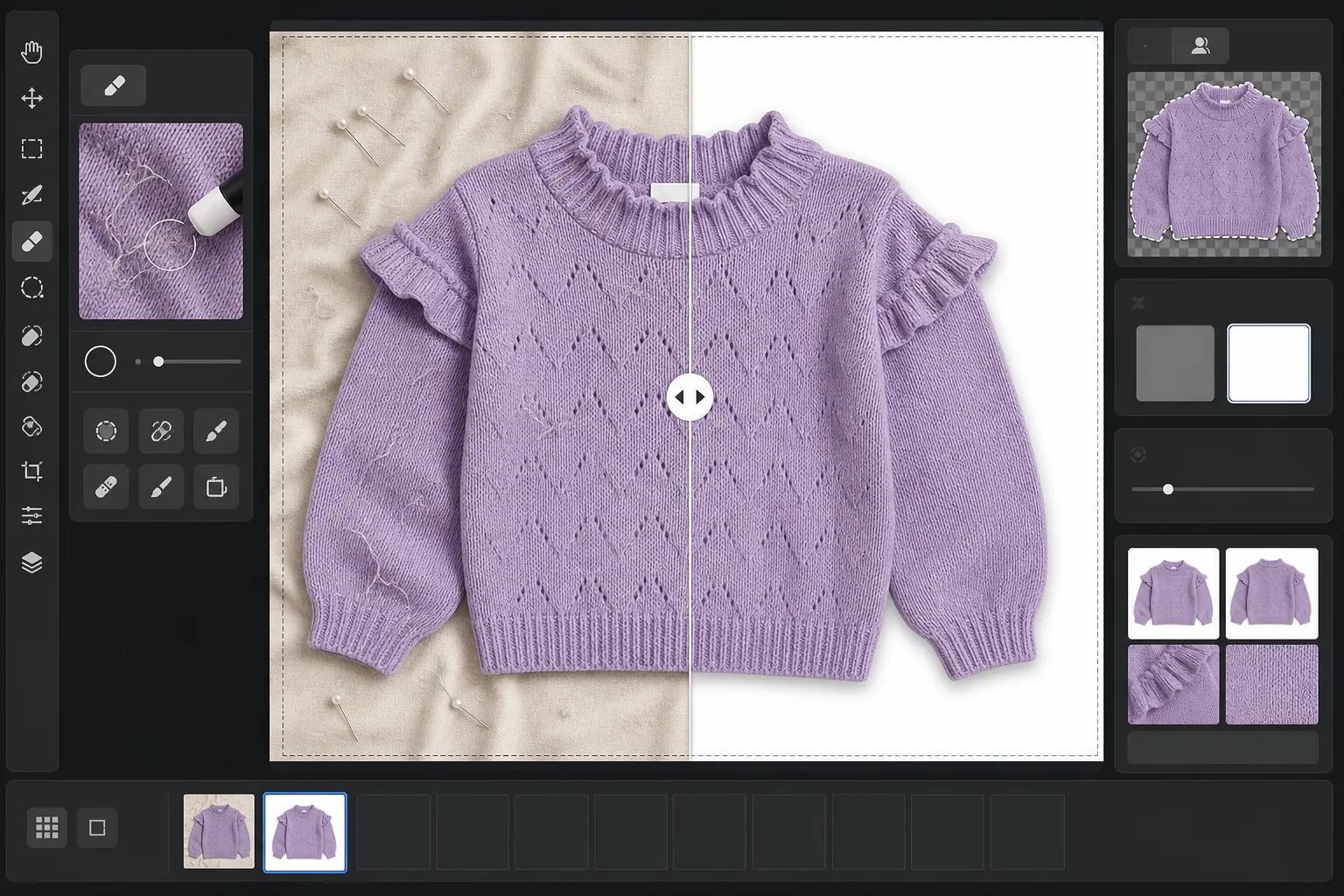
เปลี่ยนภาพถ่ายเสื้อผ้าแบบวางราบที่ยังไม่ได้แต่งให้กลายเป็นภาพสินค้าที่พร้อมขายบนมาร์เก็ตเพลส เทมเพลตนี้กำจัดรอยยับ ขุย ขนสัตว์เลี้ยง และเส้นด้ายที่หลุดออกมา แทนที่พื้นหลังรกๆ ด้วยสีขาวบริสุทธิ์ และแก้ไขสีผ้าเพื่อให้สิ่งที่ลูกค้าเห็นบนหน้าจอตรงกับสินค้าที่ได้รับในพัสดุ
ลองใช้เทมเพลตนี้ฟรีE-commerce template preview
เทมเพลตนี้ทำอะไร
จัดการกับปัญหาที่พบบ่อยที่สุดในการถ่ายภาพเสื้อผ้าแบบวางราบ ได้แก่ รอยยับของผ้าจากการพับและการจัดส่ง ขุยและขนสัตว์เลี้ยงที่กล้องจับได้แต่ตามองข้าม พื้นหลังไม่สม่ำเสมอจากผ้าปูที่นอนหรือรอยต่อของแผ่นกระดาษ และสีผ้าที่ไม่แม่นยำจากแสงผสม Magic Eraser กำจัดเศษบนพื้นผิว เส้นด้ายที่หลุดออกมา และป้ายดูแลรักษาที่โผล่ออกมาจากคอเสื้อ Background Eraser แยกเสื้อผ้าออกมาและวางบนพื้นหลังสีขาวสะอาด AI Enhance แก้ไขอุณหภูมิสีเพื่อให้สีย้อมของผ้าปรากฏอย่างแม่นยำทั้งบนหน้าจอและในแคตตาล็อกสิ่งพิมพ์
การตั้งค่าเทมเพลต
| พื้นหลัง | สีขาวบริสุทธิ์ (#FFFFFF) พร้อมขอบเบลอนุ่ม 2px |
| การลดรอยยับ | ปานกลาง (รีดรอยยับจากการจัดส่งให้เรียบ คงจีบที่ตั้งใจไว้) |
| ความแม่นยำของสี | sRGB พร้อมการปรับเทียบจุดขาวอัตโนมัติตามการ์ดสีเทากลาง |
| การกำจัดขุย | ตรวจจับเส้นใย ขน และฝุ่นที่ใหญ่กว่า 3px โดยอัตโนมัติ |
| เงา | เงาตกกระทบที่ละมุน (ออฟเซ็ต 4px ความทึบ 15%) เพื่อเพิ่มมิติ |
| ขนาดผลลัพธ์ | ครอปสี่เหลี่ยมจัตุรัส 2000×2000px พร้อมระยะขอบ 10% |
วิธีใช้เทมเพลตนี้
อัปโหลดภาพวางราบของคุณ
ถ่ายภาพเสื้อผ้าที่วางราบบนพื้นผิวสะอาดใดก็ได้ — เตียง โต๊ะ หรือแผ่นกระดาษ พื้นหลังไม่จำเป็นต้องขาวสนิทหรือปราศจากรอยยับเพราะมันจะถูกแทนที่ แสงธรรมชาติใกล้หน้าต่างให้สีผ้าที่แม่นยำที่สุด
กำจัดขุย เส้นด้าย และป้าย
Magic Eraser ตรวจจับและกำจัดขุย ขนสัตว์เลี้ยง เส้นด้ายที่หลุดออกมา และป้ายดูแลรักษาที่มองเห็นได้เหนือคอเสื้อหรือขอบเอวโดยอัตโนมัติ คุณยังสามารถเลือกและลบไม้แขวน คลิป หรือเข็มหมุดจัดสไตล์ที่หลงเหลืออยู่ในภาพด้วยตนเองได้
แทนที่พื้นหลัง
Background Eraser แยกเสื้อผ้าออกจากพื้นผิวใดก็ตามที่ใช้ถ่ายและวางบนพื้นหลังสีขาวบริสุทธิ์ การตรวจจับขอบจะไล่ตามเส้นรอบรูปจริงของเสื้อผ้ารวมถึงระบาย ชายครุย และรายละเอียดลูกไม้ โดยไม่ตัดส่วนที่ละเอียดออกไป
แก้ไขสีและส่งออก
AI Enhance ปรับสมดุลแสงขาวเพื่อให้สีผ้าบนหน้าจอตรงกับเสื้อผ้าจริงให้ใกล้เคียงที่สุด ดาวน์โหลดภาพสุดท้ายเป็น JPEG สี่เหลี่ยมจัตุรัส 2000x2000px พร้อมสำหรับ Shopify, Amazon, Etsy หรือหน้าร้านของคุณเอง — ขนาดที่ตรงตามข้อกำหนดรูปภาพของมาร์เก็ตเพลสส่วนใหญ่
เคล็ดลับมืออาชีพเพื่อผลลัพธ์ที่ดีที่สุด
- ✓อบไอน้ำหรือรีดเสื้อผ้าก่อนถ่ายหากเป็นไปได้ การลดรอยยับจัดการกับรอยยับเล็กน้อยจากการจัดส่งได้ดี แต่รอยพับลึกจากการเก็บไว้นานนั้นรีดให้เรียบได้ยากกว่าโดยไม่กระทบต่อการทิ้งตัวและเนื้อสัมผัสตามธรรมชาติของผ้า
- ✓วางการ์ดสีเทาเล็กๆ หรือการ์ดอ้างอิงสมดุลแสงขาวไว้ที่ขอบเฟรม (นอกพื้นที่ครอปสุดท้าย) อัลกอริทึมความแม่นยำของสีจะใช้มันปรับเทียบจุดขาว ทำให้ได้สีผ้าที่แม่นยำกว่าการใช้สมดุลแสงขาวอัตโนมัติเพียงอย่างเดียวอย่างเห็นได้ชัด
- ✓สำหรับผ้าสีเข้มบนพื้นหลังสีขาว ตรวจสอบให้แน่ใจว่าภาพต้นฉบับมีความต่างระหว่างขอบเสื้อผ้ากับพื้นผิวเพียงพอ เสื้อผ้าสีดำบนไม้สีเข้มแยกออกมาให้สะอาดได้ยากกว่าเสื้อผ้าสีดำบนผ้าปูสีเทาอ่อนหรือสีขาว
- ✓ถ่ายเสื้อผ้าทั้งหมดในชุดเดียวกันภายใต้แสงเดียวกันเพื่อรักษาความสม่ำเสมอของสีทั่วทั้งแคตตาล็อก การประมวลผลพร้อมกันผ่านเทมเพลตนี้ช่วยให้สมดุลแสงขาวสม่ำเสมอตลอดทั้งสายผลิตภัณฑ์
เครื่องมือ
E-commerce workflow
Product photo hub
Use this template with the full ecommerce product photo workflow for marketplace backgrounds, cleanup, compression, resizing, and listing-ready exports.
View ecommerce product photo workflowคำถามที่พบบ่อย
การกำจัดรอยยับทำให้ผ้าดูเรียบเกินจริงหรือไม่?
+
การลดรอยยับได้รับการปรับเทียบให้กำจัดรอยพับจากการพับและการจัดส่งในขณะที่ยังคงเนื้อสัมผัสตามธรรมชาติของผ้าไว้ — ลายทอผ้าลินิน ทวิลของผ้าเดนิม ร่องของผ้าฝ้าย และลวดลายถักทั้งหมดยังคงอยู่ ผลลัพธ์ดูเหมือนเสื้อผ้าที่เพิ่งอบไอน้ำ ไม่ใช่พื้นผิวที่วาดด้วยดิจิทัล
สีจะตรงกันระหว่างภาพถ่ายกับเสื้อผ้าจริงหรือไม่?
+
ความแม่นยำของสีขึ้นอยู่กับแสงในภาพต้นฉบับของคุณ ภายใต้แสงธรรมชาติหรือไฟสตูดิโอที่ปรับเทียบแล้ว อัลกอริทึมการแก้ไขสีให้ผลลัพธ์ที่อยู่ภายในค่า delta-E ที่ 3 จากเสื้อผ้าจริงบนจอที่ปรับเทียบแล้ว ภายใต้แสงฟลูออเรสเซนต์หรือทังสเตนที่แรง การปรับปรุงมีนัยสำคัญแต่การจับคู่ที่แม่นยำต้องใช้การ์ดสีเทาอ้างอิง
มาร์เก็ตเพลสใดที่รองรับขนาดเหล่านี้?
+
ผลลัพธ์สี่เหลี่ยมจัตุรัส 2000x2000px ตรงตามข้อกำหนดรูปภาพของ Amazon, Shopify, Etsy, eBay, Poshmark และแพลตฟอร์มอีคอมเมิร์ซอื่นๆ ส่วนใหญ่ Amazon แนะนำอย่างน้อย 1000px ที่ด้านยาวที่สุดสำหรับฟังก์ชันซูม และ 2000px เกินค่านี้ไปอย่างสบายๆ
ลงขายเสื้อผ้าที่ดูดีบนออนไลน์เหมือนกับตอนเห็นด้วยตาจริง
อัปโหลดภาพวางราบและรับภาพสินค้าที่ปราศจากขุย รอยยับเรียบ พื้นหลังสีขาว พร้อมสำหรับทุกแพลตฟอร์มอีคอมเมิร์ซ
ลองใช้ฟรีRelated templates
More e-commerce templates for your workflow.
เทมเพลตพื้นหลังสีขาวบริสุทธิ์สำหรับภาพถ่ายผลิตภัณฑ์ Amazon, Shopify และการตั้งค่าที่พร้อมสำหรับตลาดกลางสำหรับรูปภาพผลิตภัณฑ์ที่สะอาดและเป็นมืออาชีพที่แปลง
เทมเพลตภาพถ่ายรายการที่ได้รับการปรับให้เหมาะสมที่สุดจาก Etsy แปลงภาพถ่ายไลฟ์สไตล์ให้เป็นพื้นหลังสีขาวสะอาดตาที่ 2000px ปรับปรุงรายละเอียดผลิตภัณฑ์ทำมือ และตรงตามหลักเกณฑ์รูปภาพของ Etsy
เทมเพลตภาพถ่ายรายการที่ได้รับการปรับให้เหมาะกับ eBay พื้นหลังสีขาวสำหรับรูปภาพแกลเลอรี การปรับปรุงเอกสารเงื่อนไข และเค้าโครงหลายมุมที่ตรงตามมาตรฐานรูปภาพของ eBay
เทมเพลตการถ่ายภาพเครื่องประดับระดับมืออาชีพสำหรับแหวน สร้อยคอ และนาฬิกา ควบคุมการสะท้อน เพิ่มความแวววาวของอัญมณี และส่งมอบภาพที่พร้อมสำหรับตลาดบนพื้นหลังที่สะอาดตา
เทมเพลตภาพถ่ายเฟอร์นิเจอร์ระดับมืออาชีพสำหรับรายการสินค้าในตลาดกลาง ขจัดความยุ่งเหยิงในห้อง แสดงมิติที่แท้จริง และนำเสนอชิ้นส่วนบนพื้นหลังที่สะอาดตาหรือในบริบทของห้องที่มีสไตล์
สร้างภาพถ่ายผลิตภัณฑ์ที่สอดคล้องกับข้อกำหนดของ Amazon ด้วยพื้นหลังสีขาวบริสุทธิ์ การแก้ไขแสงที่เหมาะสม และขนาดที่ปรับให้เหมาะสมสำหรับภาพรายการหลักและรอง