
รูปภาพรายการ Etsy
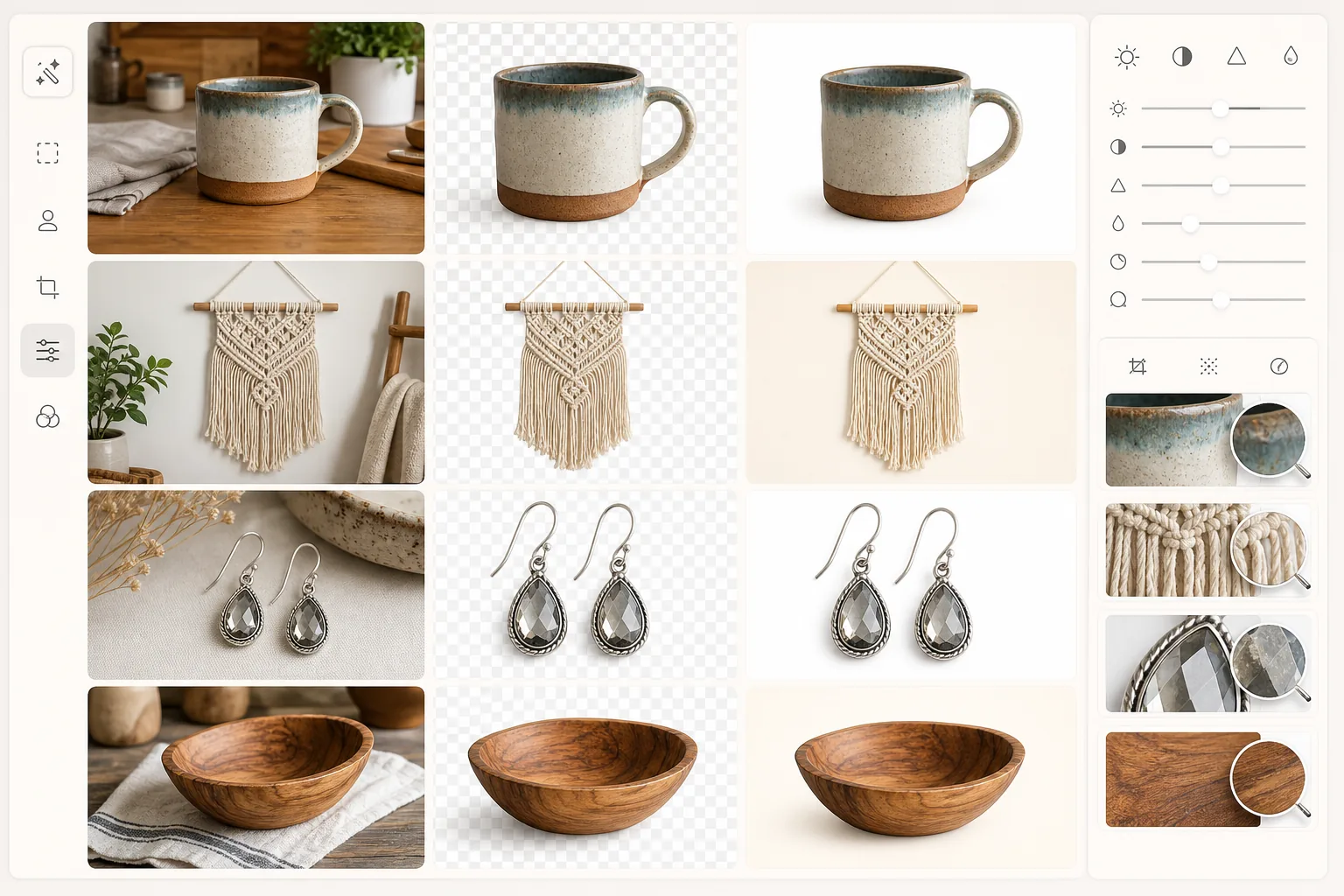
เปลี่ยนรูปถ่ายสินค้าที่ถ่ายบนโต๊ะในครัวให้กลายเป็นรูปภาพขายดีบน Etsy เทมเพลตนี้ลบพื้นหลังที่รกออก เพิ่มความคมชัดให้กับรายละเอียดเล็กๆ ที่ทำให้สินค้าทำมือพิเศษ และส่งออกที่ขนาดขั้นต่ำ 2000px ที่ Etsy แนะนำ — ปรับให้เหมาะสมทั้งสำหรับภาพขนาดย่อในการค้นหาและฟีเจอร์ซูมของรายการ
ลองใช้เทมเพลตนี้ฟรีE-commerce template preview
เทมเพลตนี้ทำอะไร
แปลงรูปถ่ายสินค้าแบบไลฟ์สไตล์หรือแบบไม่เป็นทางการให้เป็นรูปภาพรายการ Etsy ที่สะอาดและเป็นมืออาชีพ เทมเพลตจะลบพื้นหลังและแทนที่ด้วยสีขาวบริสุทธิ์หรือโทนสีกลางที่นุ่มนวล เพิ่มความคมชัดให้พื้นผิวละเอียด เช่น รอยเย็บ ลายไม้ และเหลี่ยมของเครื่องประดับ และแก้สีเพื่อให้แน่ใจว่าสินค้าทำมือของคุณดูเหมือนของจริงทุกประการ ผลลัพธ์ตรงตามขนาด 2000px ที่ Etsy แนะนำเพื่อฟังก์ชันซูมเต็มรูปแบบ
การตั้งค่าเทมเพลต
| ขนาดเอาต์พุต | 2000×1600px (อัตราส่วน 5:4 ที่ Etsy แนะนำ) |
| พื้นหลัง | สีขาวบริสุทธิ์ (#FFFFFF) หรือสีครีมนุ่ม (#FAF8F5) |
| การเพิ่มความคมชัดรายละเอียด | รับรู้พื้นผิว (เพิ่มความคมชัดรอยเย็บ ลายเนื้อ เหลี่ยม) |
| โปรไฟล์สี | sRGB พร้อมเพิ่มความอิ่มตัว +10% สำหรับการแสดงผลบนหน้าจอ |
| รูปแบบไฟล์ | JPEG คุณภาพ 92% (ต่ำกว่า 1MB เพื่อการโหลดที่รวดเร็วบน Etsy) |
| ระยะขอบสินค้า | ระยะขอบสม่ำเสมอ 10% (ปรับให้เหมาะกับการครอบตัดภาพขนาดย่อ) |
วิธีใช้เทมเพลตนี้
อัปโหลดรูปถ่ายสินค้าของคุณ
ถ่ายภาพสินค้าทำมือของคุณบนพื้นผิวใดก็ได้ — โต๊ะ ฉากผ้า หรือกลางแจ้ง แสงธรรมชาติในเวลากลางวันใกล้หน้าต่างให้สีที่แท้จริงที่สุดสำหรับวัสดุทำมืออย่างไหมพรม ไม้ และเซรามิก
ลบพื้นหลัง
Background Eraser แยกสินค้าของคุณออกจากพื้นผิวใดๆ อย่างสะอาด รักษาขอบที่ละเอียดอ่อนไว้ เช่น พู่มาคราเม่ พื้นผิวถัก และรูปทรงทำมือที่ไม่สม่ำเสมอซึ่งเครื่องมืออัตโนมัติมักจัดการได้ยาก
เพิ่มรายละเอียดสินค้า
AI Enhance เพิ่มความคมชัดให้รายละเอียดเล็กๆ ที่ผู้ซื้อมองหาในสินค้าทำมือ — พื้นผิวของเส้นด้าย ลวดลายลายไม้ ความแตกต่างของน้ำเคลือบ และความไม่สมบูรณ์ที่ตอกด้วยมือซึ่งแสดงถึงฝีมือช่าง
ส่งออกสำหรับร้าน Etsy ของคุณ
ดาวน์โหลดที่ขนาด 2000×1600px เพื่อการแสดงผลที่ดีที่สุดบน Etsy รูปภาพรายการแรกจะกลายเป็นภาพขนาดย่อในการค้นหาของคุณ ดังนั้นเทมเพลตจึงทำให้แน่ใจว่าสินค้าอยู่ตรงกลางและเต็มเฟรมเพื่อการมองเห็นสูงสุดในผลการค้นหา
เคล็ดลับมืออาชีพเพื่อผลลัพธ์ที่ดีที่สุด
- ✓ถ่ายภาพสิ่งของชิ้นเล็ก เช่น เครื่องประดับและของตกแต่งจากด้านบนบนแผ่นโฟมสีขาว — สิ่งนี้ให้จุดเริ่มต้นที่สะอาดที่สุดและมุมมองจากด้านบนที่แม่นยำที่สุดสำหรับภาพขนาดย่อของ Etsy
- ✓ใส่สิ่งอ้างอิงขนาดในรูปถ่ายต้นฉบับของคุณ (เหรียญ ไม้บรรทัด หรือมือ) สำหรับรูปภาพรายการรอง — ข้อร้องเรียนที่พบบ่อยที่สุดของผู้ซื้อบน Etsy คือขนาดสินค้าที่ไม่คาดคิด
- ✓สำหรับรูปภาพรายการหลัก ให้เติมสินค้าของคุณอย่างน้อย 75% ของเฟรม ภาพขนาดย่อในการค้นหาของ Etsy มีขนาดเล็ก และสินค้าที่ดูใหญ่กว่าในตารางจะได้รับคลิกมากกว่า
- ✓ถ่ายด้วยเลนส์ 2x หรือ 3x ของโทรศัพท์แทนมุมกว้างเริ่มต้น — การบีบอัดของเลนส์เทเลโฟโต้ทำให้สินค้าทำมือดูน่าดึงดูดยิ่งขึ้นและลดการบิดเบือนของขอบบนสิ่งของทรงกลม เช่น เครื่องปั้นดินเผา
เครื่องมือ
E-commerce workflow
Product photo hub
Use this template with the full ecommerce product photo workflow for marketplace backgrounds, cleanup, compression, resizing, and listing-ready exports.
View ecommerce product photo workflowคำถามที่พบบ่อย
สิ่งนี้ใช้ได้กับข้อกำหนดภาพขนาดย่อของ Etsy หรือไม่
+
ใช่ Etsy ครอบตัดภาพขนาดย่อของรายการเป็นรูปสี่เหลี่ยมจัตุรัสจากกึ่งกลางของรูปภาพของคุณ เทมเพลตจะวางสินค้าของคุณไว้ตรงกลางพร้อมระยะขอบสม่ำเสมอ ดังนั้นส่วนที่สำคัญที่สุดของรูปภาพจึงมองเห็นได้เสมอทั้งในภาพขนาดย่อแบบสี่เหลี่ยมจัตุรัสและในมุมมองรายการแบบเต็ม
ฉันสามารถเก็บพื้นหลังแบบไลฟ์สไตล์แทนสีขาวได้หรือไม่
+
เทมเพลตใช้สีขาวเป็นค่าเริ่มต้นสำหรับรูปภาพรายการหลัก (ซึ่งทำงานได้ดีที่สุดในการค้นหา Etsy) แต่คุณสามารถข้ามขั้นตอนการลบพื้นหลังสำหรับรูปภาพรองที่ฉากตกแต่งหรือฉากไลฟ์สไตล์เพิ่มบริบทให้กับสินค้าของคุณได้
สิ่งนี้จะทำให้สินค้าทำมือของฉันดูเหมือนผลิตจำนวนมากหรือไม่
+
ไม่ การปรับปรุงจะรักษาลักษณะเฉพาะของงานทำมือไว้ — ความไม่สมมาตรเล็กน้อย ความแตกต่างของการลงสีด้วยมือ และพื้นผิววัสดุตามธรรมชาติจะถูกทำให้คมชัดขึ้น ไม่ใช่ทำให้เรียบ เป้าหมายคือการแสดงฝีมือช่างอย่างชัดเจน ไม่ใช่การสร้างลักษณะแคตตาล็อกสินค้าที่ไร้ชีวิตชีวา
มอบรูปลักษณ์ที่เป็นมืออาชีพให้ร้าน Etsy ของคุณ
อัปโหลดรูปถ่ายสินค้าทำมือของคุณและรับรูปภาพรายการที่สะอาดและเต็มไปด้วยรายละเอียดในไม่กี่วินาที ออกแบบมาสำหรับวิธีที่ผู้ซื้อ Etsy เรียกดูและซูมจริง
ลองใช้ฟรีRelated templates
More e-commerce templates for your workflow.
เทมเพลตพื้นหลังสีขาวบริสุทธิ์สำหรับภาพถ่ายผลิตภัณฑ์ Amazon, Shopify และการตั้งค่าที่พร้อมสำหรับตลาดกลางสำหรับรูปภาพผลิตภัณฑ์ที่สะอาดและเป็นมืออาชีพที่แปลง
เทมเพลตภาพถ่ายรายการที่ได้รับการปรับให้เหมาะกับ eBay พื้นหลังสีขาวสำหรับรูปภาพแกลเลอรี การปรับปรุงเอกสารเงื่อนไข และเค้าโครงหลายมุมที่ตรงตามมาตรฐานรูปภาพของ eBay
เทมเพลตการถ่ายภาพเครื่องประดับระดับมืออาชีพสำหรับแหวน สร้อยคอ และนาฬิกา ควบคุมการสะท้อน เพิ่มความแวววาวของอัญมณี และส่งมอบภาพที่พร้อมสำหรับตลาดบนพื้นหลังที่สะอาดตา
เทมเพลตภาพถ่ายเฟอร์นิเจอร์ระดับมืออาชีพสำหรับรายการสินค้าในตลาดกลาง ขจัดความยุ่งเหยิงในห้อง แสดงมิติที่แท้จริง และนำเสนอชิ้นส่วนบนพื้นหลังที่สะอาดตาหรือในบริบทของห้องที่มีสไตล์
ทำความสะอาดภาพถ่ายแฟลตเลย์เสื้อผ้าด้วยการกำจัดรอยยับ การขจัดขุย พื้นหลังสีขาวบริสุทธิ์ และสีผ้าที่แม่นยำ พร้อมสำหรับ Shopify, Amazon และร้านค้าบูติก
สร้างภาพถ่ายผลิตภัณฑ์ที่สอดคล้องกับข้อกำหนดของ Amazon ด้วยพื้นหลังสีขาวบริสุทธิ์ การแก้ไขแสงที่เหมาะสม และขนาดที่ปรับให้เหมาะสมสำหรับภาพรายการหลักและรอง