
ภาพถ่ายสินค้าคงคลังยานพาหนะ
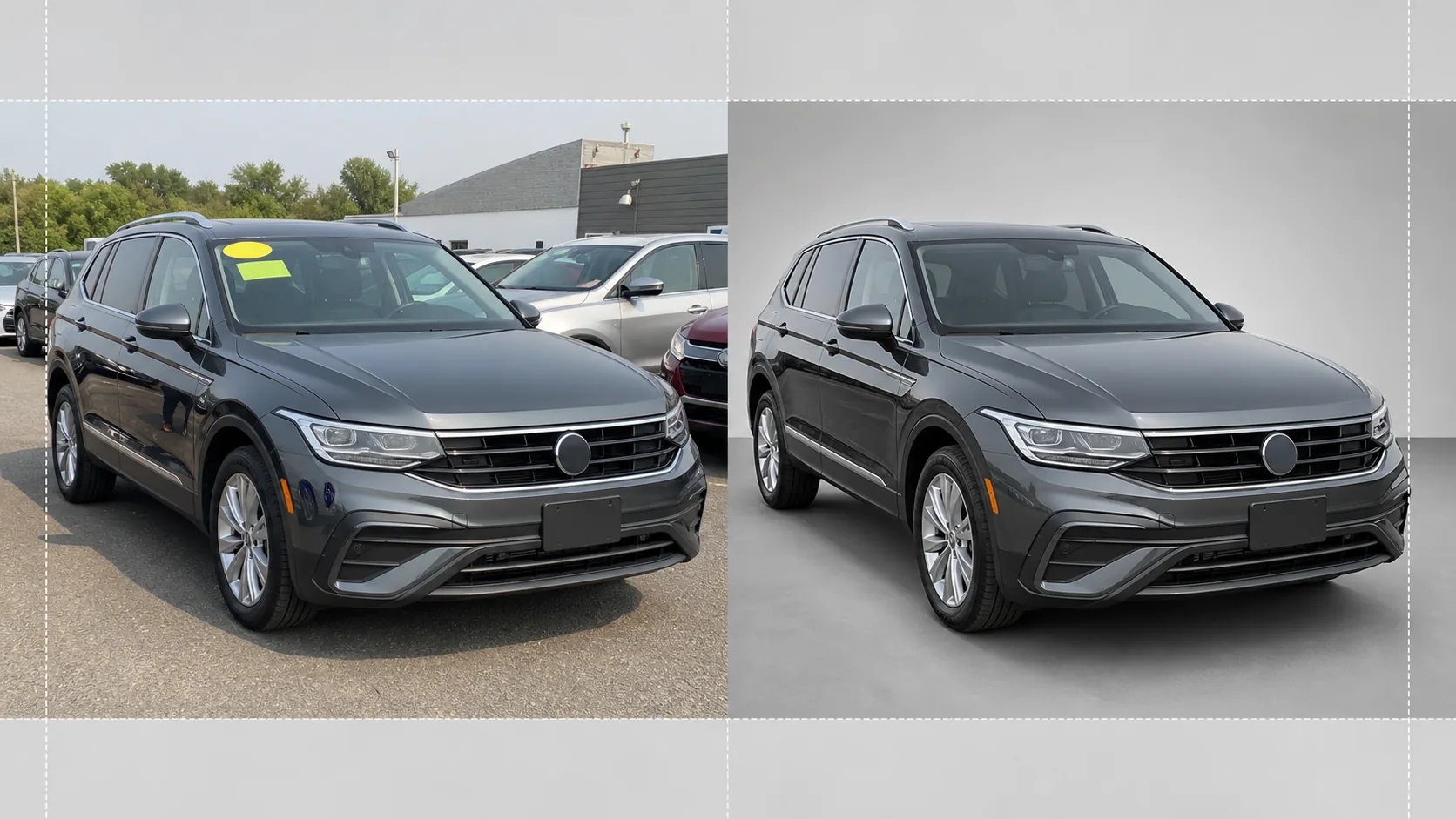
เปลี่ยนภาพถ่ายที่ลานจอดให้กลายเป็นภาพยานพาหนะคุณภาพระดับโชว์รูมสำหรับรายการสินค้าคงคลังออนไลน์ เทมเพลตนี้ลบพื้นหลังที่รกของตัวแทนจำหน่าย — รถคันอื่น ป้าย อาคาร — และแทนที่ด้วยพื้นหลังสีขาว สีเทา หรือสไตล์สตูดิโอที่สะอาดตา Magic Eraser ล้างเงาสะท้อนบนกระจกหน้า รายละเอียดป้ายทะเบียน และสติกเกอร์ลานจอด ในขณะที่การแก้สีช่วยให้สีรถดูสมจริงภายใต้แสงทุกสภาพ
ลองใช้เทมเพลตนี้ฟรีE-commerce template preview
เทมเพลตนี้ทำอะไรได้บ้าง
จัดการขั้นตอนการทำงานทั้งหมดสำหรับการถ่ายภาพสินค้าคงคลังของตัวแทนจำหน่าย Background Eraser แยกยานพาหนะออกจากสภาพแวดล้อมลานจอด และแทนที่พื้นหลังด้วยพื้นหลังสไตล์สตูดิโอที่สะอาดตา ซึ่งดึงความสนใจทั้งหมดไปที่รถยนต์ รถบรรทุก หรือ SUV Magic Eraser ลบสติกเกอร์ราคาบนกระจกหน้า ป้ายลานจอด ป้ายทะเบียน (เพื่อความเป็นส่วนตัว) และเงาสะท้อนของช่างภาพหรือยานพาหนะรอบข้างบนสีรถมันวาวและกระจก การแก้สีจะปรับสีรถให้เป็นมาตรฐาน เพื่อให้ภาพที่ถ่ายใต้ท้องฟ้ามีเมฆ ไฟโซเดียมในลานจอด หรือแสงแดดจัดตอนเที่ยง แสดงโทนสีรถที่ถูกต้องเหมือนกัน ภาพสุดท้ายจะถูกครอบตัดและปรับระดับให้ยานพาหนะอยู่กึ่งกลางและแนวนอนตลอดทั้งสินค้าคงคลังของคุณ
การตั้งค่าเทมเพลต
| พื้นหลัง | สีขาวสตูดิโอ สีเทากลาง หรือพื้นโชว์รูมแบบไล่เฉดสี |
| การล้างเงาสะท้อน | ลบช่างภาพ ความรกของลานจอด และรถข้างเคียงออกจากเงาสะท้อนบนสีรถและกระจก |
| การแก้สีของสีรถ | ปรับให้เป็นมาตรฐานตามลักษณะรหัสสีของผู้ผลิตภายใต้แสงกลางวันแบบกลาง |
| การปกปิดเพื่อความเป็นส่วนตัว | เบลอหรือลบป้ายทะเบียนโดยอัตโนมัติ |
| ครอบตัดและปรับระดับ | จัดยานพาหนะให้อยู่กึ่งกลางอัตโนมัติ ปรับระดับเส้นขอบฟ้า อัตราส่วน 16:9 |
| ความละเอียดของไฟล์ส่งออก | 3000×1688px (ปรับให้เหมาะกับ AutoTrader, Cars.com และเว็บไซต์ตัวแทนจำหน่าย) |
วิธีใช้เทมเพลตนี้
อัปโหลดภาพถ่ายจากลานจอด
อัปโหลดภาพยานพาหนะที่ถ่ายในลานจอดของตัวแทนจำหน่าย มุมด้านหน้าสามส่วนสี่เป็นมุมที่เหมาะที่สุด แต่มุมด้านข้างและด้านหลังก็ใช้ได้เช่นกัน เทมเพลตนี้รองรับทั้งสมาร์ตโฟน กล้องคอมแพกต์ และอุปกรณ์ระดับมืออาชีพได้เท่าเทียมกัน
ลบพื้นหลังและสิ่งรบกวน
Background Eraser ตัดสภาพแวดล้อมลานจอดออกและแทนที่ด้วยพื้นหลังที่สะอาดตา Magic Eraser ลบสติกเกอร์บนกระจกหน้า ป้ายหมายเลขลานจอด สติกเกอร์ราคา และข้อความบนป้ายทะเบียน เงาสะท้อนของรถข้างเคียงและช่างภาพบนสีรถและกระจกจะถูกล้างออกโดยอัตโนมัติ
แก้สีและการเปิดรับแสง
สีรถจะถูกปรับให้เป็นมาตรฐานเพื่อให้ตรงกับโทนสีที่ผู้ผลิตตั้งใจไว้ภายใต้แสงกลางวันแบบกลาง ส่วนไฮไลต์ที่สว่างเกินบนโครเมียมและกระจกจะถูกกู้คืน และรายละเอียดในเงาใต้ซุ้มล้อและกันชนจะถูกดึงขึ้นเพื่อให้ได้ลุคที่สม่ำเสมอระดับโชว์รูม
ส่งออกสำหรับรายการสินค้าคงคลัง
ดาวน์โหลดภาพที่เสร็จสมบูรณ์ที่ 3000×1688px ในอัตราส่วน 16:9 รูปแบบนี้ปรับให้เหมาะกับ AutoTrader, Cars.com, CarGurus, Facebook Marketplace และระบบจัดการตัวแทนจำหน่ายของคุณ มีการประมวลผลแบบกลุ่มสำหรับการถ่ายภาพสินค้าคงคลังทั้งลานจอด
เคล็ดลับระดับมืออาชีพเพื่อผลลัพธ์ที่ดีที่สุด
- ✓ถ่ายภาพยานพาหนะจากมุมด้านหน้าสามส่วนสี่ที่ระดับความสูงของกันชน วิธีนี้จะเก็บทั้งด้านหน้าและแนวด้านข้างไว้ในเฟรมเดียว และเป็นมุมที่ถูกคลิกมากที่สุดในรายการสินค้าคงคลังออนไลน์
- ✓หลีกเลี่ยงการถ่ายใต้แสงแดดจัดจากเหนือศีรษะโดยตรง — เพราะจะทำให้เกิดเงาแข็งใต้ท้องรถและไฮไลต์ที่สว่างจ้าบนหลังคาและฝากระโปรง วันที่มีเมฆมากหรือบริเวณที่มีร่มเงาในลานจอดให้แสงที่สม่ำเสมอที่สุดสำหรับให้ AI ทำงาน
- ✓หากเป็นไปได้ ให้ลอกสติกเกอร์ราคาออกจากกระจกหน้าก่อนถ่าย แม้ AI จะสามารถลบออกแบบดิจิทัลได้ แต่สติกเกอร์ขนาดใหญ่ที่บังรายละเอียดของแผงหน้าปัดบางครั้งอาจทิ้งเส้นขอบจาง ๆ ที่ต้องตกแต่งด้วยมือ
- ✓รักษาความสะอาดของยานพาหนะก่อนถ่ายภาพ เทมเพลตนี้แก้ไขแสงและพื้นหลัง แต่คราบสกปรก คราบน้ำ และมูลนกบนสีรถจัดการได้ดีกว่าด้วยการล้างรถอย่างรวดเร็วมากกว่าการรีทัชด้วย AI
เครื่องมือ
E-commerce workflow
Product photo hub
Use this template with the full ecommerce product photo workflow for marketplace backgrounds, cleanup, compression, resizing, and listing-ready exports.
View ecommerce product photo workflowคำถามที่พบบ่อย
ฉันสามารถประมวลผลสินค้าคงคลังทั้งหมดพร้อมกันได้ไหม
+
ได้ อัปโหลดภาพยานพาหนะหลายภาพ แล้วเทมเพลตจะใช้การตั้งค่าพื้นหลัง การแก้สี และการล้างข้อมูลเดียวกันกับแต่ละภาพ ซึ่งช่วยให้มีความสม่ำเสมอทางภาพตลอดทั้งสินค้าคงคลังออนไลน์ของคุณ
สีรถจะแม่นยำไหม
+
การแก้สีจะปรับสีรถให้เป็นมาตรฐานเพื่อให้ตรงกับลักษณะที่ปรากฏภายใต้แสงกลางวันแบบกลาง (5500K) หากคุณทราบรหัสสีของผู้ผลิต AI จะใช้รหัสนั้นเป็นข้อมูลอ้างอิงเพื่อให้สีบนหน้าจอใกล้เคียงกับยานพาหนะจริงมากที่สุด
ใช้กับรถจักรยานยนต์และเรือได้ไหม
+
ได้ การลบพื้นหลังและการล้างเงาสะท้อนใช้ได้กับยานพาหนะทุกประเภท รวมถึงรถจักรยานยนต์ เรือ รถบ้าน และรถบรรทุกหนัก การจัดกึ่งกลางอัตโนมัติและอัตราส่วนการครอบตัดอาจต้องปรับด้วยมือสำหรับสัดส่วนยานพาหนะที่ไม่เป็นมาตรฐาน
ทำให้ยานพาหนะทุกคันในลานจอดของคุณดูพร้อมสำหรับโชว์รูม
อัปโหลดภาพถ่ายจากลานจอดของตัวแทนจำหน่าย แล้วรับภาพสินค้าคงคลังที่สะอาดตา สม่ำเสมอ และเป็นมืออาชีพได้ในไม่กี่วินาที
ลองใช้ฟรีRelated templates
More e-commerce templates for your workflow.
เทมเพลตพื้นหลังสีขาวบริสุทธิ์สำหรับภาพถ่ายผลิตภัณฑ์ Amazon, Shopify และการตั้งค่าที่พร้อมสำหรับตลาดกลางสำหรับรูปภาพผลิตภัณฑ์ที่สะอาดและเป็นมืออาชีพที่แปลง
เทมเพลตภาพถ่ายรายการที่ได้รับการปรับให้เหมาะสมที่สุดจาก Etsy แปลงภาพถ่ายไลฟ์สไตล์ให้เป็นพื้นหลังสีขาวสะอาดตาที่ 2000px ปรับปรุงรายละเอียดผลิตภัณฑ์ทำมือ และตรงตามหลักเกณฑ์รูปภาพของ Etsy
เทมเพลตภาพถ่ายรายการที่ได้รับการปรับให้เหมาะกับ eBay พื้นหลังสีขาวสำหรับรูปภาพแกลเลอรี การปรับปรุงเอกสารเงื่อนไข และเค้าโครงหลายมุมที่ตรงตามมาตรฐานรูปภาพของ eBay
เทมเพลตการถ่ายภาพเครื่องประดับระดับมืออาชีพสำหรับแหวน สร้อยคอ และนาฬิกา ควบคุมการสะท้อน เพิ่มความแวววาวของอัญมณี และส่งมอบภาพที่พร้อมสำหรับตลาดบนพื้นหลังที่สะอาดตา
เทมเพลตภาพถ่ายเฟอร์นิเจอร์ระดับมืออาชีพสำหรับรายการสินค้าในตลาดกลาง ขจัดความยุ่งเหยิงในห้อง แสดงมิติที่แท้จริง และนำเสนอชิ้นส่วนบนพื้นหลังที่สะอาดตาหรือในบริบทของห้องที่มีสไตล์
ทำความสะอาดภาพถ่ายแฟลตเลย์เสื้อผ้าด้วยการกำจัดรอยยับ การขจัดขุย พื้นหลังสีขาวบริสุทธิ์ และสีผ้าที่แม่นยำ พร้อมสำหรับ Shopify, Amazon และร้านค้าบูติก