
เครื่องหมุนผลิตภัณฑ์ 360
สร้างมุมมองการหมุนผลิตภัณฑ์ 360 องศาระดับมืออาชีพจากภาพถ่ายบนแท่นหมุน เทมเพลตนี้จะลบพื้นหลังออกจากทุกมุมการหมุน รับประกันแสงและสีที่สม่ำเสมอในทุกเฟรม ขจัดฝุ่นและตำหนิบนพื้นผิว และส่งออกชุดภาพที่เป็นหนึ่งเดียวพร้อมสำหรับโปรแกรมดู 360 แบบโต้ตอบบนหน้าผลิตภัณฑ์ของคุณ
ลองใช้เทมเพลตนี้ฟรีE-commerce template preview
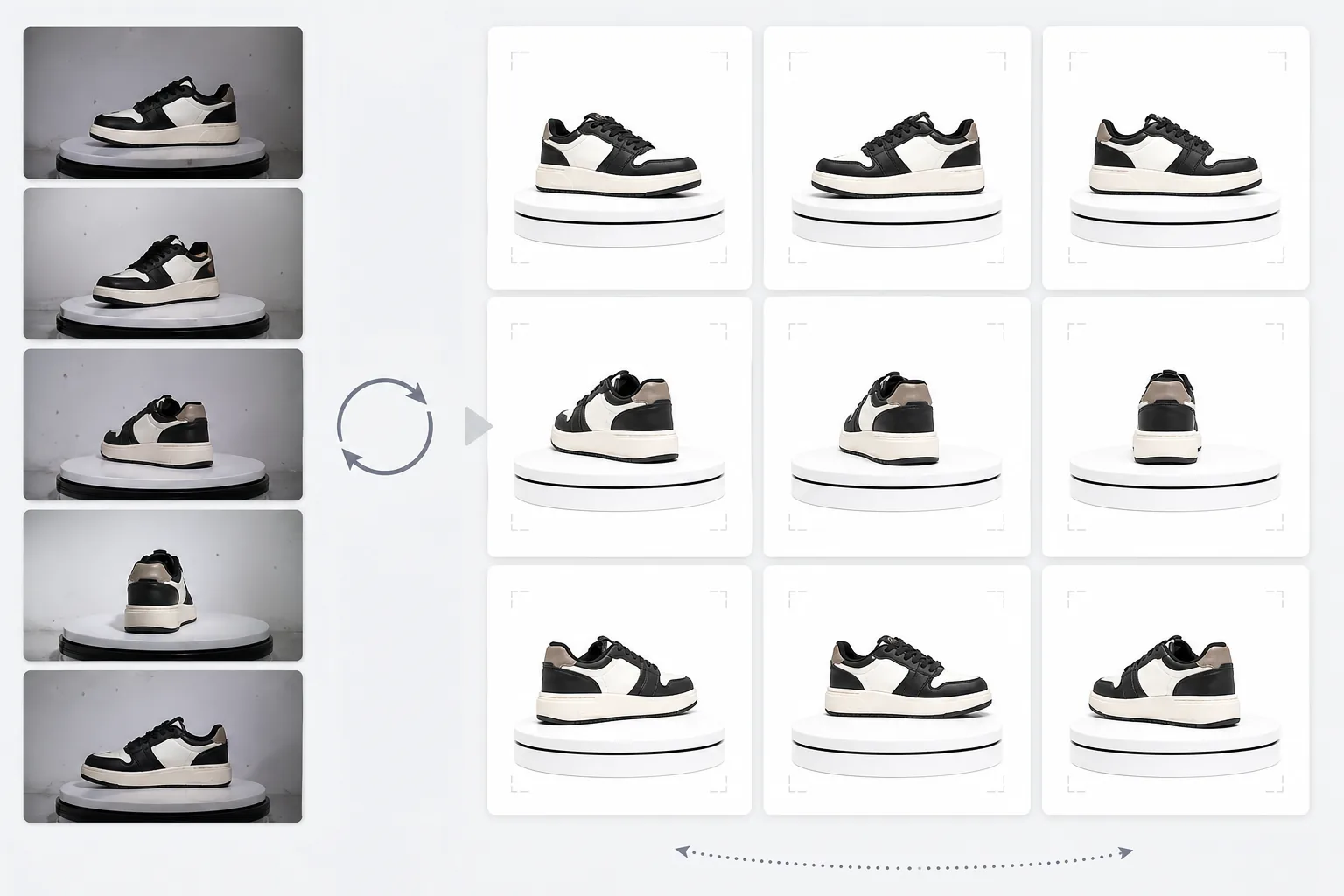
เทมเพลตนี้ทำอะไร
ประมวลผลภาพถ่ายผลิตภัณฑ์หลายมุมให้กลายเป็นชุดที่สม่ำเสมอ เหมาะสำหรับโปรแกรมดูการหมุนแบบโต้ตอบ 360 องศาบนเว็บไซต์อีคอมเมิร์ซ เมื่อคุณถ่ายภาพผลิตภัณฑ์บนแท่นหมุนจาก 24 หรือ 36 มุม ความไม่สม่ำเสมอเล็กน้อยของพื้นหลัง แสง และเงาจะสะสมและสร้างประสบการณ์การหมุนที่กระตุกและดูไม่เป็นมืออาชีพ เทมเพลตนี้ใช้ Background Eraser เพื่อแยกผลิตภัณฑ์ออกจากทุกมุมด้วยการจัดการขอบที่สม่ำเสมอ ปรับแสงและอุณหภูมิสีให้เป็นมาตรฐานในทุกเฟรมเพื่อให้ผลิตภัณฑ์ไม่กะพริบระหว่างโทนอุ่นและเย็นขณะหมุน และใช้ Magic Eraser เพื่อขจัดฝุ่น รอยนิ้วมือ และตำหนิบนพื้นผิวที่กลายเป็นสิ่งรบกวนเมื่อปรากฏในเฟรมหนึ่งแต่ไม่ปรากฏในเฟรมถัดไป
การตั้งค่าเทมเพลต
| พื้นหลัง | สีขาวบริสุทธิ์ (#FFFFFF) — สม่ำเสมอในทุกเฟรมการหมุน |
| การปรับแสงให้เป็นมาตรฐาน | ความสม่ำเสมอระหว่างเฟรม (ขจัดการกะพริบระหว่างมุม) |
| การทำความสะอาดพื้นผิว | ขจัดฝุ่น รอยนิ้วมือ และแสงสะท้อนในแต่ละเฟรม |
| การจัดผลิตภัณฑ์ให้อยู่กึ่งกลาง | จัดผลิตภัณฑ์ให้อยู่กึ่งกลางอัตโนมัติในแต่ละเฟรมเพื่อแกนการหมุนที่ราบรื่น |
| ขนาดเอาต์พุต | 1500 × 1500 px ต่อเฟรม (ปรับให้เหมาะสมสำหรับโปรแกรมดู 360 บนเว็บ) |
| จำนวนเฟรม | รองรับลำดับ 12, 24 หรือ 36 เฟรม |
วิธีใช้เทมเพลตนี้
อัปโหลดภาพถ่ายบนแท่นหมุนของคุณ
อัปโหลดชุดภาพถ่ายการหมุนทั้งหมด (12, 24 หรือ 36 เฟรม) ที่ถ่ายบนแท่นหมุนด้วยช่วงห่างที่สม่ำเสมอ ตั้งชื่อไฟล์ตามลำดับ (001.jpg ถึง 036.jpg) เพื่อให้เทมเพลตประมวลผลตามลำดับการหมุนที่ถูกต้อง เทมเพลตรองรับภาพถ่ายจากพื้นหลังใดก็ได้ — ฉากขาว เทา หรือมีสี
การลบพื้นหลังและความสม่ำเสมอ
Background Eraser ลบพื้นหลังออกจากทุกเฟรมโดยใช้การตั้งค่าการตรวจจับขอบเดียวกัน เพื่อให้แน่ใจว่าโครงร่างของผลิตภัณฑ์สม่ำเสมอในทุกมุม ผลิตภัณฑ์จะถูกจัดให้อยู่กึ่งกลางอัตโนมัติในแต่ละเฟรมเพื่อให้แกนการหมุนคงที่และการหมุนไม่สั่นคลอน
การปรับให้เป็นมาตรฐานระหว่างเฟรม
แสง อุณหภูมิสี และการเปิดรับแสงจะถูกปรับให้เป็นมาตรฐานในทุกเฟรม ซึ่งจะขจัดความผันผวนเล็กน้อยของความสว่างและสีที่เกิดขึ้นเมื่อแสงของแท่นหมุนไม่สม่ำเสมออย่างสมบูรณ์ในทุกมุม ตำหนิบนพื้นผิวที่มองเห็นได้ในบางมุมจะถูกทำความสะอาดเพื่อความสม่ำเสมอ
ส่งออกลำดับเฟรม
ดาวน์โหลดลำดับเฟรมที่สมบูรณ์ที่ 1500 × 1500 px ต่อเฟรมในรูปแบบ JPEG ไฟล์จะถูกกำหนดหมายเลขตามลำดับและพร้อมสำหรับการนำเข้าโดยตรงไปยังปลั๊กอินโปรแกรมดู 360 เช่น Magic 360, Sirv หรือ Webrotate 360 ขนาดไฟล์รวมได้รับการปรับให้เหมาะสมสำหรับการโหลดบนเว็บที่รวดเร็ว
เคล็ดลับมือโปรเพื่อผลลัพธ์ที่ดีที่สุด
- ✓ใช้แท่นหมุนแบบใช้มือที่มีเครื่องหมายองศาแทนการหมุนด้วยมือเปล่า ช่วงห่างที่สม่ำเสมอ 10 องศา (36 เฟรม) จะให้การหมุนที่ราบรื่นที่สุด เทมเพลตสามารถจัดการความไม่สม่ำเสมอของการหมุนเล็กน้อยได้ แต่ช่วงห่างที่เท่ากันจะให้ผลลัพธ์ที่ราบรื่นขึ้นอย่างเห็นได้ชัด
- ✓ล็อกกล้องของคุณบนขาตั้งและใช้การตั้งค่าการเปิดรับแสงแบบแมนนวลสำหรับทุกเฟรม การเปิดรับแสงอัตโนมัติทำให้กล้องปรับความสว่างต่างกันในแต่ละมุม สร้างเอฟเฟกต์การกะพริบที่เทมเพลตต้องแก้ไขในภายหลัง การตั้งค่าแบบแมนนวลให้จุดเริ่มต้นที่สะอาดขึ้นแก่เทมเพลต
- ✓ทำความสะอาดผลิตภัณฑ์ของคุณให้ทั่วก่อนถ่าย — ฝุ่นและรอยนิ้วมือมองเห็นได้ชัดและรบกวนมากกว่าในการหมุน 360 มากกว่าในภาพนิ่งเดียว เพราะมันปรากฏและหายไปเมื่อผลิตภัณฑ์หมุน เทมเพลตจะขจัดสิ่งเหล่านี้ แต่การเริ่มต้นด้วยพื้นผิวที่สะอาดให้ผลลัพธ์ที่ดีกว่า
เครื่องมือ
E-commerce workflow
Product photo hub
Use this template with the full ecommerce product photo workflow for marketplace backgrounds, cleanup, compression, resizing, and listing-ready exports.
View ecommerce product photo workflowคำถามที่พบบ่อย
ฉันต้องใช้กี่เฟรม?
+
36 เฟรม (ช่วงห่าง 10 องศา) ให้การหมุนที่ราบรื่นที่สุดสำหรับผลิตภัณฑ์ส่วนใหญ่ 24 เฟรม (ช่วงห่าง 15 องศา) ยอมรับได้สำหรับผลิตภัณฑ์ที่ไม่มีรายละเอียดละเอียด 12 เฟรม (ช่วงห่าง 30 องศา) เป็นขั้นต่ำสำหรับการหมุนที่จดจำได้ แต่จะรู้สึกกระตุกสำหรับผลิตภัณฑ์ที่มีรายละเอียดมาก เช่น นาฬิกาหรืออุปกรณ์อิเล็กทรอนิกส์
ฉันสามารถประมวลผลเฟรมจากวิดีโอได้ไหม?
+
ได้ หากคุณดึงเฟรมจากวิดีโอแท่นหมุนในช่วงห่างที่เท่ากัน ส่งออกเฟรมที่ความละเอียดสูงสุดที่มีอยู่และตรวจสอบให้แน่ใจว่ามีการกระจายมุมที่สม่ำเสมอตลอด 360 องศาเต็ม เฟรมวิดีโออาจมีคุณภาพต่ำกว่าภาพนิ่งเฉพาะเนื่องจากภาพเบลอจากการเคลื่อนไหวและการบีบอัดวิดีโอ
ปลั๊กอินโปรแกรมดู 360 ใดที่เข้ากันได้?
+
เอาต์พุต JPEG ตามลำดับเข้ากันได้กับโซลูชันโปรแกรมดู 360 หลักทั้งหมด รวมถึง Magic 360, Sirv 360, Webrotate 360, jQuery Reel และการใช้งานแบบกำหนดเอง ขนาดที่สม่ำเสมอและรูปแบบการตั้งชื่อทำให้การนำเข้าเป็นเรื่องง่าย
มอบมุมมองผลิตภัณฑ์ 360 ที่นักช้อปคาดหวัง
อัปโหลดภาพถ่ายบนแท่นหมุนและรับลำดับเฟรมที่สะอาดและสม่ำเสมอ พร้อมสำหรับโปรแกรมดูการหมุน 360 แบบโต้ตอบบนหน้าผลิตภัณฑ์ของคุณ
ลองใช้ฟรีRelated templates
More e-commerce templates for your workflow.
เทมเพลตพื้นหลังสีขาวบริสุทธิ์สำหรับภาพถ่ายผลิตภัณฑ์ Amazon, Shopify และการตั้งค่าที่พร้อมสำหรับตลาดกลางสำหรับรูปภาพผลิตภัณฑ์ที่สะอาดและเป็นมืออาชีพที่แปลง
เทมเพลตภาพถ่ายรายการที่ได้รับการปรับให้เหมาะสมที่สุดจาก Etsy แปลงภาพถ่ายไลฟ์สไตล์ให้เป็นพื้นหลังสีขาวสะอาดตาที่ 2000px ปรับปรุงรายละเอียดผลิตภัณฑ์ทำมือ และตรงตามหลักเกณฑ์รูปภาพของ Etsy
เทมเพลตภาพถ่ายรายการที่ได้รับการปรับให้เหมาะกับ eBay พื้นหลังสีขาวสำหรับรูปภาพแกลเลอรี การปรับปรุงเอกสารเงื่อนไข และเค้าโครงหลายมุมที่ตรงตามมาตรฐานรูปภาพของ eBay
เทมเพลตการถ่ายภาพเครื่องประดับระดับมืออาชีพสำหรับแหวน สร้อยคอ และนาฬิกา ควบคุมการสะท้อน เพิ่มความแวววาวของอัญมณี และส่งมอบภาพที่พร้อมสำหรับตลาดบนพื้นหลังที่สะอาดตา
เทมเพลตภาพถ่ายเฟอร์นิเจอร์ระดับมืออาชีพสำหรับรายการสินค้าในตลาดกลาง ขจัดความยุ่งเหยิงในห้อง แสดงมิติที่แท้จริง และนำเสนอชิ้นส่วนบนพื้นหลังที่สะอาดตาหรือในบริบทของห้องที่มีสไตล์
ทำความสะอาดภาพถ่ายแฟลตเลย์เสื้อผ้าด้วยการกำจัดรอยยับ การขจัดขุย พื้นหลังสีขาวบริสุทธิ์ และสีผ้าที่แม่นยำ พร้อมสำหรับ Shopify, Amazon และร้านค้าบูติก