
Amazon Product Photo
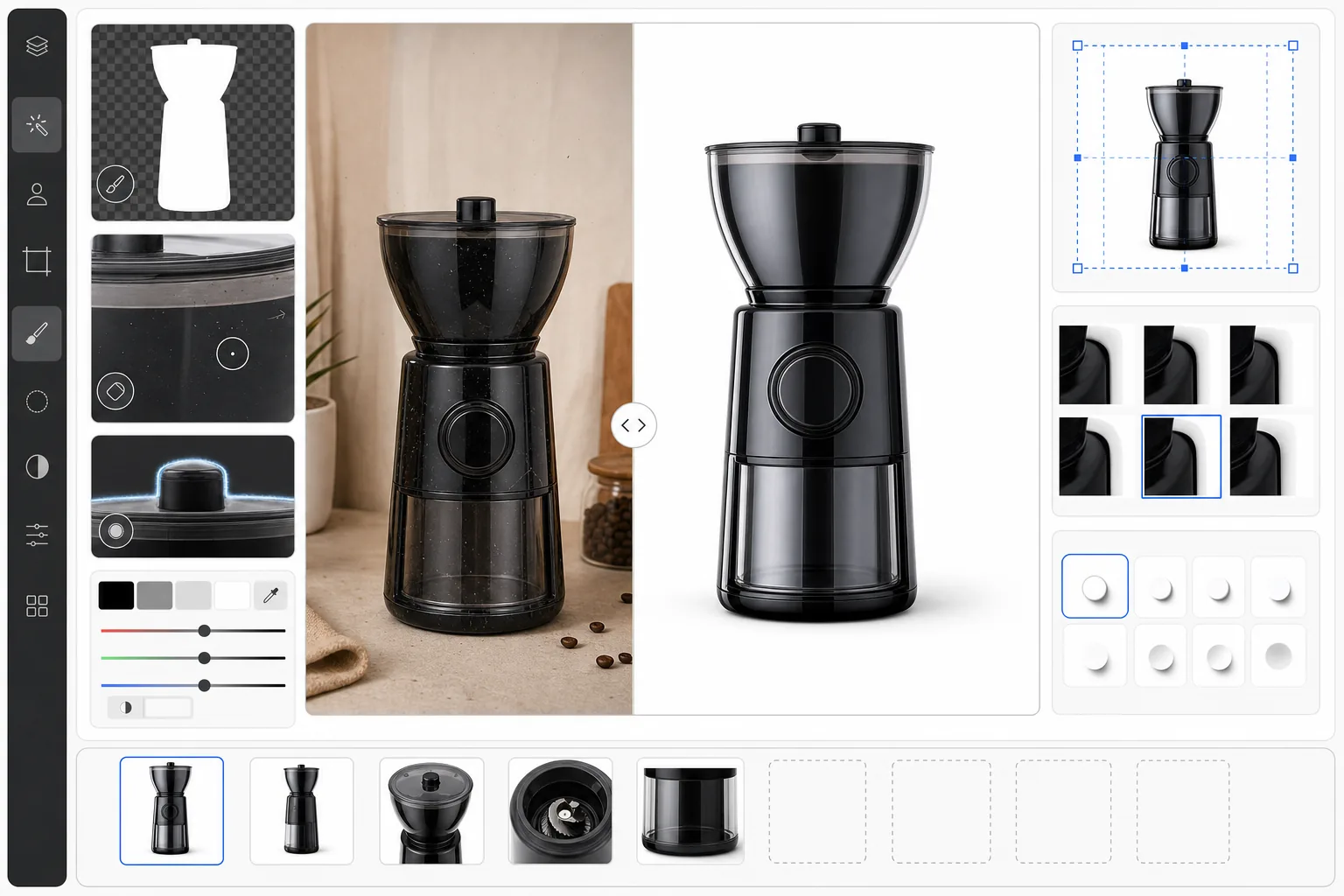
เปลี่ยนภาพถ่ายผลิตภัณฑ์ดิบให้เป็นภาพรายการที่พร้อมสำหรับ Amazon ซึ่งตรงตามทุกข้อกำหนดของมาร์เก็ตเพลส เทมเพลตนี้ลบพื้นหลังและแทนที่ด้วยสีขาวบริสุทธิ์ (#FFFFFF) แก้ไขอุณหภูมิสีเพื่อให้ผลิตภัณฑ์แสดงผลได้แม่นยำบนทุกจอภาพ ลบแสงสะท้อนและฝุ่นบนพื้นผิว และส่งออกภาพที่ขนาดขั้นต่ำ 2000px ตามที่ Amazon กำหนดสำหรับฟังก์ชันซูม
ลองใช้เทมเพลตนี้ฟรีE-commerce template preview
เทมเพลตนี้ทำอะไร
เตรียมภาพผลิตภัณฑ์โดยเฉพาะสำหรับรายการบน Amazon Seller Central โดย Amazon กำหนดให้ภาพหลักต้องมีพื้นหลังสีขาวบริสุทธิ์ (RGB 255, 255, 255) และให้ผลิตภัณฑ์เต็มเฟรมอย่างน้อย 85% เทมเพลตนี้ใช้ Background Eraser เพื่อแยกผลิตภัณฑ์ออกมาด้วยความแม่นยำของขอบระดับต่ำกว่าพิกเซล วางบนพื้นหลังสีขาวที่เป็นไปตามข้อกำหนด และปรับการจัดเฟรมให้ตรงตามเงื่อนไขการเติมเต็ม 85% Magic Eraser ลบจุดฝุ่น รอยขีดข่วน ตำหนิบนฉลาก และเส้นด้ายที่หลุดรุ่ยซึ่งมองเห็นได้เมื่อซูมเข้ามาก การแก้ไขสีทำให้ผลิตภัณฑ์ดูสมจริง ลดอัตราการคืนสินค้าที่เกิดจากสีไม่ตรงกันระหว่างภาพในรายการกับสินค้าที่จัดส่ง
การตั้งค่าเทมเพลต
| สีพื้นหลัง | สีขาวบริสุทธิ์ (#FFFFFF) — เป็นไปตามข้อกำหนดภาพหลักของ Amazon |
| ขนาดเอาต์พุต | 2000 × 2000 px (สี่เหลี่ยมจัตุรัส รองรับการซูม) |
| การเติมเต็มของผลิตภัณฑ์ | 85–95% ของเฟรม (แนวปฏิบัติที่ดีที่สุดของ Amazon) |
| การแก้ไขสี | สมดุลสีขาวอัตโนมัติ + โปรไฟล์สี sRGB |
| การปรับขอบ | การตัดขอบระดับต่ำกว่าพิกเซลเพื่อขอบผลิตภัณฑ์ที่คมชัด |
วิธีใช้เทมเพลตนี้
อัปโหลดภาพถ่ายผลิตภัณฑ์ของคุณ
อัปโหลดภาพที่ถ่ายบนพื้นหลังใดก็ได้ — โต๊ะในครัว ฉากหลังผ้า หรือการจัดฉากในสตูดิโอ AI จะแยกผลิตภัณฑ์ออกมาไม่ว่าพื้นหลังเดิมจะซับซ้อนเพียงใด เพื่อผลลัพธ์ที่ดีที่สุด โปรดตรวจสอบให้แน่ใจว่าผลิตภัณฑ์อยู่ในโฟกัสและมีแสงสว่างเพียงพอจากด้านหน้าเพื่อลดเงาที่แข็งกระด้าง
การลบพื้นหลังและการทำความสะอาด
Background Eraser ลบพื้นหลังเดิมและแทนที่ด้วยสีขาวบริสุทธิ์ จากนั้น Magic Eraser จะลบฝุ่น รอยขีดข่วน รอยนิ้วมือบนพื้นผิวมันวาว และตำหนิของบรรจุภัณฑ์ใด ๆ ขอบของผลิตภัณฑ์จะได้รับการปรับให้ละเอียดเพื่อขจัดรัศมีหรือขอบสีที่หลงเหลือจากสีพื้นหลังเดิม
การจัดเฟรมอัตโนมัติและการแก้ไขสี
ผลิตภัณฑ์จะถูกจัดให้อยู่กึ่งกลางและปรับขนาดโดยอัตโนมัติให้เต็ม 85–95% ของผืนผ้าใบสี่เหลี่ยมจัตุรัส สมดุลสีขาวจะได้รับการแก้ไขเพื่อให้สีของผลิตภัณฑ์แสดงผลได้แม่นยำภายใต้การปรับเทียบจอภาพมาตรฐาน เงาจะถูกทำให้นุ่มนวลเพื่อเพิ่มความลึกที่เป็นธรรมชาติโดยไม่ละเมิดนโยบายพื้นหลังสีขาวของ Amazon
ส่งออกภาพที่พร้อมลงรายการ
ดาวน์โหลดที่ขนาด 2000 × 2000 px ในรูปแบบ JPEG พร้อมฝังโปรไฟล์สี sRGB ไฟล์ได้รับการปรับให้เหมาะสมเพื่อให้มีขนาดต่ำกว่า 10 MB (ขีดจำกัดการอัปโหลดของ Amazon) ในขณะที่ยังคงรายละเอียดคุณภาพระดับซูม อัปโหลดไปยัง Seller Central โดยตรงเป็นภาพหลักของรายการคุณ
เคล็ดลับมืออาชีพเพื่อผลลัพธ์ที่ดีที่สุด
- ✓ถ่ายภาพผลิตภัณฑ์ของคุณด้วยแสงที่สม่ำเสมอและกระจายตัวจากสองด้านเพื่อลดเงาที่แข็งกระด้าง เทมเพลตสามารถแก้ไขปัญหาเงาในระดับปานกลางได้ แต่การเริ่มต้นด้วยแสงที่สม่ำเสมอจะให้ผลลัพธ์ที่ดูเป็นธรรมชาติที่สุดบนพื้นหลังสีขาว
- ✓สำหรับผลิตภัณฑ์ที่สะท้อนแสงอย่างแก้ว โลหะ หรือพลาสติกมันวาว ให้เอียงผลิตภัณฑ์เล็กน้อย (5–10 องศา) เพื่อหลีกเลี่ยงแสงสะท้อนตรงจากกล้อง เทมเพลตจัดการกับแสงสะท้อนเล็กน้อยได้ แต่ไม่สามารถลบจุดไฮไลต์สะท้อนขนาดใหญ่บนพื้นผิวผลิตภัณฑ์ได้โดยไม่เปลี่ยนรูปลักษณ์ของผลิตภัณฑ์
- ✓ใส่ตัวอ้างอิงขนาดในภาพรอง (ไม่ใช่ภาพหลัก) Amazon ห้ามใช้อุปกรณ์ประกอบฉากในภาพหลัก แต่ภาพไลฟ์สไตล์และอินโฟกราฟิกจะได้ประโยชน์จากการแสดงผลิตภัณฑ์ในบริบทเพื่อลดความไม่แน่ใจของผู้ซื้อเกี่ยวกับขนาด
- ✓ถ่ายภาพที่ความละเอียดสูงสุดของกล้องคุณ Amazon เปิดใช้งานการซูมเมื่อภาพมีขนาดอย่างน้อย 2000px ในด้านที่ยาวที่สุด — ยิ่งเทมเพลตมีข้อมูลพิกเซลให้ทำงานมากเท่าไร รายละเอียดเมื่อซูมเข้าก็จะยิ่งคมชัดต่อผู้ซื้อมากขึ้นเท่านั้น
เครื่องมือ
E-commerce workflow
Product photo hub
Use this template with the full ecommerce product photo workflow for marketplace backgrounds, cleanup, compression, resizing, and listing-ready exports.
View ecommerce product photo workflowคำถามที่พบบ่อย
สิ่งนี้ตรงตามข้อกำหนดภาพหลักของ Amazon หรือไม่?
+
ใช่ เทมเพลตส่งออกพื้นหลังสีขาวบริสุทธิ์ (#FFFFFF) จัดวางผลิตภัณฑ์ให้เต็ม 85–95% ของเฟรม และส่งออกที่ 2000 × 2000 px ในรูปแบบ JPEG sRGB — ทั้งหมดเป็นข้อกำหนดสำหรับภาพหลักของรายการบน Amazon ไม่จำเป็นต้องแก้ไขเพิ่มเติมก่อนอัปโหลดไปยัง Seller Central
ฉันสามารถใช้สิ่งนี้สำหรับภาพตัวเลือก (variation) ของ Amazon ได้หรือไม่?
+
เทมเพลตได้รับการปรับให้เหมาะกับภาพหลัก แต่ผลลัพธ์ก็ใช้งานได้ดีในฐานะภาพแรกของแต่ละตัวเลือกผลิตภัณฑ์ (สี ขนาด สไตล์) สำหรับภาพรองแบบไลฟ์สไตล์หรืออินโฟกราฟิก คุณอาจต้องการใช้พื้นหลังอื่นหรือเพิ่มข้อความซ้อนทับหลังจากส่งออก
จะเกิดอะไรขึ้นหากผลิตภัณฑ์ของฉันมีส่วนที่โปร่งใสหรือเป็นสีขาว?
+
ผลิตภัณฑ์ที่มีองค์ประกอบสีขาวหรือโปร่งใส (ขวดใส อุปกรณ์อิเล็กทรอนิกส์สีขาว) จะได้รับการจัดการด้วยการเพิ่มเงาสัมผัสที่ละเอียดอ่อนใต้ผลิตภัณฑ์เพื่อกำหนดขอบเขตของมันกับพื้นหลังสีขาว เงาจะจางพอที่จะยังคงเป็นไปตามข้อกำหนดของ Amazon ในขณะเดียวกันก็ป้องกันไม่ให้ผลิตภัณฑ์ดูเหมือนลอยอยู่หรือกลืนไปกับพื้นหลัง
ทำให้ทุกรายการบน Amazon เปลี่ยนเป็นยอดขายด้วยภาพถ่ายผลิตภัณฑ์ระดับมืออาชีพ
อัปโหลดภาพถ่ายผลิตภัณฑ์จากพื้นหลังใดก็ได้ และรับภาพรายการที่เป็นไปตามข้อกำหนดของ Amazon พร้อมซูมได้ภายในไม่กี่วินาที
ลองใช้ฟรีRelated templates
More e-commerce templates for your workflow.
เทมเพลตพื้นหลังสีขาวบริสุทธิ์สำหรับภาพถ่ายผลิตภัณฑ์ Amazon, Shopify และการตั้งค่าที่พร้อมสำหรับตลาดกลางสำหรับรูปภาพผลิตภัณฑ์ที่สะอาดและเป็นมืออาชีพที่แปลง
เทมเพลตภาพถ่ายรายการที่ได้รับการปรับให้เหมาะสมที่สุดจาก Etsy แปลงภาพถ่ายไลฟ์สไตล์ให้เป็นพื้นหลังสีขาวสะอาดตาที่ 2000px ปรับปรุงรายละเอียดผลิตภัณฑ์ทำมือ และตรงตามหลักเกณฑ์รูปภาพของ Etsy
เทมเพลตภาพถ่ายรายการที่ได้รับการปรับให้เหมาะกับ eBay พื้นหลังสีขาวสำหรับรูปภาพแกลเลอรี การปรับปรุงเอกสารเงื่อนไข และเค้าโครงหลายมุมที่ตรงตามมาตรฐานรูปภาพของ eBay
เทมเพลตการถ่ายภาพเครื่องประดับระดับมืออาชีพสำหรับแหวน สร้อยคอ และนาฬิกา ควบคุมการสะท้อน เพิ่มความแวววาวของอัญมณี และส่งมอบภาพที่พร้อมสำหรับตลาดบนพื้นหลังที่สะอาดตา
เทมเพลตภาพถ่ายเฟอร์นิเจอร์ระดับมืออาชีพสำหรับรายการสินค้าในตลาดกลาง ขจัดความยุ่งเหยิงในห้อง แสดงมิติที่แท้จริง และนำเสนอชิ้นส่วนบนพื้นหลังที่สะอาดตาหรือในบริบทของห้องที่มีสไตล์
ทำความสะอาดภาพถ่ายแฟลตเลย์เสื้อผ้าด้วยการกำจัดรอยยับ การขจัดขุย พื้นหลังสีขาวบริสุทธิ์ และสีผ้าที่แม่นยำ พร้อมสำหรับ Shopify, Amazon และร้านค้าบูติก