
ภาพถ่ายผลิตภัณฑ์กระเป๋าถือ
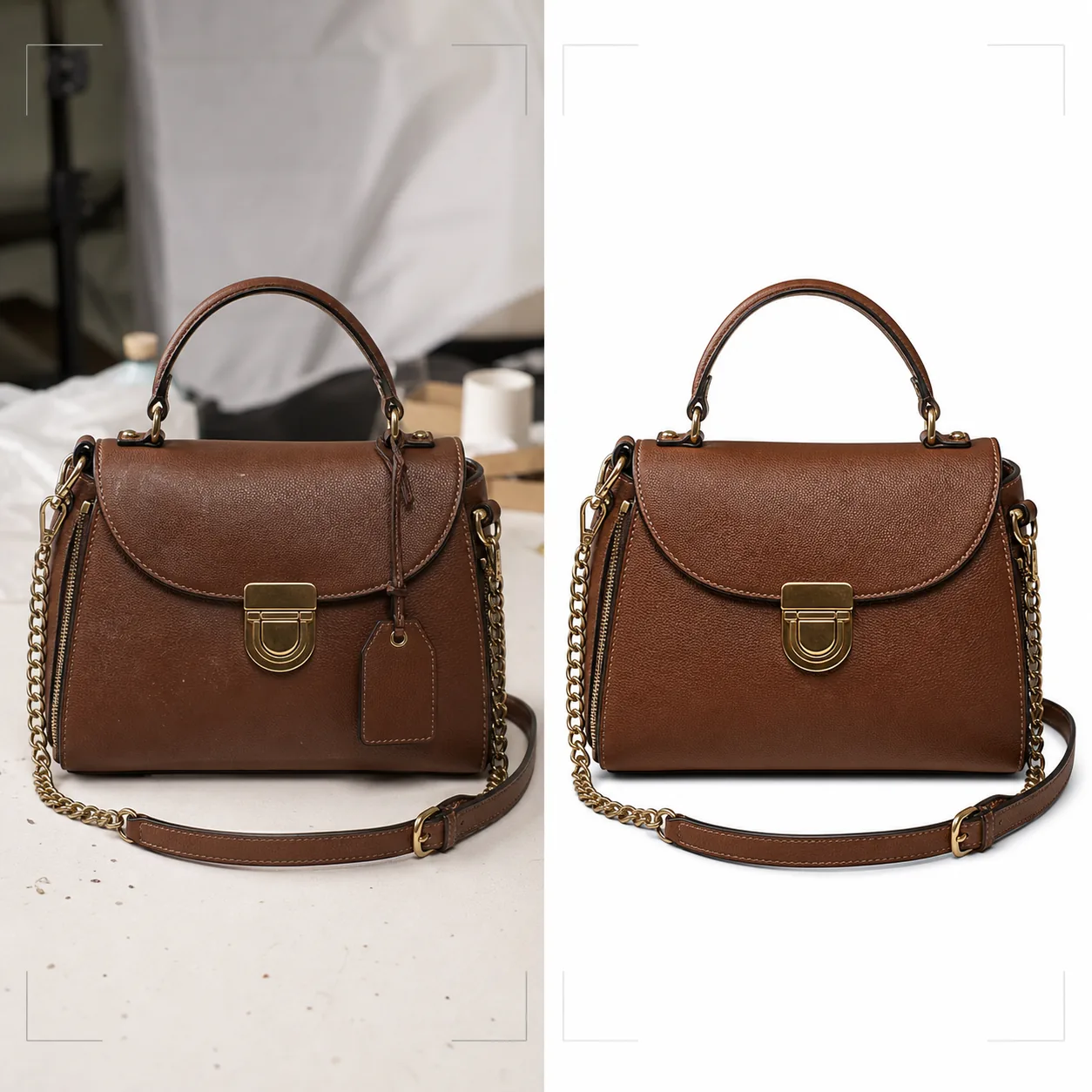
สร้างภาพถ่ายผลิตภัณฑ์ระดับหรูหราสำหรับกระเป๋าถือ กระเป๋าคลัตช์ กระเป๋าสตางค์ และเครื่องหนัง เทมเพลตนี้แยกกระเป๋าออกจากพื้นผิวใดก็ได้ เปลี่ยนพื้นหลังเป็นฉากสตูดิโอที่สะอาดตาหรือฉากไลฟ์สไตล์ ปรับลายหนังและรายละเอียดของรอยเย็บให้เด่นชัด และเพิ่มความคมชัดให้กับชิ้นส่วนฮาร์ดแวร์ เช่น ซิป ตัวล็อก และหัวเข็มขัด เพื่อให้ลูกค้าประเมินงานฝีมือได้จากทุกมุมมอง
ลองใช้เทมเพลตนี้ฟรีE-commerce template preview
เทมเพลตนี้ทำอะไร
มอบมาตรฐานภาพที่แบรนด์กระเป๋าถือระดับหรูหราและระดับกลางต้องการสำหรับการค้าปลีกออนไลน์ Background Eraser แยกกระเป๋าออกจากหน้าโต๊ะ พื้นผิวถ่ายภาพ และความรกของสตูดิโอ โดยเปลี่ยนสภาพแวดล้อมเป็นสีขาวบริสุทธิ์เพื่อให้สอดคล้องกับมาร์เก็ตเพลส หรือฉากที่จัดวางให้เข้ากับสุนทรียะของแบรนด์ Magic Eraser ลบอนุภาคฝุ่น รอยนิ้วมือบนฮาร์ดแวร์ และป้ายราคาที่พลาดไปตอนถ่าย การปรับปรุงด้วย AI ช่วยขับลายหนัง การทอผ้าใบ หรือพื้นผิวผ้าที่สื่อถึงคุณภาพ ในขณะที่ชิ้นส่วนฮาร์ดแวร์ — ซิป ตัวล็อก สายโซ่ และแผ่นโลโก้ — ได้รับการเพิ่มความคมชัดเพื่อให้ลูกค้าตรวจสอบคุณภาพงานเก็บรายละเอียดได้ราวกับกำลังถือกระเป๋าอยู่ในบูติก
การตั้งค่าเทมเพลต
| พื้นหลัง | ขาวบริสุทธิ์ ครีม หรือพื้นผิวจัดวาง (หินอ่อน ผ้าลินิน ชั้นไม้) |
| การปรับปรุงหนัง | เพิ่มความคมชัดของพื้นผิวลายหนังพร้อมรักษาความเงาตามธรรมชาติ |
| รายละเอียดฮาร์ดแวร์ | เพิ่มความคมชัดให้ซิป ตัวล็อก หัวเข็มขัด และแผ่นโลโก้โลหะ |
| การลบฝุ่นและรอยนิ้วมือ | ตรวจจับและลบอนุภาคบนพื้นผิวและรอยเปื้อนบนฮาร์ดแวร์โดยอัตโนมัติ |
| สไตล์เงา | เงาตกกระทบแบบธรรมชาติหรือเงาสะท้อนบนพื้นหลังสีขาว |
| ความละเอียดเอาต์พุต | 3000×3000px (1:1 สำหรับมาร์เก็ตเพลส) หรือ 2400×3200px (3:4 สำหรับเว็บไซต์แบรนด์) |
วิธีใช้เทมเพลตนี้
อัปโหลดภาพกระเป๋าถือของคุณ
อัปโหลดภาพถ่ายผลิตภัณฑ์ของกระเป๋าถือ — ถ่ายตรงหน้า เอียงมุมเพื่อแสดงความลึก หรือวางแบนพร้อมเปิดกระเป๋า รวมภาพจากหลายมุมเพื่อรายการสินค้าที่สมบูรณ์ เทมเพลตนี้รองรับภาพจากกล้องโทรศัพท์ การจัดสตูดิโอ และอุปกรณ์ DSLR
ทำความสะอาดพื้นหลังและลบตำหนิ
Background Eraser แยกกระเป๋าถือออกจากพื้นผิวถ่ายภาพด้วยการตรวจจับขอบที่รักษาขอบหนังนุ่ม สายที่ห้อยลงมา และรายละเอียดของโซ่ Magic Eraser ลบจุดฝุ่นบนหนัง รอยเปื้อนนิ้วมือบนฮาร์ดแวร์ขัดเงา และป้ายราคาหรือเซ็นเซอร์กันขโมยที่ยังติดอยู่
ปรับปรุงวัสดุและฮาร์ดแวร์
พื้นผิวหนังได้รับการเพิ่มความคมชัดเพื่อเผยให้เห็นลวดลายและรอยเย็บ ชิ้นส่วนฮาร์ดแวร์ได้รับการปรับปรุงให้ชัดเจน — ลูกค้าสามารถเห็นได้ว่าซิปเป็น YKK หรือไม่ ตัวล็อกเป็นทองเหลืองแท้หรือชุบ และรอยเย็บสม่ำเสมอและแน่นหรือไม่ การแก้สีช่วยให้หนังปรากฏในเฉดสีย้อมที่แท้จริง
ส่งออกสำหรับอีคอมเมิร์ซ
ดาวน์โหลดที่ 3000×3000px สำหรับ Amazon, eBay และ Poshmark หรือในอัตราส่วนภาพที่กำหนดเองสำหรับเว็บไซต์แบรนด์ของคุณ เวอร์ชันพื้นหลังขาวบริสุทธิ์เป็นไปตามข้อกำหนดภาพของมาร์เก็ตเพลส เวอร์ชันฉากไลฟ์สไตล์เหมาะสำหรับโซเชียลมีเดียและแคมเปญอีเมล
เคล็ดลับมืออาชีพเพื่อผลลัพธ์ที่ดีที่สุด
- ✓ยัดกระดาษทิชชูเข้าไปในกระเป๋าถือก่อนถ่ายเพื่อให้ได้รูปทรงและโครงสร้างตามที่ตั้งใจไว้ กระเป๋าเปล่าจะยุบและพับในลักษณะที่ทำให้ดูพรีเมี่ยมน้อยกว่าตอนเห็นจริง
- ✓ถ่ายภาพระยะใกล้ของฮาร์ดแวร์แยกต่างหาก แม้เทมเพลตจะปรับปรุงฮาร์ดแวร์ในภาพกระเป๋าทั้งใบ แต่ภาพระยะใกล้เฉพาะของตัวล็อก หัวรูดซิป และแผ่นโลโก้จะมอบประสบการณ์การตรวจสอบรายละเอียดให้ลูกค้าเหมือนที่ได้ในร้านจริง
- ✓เช็ดฮาร์ดแวร์ด้วยผ้าไมโครไฟเบอร์ก่อนถ่าย เทมเพลตลบรอยนิ้วมือด้วยวิธีดิจิทัล แต่คราบเปื้อนหนักบนฮาร์ดแวร์สีทองหรือเงินขัดเงาอาจลดความคมชัดของผิวโลหะด้านล่างได้แม้หลังจากการทำความสะอาดด้วย AI แล้ว
เครื่องมือ
E-commerce workflow
Product photo hub
Use this template with the full ecommerce product photo workflow for marketplace backgrounds, cleanup, compression, resizing, and listing-ready exports.
View ecommerce product photo workflowคำถามที่พบบ่อย
เทมเพลตนี้รองรับกระเป๋าที่ทำจากผ้าใบหรือไนลอนได้ไหม
+
ได้ เทมเพลตตรวจจับประเภทวัสดุและปรับการปรับปรุงพื้นผิวให้เหมาะสม พื้นผิวการทอผ้าใบและไนลอนริปสต็อปจะถูกเพิ่มความคมชัดต่างจากลายหนังเพื่อขับเน้นคุณสมบัติเฉพาะตัวของแต่ละวัสดุ
รายละเอียดสายโซ่จะถูกรักษาไว้ระหว่างการลบพื้นหลังหรือไม่
+
ได้ การตรวจจับขอบได้รับการปรับเทียบสำหรับรายละเอียดโลหะที่ละเอียด เช่น ข้อโซ่ สายหนังเส้นบาง และหัวรูดซิปที่ห้อยลงมา องค์ประกอบเหล่านี้จะถูกรักษาไว้ด้วยขอบที่สะอาดบนพื้นหลังใหม่
ฉันสามารถเพิ่มเงาสะท้อนบนพื้นหลังสีขาวได้ไหม
+
ได้ เทมเพลตมีทั้งเงาตกกระทบแบบธรรมชาติ (ราวกับกระเป๋าวางอยู่บนพื้นผิวสีขาวที่ส่องสว่างจากด้านบน) และเงาสะท้อน (การจางแบบกระจกใต้กระเป๋า) ที่ใช้กันทั่วไปในการถ่ายภาพผลิตภัณฑ์หรูหรา
นำเสนอทุกใบด้วยรายละเอียดระดับบูติก
อัปโหลดภาพกระเป๋าถือและรับภาพผลิตภัณฑ์ระดับหรูหราพร้อมพื้นผิวหนังที่ปรับปรุงแล้ว ฮาร์ดแวร์ที่คมชัด และพื้นหลังที่สะอาด
ลองใช้ฟรีRelated templates
More e-commerce templates for your workflow.
เทมเพลตพื้นหลังสีขาวบริสุทธิ์สำหรับภาพถ่ายผลิตภัณฑ์ Amazon, Shopify และการตั้งค่าที่พร้อมสำหรับตลาดกลางสำหรับรูปภาพผลิตภัณฑ์ที่สะอาดและเป็นมืออาชีพที่แปลง
เทมเพลตภาพถ่ายรายการที่ได้รับการปรับให้เหมาะสมที่สุดจาก Etsy แปลงภาพถ่ายไลฟ์สไตล์ให้เป็นพื้นหลังสีขาวสะอาดตาที่ 2000px ปรับปรุงรายละเอียดผลิตภัณฑ์ทำมือ และตรงตามหลักเกณฑ์รูปภาพของ Etsy
เทมเพลตภาพถ่ายรายการที่ได้รับการปรับให้เหมาะกับ eBay พื้นหลังสีขาวสำหรับรูปภาพแกลเลอรี การปรับปรุงเอกสารเงื่อนไข และเค้าโครงหลายมุมที่ตรงตามมาตรฐานรูปภาพของ eBay
เทมเพลตการถ่ายภาพเครื่องประดับระดับมืออาชีพสำหรับแหวน สร้อยคอ และนาฬิกา ควบคุมการสะท้อน เพิ่มความแวววาวของอัญมณี และส่งมอบภาพที่พร้อมสำหรับตลาดบนพื้นหลังที่สะอาดตา
เทมเพลตภาพถ่ายเฟอร์นิเจอร์ระดับมืออาชีพสำหรับรายการสินค้าในตลาดกลาง ขจัดความยุ่งเหยิงในห้อง แสดงมิติที่แท้จริง และนำเสนอชิ้นส่วนบนพื้นหลังที่สะอาดตาหรือในบริบทของห้องที่มีสไตล์
ทำความสะอาดภาพถ่ายแฟลตเลย์เสื้อผ้าด้วยการกำจัดรอยยับ การขจัดขุย พื้นหลังสีขาวบริสุทธิ์ และสีผ้าที่แม่นยำ พร้อมสำหรับ Shopify, Amazon และร้านค้าบูติก