
ภาพไลฟ์สไตล์อีคอมเมิร์ซ
حوّل صور المنتجات العادية إلى صور بأسلوب الحياة تُظهر عناصرك في سياق العالم الحقيقي — على أسطح المطبخ، في غرف المعيشة، على المكاتب، أو في الهواء الطلق. يزيل هذا القالب الخلفية الأصلية ويضع منتجك في مشاهد أسلوب حياة منسقة بإضاءة متطابقة وظلال طبيعية، مما يمنح قوائم منتجاتك الصور السياقية التي تدفع قرارات الشراء دون جلسة تصوير مكلفة.
جرّب هذا القالب مجانًاE-commerce template preview
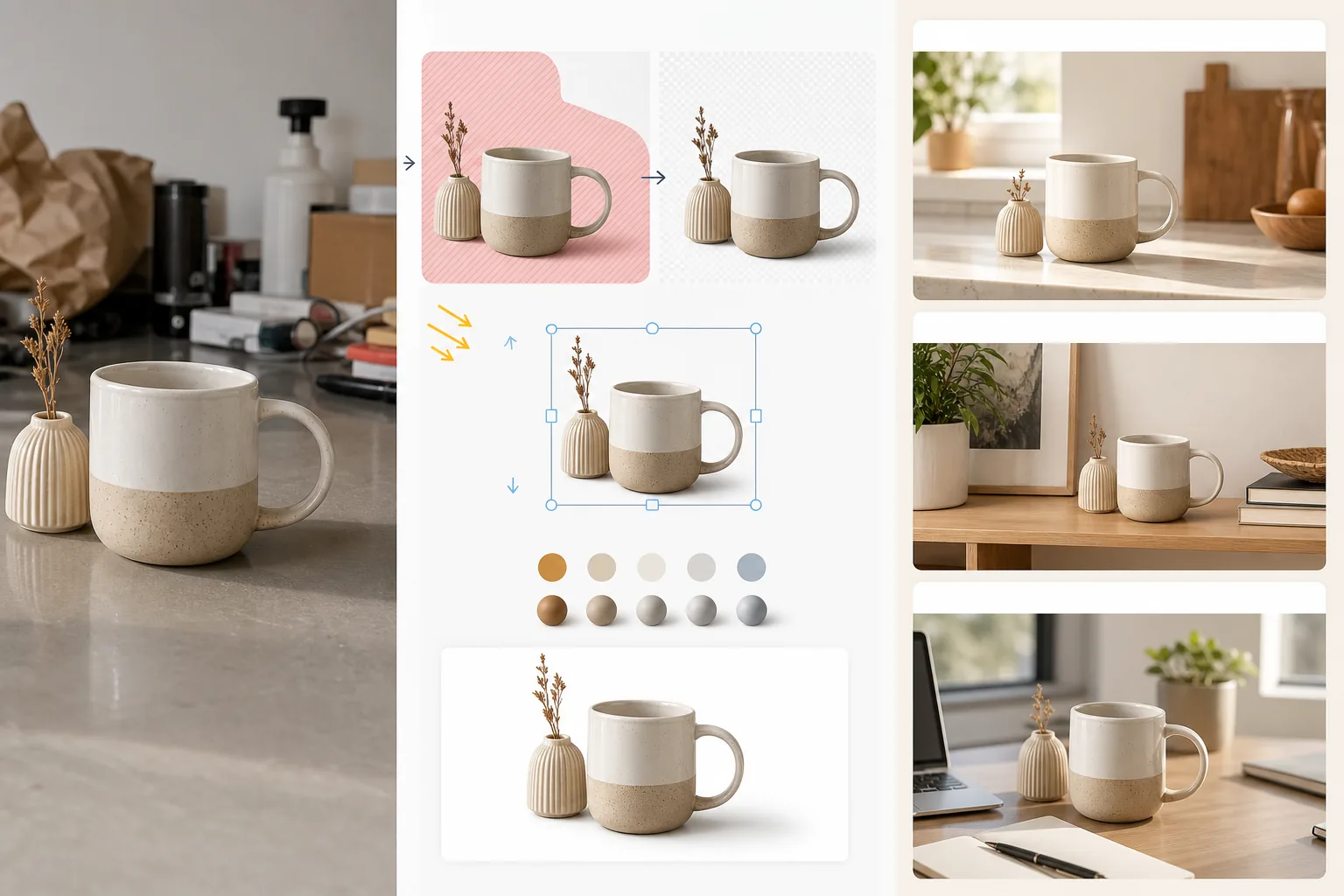
ما الذي يفعله هذا القالب
يحوّل صور المنتجات القياسية على خلفية بيضاء أو صور المنتجات العادية إلى مشاهد أسلوب حياة تساعد العملاء على تخيّل امتلاك العنصر واستخدامه. يزيل Magic Eraser الخلفية الأصلية وأي عناصر مشتتة حول المنتج. ثم يضع AI Enhance المنتج في بيئة أسلوب حياة منسقة — سطح مطبخ لأدوات الطهي، رف غرفة معيشة لديكور المنزل، إعداد مكتب للإلكترونيات، فناء خارجي لأدوات الحديقة — باتجاه إضاءة وعرض ظلال يتطابقان مع المشهد. يتم تنسيق لون المنتج وتعريضه مع البيئة بحيث يبدو التركيب وكأنه صورة واحدة التُقطت في إعداد منسق. وهذا يسد الفجوة بين متطلب الخلفية البيضاء الصرفة في الأسواق (الذي يبيع الوظيفة) وسياق أسلوب الحياة (الذي يبيع الرغبة) الذي تُظهر أبحاث التحويل في التجارة الإلكترونية باستمرار أنه يدفع معدلات إضافة أعلى إلى سلة التسوق.
إعدادات القالب
| فئة المشهد | المطبخ، غرفة المعيشة، الحمام، المكتب/المكتب المنزلي، الهواء الطلق، أو سطح التصوير من الأعلى |
| تنسيق الإضاءة | مطابقة اتجاه إضاءة المنتج ودرجة حرارة اللون مع المشهد |
| عرض الظلال | ظل تماس طبيعي وانسداد محيطي يتطابق مع هندسة المشهد |
| مقياس المنتج | كشف تلقائي أو تحديد الحجم يدويًا بالنسبة إلى أثاث المشهد وأشيائه |
| تنسيق الألوان | ضبط توازن اللون الأبيض للمنتج ليطابق الإضاءة المحيطة للمشهد |
| دقة الإخراج | 3000×3000px (مربع 1:1) أو 3000×2250px (4:3 لمواقع العلامات التجارية) |
كيفية استخدام هذا القالب
ارفع صورة منتجك
ارفع صورة منتج التُقطت على أي خلفية — استوديو أبيض، سطح طاولة، أو حتى سطح مطبخك. كلما كانت الخلفية الأصلية أنظف، كان عزل المنتج أفضل، لكن القالب يتعامل أيضًا مع البيئات المزدحمة. أدرج المنتج كاملًا دون قص أي حواف.
اختر مشهد أسلوب حياة
اختر فئة مشهد تتطابق مع الطريقة التي سيستخدم بها العملاء المنتج. يختار الذكاء الاصطناعي بيئة محددة ضمن تلك الفئة بناءً على نوع المنتج وحجمه. يمكنك تصفّح البدائل إذا لم يتطابق الاقتراح الأول مع جماليات علامتك التجارية.
نسّق المنتج داخل المشهد
يُدمج المنتج في المشهد باتجاه إضاءة متطابق، وعرض ظلال مناسب، وضبط درجة حرارة اللون. يضمن الذكاء الاصطناعي أن يبدو المنتج موجودًا فعليًا — موضوعًا على السطح، مستقرًا على الرف، واقفًا على المكتب — بدلًا من أن يطفو فوق السطح.
صدّر للقوائم والتسويق
نزّل بدقة 3000×3000px لخانات صور أسلوب الحياة في الأسواق أو بنسبة 4:3 لصفحات منتجات مواقع العلامات التجارية. استخدمها إلى جانب صورتك الرئيسية ذات الخلفية البيضاء — تُظهر صورة أسلوب الحياة السياق والرغبة بينما تُظهر صورة الخلفية البيضاء التفاصيل والمواصفات.
نصائح احترافية لأفضل النتائج
- ✓صوّر منتجك والضوء قادم من الأعلى إلى اليسار. تُضاء معظم بيئات مشاهد أسلوب الحياة من الأعلى إلى اليسار، لذا فإن مطابقة هذا الاتجاه منذ البداية تنتج أكثر تركيب إقناعًا حيث يكون اتجاه الظل متسقًا بين المنتج والبيئة.
- ✓أدرج قدرًا صغيرًا من سطح الأرض في صورة المنتج الأصلية. تساعد نقطة التماس بين قاعدة المنتج والسطح الذكاء الاصطناعي على فهم منظور المنتج ووضعه بشكل مقنع على سطح المشهد الجديد.
- ✓استخدم صور أسلوب الحياة للخانات الثانوية في قوائم الأسواق. أبقِ الصورة الرئيسية صورة رئيسية نظيفة بخلفية بيضاء للامتثال لقواعد السوق، واستخدم صور أسلوب الحياة في الخانات من 2 إلى 5 لإظهار المنتج في سياقه. يتفوق هذا المزيج باستمرار على نهج الخلفية البيضاء بالكامل أو أسلوب الحياة بالكامل.
เครื่องมือ
E-commerce workflow
Product photo hub
Use this template with the full ecommerce product photo workflow for marketplace backgrounds, cleanup, compression, resizing, and listing-ready exports.
View ecommerce product photo workflowأسئلة شائعة
هل سيبدو المنتج وكأنه ملصق على المشهد؟
+
لا. يطابق القالب اتجاه إضاءة المنتج ودرجة حرارة لونه وزاوية ظله مع بيئة المشهد. تُعرض ظلال التماس حيث يلتقي المنتج بالسطح بظل خافت ناعم يطابق الإضاءة المحيطة للمشهد. تبدو النتيجة وكأن المنتج صُوّر في ذلك الإعداد.
هل يمكنني استخدام صور مشاهد مخصصة خاصة بي؟
+
نعم. يمكنك رفع صورة مشهد أسلوب حياة خاصة بك كبيئة خلفية. سينسّق الذكاء الاصطناعي إضاءة المنتج ولونه ليطابقا مشهدك المخصص، تمامًا كما يفعل مع مكتبة المشاهد المدمجة.
هل تُعالَج مقياس المنتج تلقائيًا؟
+
نعم. يقدّر الذكاء الاصطناعي الحجم الحقيقي للمنتج من الصورة الأصلية ويغيّر مقياسه بشكل مناسب بالنسبة إلى الأثاث والأشياء في المشهد. سيظهر كوب القهوة بحجم كوب على سطح المطبخ، وليس بحجم غطاء مصباح. يمكنك ضبط المقياس يدويًا إذا احتاج الكشف التلقائي إلى تصحيح.
أظهر للعملاء كيف يبدو امتلاك منتجك
ارفع صور المنتجات واحصل على صور بأسلوب الحياة تدفع قرارات الشراء بسياق العالم الحقيقي.
جرّبه مجانًاRelated templates
More e-commerce templates for your workflow.
เทมเพลตพื้นหลังสีขาวบริสุทธิ์สำหรับภาพถ่ายผลิตภัณฑ์ Amazon, Shopify และการตั้งค่าที่พร้อมสำหรับตลาดกลางสำหรับรูปภาพผลิตภัณฑ์ที่สะอาดและเป็นมืออาชีพที่แปลง
เทมเพลตภาพถ่ายรายการที่ได้รับการปรับให้เหมาะสมที่สุดจาก Etsy แปลงภาพถ่ายไลฟ์สไตล์ให้เป็นพื้นหลังสีขาวสะอาดตาที่ 2000px ปรับปรุงรายละเอียดผลิตภัณฑ์ทำมือ และตรงตามหลักเกณฑ์รูปภาพของ Etsy
เทมเพลตภาพถ่ายรายการที่ได้รับการปรับให้เหมาะกับ eBay พื้นหลังสีขาวสำหรับรูปภาพแกลเลอรี การปรับปรุงเอกสารเงื่อนไข และเค้าโครงหลายมุมที่ตรงตามมาตรฐานรูปภาพของ eBay
เทมเพลตการถ่ายภาพเครื่องประดับระดับมืออาชีพสำหรับแหวน สร้อยคอ และนาฬิกา ควบคุมการสะท้อน เพิ่มความแวววาวของอัญมณี และส่งมอบภาพที่พร้อมสำหรับตลาดบนพื้นหลังที่สะอาดตา
เทมเพลตภาพถ่ายเฟอร์นิเจอร์ระดับมืออาชีพสำหรับรายการสินค้าในตลาดกลาง ขจัดความยุ่งเหยิงในห้อง แสดงมิติที่แท้จริง และนำเสนอชิ้นส่วนบนพื้นหลังที่สะอาดตาหรือในบริบทของห้องที่มีสไตล์
ทำความสะอาดภาพถ่ายแฟลตเลย์เสื้อผ้าด้วยการกำจัดรอยยับ การขจัดขุย พื้นหลังสีขาวบริสุทธิ์ และสีผ้าที่แม่นยำ พร้อมสำหรับ Shopify, Amazon และร้านค้าบูติก