
ลบอิโมจิออกจากรูปภาพ
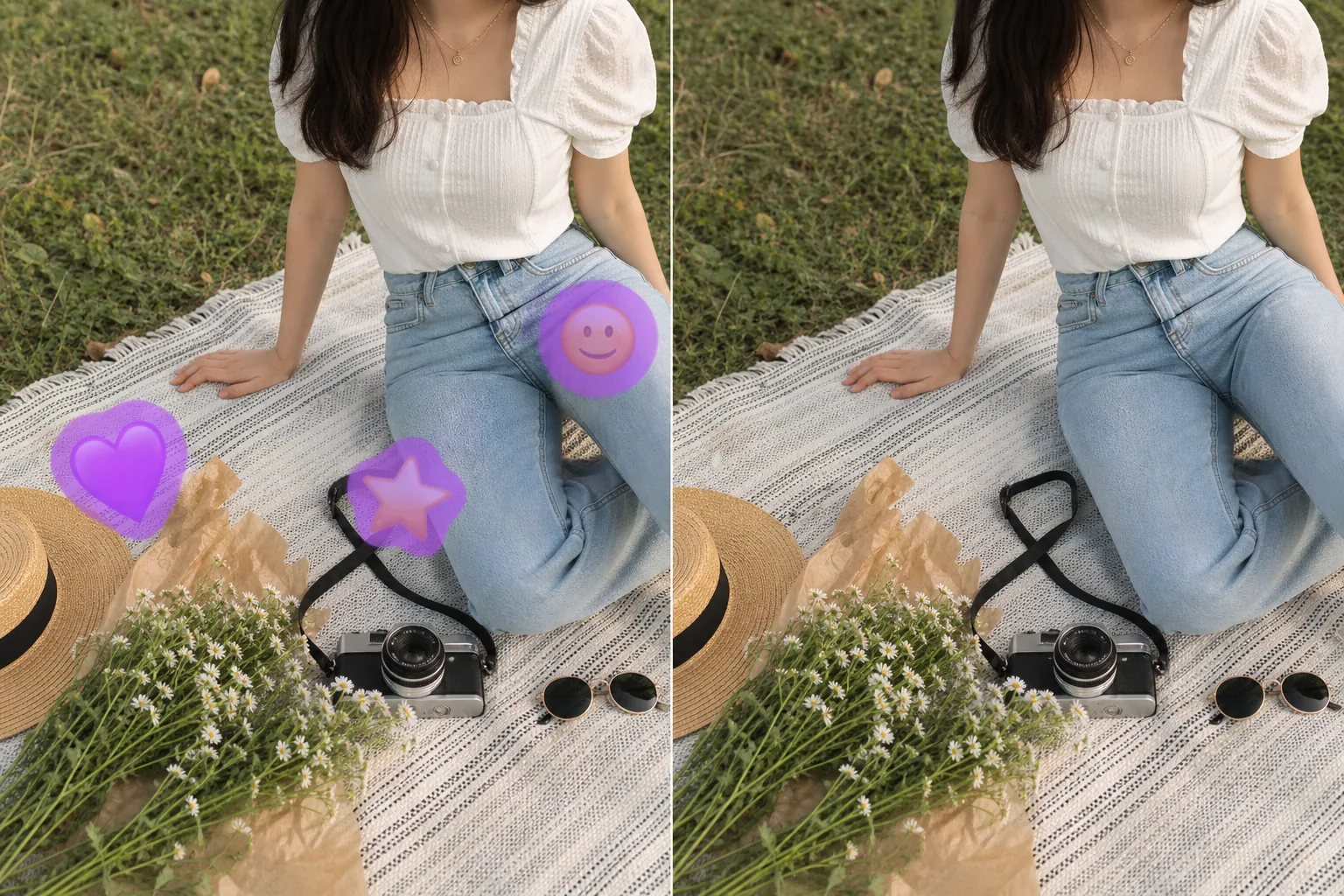
ลบสติกเกอร์อิโมจิ ภาพซ้อนทับหน้ายิ้ม ตราประทับหัวใจ และเซ็นเซอร์อิโมจิออกจากภาพหน้าจอ บันทึกโซเชียลมีเดีย และแก้ไขรูปภาพ Magic Eraser ลบอิโมจิออกและใช้ AI เพื่อสร้างสิ่งที่อยู่ข้างใต้ขึ้นมาใหม่ โดยคืนค่ารูปภาพต้นฉบับให้ใกล้เคียงที่สุด
อัปเดตล่าสุด
วิธีลบอิโมจิออกจากรูปภาพ
เปิด Magic Eraser บนเว็บ iOS หรือ Android อัปโหลดรูปภาพ จากนั้นใช้แปรงระบายตรงอิโมจิ สติกเกอร์ หรือหน้ายิ้มที่ทับอยู่ แล้วแตะ Erase AI จะลบมันออกและสร้างภาพส่วนที่อยู่ด้านหลังขึ้นมาใหม่ให้ดูสมจริงจากพิกเซลรอบ ๆ ใช้ฟรี ไม่ต้องสมัครสมาชิก และไม่มีลายน้ำ อิโมจิมีอยู่ทั่วไปในรูปภาพ ใช้ในการเซนเซอร์ใบหน้าในโพสต์บนโซเชียลมีเดีย ตกแต่งสแนปช็อตที่แชร์ในข้อความ หรือเพิ่มภาพซ้อนทับที่สนุกสนานให้กับเรื่องราวและโพสต์ แต่บ่อยครั้งที่ยังคงจำเป็นต้องใช้ภาพถ่ายที่อยู่ด้านล่าง เช่น ภาพต้นฉบับที่ไม่มีสติกเกอร์ตาหัวใจ ภาพถ่ายผลิตภัณฑ์ที่ไม่มีรูปดาวซ้อนทับ หรือภาพหน้าจอที่ไม่มีหน้ายิ้มเซ็นเซอร์ใบหน้าของใครบางคน เครื่องมือแก้ไขแบบดั้งเดิมเพียงแค่เบลอหรือทำให้พื้นที่เปื้อน AI เจนเนอเรชั่นของ Magic Eraser วิเคราะห์สิ่งที่มองเห็นได้รอบๆ อิโมจิ เช่น สีผิว รูปแบบพื้นหลัง ความต่อเนื่องของพื้นผิว และสร้างสิ่งที่อีโมจิครอบคลุมในเวอร์ชันที่เป็นไปได้ขึ้นมาใหม่ ผลลัพธ์ขึ้นอยู่กับจำนวนข้อมูลที่อยู่รอบๆ พื้นที่ที่ครอบคลุม: อีโมจิขนาดเล็กบนพื้นหลังที่มีพื้นผิวสร้างขึ้นใหม่ได้ดี อีโมจิขนาดใหญ่ที่ครอบคลุมคุณลักษณะเฉพาะ (เช่น ใบหน้า) จะสร้างการสร้างใหม่โดยประมาณการโดย AI
ลบอิโมจิในสามขั้นตอน
- 1
อัพโหลดรูปภาพของคุณ
เปิด Magic Eraser บนเว็บ, iOS หรือ Android แล้วอัปโหลดภาพที่มีอิโมจิที่คุณต้องการลบ ใช้งานได้กับภาพหน้าจอ รูปภาพโซเชียลมีเดียที่บันทึกไว้ และรูปภาพที่แก้ไข
- 2
แปรงอีโมจิ
ทาสีทับสติกเกอร์อิโมจิทั้งหมด รวมถึงเงาตกกระทบหรือเอฟเฟกต์เรืองแสงรอบๆ สติกเกอร์ ครอบคลุมพื้นที่ทั้งหมด — การครอบคลุมบางส่วนอาจทำให้วัตถุที่เป็นสีหลุดออกจากขอบอิโมจิ
- 3
ลบและทบทวน
แตะลบ จากนั้น AI จะลบอิโมจิและเติมเต็มพื้นที่ด้วยรายละเอียดที่สร้างขึ้นใหม่ ตรวจสอบผลลัพธ์ — พื้นหลังและพื้นผิวสร้างขึ้นใหม่อย่างแม่นยำ ในขณะที่ใบหน้าที่ถูกปกคลุมหรือคุณลักษณะเฉพาะเป็นการประมาณค่าโดย AI ส่งออกภาพที่ล้างแล้ว
ดีที่สุดสำหรับ
- การลบสติกเกอร์ตกแต่งออกจากภาพถ่ายโซเชียลมีเดียที่บันทึกไว้
- ทำความสะอาดภาพหน้าจอด้วยการซ้อนทับอิโมจิ
- การเรียกคืนภาพถ่ายสินค้าด้วยการซ้อนทับแสตมป์ส่งเสริมการขาย
- ลบการตกแต่งหัวใจ ดาว และหน้ายิ้มออกจากรูปภาพที่แชร์
- ทำความสะอาดรูปภาพแอพส่งข้อความด้วยการเพิ่มอิโมจิ
- การกู้คืนรูปภาพที่ใช้อีโมจิเป็นการเซ็นเซอร์แบบไม่เป็นทางการ
- การลบลายน้ำสติกเกอร์แบรนด์ออกจากภาพที่บันทึกไว้
- การเตรียมรูปถ่ายที่แก้ไขแล้วสำหรับการพิมพ์
สิ่งที่คาดหวังจากการลบอิโมจิ
คุณภาพการลบอีโมจิขึ้นอยู่กับสิ่งที่ซ่อนอยู่ข้างใต้ อิโมจิขนาดเล็กบนพื้นหลังที่มีพื้นผิว (หญ้า ผนัง ผ้า ท้องฟ้า) สร้างขึ้นใหม่ได้ดีมาก เนื่องจาก AI มีรูปแบบโดยรอบมากมายที่จะขยายไปยังพื้นที่ที่ครอบคลุม อิโมจิขนาดกลางบนผิวหนังหรือเสื้อผ้าสร้างขึ้นใหม่ให้ดูน่าเชื่อเมื่อมองเห็นพื้นที่โดยรอบได้เพียงพอ อีโมจิขนาดใหญ่ที่ครอบคลุมคุณสมบัติที่เป็นเอกลักษณ์ โดยเฉพาะใบหน้า จะสร้างการสร้างใหม่โดยประมาณการโดย AI ซึ่งอาจไม่ตรงกับรูปลักษณ์ของบุคคลดั้งเดิม AI สร้างใบหน้าหรือคุณลักษณะที่เป็นไปได้ตามเบาะแสบริบท แต่ไม่สามารถกู้คืนข้อมูลที่ถูกซ่อนไว้ได้อย่างสมบูรณ์ เพื่อผลลัพธ์ที่ดีที่สุด ให้ลบอีโมจิออกจากพื้นที่ที่มีพื้นผิวหรือลวดลายซ้ำๆ ก่อน เนื่องจากสิ่งเหล่านี้จะให้ผลลัพธ์ที่น่าเชื่อถือที่สุด สำหรับอิโมจิบนใบหน้า คาดว่าจะได้ผลลัพธ์ที่ดูเป็นธรรมชาติแต่เป็นการประมาณไว้ คุณสามารถลบอีโมจิขนาดเล็กหลายตัวบนรูปภาพพร้อมกันได้โดยการปัดไปบนอีโมจิทั้งหมดก่อนที่จะแตะลบ
คำถามที่พบบ่อย
- มันสามารถสร้างสิ่งที่อยู่เบื้องหลังอิโมจิขึ้นมาใหม่ได้จริงหรือ?
- สำหรับพื้นหลังและพื้นผิว ใช่ — AI ขยายรูปแบบโดยรอบไปยังพื้นที่ที่ครอบคลุม สำหรับคุณสมบัติที่เป็นเอกลักษณ์ เช่น ใบหน้า AI จะสร้างการสร้างใหม่ที่เป็นไปได้ตามบริบท แต่ไม่สามารถกู้คืนรูปลักษณ์ดั้งเดิมที่ถูกซ่อนไว้ได้
- มันใช้งานได้กับอิโมจิหน้าจอและสติ๊กเกอร์หรือไม่?
- ใช่. ไม่ว่าจะเพิ่มอิโมจิในแอปส่งข้อความ แพลตฟอร์มโซเชียลมีเดีย หรือโปรแกรมตกแต่งรูปภาพ Magic Eraser ก็ประมวลผลด้วยวิธีเดียวกัน เครื่องมือนี้ใช้งานได้กับรูปภาพระดับพิกเซล ไม่ใช่บนเลเยอร์หรือข้อมูลเมตา
- ฉันสามารถลบอิโมจิหลายตัวออกจากรูปภาพเดียวได้หรือไม่
- ใช่. แปรงอีโมจิทั้งหมดที่คุณต้องการลบ จากนั้นแตะลบหนึ่งครั้ง AI ประมวลผลพื้นที่ที่ทำเครื่องหมายไว้ทั้งหมดพร้อมกัน ซึ่งสามารถให้ผลลัพธ์ที่สม่ำเสมอมากกว่าการลบออกทีละรายการ
- การลบอิโมจิฟรีหรือไม่?
- ใช่. เทียร์ฟรีของ Magic Eraser จัดการการลบอีโมจิ อัปโหลดรูปภาพของคุณ แปรงทับสติกเกอร์ และส่งออกเวอร์ชันที่ล้างสะอาดแล้วโดยไม่มีค่าใช้จ่าย