
ลบสติกเกอร์ออกจากภาพถ่าย
ลบภาพซ้อนทับอิโมจิ สติกเกอร์แอพ คำอธิบายประกอบ Snapchat การประทับตราภาพหน้าจอ และป้ายราคาจากภาพถ่าย แปรงทับสติกเกอร์แล้ว Magic Eraser สร้างสิ่งที่อยู่ด้านหลังขึ้นมาใหม่
อัปเดตล่าสุด
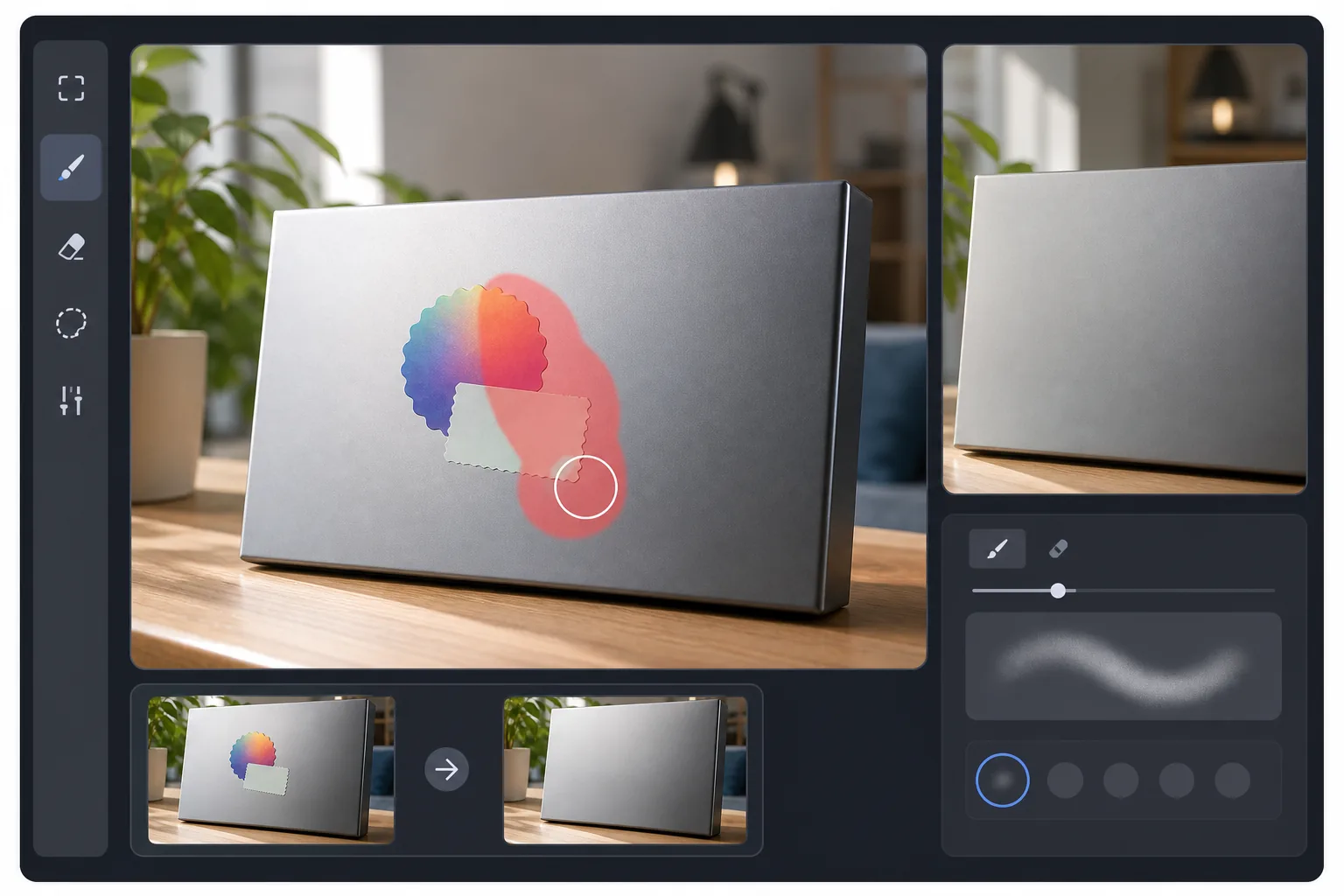
วิธีลบสติกเกอร์ออกจากรูปภาพ
หากต้องการลบสติกเกอร์ออกจากรูปภาพ ให้เปิด Magic Eraser บนเว็บ iOS หรือ Android อัปโหลดรูปภาพ ระบายแปรงทับสติกเกอร์ แล้วแตะ Erase จากนั้น AI จะสร้างสิ่งที่อยู่ด้านหลังขึ้นมาใหม่จากพิกเซลรอบ ๆ ใช้งานได้ฟรี ไม่ต้องสมัครสมาชิก ไม่มีลายน้ำ และรองรับสติกเกอร์จากแอป อิโมจิและข้อความซ้อนทับ ป้ายราคาและฉลากสินค้า รวมถึงกราฟิกตกแต่งที่เพิ่มเข้ามาโดยแอปแต่งรูปหรือแอปแชต สติกเกอร์ที่อยู่บนพื้นหลังเรียบ ๆ หรือพื้นหลังที่มีลวดลายซ้ำกันจะให้ผลลัพธ์ที่เนียนที่สุด ส่วนสติกเกอร์ที่บังใบหน้าหรือรายละเอียดเฉพาะ จะเป็นการสร้างขึ้นใหม่แบบคาดเดาให้ใกล้เคียงที่สุด โดยพื้นฐานแล้วสติกเกอร์จะเป็นแผ่นทึบแสงซึ่งครอบคลุมพื้นที่ของภาพ พิกเซลดั้งเดิมที่อยู่ด้านหลังจะหายไป เครื่องมือแก้ไขด้วยตนเอง เช่น โคลนสแตมป์ จำเป็นต้องมีพื้นที่แหล่งที่มาที่มีลักษณะคล้ายกันเพื่อคัดลอก ซึ่งไม่ได้มีอยู่เสมอไป การลบโดยอาศัย AI จะคาดการณ์ว่าพิกเซลที่หายไปควรมาจากบริบทโดยรอบอย่างไร ดังนั้นจึงทำงานได้แม้ว่าจะไม่มีอะไรจะคัดลอกก็ตาม ทำให้เหมาะกับพื้นหลังที่ยุ่งวุ่นวาย ใบหน้าที่ถูกอิโมจิคลุมบางส่วน และภาพหน้าจอที่มีสติกเกอร์วางอยู่ด้านบนขององค์ประกอบ UI
ลบสติกเกอร์ในสามขั้นตอน
- 1
อัปโหลดรูปภาพหรือภาพหน้าจอของคุณ
เปิด Magic Eraser และวางรูปภาพพร้อมสติกเกอร์ รองรับ JPEG, PNG และ WebP ทั้งหมด รวมถึง PNG แบบโปร่งใสและภาพหน้าจอที่บันทึกจากโทรศัพท์ทุกรุ่น
- 2
แปรงทับสติกเกอร์
ทาสีให้ทั่วสติกเกอร์ รวมถึงเงาตกกระทบหรือขอบด้วย สำหรับรูปร่างสติกเกอร์ที่ผิดปกติ เช่น หัวใจหรืออิโมจิที่มีขอบโปร่งใส ให้ปัดเลยขอบที่มองเห็นได้เล็กน้อยเพื่อให้ขอบเขตของ AI สะอาดตา
- 3
แตะลบและส่งออก
AI จะสร้างพื้นที่ด้านล่างขึ้นมาใหม่ภายในไม่กี่วินาที สติกเกอร์ส่วนใหญ่จะออกมาหมดจดตั้งแต่ครั้งแรกที่ลอง พื้นหลังที่ไม่ว่างอาจต้องใช้เวลาสักครู่ด้วยแปรงอันเล็กกว่าเพื่อจัดรายละเอียดให้เป็นระเบียบ
ดีที่สุดสำหรับ
- การลบการซ้อนทับอิโมจิออกจากภาพหน้าจอ Instagram Story
- การลบคำอธิบายประกอบของแอปออกจาก Snapchat, BeReal หรือภาพหน้าจอการส่งข้อความ
- ทำความสะอาดป้ายราคาและสติ๊กเกอร์เคลียร์สินค้าจากรูปถ่ายสินค้า
- การลบฟิลเตอร์แอพรูปภาพที่ทิ้งสติ๊กเกอร์ลายน้ำไว้
- ทำความสะอาดภาพหน้าจอก่อนแชร์หรือฝังในเอกสาร
สิ่งที่ควรรู้
สติกเกอร์ปิดใบหน้าใช้งานได้ แต่ใบหน้าที่สร้างขึ้นใหม่เป็นการคาดเดาที่ดีที่สุดของ AI ว่ามีอะไรอยู่ข้างใต้ ซึ่งมีประโยชน์ในการกู้คืนภาพถ่ายของตัวเอง แต่ไม่ใช่วิธีเปิดเผยตัวตนของคนแปลกหน้า การนำสติกเกอร์ออกไม่ได้ข้ามการป้องกันลายน้ำบนภาพหน้าจอที่มีลิขสิทธิ์จากบริการสตรีมมิ่ง โอเวอร์เลย์การเล่นเกม หรือแอปแบบชำระเงินที่ลายน้ำนั้นเป็นสัญญาณลิขสิทธิ์ ปฏิบัติต่อมันเหมือน Photoshop: เฉพาะเนื้อหาที่คุณมีสิทธิ์แก้ไขเท่านั้น
คำถามที่พบบ่อย
- ฉันสามารถลบสติกเกอร์ที่ปิดใบหน้าได้หรือไม่?
- ใช่. AI จะสร้างสิ่งที่น่าจะอยู่ข้างใต้มากที่สุดขึ้นมาใหม่ หากเป็นใบหน้าของคุณเองและคุณมีรูปถ่ายของตัวเองอื่น ๆ ผลลัพธ์มักจะใกล้เคียงกัน หากเป็นคนอื่น AI กำลังคาดเดา — ไม่สามารถเปิดเผยตัวตนที่ไม่มีข้อมูลได้
- ใช้งานกับสติ๊กเกอร์อนิเมชั่นในวิดีโอได้หรือไม่?
- Magic Eraser ปัจจุบันจัดการภาพนิ่ง สำหรับการลบสติกเกอร์วิดีโอ ให้ส่งออกเฟรมที่คุณต้องการ ล้างเฟรมใน Magic Eraser และคอมไพล์ใหม่
- แล้วสติกเกอร์หลายอันในรูปภาพเดียวล่ะ?
- แปรงให้ทั่วทั้งหมดในรอบเดียวหรือลบออกทีละรายการ สำหรับสติกเกอร์ที่ทับซ้อนกัน ให้นำออกทีละชิ้นเพื่อให้ได้ผลลัพธ์ที่สะอาดยิ่งขึ้น
- สติ๊กเกอร์จะทิ้งร่องรอยไว้หรือไม่?
- บนพื้นหลังธรรมดาหรือพื้นผิว ไม่มี บนพื้นหลังที่มีรายละเอียดสูง เช่น วอลล์เปเปอร์ที่มีลวดลาย ข้อความ โลโก้ซ้ำๆ คุณอาจเห็นว่าบริเวณที่สติกเกอร์อยู่นั้นดูอ่อนลง ใช้แปรงทัชอัพเพื่อปรับแต่งหากจำเป็น
- จะลบสติกเกอร์ออกจากรูปภาพบนมือถือได้อย่างไร?
- เปิด Magic Eraser ในเบราว์เซอร์มือถือใด ๆ หรือแอป iOS หรือ Android โหลดรูปภาพจากคลังภาพของคุณ จีบนิ้วเพื่อซูมเข้าไปที่สติกเกอร์ แล้วใช้นิ้วระบายแปรงทับ แตะ Erase แล้วสติกเกอร์จะถูกแทนที่ด้วยพื้นหลังที่สร้างขึ้นใหม่ การลบบนมือถือสะดวกสำหรับการเคลียร์สติกเกอร์ออกจากรูป Instagram, Snapchat หรือ WhatsApp ที่บันทึกไว้ ได้ทันทีในที่ที่คุณได้รับรูปนั้นมา
- ลบป้ายราคาหรือฉลากสินค้าออกจากของได้ไหม?
- ได้ ระบายแปรงทับป้ายราคา ฉลากบาร์โค้ด หรือสติกเกอร์โปรโมชันบนสินค้า แล้วแตะ Erase จากนั้น AI จะสร้างบรรจุภัณฑ์หรือพื้นผิวที่อยู่ด้านล่างขึ้นมาใหม่ วิธีนี้นิยมใช้กับรูปสำหรับลงขายต่อหรือลงประกาศในมาร์เก็ตเพลส ที่คุณต้องการภาพสินค้าที่ดูสะอาดตา ฉลากที่อยู่บนพื้นผิวเรียบและสม่ำเสมอจะออกมาเนียนสนิท ส่วนฉลากที่ติดบนพื้นผิวโค้งหรือมีพื้นผิวขรุขระอาจต้องระบายซ้ำอีกครั้ง
- เครื่องมือลบสติกเกอร์ใช้ฟรีจริงไหม และไม่ต้องสมัครสมาชิกจริงหรือ?
- จริงทั้งสองอย่าง การลบสติกเกอร์ทำงานบนแพ็กเกจฟรีของ Magic Eraser โดยไม่ต้องมีบัญชี และไม่มีลายน้ำเพิ่มเข้ามาในไฟล์ที่คุณส่งออก เพียงอัปโหลด ระบายแปรง ลบ แล้วดาวน์โหลด ใช้งานได้เหมือนกันทั้งบนเบราว์เซอร์มือถือหรือเดสก์ท็อป และในแอป iOS และ Android โดยให้ผลลัพธ์จาก AI ที่เหมือนกันทุกแพลตฟอร์ม