
Remove Decorative Emoji Overlays From a Photo
เรียนรู้วิธีลบโอเวอร์เลย์อิโมจิด้วย Magic Eraser คำแนะนำทีละขั้นตอนง่ายๆ ด้วยเครื่องมือ AI ฟรี ใช้ได้บนเว็บ, iOS และ Android
Last updated
ลองใช้เลย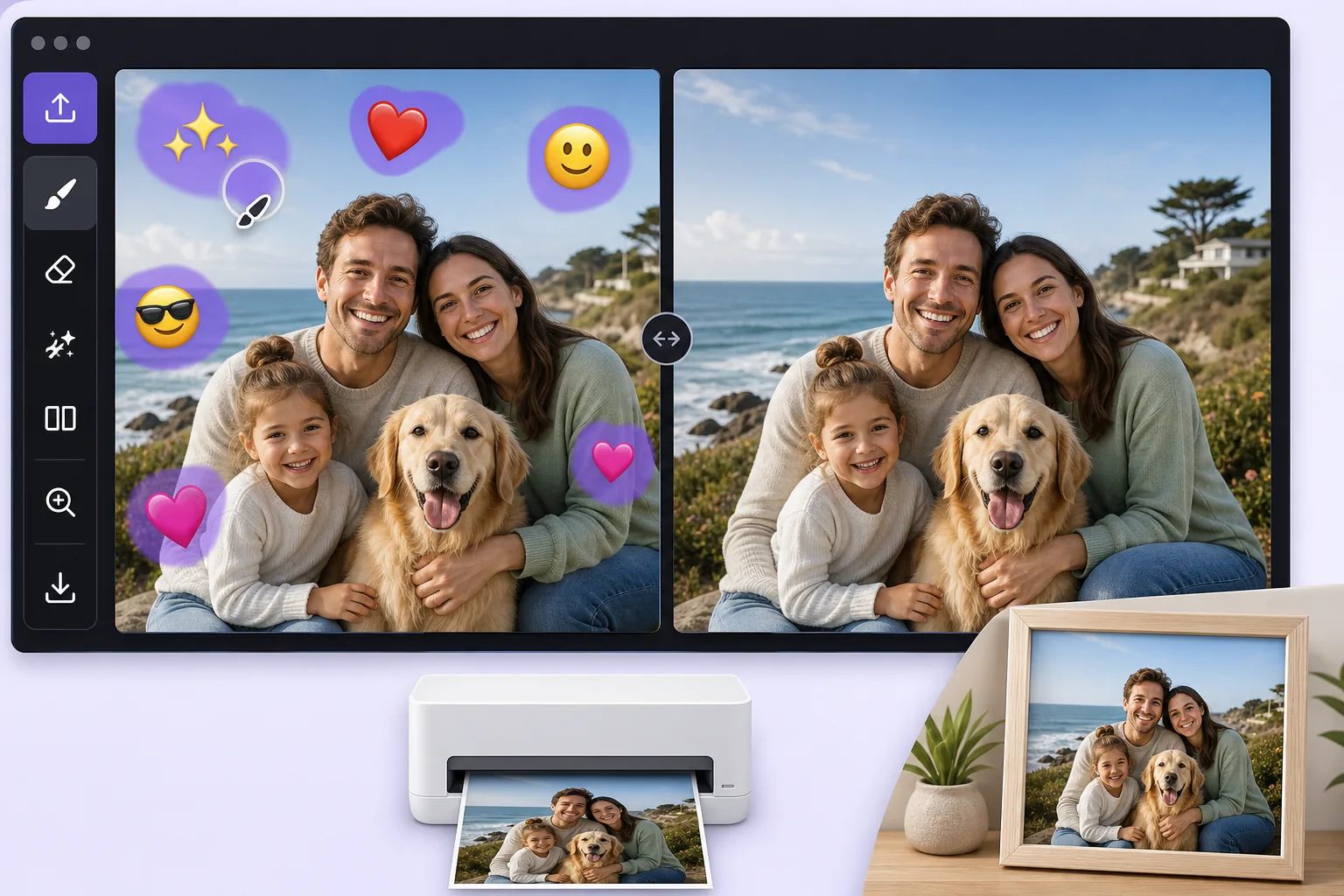
Turn a fun, sticker-covered photo into a clean print-ready image — Magic Eraser
We all decorate photos with emoji overlays for laughs, a crown on a birthday selfie, sunglasses on the dog, a string of hearts across a couple shot. The problem comes later, when you want to print that photo as a framed gift, submit it for a professional profile, or hand it to a client, and the cartoon stickers suddenly look out of place. Re-shooting is rarely an option, and the original un-stickered file is often long gone. Magic Eraser solves this by removing the decorative emoji overlay and using AI inpainting to fill the gap with a believable continuation of the surrounding scene. Be clear on what this does: the AI synthesizes a plausible reconstruction of the area an emoji was covering, it does not recover the literal original pixels that were hidden, and it cannot reveal a face or detail that the sticker concealed. For most decorative overlays, though, what was behind them is ordinary background, wall, sky, clothing, hair, so the result is clean enough to print or use professionally. It runs free on web, iOS, and Android with no watermark, so you can clean up a photo on your phone right after the fun and have a print-ready version in seconds.
Before you start
ขั้นตอนการใช้งาน
Start with อัปโหลดรูป. The result preview above and tips below use this guide's existing content; no separate before-and-after proof is assumed.
- 1
อัปโหลดรูป
เปิด Magic Eraser บนเว็บ, iOS หรือ Android ลากและวางรูป JPEG, PNG, HEIC หรือ WebP ไม่ต้องสร้างบัญชี
- 2
เลือกเครื่องมือและพื้นที่
เลือกเครื่องมือที่เหมาะสมและทำเครื่องหมายพื้นที่ที่ต้องการ AI จะวิเคราะห์และใช้การเปลี่ยนแปลงโดยอัตโนมัติภายในไม่กี่วินาที
- 3
ดาวน์โหลดผลลัพธ์
ดูตัวอย่างผลลัพธ์และดาวน์โหลดรูปที่แก้ไขแล้ว ส่งออกเป็น PNG หรือ JPEG คุณภาพสูง
เหมาะสำหรับ
- Cleaning a birthday or holiday selfie before ordering it as a framed print or photo gift
- Turning a fun, sticker-decorated headshot into a usable photo for a resume or LinkedIn profile
- Removing playful emoji a friend added before you reuse the shot in a client deck or brochure
- Stripping heart and sparkle overlays off a couple or wedding photo destined for a printed album
- Prepping a casually decorated product or pet photo for a professional listing or store catalog
เคล็ดลับเพื่อผลลัพธ์ที่ดีที่สุด
Start from the largest version of the file you can find, the original camera roll image rather than a re-saved chat screenshot, because printing magnifies any softness in the reconstructed area. Emoji placed over flat, repeating backgrounds like a wall, sky, or solid shirt reconstruct most convincingly; an emoji sitting on top of a face or fine detail is harder, and the AI will invent a plausible fill rather than restore the true hidden feature, so treat those spots critically before printing. Work emoji-by-emoji on busy photos and review each erased patch zoomed in. If a result looks off, a slightly larger or smaller brush selection often gives the AI better context to rebuild the scene.
คำถามที่พบบ่อย
- ฟีเจอร์ลบโอเวอร์เลย์อิโมจิใช้ฟรีไหม?
- ใช่ Magic Eraser ให้คุณลบโอเวอร์เลย์อิโมจิฟรีภายในโควตาประจำวัน อัปเกรดเป็น Pro สำหรับการประมวลผลไม่จำกัดและส่งออกความละเอียดสูง
- ลบโอเวอร์เลย์อิโมจิใช้เวลานานเท่าไหร่?
- แค่ไม่กี่วินาที AI ของ Magic Eraser ประมวลผลรูปอย่างรวดเร็ว ผลลัพธ์ส่วนใหญ่พร้อมใช้งานทันทีหลังอัปโหลด
- ใช้บนมือถือได้ไหม?
- ใช่ Magic Eraser ใช้ได้บน iOS, Android และเบราว์เซอร์ทุกชนิด สลับระหว่างอุปกรณ์ได้อย่างอิสระ
- คุณภาพภาพจะลดลงไหม?
- ไม่ Magic Eraser รักษาคุณภาพรูปต้นฉบับ AI ประมวลผลอย่างชาญฉลาดเพื่อรักษารายละเอียดและความคมชัด