
Magic Eraser vs Pixlr: โปรแกรมแก้ไขบนเว็บตัวไหนดีกว่าสำหรับผลลัพธ์ที่รวดเร็วกว่า?
Pixlr มอบสภาพแวดล้อมการแก้ไขบนเบราว์เซอร์แบบคลาสสิกพร้อมเลเยอร์และเอฟเฟกต์ให้กับผู้ใช้ ส่วน Magic Eraser มุ่งเน้นการทำความสะอาด การปรับปรุง และงานพื้นหลังด้วย AI เป็นหลัก สำหรับผู้ใช้ที่ต้องการผลลัพธ์ที่ดูดีโดยไม่ต้องใช้อินเทอร์เฟซแก้ไขเต็มรูปแบบ
Last updated
ลองใช้ Magic Eraser ฟรีComparison rows are editorial summaries from the latest page review, not a guarantee of current pricing, limits, watermark policy, batch support, speed, or platform availability.
ภาพรวม
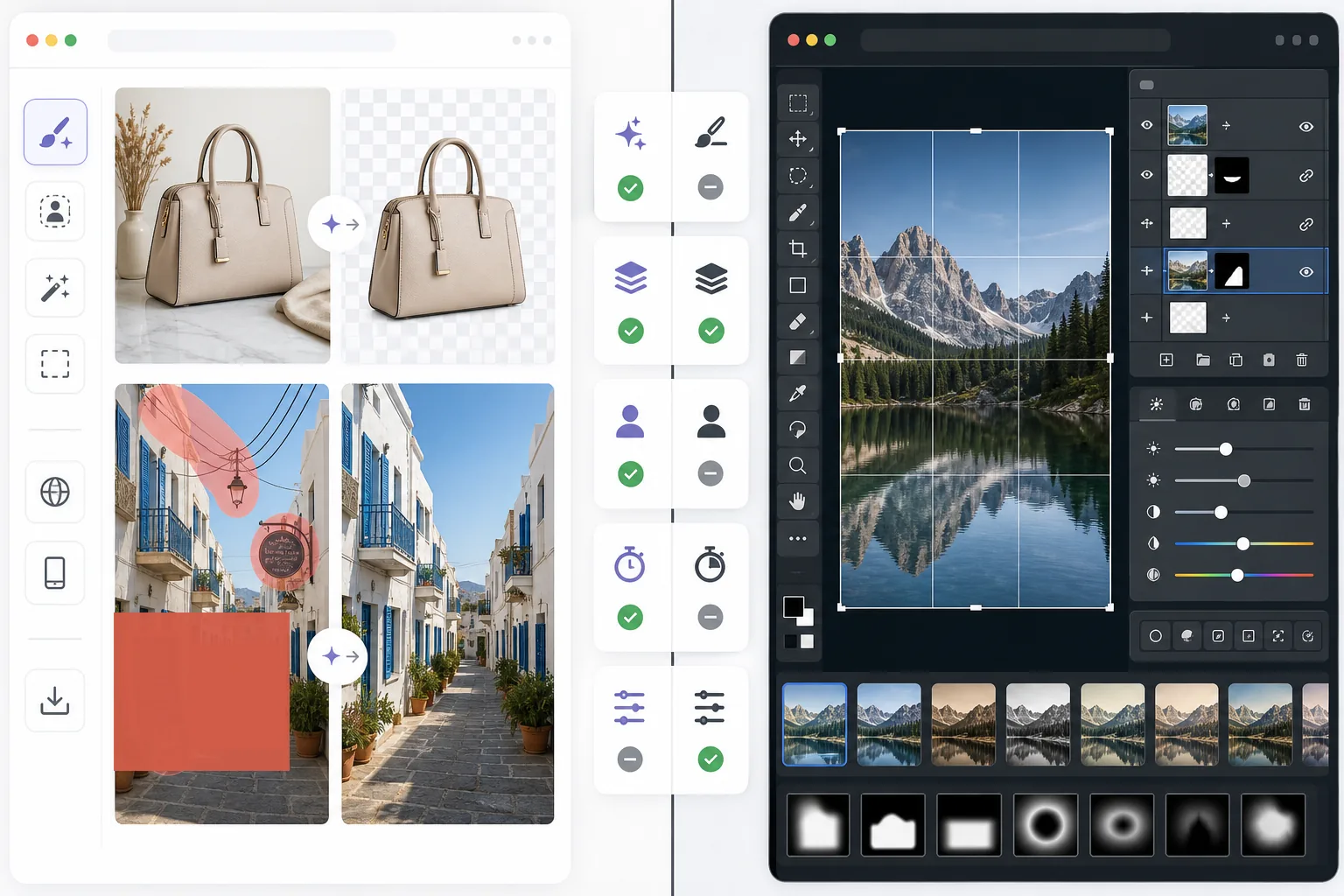
Magic Eraser ช่วยให้ผู้ใช้แก้ไขปัญหาภาพในทางปฏิบัติได้อย่างรวดเร็วด้วย AI: ลบวัตถุที่ไม่ต้องการ ลบข้อความ ทำความสะอาดพื้นหลัง เพิ่มความคมชัดของรายละเอียด และเติมส่วนที่ขาดหายไป
Pixlr มอบประสบการณ์การแก้ไขบนเบราว์เซอร์แบบดั้งเดิมมากกว่า พร้อมเลเยอร์ ฟิลเตอร์ และเครื่องมือแบบแมนนวล มีความยืดหยุ่น แต่มักช้ากว่าสำหรับงานทำความสะอาดที่ทำซ้ำๆ
การเปรียบเทียบคุณสมบัติ
Magic Eraser ช่วยให้ผู้ใช้แก้ไขปัญหาภาพในทางปฏิบัติได้อย่างรวดเร็วด้วย AI: ลบวัตถุที่ไม่ต้องการ ลบข้อความ ทำความสะอาดพื้นหลัง เพิ่มความคมชัดของรายละเอียด และเติมส่วนที่ขาดหายไป
Pixlr มอบประสบการณ์การแก้ไขบนเบราว์เซอร์แบบดั้งเดิมมากกว่า พร้อมเลเยอร์ ฟิลเตอร์ และเครื่องมือแบบแมนนวล มีความยืดหยุ่น แต่มักช้ากว่าสำหรับงานทำความสะอาดที่ทำซ้ำๆ
| Feature | Magic Eraser | Pixlr |
|---|---|---|
| การลบวัตถุ | ได้ — แปรง AI | จำกัด |
| การลบพื้นหลัง | ได้ | ได้ |
| การปรับปรุงภาพ | ได้ | พื้นฐาน |
| การแก้ไขแบบใช้เลเยอร์ | ไม่ได้ | ได้ |
| การเติมภาพแบบ Generative | ได้ | จำกัด |
| เป็นมิตรกับผู้เริ่มต้น | ได้ | ปานกลาง |
| เหมาะที่สุดสำหรับ | การทำความสะอาดอย่างรวดเร็วและการแก้ไขด้วย AI | การแก้ไขทั่วไปบนเบราว์เซอร์ |
| แพลตฟอร์ม | เว็บ + มือถือ | เว็บ + มือถือ |
Feature rows summarize visible product positioning and should be rechecked against official product pages before purchase, migration, or compliance decisions.
- Last content review June 21, 2026
- Pixlr source: official product site (https://pixlr.com/)
- Magic Eraser source: https://magiceraser.live/th/product/magic-eraser
- Pricing, feature availability, platform support, and limits can change; recheck official sources before relying on a buying decision.
การเปรียบเทียบราคา
| Plan | Magic Eraser | Pixlr |
|---|---|---|
| ระดับฟรี | ฟรี — แก้ไขได้จำกัด | ฟรี — พื้นฐาน + มีโฆษณา |
| รายเดือน | $9.99/mo | $7.99/mo (Plus) |
| รายปี | $4.99/mo (เรียกเก็บรายปี) | $4.90/mo (Plus, เรียกเก็บรายปี) |
ราคา ณ เดือน May 2026 โปรดตรวจสอบอัตราปัจจุบันกับผู้ให้บริการแต่ละราย
Pricing rows are snapshots from review time. Free tiers, subscriptions, trials, export limits, and regional availability can change without notice.
- Last content review June 21, 2026
- Pixlr source: official product site (https://pixlr.com/)
- Magic Eraser source: https://magiceraser.live/th/product/magic-eraser
- Pricing, feature availability, platform support, and limits can change; recheck official sources before relying on a buying decision.
ทำไมต้องเลือก Magic Eraser
ใช้เวลาน้อยลงกับการควบคุมการแก้ไข
Magic Eraser ลดความจำเป็นในการจัดการแถบเครื่องมือ เลเยอร์ และเอฟเฟกต์แบบแมนนวล เมื่อเป้าหมายหลักเป็นเพียงการทำความสะอาดและปรับปรุงภาพอย่างรวดเร็ว
มีประโยชน์มากกว่าสำหรับงานที่ทำซ้ำได้
เมื่อคุณแก้ไขภาพสินค้า ภาพโซเชียล รายการสินค้า หรือสื่อสำหรับครีเอเตอร์ทุกวัน เวิร์กโฟลว์ AI ของ Magic Eraser ที่แคบกว่าแต่ทรงพลังกว่ามักช่วยประหยัดเวลาได้มากกว่าโปรแกรมแก้ไขอเนกประสงค์
ดีกว่าสำหรับการทำความสะอาดพื้นหลังและสิ่งรบกวน
Magic Eraser แข็งแกร่งเป็นพิเศษเมื่อปัญหาคือความรกรุงรัง ข้อความ สายไฟ หรือสภาพแวดล้อมที่รบกวนซึ่งต้องหายไปอย่างเป็นธรรมชาติ
ภาระการฝึกอบรมน้อยลง
ทีมงานสามารถเริ่มต้นใช้งานได้เร็วขึ้นด้วย Magic Eraser เพราะต้องการความรู้ด้านการแก้ไขน้อยกว่าโปรแกรมแก้ไขบนเบราว์เซอร์แบบคลาสสิกที่มีชุดเครื่องมือแบบแมนนวลที่หลากหลายกว่า
เครื่องมือ
คำถามที่พบบ่อย
Magic Eraser ใช้งานง่ายกว่า Pixlr หรือไม่?
+
ใช่ สำหรับงานที่เน้นการทำความสะอาด Pixlr มอบความยืดหยุ่นในการแก้ไขแบบดั้งเดิมมากกว่า แต่ Magic Eraser ใช้งานง่ายกว่าสำหรับผู้ใช้ที่ต้องการการลบวัตถุด้วย AI และการแก้ไขพื้นหลังเป็นหลัก
Pixlr มีเลเยอร์หรือไม่?
+
มี Pixlr มีสภาพแวดล้อมการแก้ไขแบบใช้เลเยอร์ที่คลาสสิกกว่า ส่วน Magic Eraser มุ่งเน้นผลลัพธ์ที่รวดเร็วโดยมี AI ช่วยมากกว่าการแก้ไขเลเยอร์แบบแมนนวล
เครื่องมือไหนดีกว่าสำหรับนักการตลาดและผู้ขาย?
+
Magic Eraser มักเหมาะกว่าเพราะจัดการการทำความสะอาด การปรับปรุง และการเตรียมภาพให้พร้อมนำเสนอได้รวดเร็วกว่า
ฉันสามารถลบข้อความออกจากภาพด้วย Magic Eraser ได้หรือไม่?
+
ได้ Magic Eraser สามารถลบข้อความ ป้ายกำกับ ป้าย และสิ่งรบกวนอื่นๆ ได้ พร้อมสร้างพื้นหลังขึ้นใหม่อย่างเป็นธรรมชาติ
โปรแกรมแก้ไขตัวไหนทำงานบนมือถือและเดสก์ท็อปร่วมกันได้ดีกว่า?
+
Magic Eraser มอบเวิร์กโฟลว์ AI ที่สอดคล้องกันมากกว่าทั้งบนเว็บและมือถือ ซึ่งทำให้การสลับอุปกรณ์ง่ายขึ้นสำหรับงานแก้ไขในทางปฏิบัติ
ต้องการโปรแกรมแก้ไขบนเว็บที่เร็วกว่าสำหรับการทำความสะอาดภาพในโลกจริงหรือไม่?
ลองใช้ Magic Eraser ฟรี และใช้ AI เพื่อลบสิ่งรบกวน เพิ่มความชัดเจน และทำการแก้ไขให้ดูดีเสร็จสมบูรณ์ด้วยขั้นตอนที่น้อยลง
ลองใช้ Magic Eraser ฟรีกรณีการใช้งานที่เกี่ยวข้อง
ดูว่ามืออาชีพใช้เครื่องมือเหล่านี้ในเวิร์กโฟลว์จริงอย่างไร
ภาพประกาศที่เต็มไปด้วยของส่วนตัว รถจอด หรืออุปกรณ์ก่อสร้าง ทำให้ผู้ซื้อไม่สนใจ Magic Eraser ใช้ AI ทำความสะอาดภาพอสังหาริมทรัพย์ของคุณทันที — ไม่ต้องมีทักษะ Photoshop
รูปสินค้าที่พื้นหลังรกรุงรังทำให้ลูกค้าเลื่อนผ่านร้านคุณทุกวัน Magic Eraser ช่วยสร้างรูปสินค้ามืออาชีพได้ในไม่กี่วินาที ไม่ต้องเก่ง Photoshop อัปโหลด ลบสิ่งรบกวน แล้วลงขายได้เลย
คนแปลกหน้าทำลายรูปท่องเที่ยวของคุณ? พื้นหลังรกๆ ทำให้เซลฟี่ดูไม่ดี? เลิกเสียเวลาหลายชั่วโมงกับ Photoshop ได้แล้ว Magic Eraser ลบสิ่งรบกวน ทำความสะอาดฉากหลัง และขยายรูปให้พอดีทุกแพลตฟอร์ม — แค่แตะครั้งเดียว
คู่มือที่เกี่ยวข้อง
ดูคู่มือและเนื้อหาเชิงบรรณาธิการเพิ่มเติมที่เกี่ยวข้องกับเวิร์กโฟลว์นี้
เรียนรู้วิธีใช้ Magic Eraser เพื่อลบวัตถุ คน ข้อความ และสิ่งรบกวนออกจากรูปภาพ พร้อมผลลัพธ์ AI ที่สะอาดขึ้น
เรียนรู้วิธีลบคนออกจากรูปภาพด้วย AI ภายในไม่กี่วินาที สำหรับรูปท่องเที่ยว อสังหาริมทรัพย์ และรูปสินค้า
คำแนะนำทีละขั้นตอนในการลบลายน้ำจากรูปภาพของคุณด้วย AI เมื่อไหร่ที่เหมาะสม เทคนิค และวิธีใช้ Magic Eraser
การเปรียบเทียบอื่นๆ
ดูว่า Magic Eraser เปรียบเทียบกับเครื่องมือแก้ไขรูปภาพอื่นอย่างไร
โปรแกรมแต่งรูป AI ที่ทรงพลังสองตัวที่มีจุดแข็งต่างกัน Magic Eraser มีเครื่องมือ AI สร้างสรรค์ที่หลากหลายกว่า ขณะที่ Photoroom เชี่ยวชาญด้านภาพถ่ายสินค้าอีคอมเมิร์ซและการประมวลผลแบบกลุ่ม ดูว่าตัวไหนเหมาะกับคุณ
เราทดสอบและเปรียบเทียบเครื่องมือแต่งรูป AI ชั้นนำเพื่อคุณ จากการลบวัตถุไปจนถึงการเปลี่ยนพื้นหลัง ดูว่าโปรแกรมไหนให้ผลลัพธ์ที่ดีที่สุด
Adobe Photoshop นั้นทรงพลัง แต่คนส่วนใหญ่ใช้เพียงเศษเสี้ยวของฟีเจอร์ทั้งหมด Magic Eraser มอบเครื่องมือลบสิ่งรบกวนในภาพที่คุณต้องการจริง ๆ — การลบวัตถุ การลบพื้นหลัง การปรับปรุงด้วย AI และ generative fill — ในอินเทอร์เฟซที่เรียบง่ายกว่า ใช้งานได้ทั้งบนเว็บและมือถือ ในอินเทอร์เฟซที่เริ่มต้นได้ง่าย
remove.bg เชี่ยวชาญเรื่องเดียวคือการลบพื้นหลัง Magic Eraser ทำได้ดีเช่นกัน พร้อมทั้งลบวัตถุที่ไม่ต้องการ ปรับปรุงคุณภาพภาพ เติมเต็มพื้นที่ที่ขาดหายด้วย AI และจัดการขั้นตอนการทำงานตัดต่อภาพทั้งหมดของคุณ — ในที่เดียว
Tried to remove an object or background and hit a Pro paywall in Canva, Adobe Express/Photoshop, or Fotor? Magic Eraser does the same job — object removal, background removal, watermark cleanup, and enhancement — for free. No subscription, and no watermark stamped on your download.
เปรียบเทียบ Magic Eraser กับ magic-eraser.io ดูฟีเจอร์ ราคา และความง่ายในการใช้งานแบบเทียบกัน ค้นพบว่าทำไม Magic Eraser ถึงเป็นตัวเลือกที่ดีกว่าสำหรับการแต่งรูปด้วย AI