
Magic Eraser vs Photoshop: โปรแกรมไหนเหมาะกับเวิร์กโฟลว์ที่รวดเร็วกว่า?
Photoshop เป็นมาตรฐานอุตสาหกรรมสำหรับการแก้ไขภาพเชิงลึก แต่หลายคนต้องการแค่การลบวัตถุอย่างรวดเร็ว พื้นหลังที่สะอาด และการแก้ไขด้วย AI Magic Eraser มุ่งเน้นงานเหล่านั้นด้วยเวิร์กโฟลว์ที่เบากว่า ทำงานได้ในไม่กี่วินาทีบนเว็บและมือถือ
Last updated
ลองใช้ Magic Eraser ฟรีComparison rows are editorial summaries from the latest page review, not a guarantee of current pricing, limits, watermark policy, batch support, speed, or platform availability.
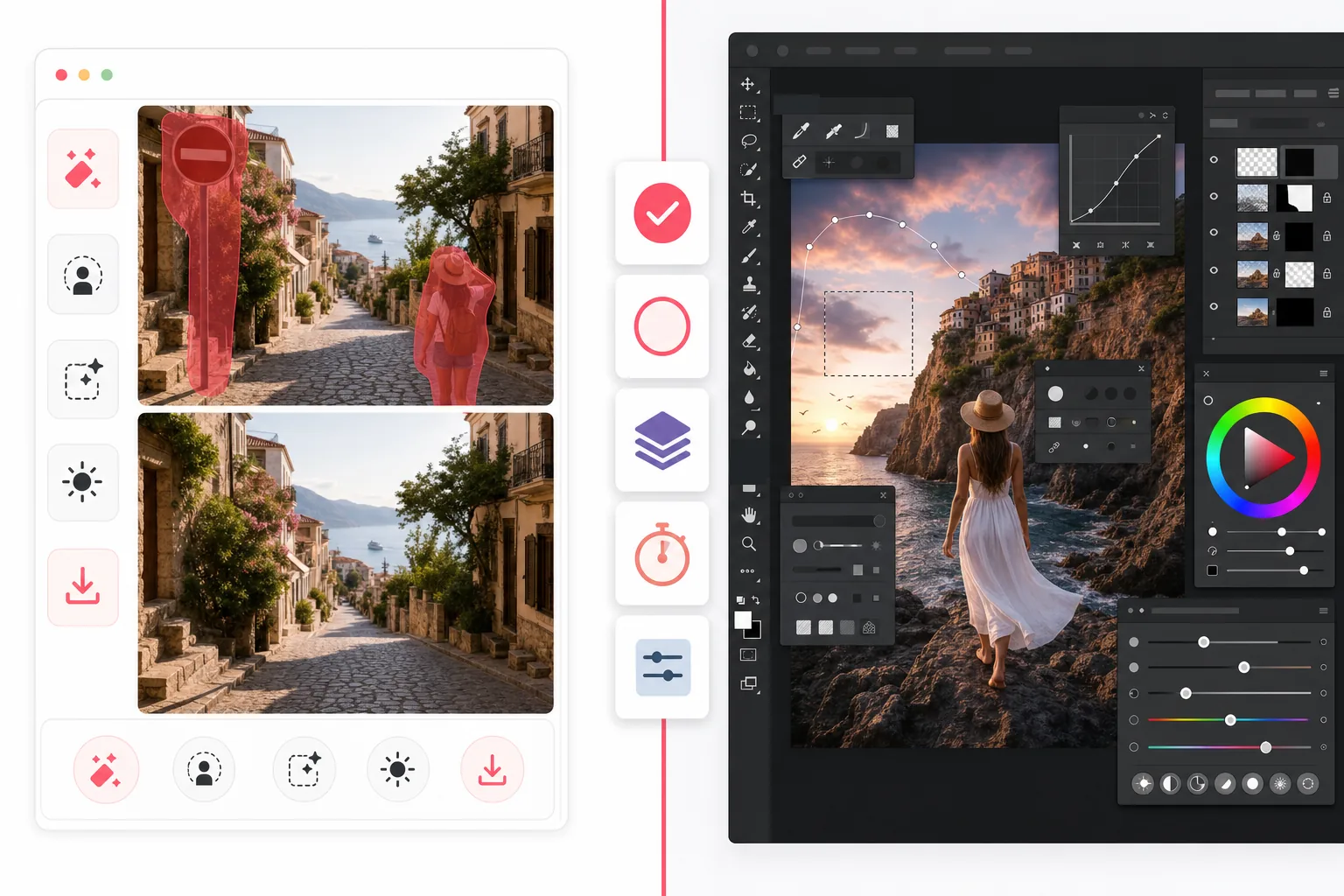
ภาพรวม
Magic Eraser เป็นโปรแกรมแก้ไขภาพด้วย AI ที่สร้างขึ้นสำหรับงานทำความสะอาดอย่างรวดเร็ว เช่น ลบคน ลบความรกรุงรัง เปลี่ยนพื้นหลัง เพิ่มคุณภาพภาพเบลอ และเติมพื้นที่ที่ขาดหาย โดยไม่ต้องเรียนรู้ที่ซับซ้อน
Adobe Photoshop เป็นชุดโปรแกรมแก้ไขภาพระดับมืออาชีพเต็มรูปแบบ พร้อมเลเยอร์ขั้นสูง การมาสก์ การรีทัช การเติมแบบเจเนอเรทีฟ และเครื่องมือคอมโพสิต ออกแบบมาเพื่อการควบคุมเชิงสร้างสรรค์อย่างละเอียดบนเดสก์ท็อปและ iPad
เปรียบเทียบฟีเจอร์
Magic Eraser เป็นโปรแกรมแก้ไขภาพด้วย AI ที่สร้างขึ้นสำหรับงานทำความสะอาดอย่างรวดเร็ว เช่น ลบคน ลบความรกรุงรัง เปลี่ยนพื้นหลัง เพิ่มคุณภาพภาพเบลอ และเติมพื้นที่ที่ขาดหาย โดยไม่ต้องเรียนรู้ที่ซับซ้อน
Adobe Photoshop เป็นชุดโปรแกรมแก้ไขภาพระดับมืออาชีพเต็มรูปแบบ พร้อมเลเยอร์ขั้นสูง การมาสก์ การรีทัช การเติมแบบเจเนอเรทีฟ และเครื่องมือคอมโพสิต ออกแบบมาเพื่อการควบคุมเชิงสร้างสรรค์อย่างละเอียดบนเดสก์ท็อปและ iPad
| Feature | Magic Eraser | Adobe Photoshop |
|---|---|---|
| ลบวัตถุ | มี — แปรง AI | มี — เครื่องมือรับรู้เนื้อหา |
| ลบพื้นหลัง | มี — คลิกเดียว | มี — ด้วยตนเอง + AI |
| การเติมแบบเจเนอเรทีฟ | มี — เวิร์กโฟลว์เรียบง่าย | มี — เครื่องมือพรอมป์ขั้นสูง |
| ความยากในการเรียนรู้ | เป็นมิตรกับมือใหม่ | สูง |
| แพลตฟอร์ม | เว็บ + iOS + Android | เดสก์ท็อป + iPad + เว็บเบต้า |
| แก้ไขเป็นชุด | มี | มี — ตั้งค่ามากกว่า |
| ต้องสมัครสมาชิก | ไม่ต้องเมื่อเริ่ม | ต้อง |
| เหมาะที่สุดสำหรับ | การแก้ไขรวดเร็วในชีวิตประจำวัน | งานผลิตระดับมืออาชีพ |
Feature rows summarize visible product positioning and should be rechecked against official product pages before purchase, migration, or compliance decisions.
- Last content review May 1, 2026
- Adobe Photoshop source: official product site (https://www.adobe.com/products/photoshop.html)
- Magic Eraser source: https://magiceraser.live/th/product/magic-eraser
- Pricing, feature availability, platform support, and limits can change; recheck official sources before relying on a buying decision.
เปรียบเทียบราคา
| Plan | Magic Eraser | Adobe Photoshop |
|---|---|---|
| แพ็กเกจฟรี | ฟรี — แก้ไขได้จำกัด | ทดลองใช้ 7 วัน |
| รายเดือน | $9.99/เดือน | $22.99/เดือน |
| รายปี | $4.99/เดือน (เรียกเก็บรายปี) | $20.99/เดือน (เรียกเก็บรายปี) |
ราคา ณ เดือนพฤษภาคม 2026 โปรดตรวจสอบอัตราปัจจุบันกับผู้ให้บริการแต่ละราย
Pricing rows are snapshots from review time. Free tiers, subscriptions, trials, export limits, and regional availability can change without notice.
- Last content review May 1, 2026
- Adobe Photoshop source: official product site (https://www.adobe.com/products/photoshop.html)
- Magic Eraser source: https://magiceraser.live/th/product/magic-eraser
- Pricing, feature availability, platform support, and limits can change; recheck official sources before relying on a buying decision.
ทำไมจึงเลือก Magic Eraser
เร็วกว่าตั้งแต่คลิกแรกจนถึงการส่งออก
Magic Eraser ตัดภาระการตั้งค่าออก เปิดโปรแกรม ไฮไลต์สิ่งที่รบกวน แล้วปล่อยให้ AI สร้างพื้นที่ขึ้นใหม่โดยไม่ต้องจัดการเลเยอร์ มาสก์ หรือเมนูที่ซับซ้อน
สร้างมาเพื่อการทำความสะอาดภาพเชิงปฏิบัติ
หากเป้าหมายของคุณคือลบนักท่องเที่ยว ป้าย ตำหนิ สายไฟ ข้อความ หรือพื้นหลังรกรุงรัง Magic Eraser ไปถึงผลลัพธ์นั้นได้โดยตรง แทนที่จะให้คุณเรียนรู้ชุดโปรแกรมสร้างสรรค์ทั้งชุด
ใช้งานได้ทุกที่
Photoshop ยังคงโดดเด่นในเวิร์กโฟลว์เชิงลึกบนเดสก์ท็อป แต่ Magic Eraser ทำงานบนเบราว์เซอร์และอุปกรณ์มือถือ ทำให้นักการตลาด ผู้ขาย ครีเอเตอร์ และทีมแก้ไขจากที่ใดก็ได้ง่ายขึ้น
อุปสรรคน้อยลงสำหรับทีม
Magic Eraser กำหนดมาตรฐานได้ง่ายกว่าในทีมที่ต้องการการแก้ไขที่สม่ำเสมอและรวดเร็วสำหรับภาพสินค้า สื่อโซเชียล รายการสินค้า และโฆษณา โดยไม่ต้องซื้อซอฟต์แวร์สร้างสรรค์เต็มรูปแบบให้ทุกคน
เครื่องมือ
คำถามที่พบบ่อย
Magic Eraser ใช้แทน Photoshop ได้ไหม?
+
สำหรับการทำความสะอาดอย่างรวดเร็ว การลบพื้นหลัง และการแก้ไขภาพด้วย AI ได้ สำหรับการคอมโพสิตขั้นสูง งานออกแบบที่มีหลายเลเยอร์ และการรีทัชระดับมืออาชีพอย่างละเอียด Photoshop ยังให้ความลึกมากกว่า
เครื่องมือไหนง่ายกว่าสำหรับมือใหม่?
+
Magic Eraser ง่ายกว่ามากสำหรับมือใหม่ เพราะออกแบบรอบงานแก้ไขด้วย AI แบบมีคำแนะนำ แทนที่จะเป็นพื้นที่ทำงานระดับมืออาชีพเต็มรูปแบบ
Photoshop ควบคุมได้ดีกว่าไหม?
+
ใช่ Photoshop ให้การควบคุมด้วยตนเองมากกว่า โดยเฉพาะการรีทัชและการคอมโพสิตระดับมืออาชีพ Magic Eraser แลกความลึกบางส่วนนั้นเพื่อการแก้ไขในชีวิตประจำวันที่เร็วกว่ามาก
ฉันใช้ Magic Eraser บนมือถือได้ไหม?
+
ได้ Magic Eraser มีให้ใช้บน iOS และ Android และยังทำงานบนเว็บ จึงสลับระหว่างอุปกรณ์ได้โดยไม่ต้องเปลี่ยนเครื่องมือ
อันไหนดีกว่าสำหรับภาพสินค้าอีคอมเมิร์ซ?
+
Magic Eraser มักเป็นตัวเลือกที่เร็วกว่าสำหรับการลบพื้นหลัง จัดการสิ่งรบกวน และเตรียมชุดภาพสินค้าจำนวนมาก Photoshop ดีกว่าเมื่อแต่ละภาพต้องการการรีทัชเฉพาะระดับการออกแบบ
ต้องการการแก้ไขที่รวดเร็วโดยไม่มีความซับซ้อนแบบ Photoshop?
ลองใช้ Magic Eraser ฟรี และทำความสะอาดภาพในไม่กี่วินาทีด้วยการลบวัตถุ การทำความสะอาดพื้นหลัง และการเติมแบบเจเนอเรทีฟที่ขับเคลื่อนด้วย AI
ลองใช้ Magic Eraser ฟรีกรณีการใช้งานที่เกี่ยวข้อง
ดูว่ามืออาชีพใช้เครื่องมือเหล่านี้ในเวิร์กโฟลว์จริงอย่างไร
ภาพประกาศที่เต็มไปด้วยของส่วนตัว รถจอด หรืออุปกรณ์ก่อสร้าง ทำให้ผู้ซื้อไม่สนใจ Magic Eraser ใช้ AI ทำความสะอาดภาพอสังหาริมทรัพย์ของคุณทันที — ไม่ต้องมีทักษะ Photoshop
รูปสินค้าที่พื้นหลังรกรุงรังทำให้ลูกค้าเลื่อนผ่านร้านคุณทุกวัน Magic Eraser ช่วยสร้างรูปสินค้ามืออาชีพได้ในไม่กี่วินาที ไม่ต้องเก่ง Photoshop อัปโหลด ลบสิ่งรบกวน แล้วลงขายได้เลย
คนแปลกหน้าทำลายรูปท่องเที่ยวของคุณ? พื้นหลังรกๆ ทำให้เซลฟี่ดูไม่ดี? เลิกเสียเวลาหลายชั่วโมงกับ Photoshop ได้แล้ว Magic Eraser ลบสิ่งรบกวน ทำความสะอาดฉากหลัง และขยายรูปให้พอดีทุกแพลตฟอร์ม — แค่แตะครั้งเดียว
คู่มือที่เกี่ยวข้อง
ดูคู่มือและเนื้อหาเชิงบรรณาธิการเพิ่มเติมที่เกี่ยวข้องกับเวิร์กโฟลว์นี้
เรียนรู้วิธีใช้ Magic Eraser เพื่อลบวัตถุ คน ข้อความ และสิ่งรบกวนออกจากรูปภาพ พร้อมผลลัพธ์ AI ที่สะอาดขึ้น
เรียนรู้วิธีลบคนออกจากรูปภาพด้วย AI ภายในไม่กี่วินาที สำหรับรูปท่องเที่ยว อสังหาริมทรัพย์ และรูปสินค้า
คำแนะนำทีละขั้นตอนในการลบลายน้ำจากรูปภาพของคุณด้วย AI เมื่อไหร่ที่เหมาะสม เทคนิค และวิธีใช้ Magic Eraser
การเปรียบเทียบอื่นๆ
ดูว่า Magic Eraser เปรียบเทียบกับเครื่องมือแก้ไขรูปภาพอื่นอย่างไร
เราทดสอบและเปรียบเทียบเครื่องมือแต่งรูป AI ชั้นนำเพื่อคุณ จากการลบวัตถุไปจนถึงการเปลี่ยนพื้นหลัง ดูว่าโปรแกรมไหนให้ผลลัพธ์ที่ดีที่สุด
Adobe Photoshop นั้นทรงพลัง แต่คนส่วนใหญ่ใช้เพียงเศษเสี้ยวของฟีเจอร์ทั้งหมด Magic Eraser มอบเครื่องมือลบสิ่งรบกวนในภาพที่คุณต้องการจริง ๆ — การลบวัตถุ การลบพื้นหลัง การปรับปรุงด้วย AI และ generative fill — ในอินเทอร์เฟซที่เรียบง่ายกว่า ใช้งานได้ทั้งบนเว็บและมือถือ ในอินเทอร์เฟซที่เริ่มต้นได้ง่าย
Tried to remove an object or background and hit a Pro paywall in Canva, Adobe Express/Photoshop, or Fotor? Magic Eraser does the same job — object removal, background removal, watermark cleanup, and enhancement — for free. No subscription, and no watermark stamped on your download.
เปรียบเทียบ Magic Eraser กับ magic-eraser.io ดูฟีเจอร์ ราคา และความง่ายในการใช้งานแบบเทียบกัน ค้นพบว่าทำไม Magic Eraser ถึงเป็นตัวเลือกที่ดีกว่าสำหรับการแต่งรูปด้วย AI
เปรียบเทียบ Magic Eraser กับ Pixelcut ดูฟีเจอร์ ราคา และความง่ายในการใช้งานแบบเทียบกัน ค้นพบว่าทำไม Magic Eraser ถึงเป็นตัวเลือกที่ดีกว่าสำหรับการแต่งรูปด้วย AI
ค้นพบเครื่องมือลบอิโมจิที่ดีที่สุดสำหรับแต่งภาพ เราเปรียบเทียบฟีเจอร์ ราคา และความสามารถ AI เพื่อช่วยคุณเลือกเครื่องมือที่เหมาะสม