
Twitter/X 헤더 사진
모든 기기와 모든 모드에서 세련되게 보이는 헤더 이미지를 디자인하세요. 이 템플릿은 Twitter가 요구하는 정확한 1500×500px 크기를 처리하고, 핵심 콘텐츠가 가려지지 않도록 프로필 사진 겹침 영역을 고려하며, 어두운 모드와 밝은 모드 모두에서 배너가 멋지게 보이도록 보장합니다.
이 템플릿 무료로 사용해 보기Social Media template preview
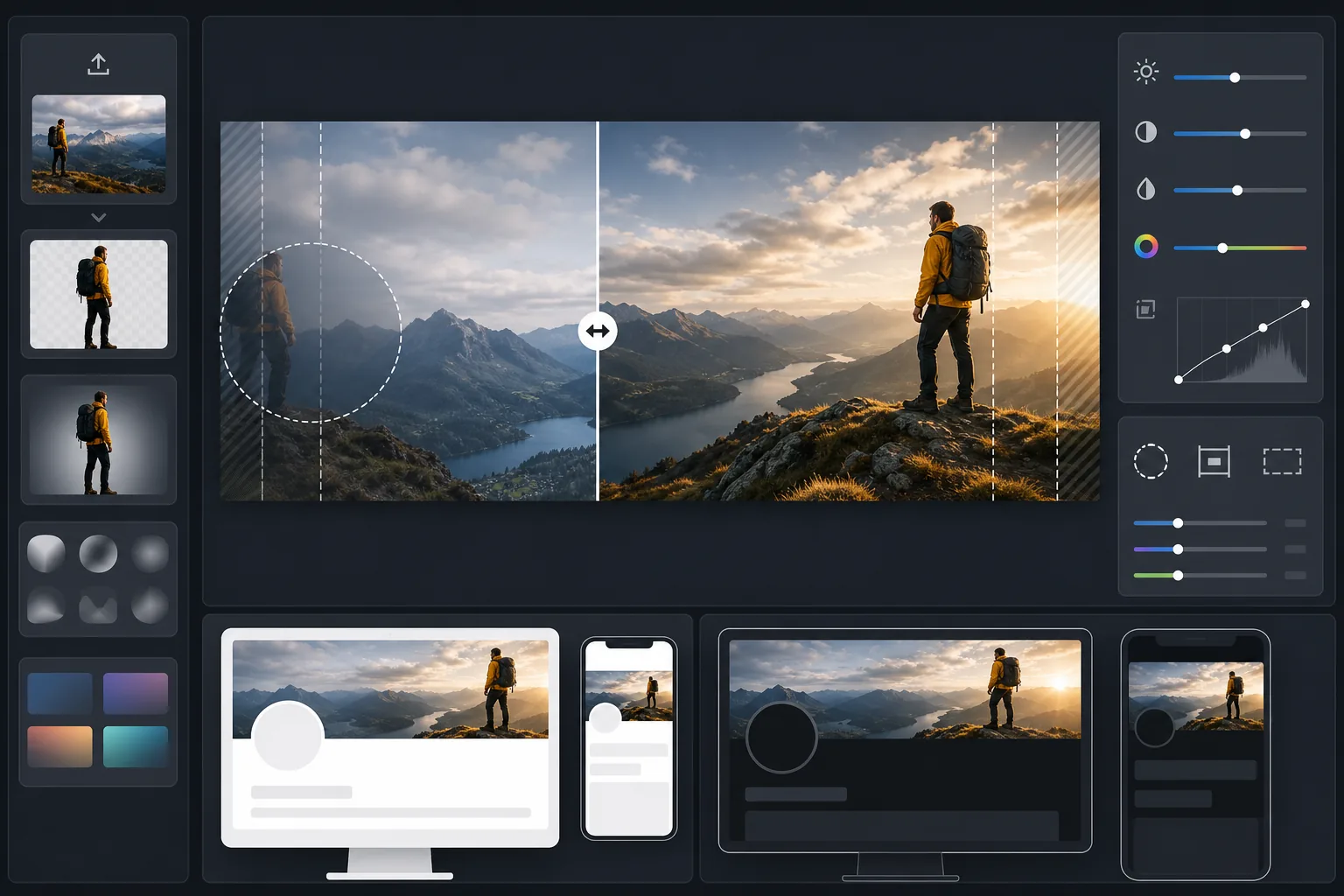
이 템플릿의 기능
Twitter/X가 요구하는 정확한 1500×500px 배너 크기로 사진을 처리하며, 얼굴과 핵심 콘텐츠를 보이는 안전 영역 안에 유지하는 지능형 자르기를 제공합니다. Background Eraser로 피사체를 분리해 깔끔한 구성을 만들 수 있고, AI Enhance는 팔로워가 보게 될 어두운 모드와 밝은 모드 배경 모두에 맞춰 대비와 색상을 최적화합니다.
템플릿 설정
| 출력 크기 | 1500×500px (3:1 Twitter/X 헤더 비율) |
| 안전 영역 | 왼쪽 25% 예약 — 데스크톱과 모바일에서 프로필 사진 겹침 방지 |
| 가장자리 블렌딩 | 어두운 색 또는 밝은 색으로 부드럽게 페이드 (모드에 맞춰 조정) |
| 색상 최적화 | 어두운 모드(#15202B)와 밝은 모드(#FFFFFF) 대비를 이중 테스트 |
| 파일 형식 | 92% 품질 JPEG (Twitter의 5MB 업로드 제한 이하) |
| 텍스트 안전 영역 | 중앙 50% 가로 띠 — 모바일에서 상하 잘림 방지 |
이 템플릿 사용 방법
원본 이미지 업로드
가로 방향의 사진이나 그래픽을 사용하세요. 넓은 파노라마 사진, 도시 풍경, 수평 구도가 가장 효과적입니다. 템플릿은 극단적인 3:1 종횡비로 잘리므로 세로로 긴 피사체나 수직으로 중앙에 배치된 콘텐츠는 피하세요.
핵심 콘텐츠를 안전 영역에 배치
템플릿은 왼쪽 25%를 프로필 사진 겹침 영역으로, 바깥쪽 가장자리를 모바일 잘림 영역으로 표시합니다. 가장 중요한 시각적 콘텐츠는 배너의 오른쪽 중앙 영역에 두어야 합니다.
어두운 모드와 밝은 모드에 최적화
AI Enhance는 대비를 조정하여 배너가 어두운 모드의 거의 검은 배경과 밝은 모드의 흰 배경 모두에서 거친 가장자리를 피하도록 합니다. 가장자리 블렌딩은 딱딱한 잘림 대신 부드러운 전환을 만듭니다.
내보내기 및 업로드
최적화된 1500×500px JPEG를 다운로드하여 Twitter/X에 직접 업로드하세요. 파일은 레티나 디스플레이에서 선명한 디테일을 유지하면서도 5MB 제한을 충분히 밑도는 크기로 조정됩니다.
최상의 결과를 위한 전문가 팁
- ✓최종 확정 전에 헤더를 휴대폰과 데스크톱 모두에서 미리 보세요 — Twitter는 모바일에서 상하 가장자리를 더 강하게 잘라 각 가장자리에서 약 10%를 제거합니다.
- ✓데스크톱에서 프로필 사진, 이름, 소개가 겹치는 왼쪽 하단 사분면에는 텍스트나 얼굴을 배치하지 마세요.
- ✓배너 가장자리에는 #15202B(어두운 모드)와 #FFFFFF(밝은 모드) 모두와 대비되는 색을 사용하세요 — 중간 톤의 파란색, 초록색, 따뜻한 회색이 두 환경 모두에서 잘 어울립니다.
- ✓인물이 있는 사진을 사용하는 경우, 왼쪽의 프로필 사진 옆에서도 보이도록 프레임의 오른쪽 1/3에 배치하세요.
자주 묻는 질문
프로필 사진은 정확히 어디서 겹치나요?
+
데스크톱에서는 원형 프로필 사진이 헤더의 왼쪽 하단 모서리에 겹쳐 배너의 가장 왼쪽 20% 중 아래쪽 약 60%를 덮습니다. 모바일에서는 겹침이 비슷하지만 약간 이동됩니다. 템플릿의 안전 영역은 두 레이아웃을 모두 고려합니다.
제 헤더가 어두운 모드에서도 잘 보일까요?
+
네. 템플릿은 어두운 모드 배경(#15202B)과 밝은 모드 배경(#FFFFFF) 모두에 대해 배너를 테스트합니다. 가장자리 블렌딩이 두 모드 모두에서 부드러운 전환을 보장하므로, 최적화되지 않은 헤더에서 나타나는 거슬리는 딱딱한 가장자리 효과를 피할 수 있습니다.
Twitter가 헤더 크기를 변경하면 어떻게 되나요?
+
1500×500px 사양은 2017년 이후 X로의 브랜드 변경을 거치면서도 안정적으로 유지되어 왔습니다. 크기가 변경되면 템플릿을 업데이트하겠습니다. 현재 출력물은 더 작은 배너 크기로도 깔끔하게 축소됩니다.
Twitter 프로필을 방문할 때마다 돋보이세요
이미지를 업로드하면 완벽한 크기에 어두운 모드까지 대응하는 Twitter 헤더를 몇 초 만에 얻을 수 있습니다. Photoshop도, 크기 추측도 필요 없습니다.
무료로 사용해 보기Related templates
More social media templates for your workflow.
Instagram에 최적화된 정사각형 자르기 템플릿(1080×1080px). 깔끔한 배경, 생동감 넘치는 색상, 피드에서 눈에 띄는 선명한 디테일.
안전 지대 가이드가 포함된 2560×1440픽셀의 YouTube 배너 템플릿입니다. 크리에이터 사진, 기기 인식 레이아웃, 브랜드와 일관된 채널 아트를 위한 깔끔한 배경 제거.
데스크톱의 경우 820×312px, 모바일의 경우 640×360px 크기의 Facebook 표지 사진 템플릿입니다. 프로필 사진 중복 및 CTA 버튼 배치를 위한 적절한 안전 영역을 사용하여 브랜드 이미지를 정리하세요.
자연스러운 피부 보정, 배경 정리, 조명 보정, 필터링되지 않은 실제처럼 보이는 미묘한 색상 그레이딩을 통해 데이트 프로필 사진을 향상하세요.
깨끗한 배경, 최적의 2:3 세로 크기, 생생한 색상 향상, 핀 준비 구성을 갖춘 스크롤이 멈추는 Pinterest 핀 이미지를 만드세요.
깔끔한 배경, 대담한 주제 프레임, 프로필 그리드 일관성을 위해 최적화된 9:16 세로 크기로 눈길을 끄는 TikTok 비디오 커버 사진을 만드세요.