
Pinterest 핀 이미지
스크롤을 멈추고 저장을 유도하는 핀 이미지를 만드세요. 이 템플릿은 사진을 Pinterest 최적의 2:3 세로 비율로 맞추고, 복잡한 배경을 제거해 제품 중심의 깔끔한 구성을 만들며, Pinterest 피드를 위해 색상 선명도를 높이고, 모바일과 데스크톱 모두에서 선명하게 보이는 핀 준비 이미지를 출력합니다.
이 템플릿 무료로 사용해보기Social Media template preview
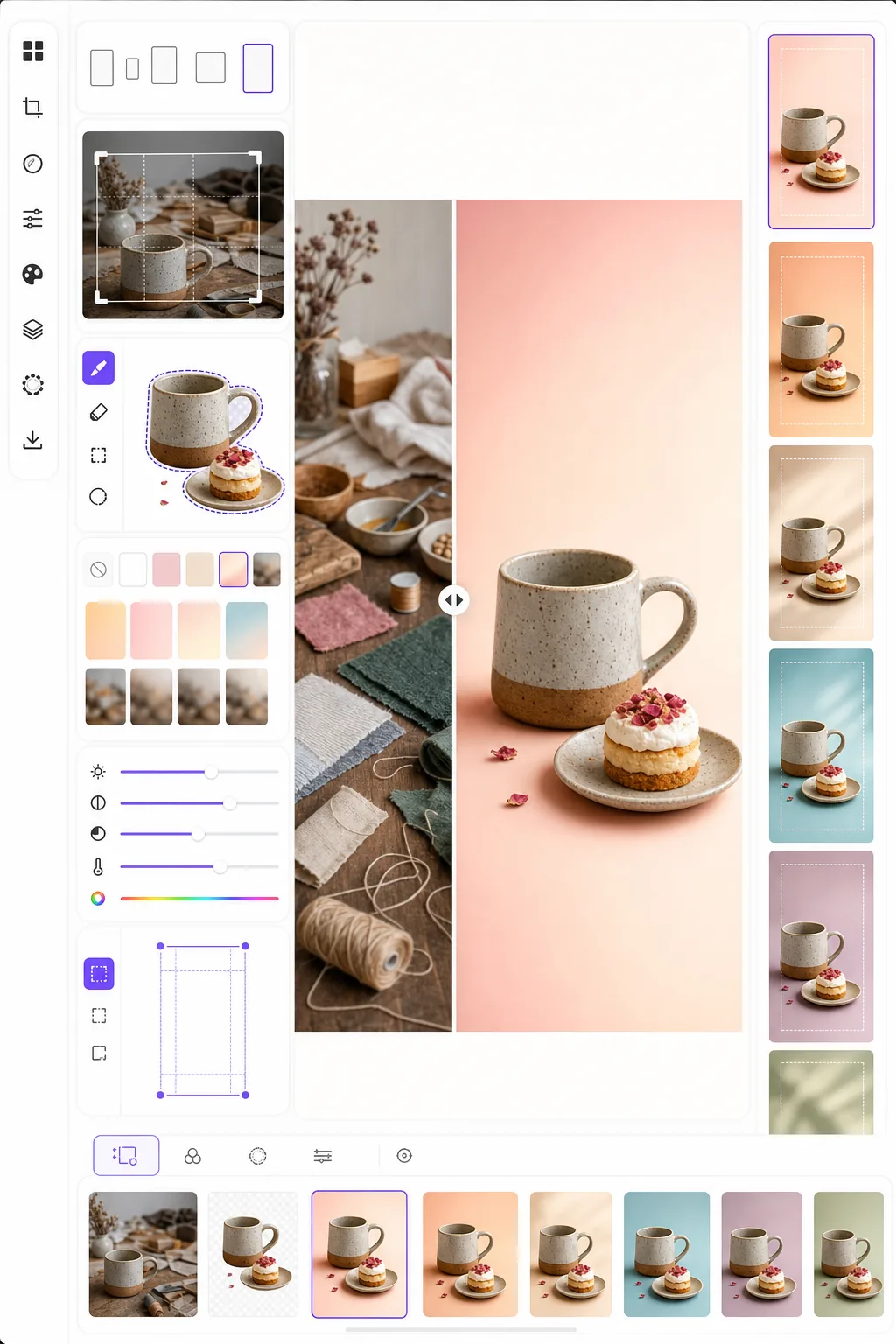
이 템플릿의 기능
세로로 길고 시각적으로 눈에 띄는 핀이 표준 가로 사진보다 저장률에서 3~5배 뛰어난 Pinterest에서 최대 참여를 얻도록 이미지를 최적화합니다. Background Eraser는 피사체 — 제품, 요리, 의상, 공예품 — 를 분리하여 복잡한 피드에서 피사체가 돋보이는 깔끔한 배경, 단색 배경 또는 그라데이션 배경에 배치합니다. 밝고 채도 높은 콘텐츠를 선호하는 Pinterest 알고리즘의 경향에 맞춰 색상 선명도가 강화됩니다. 템플릿은 Pinterest가 표준 핀에 권장하는 정확한 크기인 1000 × 1500 px로 출력합니다.
템플릿 설정
| 화면 비율 | 2:3 세로 (1000 × 1500 px — Pinterest 표준) |
| 배경 옵션 | 깨끗한 흰색, 단색, 부드러운 그라데이션 또는 흐림 처리된 원본 |
| 색상 부스트 | 피드 가시성을 위한 +20% 채도 (조정 가능) |
| 피사체 프레이밍 | 텍스트 오버레이 공간을 위한 10% 여백과 함께 자동 가운데 정렬 |
| 출력 형식 | PNG (텍스트 오버레이용) 또는 JPEG (직접 업로드용) |
이 템플릿 사용 방법
원본 이미지 업로드
제품 사진, 요리 사진, 의상 사진 또는 Pinterest 핀으로 만들고 싶은 모든 이미지를 업로드하세요. 템플릿은 가로, 정사각형 또는 세로 이미지를 허용하며 피사체를 가운데에 유지하는 스마트 자르기로 최적의 2:3 세로 비율로 다시 프레이밍합니다.
배경 및 구성
Background Eraser는 피사체를 분리하여 깔끔한 배경에 배치합니다. 순백색, 단색 브랜드 색상, 부드러운 그라데이션 또는 원본 배경의 흐림 처리 버전 중에서 선택하세요. 피사체는 텍스트 오버레이를 위해 상단과 하단에 공간을 남기도록 자동으로 배치됩니다.
색상 및 선명도 최적화
색상은 채도 20%만큼 강화되어 흐릿한 이미지가 그냥 스크롤되어 지나가는 Pinterest 피드에서 돋보입니다. 배경은 부드럽게 유지하면서 피사체의 선명도가 향상되어 주 피사체로 시선을 끄는 시각적 깊이를 만들어냅니다.
핀 내보내기
1000 × 1500 px로 PNG (Canva나 다른 편집기에서 텍스트 오버레이를 추가할 계획이라면) 또는 JPEG (Pinterest에 직접 업로드하려면)로 다운로드하세요. 모든 기기와 브라우저에서 정확하게 표시되도록 색상 프로필이 sRGB로 설정되어 있습니다.
최상의 결과를 위한 전문가 팁
- ✓텍스트 오버레이를 위해 핀의 상단 20%와 하단 15%를 비교적 깔끔하게 남겨두세요. 템플릿은 이 공간을 남기도록 피사체를 배치하지만, 이 영역에 단색 또는 그라데이션 배경을 선택하면 복잡한 사진 배경보다 텍스트가 더 잘 읽힙니다.
- ✓라이프스타일과 음식 핀에는 따뜻한 톤의 배경(블러시, 테라코타, 크림)을, 제품과 기술 핀에는 차가운 중립 색상(흰색, 밝은 회색, 옅은 파란색)을 사용하세요. Pinterest 참여 데이터는 의도적인 색상 팔레트를 가진 핀이 무작위 배경의 핀보다 일관되게 뛰어남을 보여줍니다.
- ✓같은 콘텐츠에 대해 여러 핀 버전을 만드세요 — 같은 피사체에 다른 배경색과 자르기를 적용합니다. Pinterest는 콘텐츠 다양성을 보상하며, 콘텐츠당 두세 가지 핀 디자인을 테스트하면 어떤 시각적 스타일이 청중에게 반향을 일으키는지 파악하는 데 도움이 됩니다.
자주 묻는 질문
핀에 텍스트를 추가할 수 있나요?
+
템플릿은 텍스트 오버레이에 최적화된 깔끔한 이미지를 출력하지만 텍스트를 직접 추가하지는 않습니다. PNG로 내보낸 후 Canva, Photoshop 또는 모든 디자인 도구에서 텍스트를 추가하세요. 피사체는 상단에 제목, 하단에 행동 유도 문구를 위한 공간을 남기도록 배치됩니다.
Idea Pins(동영상)는 어떤가요?
+
이 템플릿은 표준 정적 핀용입니다. Idea Pins(이전 Story Pins)는 다른 도구가 필요한 동영상 및 다중 페이지 형식을 사용합니다. 정적 썸네일이 필요한 경우 템플릿 출력은 Idea Pins의 표지 프레임으로 잘 작동합니다.
인포그래픽 스타일 핀에도 작동하나요?
+
인포그래픽 핀의 경우, 템플릿은 개별 이미지나 제품 사진을 준비한 다음 더 긴 인포그래픽 레이아웃(1000 × 2100 px 이상)으로 배치하는 데 가장 적합합니다. 각 요소는 별도로 처리한 후 디자인 도구에서 결합할 수 있습니다.
스크롤을 멈추게 하는 Pinterest 핀 만들기
아무 이미지나 업로드하고 깔끔한 배경과 최적화된 색상으로 최대한의 저장과 클릭을 위한 핀 준비 세로 구성을 받아보세요.
무료로 사용해보기Related templates
More social media templates for your workflow.
Instagram에 최적화된 정사각형 자르기 템플릿(1080×1080px). 깔끔한 배경, 생동감 넘치는 색상, 피드에서 눈에 띄는 선명한 디테일.
안전 지대 가이드가 포함된 2560×1440픽셀의 YouTube 배너 템플릿입니다. 크리에이터 사진, 기기 인식 레이아웃, 브랜드와 일관된 채널 아트를 위한 깔끔한 배경 제거.
데스크톱의 경우 820×312px, 모바일의 경우 640×360px 크기의 Facebook 표지 사진 템플릿입니다. 프로필 사진 중복 및 CTA 버튼 배치를 위한 적절한 안전 영역을 사용하여 브랜드 이미지를 정리하세요.
정확한 1500×500px 크기로 전문적인 Twitter/X 헤더 이미지를 만듭니다. 프로필 사진 중복을 고려하고 어두운 모드와 밝은 모드 모두에서 작동합니다.
자연스러운 피부 보정, 배경 정리, 조명 보정, 필터링되지 않은 실제처럼 보이는 미묘한 색상 그레이딩을 통해 데이트 프로필 사진을 향상하세요.
깔끔한 배경, 대담한 주제 프레임, 프로필 그리드 일관성을 위해 최적화된 9:16 세로 크기로 눈길을 끄는 TikTok 비디오 커버 사진을 만드세요.