
여권 사진 템플릿
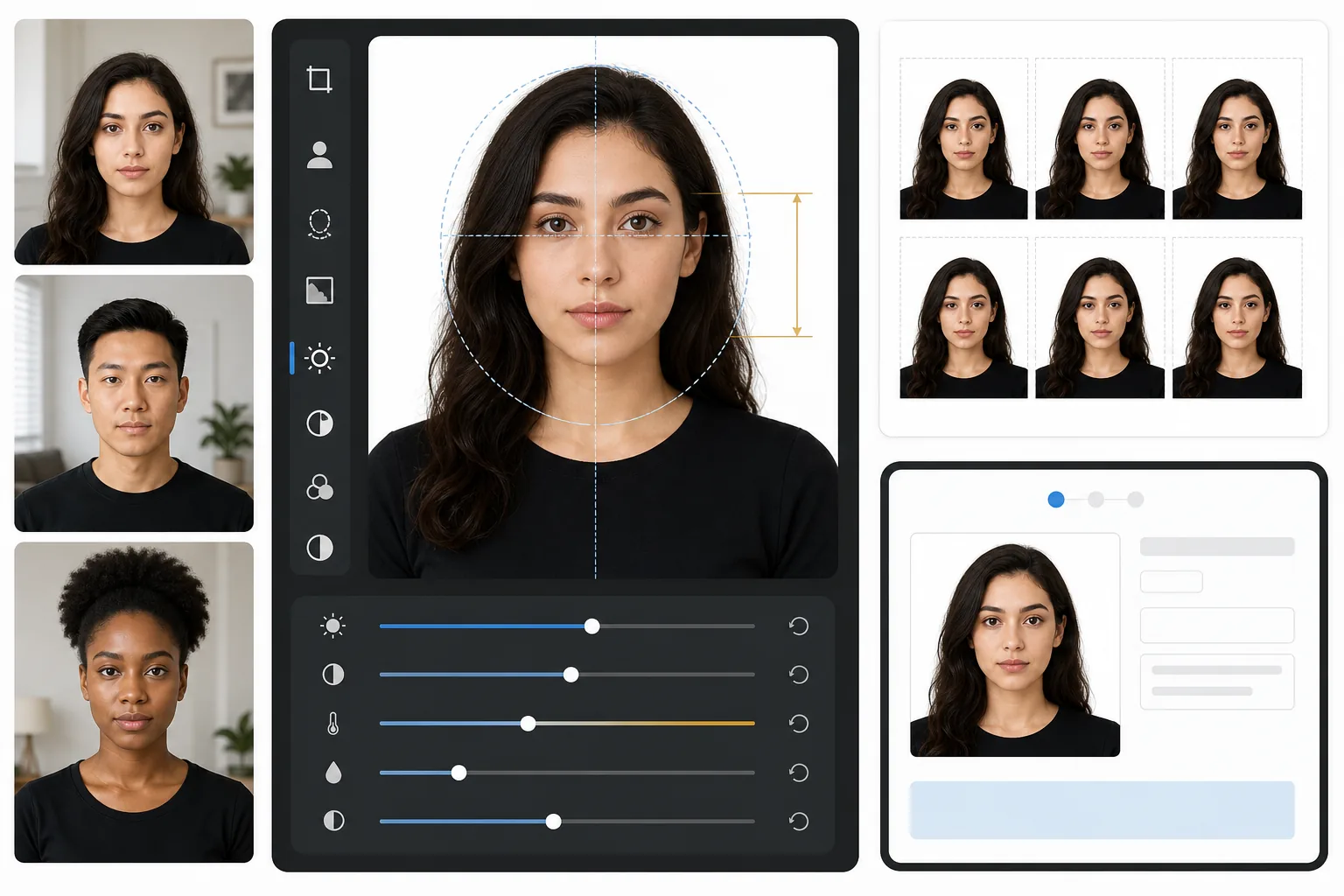
약국 사진 부스는 잊으세요. 이 템플릿은 조명이 좋은 셀카만 있으면 정부 규정을 준수하는 여권 사진을 만들어 줍니다 — 흰색 배경, 올바른 머리-프레임 비율(턱에서 정수리까지 1~1-3/8인치), 그리고 미국 국무부, 영국 HMPO, EU 및 솅겐 비자 요구 사항을 충족하는 600 DPI의 2×2인치 출력.
이 템플릿 무료로 사용해보기Professional template preview
이 템플릿의 기능
표준 인물 사진을 정부 규정을 준수하는 여권 또는 비자 사진으로 변환합니다. 이 템플릿은 모든 배경을 제거하고 단색 흰색으로 대체하며, 미국 국무부가 요구하는 정확한 2×2인치(51×51mm) 크기로 자르고, 머리를 필요한 크기 범위 내에 배치하며, 강한 그림자 없이 고른 조명을 보장합니다. 출력물은 600 DPI로 인쇄 준비가 완료되어 사진 용지 인쇄 또는 직접 디지털 제출에 사용할 수 있습니다.
템플릿 설정
| 출력 크기 | 2×2인치(51×51mm) 600 DPI(1200×1200px) |
| 배경 | 단색 흰색(#FFFFFF), 그라데이션이나 질감 없음 |
| 머리 크기 | 턱에서 정수리까지 1인치~1-3/8인치(25~35mm) |
| 눈 위치 | 아래에서 1-1/8~1-3/8인치 사이에 눈을 중앙 배치 |
| 색상 프로필 | sRGB(사진 현상소 호환) |
| 파일 형식 | JPEG 100% 품질 또는 PNG(디지털 제출 포털용) |
이 템플릿 사용 방법
정면 인물 사진 촬영
얼굴에 고른 조명이 비치는 단색 벽 앞에 서세요. 자연광을 사용하거나 양쪽에 같은 거리로 배치한 두 개의 램프를 사용하세요. 중립적인 표정으로 카메라를 똑바로 바라보고 양쪽 귀가 보이도록 하세요.
배경 제거 및 교체
Background Eraser는 벽지 무늬, 그림자, 가구 가장자리 등 모든 배경을 제거하고 필요한 단색 흰색으로 대체합니다. 이 도구는 후광 아티팩트를 만들지 않으면서 자연스러운 머리카락 가장자리와 안경테를 보존합니다.
규정에 맞게 자동 자르기
템플릿은 얼굴을 감지하여 정부가 지정한 머리 크기 범위 내에 배치합니다. 눈은 올바른 높이에 배치되고, 턱에서 정수리까지의 측정값은 1~1-3/8인치 요구 사항 내에 들어갑니다.
인쇄 또는 디지털 제출
4×6 광택 사진 용지에 인쇄하기 위해 600 DPI 파일을 다운로드하거나(한 장에 2×2 사진 네 장이 들어갑니다), 디지털 파일을 온라인 여권 갱신 및 비자 신청 포털에 직접 제출하세요.
최상의 결과를 위한 전문가 팁
- ✓창문에서 들어오는 정면 자연광을 사용하세요 — 여권 사무소가 선호하는 부드럽고 고른 조명을 만들어 주며 플래시 촬영의 강한 그림자를 없애줍니다.
- ✓가능하면 촬영 전에 안경을 벗으세요. 많은 국가에서 이제 안경을 쓰지 않은 사진을 요구하며, 허용되는 경우에도 반사와 안경테 그림자는 사진 거부의 가장 흔한 이유입니다.
- ✓흰색과 대비되는 단색 상의를 입으세요 — 짙은 파랑, 검정 또는 진한 녹색이 가장 좋습니다. 흰색 옷은 배경에 묻혀 거부를 초래할 수 있습니다.
- ✓셀카 대신 다른 사람에게 팔 길이 거리에서 사진을 찍어달라고 하세요. 전면 카메라 셀카는 약간의 광각 왜곡을 일으켜 얼굴 비율이 부자연스러워 보이게 하고 수동 검토를 유발할 수 있습니다.
자주 묻는 질문
이 사진이 미국 국무부에서 승인되나요?
+
이 템플릿은 미국 국무부의 여권 사진 요구 사항에 공개된 정확한 사양을 따릅니다: 2×2인치, 흰색 배경, 1~1-3/8인치 사이의 머리 크기, 올바른 눈 위치. 다만 승인 여부는 표정, 머리 각도, 조명에도 좌우됩니다 — 템플릿은 배경, 크기 조정, 자르기를 처리하지만 감은 눈이나 돌린 머리는 수정할 수 없습니다.
미국 외 여권 사진에도 사용할 수 있나요?
+
기본값은 미국 여권(2×2인치)으로 설정되어 있지만, 여권 사진 크기는 국가마다 다릅니다 — 예를 들어 영국은 35×45mm를, 인도는 다른 머리 크기 비율의 2×2인치를 요구합니다. 핵심 배경 제거와 얼굴 배치는 모든 국가에서 작동합니다. 특정 요구 사항에 맞게 자르기 크기를 조정하세요.
집에서 인쇄할 수 있나요?
+
네. 600 DPI 출력물은 어떤 사진 프린터에서도 정확히 2×2인치로 인쇄됩니다. 최상의 결과를 얻으려면 광택 또는 무광 사진 용지를 사용하고 한 장의 4×6 용지에 네 부를 인쇄하세요. 대부분의 약국 사진 키오스크에서도 고품질 인쇄를 위해 디지털 파일을 받아줍니다.
집을 나서지 않고 규정에 맞는 여권 사진을 받으세요
정면 인물 사진을 업로드하면 몇 초 만에 정부 사양의 여권 사진을 받을 수 있습니다. 집에서 인쇄하거나 디지털로 제출하세요.
무료로 사용해보기Related templates
More professional templates for your workflow.