
LinkedIn 프로페셔널 얼굴 사진
조명이 잘 든 사진을 LinkedIn에 바로 쓸 수 있는 전문 얼굴 사진으로 바꿔 보세요. 깔끔한 배경, 자연스러운 보정, 그리고 프로필 조회수를 14배 늘려 주는 세련된 연출.
이 템플릿 무료로 사용해 보기Professional template preview
이 템플릿이 하는 일
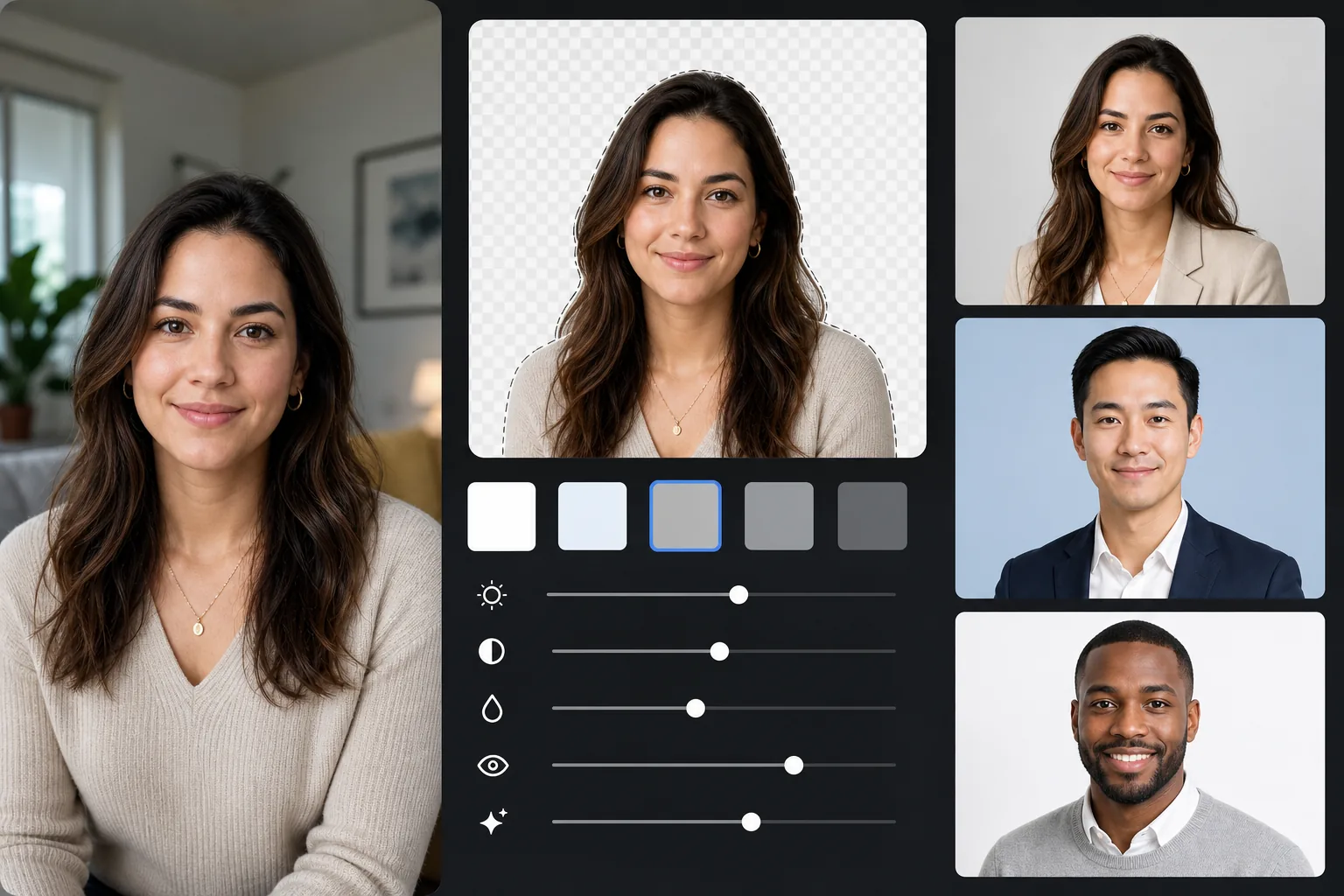
어떤 배경이든 전문적인 단색(밝은 회색, 부드러운 파란색 또는 흰색)으로 바꾸고, 자연스러운 피부와 조명 보정을 적용하며, LinkedIn 권장 크기로 내보냅니다. 결과물은 스튜디오 촬영 얼굴 사진처럼 보입니다.
템플릿 설정
| 배경 | 밝은 회색 (#E8E8E8) — 전문가 표준 |
| 출력 크기 | 800×800px (LinkedIn 권장) |
| 보정 | 자연스러운 피부, 고른 조명, 선명한 눈 |
| 자르기 | 머리와 어깨, 얼굴은 상단 3분의 1 위치 |
| 파일 형식 | JPEG (품질 95%) |
이 템플릿 사용법
사진 촬영하기
자연광을 위해 창가에 서세요. 면접에 어울리는 옷을 입으세요. 약 4피트 거리에서 눈높이로, 어깨 위가 보이도록 누군가에게 사진을 찍어 달라고 하세요.
배경 제거하기
Background Eraser는 어떤 환경이든 깔끔한 전문가용 회색으로 바꿉니다. AI가 머리카락 윤곽, 옷의 가장자리, 자연스러운 몸의 윤곽을 정밀하게 보존합니다.
자연스럽게 보정하기
AI Enhance는 얼굴 전체의 조명을 고르게 하고, 실내의 색감 편향을 보정해 자연스러운 피부 톤을 만들며, 모든 얼굴 사진의 초점인 눈을 선명하게 합니다.
LinkedIn용으로 내보내기
LinkedIn 프로필용으로 800×800px로 다운로드하세요. 같은 원본을 다른 크기로도 내보낼 수 있습니다. LinkedIn 썸네일용 400×400, 이력서나 인쇄용 전체 해상도.
최상의 결과를 위한 프로 팁
- ✓편안한 눈빛과 함께 짓는 살짝 진심 어린 미소는 친근하고 자신감 있게 보입니다 — LinkedIn에 이상적인 표정입니다.
- ✓회색 배경과 대비되는 색을 입으세요: 네이비, 짙은 녹색, 버건디, 검정 모두 잘 어울립니다.
- ✓최소 20장은 찍으세요 — 표정이 자연스럽고 눈이 완전히 선명한 한 장이 필요합니다.
- ✓브랜드 일관성을 위해 LinkedIn, 이력서, 모든 전문 프로필에 같은 얼굴 사진을 사용해야 합니다.
자주 묻는 질문
LinkedIn에 가장 잘 맞는 배경색은 무엇인가요?
+
밝은 회색(#E8E8E8)이 가장 보편적으로 전문적인 선택입니다. 부드러운 파란색은 기업 직무에 신뢰감을 줍니다. 흰색은 깔끔하지만 밝은 피부 톤을 날려 버릴 수 있습니다. 이 템플릿에서는 세 가지 모두 사용할 수 있습니다.
전문 스튜디오 사진처럼 보일까요?
+
좋은 자연광과 진심 어린 표정이 있다면, AI로 보정한 결과물은 스튜디오 얼굴 사진과 시각적으로 구분되지 않습니다. 배경 교체, 조명 보정, 미묘한 피부 보정이 전문 사진작가가 만들어 내는 결과를 재현합니다.
다른 전문 프로필에도 사용할 수 있나요?
+
네. 같은 템플릿은 회사 소개, 콘퍼런스 연사 페이지, 저자 사진, 그리고 전문 얼굴 사진이 필요한 모든 플랫폼에 사용할 수 있습니다. 각 플랫폼에 맞게 다른 크기로 내보내세요.
오늘 전문 얼굴 사진을 받아 보세요
스튜디오 예약이 필요 없습니다. 사진을 업로드하면 1분 이내에 LinkedIn에 바로 쓸 수 있는 얼굴 사진을 받을 수 있습니다.
무료로 사용해 보기Related templates
More professional templates for your workflow.