
치과 미소 강화
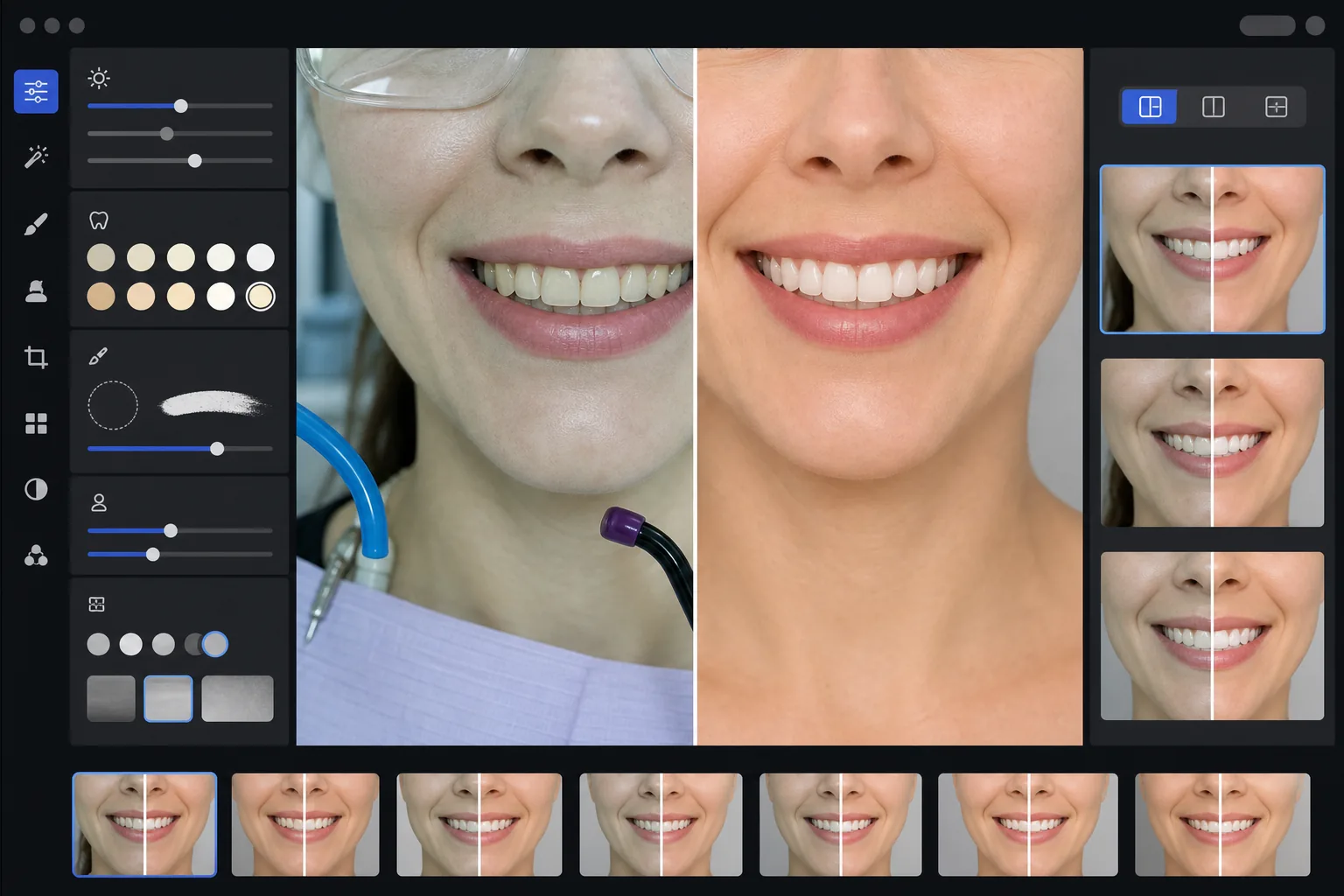
진료실의 작업을 보여주는 전문적인 치과 마케팅 전후 이미지를 만드세요. 이 템플릿은 자연스러워 보이는 치아 미백을 적용하고, 임상적인 배경의 잡다한 요소를 제거하며, 환자 인물 사진 배경을 통일하고, 진료실 사진에서 흔히 나타나는 강한 상단 조명을 고르게 조정합니다.
이 템플릿 무료로 사용해 보기Professional template preview
이 템플릿의 기능
임상 치과 사진을 진료실 웹사이트, 소셜 미디어, 환자 교육 자료에 사용할 수 있는 세련된 마케팅 이미지로 변환합니다. AI Enhance는 치과 진료실 조명의 매력 없는 녹백색 색조를 보정하고 자연스러워 보이는 은은한 치아 미백을 적용하여, 인위적으로 보이지 않게 치아를 2~3단계 밝게 만듭니다. Magic Eraser는 흡인 호스, 광중합기, 입술에 묻은 교합지 자국, 보호 안경 같은 임상적 배경 요소를 제거합니다. 환자 인물 사진 배경은 전체 사례 갤러리에 걸쳐 깔끔하고 일관된 배경으로 표준화됩니다.
템플릿 설정
| 치아 미백 | 자연스러운 +2~+3단계 밝기 향상 (투명감과 법랑질 질감 유지) |
| 조명 보정 | 치과 진료실 주광 밸런스 (녹백색 임상 색조 제거) |
| 배경 | 부드러운 비네팅이 적용된 일관된 중성 회색 또는 흰색 배경 |
| 피부 톤 | 입 주변 따뜻함 보정 (치과 조명으로 인한 창백함 감소) |
| 입술 색상 | 자연스러운 채도 회복 (희미해진 임상 조명을 상쇄) |
이 템플릿 사용 방법
임상 사진 업로드
미소 클로즈업, 인물 사진 스타일의 전후 사진 또는 진료실에서 촬영한 구강 내 이미지를 업로드하세요. 이 템플릿은 치과 전용 카메라, 링 플래시가 장착된 DSLR, 진료실 조명 아래에서 촬영한 스마트폰 사진과 함께 작동합니다.
임상 조명 보정
AI Enhance는 상단 치과 유닛 조명의 녹백색 색조를 중화하고, 입 주변 피부 톤을 따뜻하게 만들며, 자연스러운 입술 색상을 회복시킵니다. 치아 색상은 사실적이고 정직함을 유지하면서 결과를 가장 좋게 보여주도록 은은하게 밝아집니다.
배경 및 방해 요소 정리
Magic Eraser는 눈에 보이는 호스, 광중합기 팁, 턱받이 클립, 입술에 묻은 교합지 얼룩, 배경의 임상 장비를 제거합니다. 배경은 모든 전후 쌍에 걸쳐 일치하는 일관된 중성 배경으로 교체됩니다.
마케팅용으로 내보내기
개별적으로 강화된 이미지 또는 나란히 배치된 전후 합성 이미지를 다운로드하세요. 출력물은 웹사이트 갤러리, Instagram 게시물, Google Business Profile, 인쇄용 환자 브로슈어에 맞게 크기가 조정되며, 8x10인치 인쇄에 적합한 해상도를 제공합니다.
최상의 결과를 위한 전문가 팁
- ✓전후 쌍의 경우 치료 전과 치료 후 이미지를 모두 동일한 각도, 거리, 조명 위치에서 촬영하세요. 이 템플릿은 두 이미지 간의 노출 차이를 보정할 수 있지만, 원래의 카메라 각도를 맞추면 가장 설득력 있는 비교가 만들어집니다.
- ✓치아 미백은 의도적으로 보수적으로 설정되어 있습니다 — 치아를 종이처럼 새하얗게 만드는 대신 2~3 비타 단계 밝게 합니다. 이는 잠재 환자에게 더 자연스럽고 신뢰감 있게 보입니다. 실제 임상 결과가 극적이더라도, 가벼운 강화를 적용한 정직한 사진이 과도하게 처리된 이미지보다 더 설득력이 있습니다.
- ✓구강 내 미소 촬영 시 볼 견인기를 사용하여 치과 작업을 가장 완전하게 보여주세요. 이 템플릿은 피부 톤을 따뜻하게 하고 미소 영역에 초점을 맞춰 크롭함으로써 견인기를 사용한 사진의 다소 임상적인 느낌을 처리합니다.
- ✓전체 사례 갤러리를 한 번에 일괄 처리하여 모든 전후 쌍에 걸쳐 일관된 배경 색상, 밝기, 따뜻함을 보장하세요. 웹사이트의 사례 간 조명이 일치하지 않으면 전문적인 인상이 손상됩니다.
자주 묻는 질문
이것이 오해를 불러일으키는 치과 광고로 간주됩니까?
+
미백 강화는 2~3 비타 단계로 제한되며 법랑질의 자연스러운 투명감과 표면 질감을 유지합니다. 이는 전문 사진 조명과 화이트 밸런스가 자연스럽게 영향을 미치는 범위 내에 충분히 속합니다. 이 템플릿은 치아 모양, 정렬, 잇몸 윤곽을 변경하지 않으며, 사진에서 실제보다 결과가 나쁘게 보이게 만드는 임상 조명의 매력 없는 색상 효과만 보정합니다.
나란히 배치된 전후 합성 이미지를 만들 수 있습니까?
+
예. 이 템플릿은 개별적으로 강화된 이미지를 출력하거나, 중앙 구분선, 일관된 배경, 전/후 라벨이 있는 나란히 배치된 합성 이미지를 생성할 수 있습니다. 쌍의 두 이미지 모두 동일한 배경 처리를 받으므로 비교가 시각적으로 깔끔하고 전문적입니다.
구강 내 카메라 사진에서도 작동합니까?
+
예. 구강 내 카메라 이미지는 일반적으로 표면 질감을 하얗게 날려버리는 매우 강하고 직접적인 조명을 가지고 있습니다. 이 템플릿은 법랑질 디테일을 회복하고, 극단적인 흰색 색조를 보정하며, 치아 해부 구조를 자연스럽게 보여주도록 대비를 조정합니다. 결과물은 원본 구강 내 촬영본보다 더 디테일하고 자연스러워 보입니다.
전문적인 마케팅 사진으로 치과 작업을 선보이세요
임상 사진을 업로드하면 자연스럽게 강화되고 일관된 스타일의 전후 이미지를 받아 웹사이트, 소셜 미디어, 환자 브로슈어에 바로 사용할 수 있습니다.
무료로 사용해 보기Related templates
More professional templates for your workflow.