
책 표지 모형
라이프스타일 장면 속, 책장 위, 또는 자연스러운 그림자가 있는 독립형 3D 렌더링으로 배치된 책 표지의 사실적인 모형을 만드세요. 이 템플릿은 평면 표지 아트워크를 소셜 미디어 공지, 저자 웹사이트, Amazon A+ 콘텐츠, 보도 자료용 홍보 이미지로 변환합니다. 3D 소프트웨어는 전혀 필요하지 않습니다.
이 템플릿 무료로 사용해 보기Design template preview
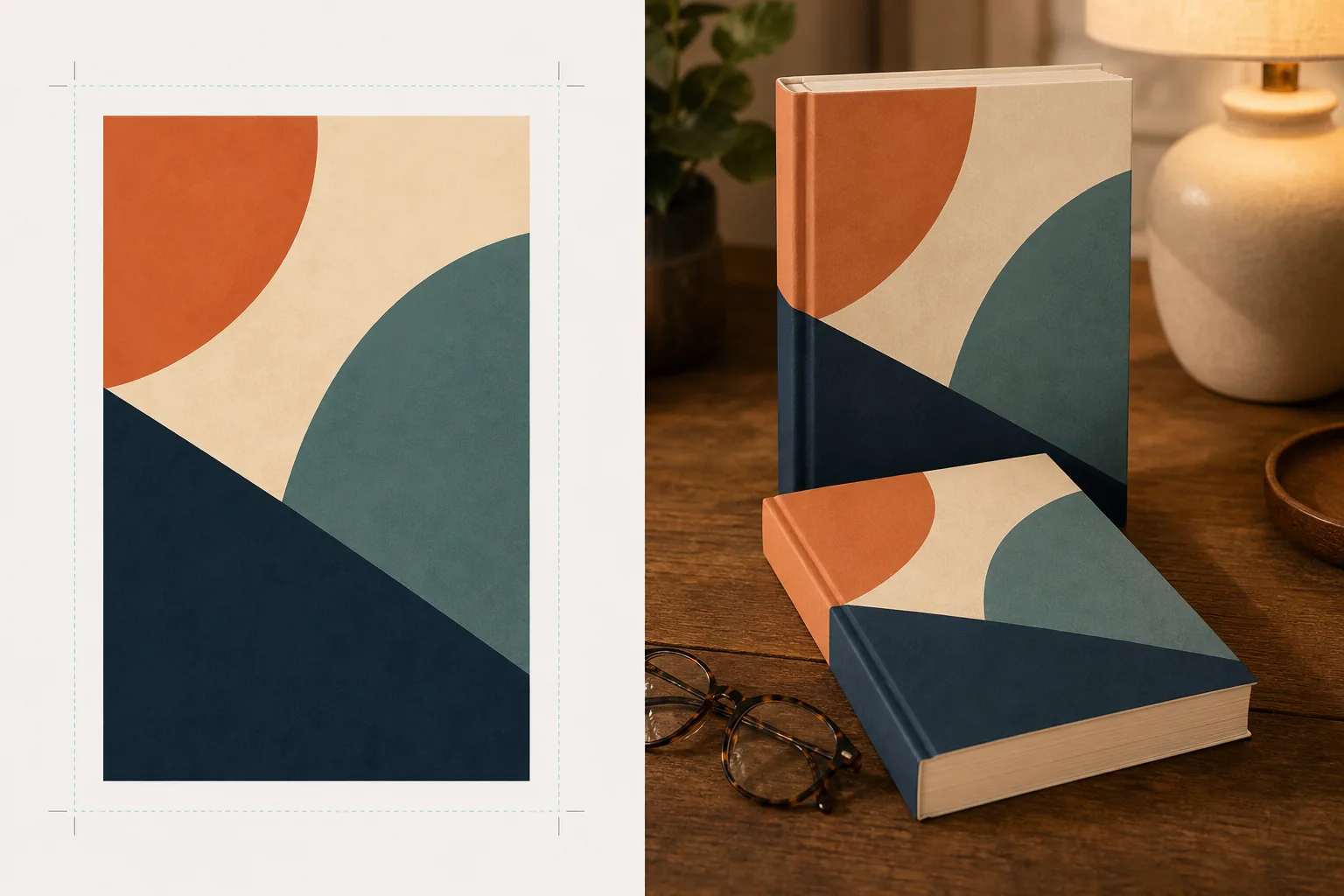
이 템플릿이 하는 일
평면 책 표지 디자인을 전문 제품 사진처럼 보이는 홍보용 모형 이미지로 변환합니다. 표지 아트워크를 평면 JPEG 또는 PNG로 업로드하면 템플릿이 적절한 원근감, 페이지 두께, 책등 곡률을 갖춘 사실적인 책 형태에 매핑합니다. 그런 다음 모형은 라이프스타일 장면 — 독서용 안경이 놓인 커피 테이블, 서점 책장, 따뜻한 램프 불빛이 있는 협탁 — 에 배치되거나, 자연스러운 그림자가 있는 깔끔한 배경 위에 독립형 제품으로 렌더링됩니다. 시리즈나 여러 권의 홍보를 위해 여러 표지를 일관된 원근감으로 한 줄로 배열하거나 쌓을 수 있습니다. 조명과 그림자 방향이 장면 환경과 일치하여 책이 합성된 것이 아니라 실제로 존재하는 것처럼 보입니다.
템플릿 설정
| 책 형식 | 페이퍼백, 양장본, 또는 책 커버가 있는 양장본 |
| 페이지 수 표현 | 얇음(100p), 보통(250p), 두꺼움(400p 이상) — 책등과 페이지 가장자리 너비에 영향을 줍니다 |
| 장면 유형 | 그림자가 있는 독립형, 커피 테이블, 책장, 협탁, 또는 손에 든 모습 |
| 원근 각도 | 정면, 4분의 3, 또는 약간 위에서 내려다본 기울기 |
| 출력 해상도 | 3000×3000px(1:1 소셜) 또는 2400×1600px(16:10 배너) |
이 템플릿 사용 방법
표지 아트워크 업로드
책 표지를 평면 이미지로 업로드하세요 — 최소한 앞표지가 필요합니다. 책 커버가 있는 양장본 모형의 경우 책등과 뒤표지도 업로드할 수 있습니다. 템플릿은 JPEG, PNG, PDF를 지원합니다. 표지 크기는 자동으로 감지되며 책 비율이 그에 맞게 조정됩니다.
책 형식과 장면 선택
페이퍼백, 양장본, 책 커버 형식 중에서 선택하세요. 책등과 페이지 가장자리 너비가 실제 책과 일치하도록 페이지 수 범위를 선택하세요. 그런 다음 장면을 선택합니다: 그림자가 있는 독립형, 라이프스타일 설정, 또는 사용자 지정 배경색.
원근감 조정 및 렌더링
시야 각도를 선택하세요 — 썸네일 선명도를 위한 정면, 시각적 깊이를 위한 4분의 3, 또는 평면 배치 소셜 게시물을 위한 위에서 내려다본 기울기. 템플릿은 적절한 조명, 페이지 가장자리 질감, 선택한 장면과 일치하는 그림자 방향으로 모형을 렌더링합니다.
홍보 이미지 다운로드
Instagram용 1:1, Twitter/Facebook 헤더용 16:9, 또는 웹사이트 히어로 섹션용 사용자 지정 크기로 내보내세요. 각 내보내기에는 투명 배경 옵션이 있는 책 모형이 포함되어 있어 자신만의 사용자 지정 레이아웃에 배치할 수 있습니다.
최상의 결과를 위한 전문가 팁
- ✓사용 가능한 가장 높은 해상도로 표지를 업로드하세요. 3D 원근 변환은 책의 멀어지는 면에서 겉보기 해상도를 낮추므로, 고해상도 소스로 시작하면 책등과 표지의 글자가 읽기 쉽게 유지됩니다.
- ✓Amazon A+ 콘텐츠에는 흰색 배경의 독립형 모형을 사용하세요. 이는 책에 고급 제품 사진의 느낌을 주어 상품 페이지에 이미 표시된 평면 표지 이미지와 차별화됩니다.
- ✓시리즈의 모든 표지를 업로드하여 시리즈 배열을 만드세요. 템플릿은 일관된 원근감과 간격으로 한 줄에 배열하며, 이는 표지를 개별적으로 보여주는 것보다 시리즈 홍보에 훨씬 더 시각적으로 강력합니다.
자주 묻는 질문
전자책 리더기나 태블릿에 표지가 표시되는 모형을 만들 수 있나요?
+
이 템플릿은 실물 책 모형 — 페이퍼백 및 양장본 형식 — 에 중점을 둡니다. 전자책 리더기나 태블릿 표시 모형의 경우, 평면 표지를 기기 사진 위에 별도로 합성하게 됩니다.
책등 글자가 읽힐까요?
+
예, 소스 표지 파일에 책등 아트워크가 포함되어 있는 한 가능합니다. 템플릿은 앞표지 각도와 일치하는 원근감으로 책등 아트워크를 책 가장자리에 감쌉니다. 얇은 책(150페이지 미만)의 경우 책등이 좁아 작은 글자는 작은 표시 크기에서 읽기 어려워질 수 있습니다.
오디오북이나 팟캐스트 홍보에 사용할 수 있나요?
+
예. 오디오북과 팟캐스트에 사용되는 정사각형 표지 형식은 CD 케이스 스타일 모형으로 또는 입체적인 그림자가 있는 독립형 정사각형으로 렌더링할 수 있어, 평면 표지 아트에는 없는 실물 같은 존재감을 부여합니다.
Related templates
More design templates for your workflow.
깔끔한 가장자리 개선과 웹, 인쇄, 소셜 미디어, 앱 아이콘에 대한 다양한 크기 내보내기를 통해 투명한 PNG 로고를 생성하세요. 인쇄된 로고 및 디지털 파일의 사진을 작업합니다.
배경 교체, 호스트 세로 격리 및 타이포그래피 지원 레이아웃을 통해 Apple Podcast 및 Spotify 사양을 충족하는 팟캐스트 커버 아트를 디자인하세요.
AI 업스케일링, 캔버스 확장, 정확한 색상 교정, 인쇄용 파일 내보내기를 통해 대형 인쇄용 디지털 아트와 사진을 준비하세요.
상표 제거, 초상권 사용 동의서 준수 편집, 기술 품질 확인 및 대행사별 형식 요구 사항을 통해 스톡 대행사 제출을 위한 사진을 준비합니다.