
아트 프린트 준비
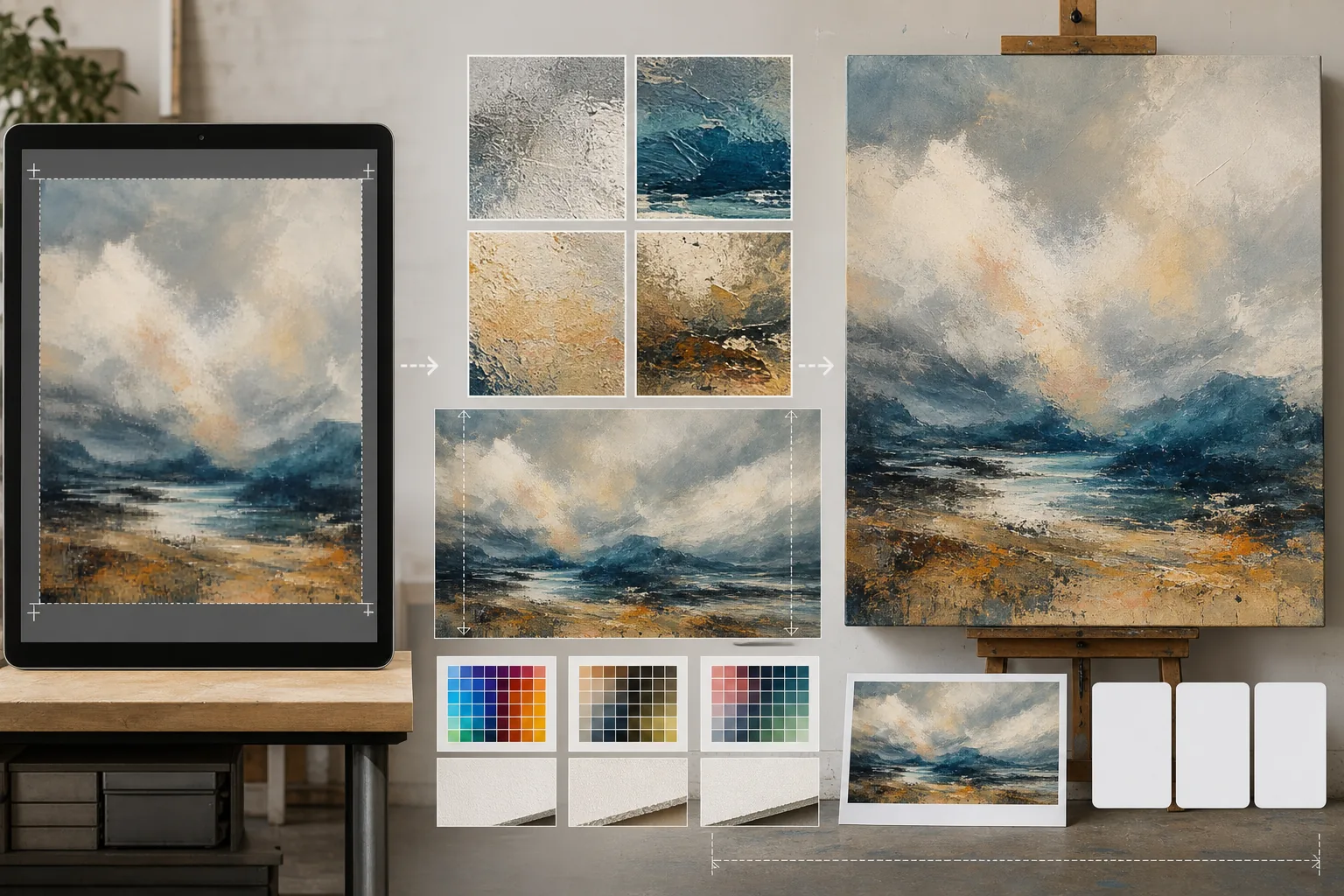
디지털 작품, 사진, 일러스트레이션을 대형 갤러리 프린트, 캔버스 랩, 포스터 제작용으로 준비하세요. 이 템플릿은 AI Enhance를 사용해 품질 손실 없이 이미지를 인쇄에 적합한 해상도로 업스케일링하고, AI Expand로 캔버스 가장자리를 확장해 갤러리 랩 여백을 만듭니다 — 이 모든 과정에서 전문 인쇄를 위한 색상 정확도를 유지합니다.
이 템플릿 무료로 사용해 보기Design template preview
이 템플릿의 기능
화면 해상도의 디지털 파일과 실물 인쇄 제작이 요구하는 까다로운 해상도 요건 사이의 간극을 메웁니다. AI Enhance는 미세한 디테일 — 회화의 붓 터치, 사진의 입자 구조, 일러스트레이션의 선 작업 — 을 보존하면서 이미지를 2배에서 4배까지 업스케일링하며, 단순 보간에서 흔히 나타나는 흐림이나 노이즈를 발생시키지 않습니다. AI Expand는 작품의 자연스러운 연장을 생성해 캔버스 가장자리를 확장하여, 이미지가 틀을 감싸는 갤러리 캔버스 랩에 필요한 여분의 여백을 제공합니다. 색상 프로필은 CMYK 또는 Adobe RGB로 변환되며, 최종 인쇄물이 종이, 캔버스, 금속 소재에서 어떻게 보일지 보여주는 소프트 프루핑을 제공합니다.
템플릿 설정
| 업스케일 배율 | 2배, 3배 또는 4배 (대형 인쇄의 경우 긴 변 최대 16000px까지) |
| 캔버스 확장 | 갤러리 랩 도련을 위한 1.5인치, 2인치 또는 사용자 지정 여백 |
| 디테일 보존 | 적응형: 회화에는 붓 터치, 사진에는 입자, 일러스트레이션에는 선 |
| 색상 프로필 | sRGB (화면), Adobe RGB (사진 인쇄) 또는 CMYK (상업 인쇄) |
| 출력 형식 | TIFF (무손실 인쇄), PNG (투명도) 또는 JPEG (웹 미리보기) |
이 템플릿 사용 방법
작품 업로드하기
디지털 파일 — 회화, 사진, 일러스트레이션 또는 혼합 매체 — 을 업로드하세요. 템플릿은 JPEG, PNG, TIFF, PSD 파일을 지원합니다. 최상의 업스케일링 결과를 얻으려면 인쇄 요건에 못 미치더라도 보유한 가장 높은 해상도 버전부터 시작하세요.
인쇄 해상도로 업스케일링하기
목표 인쇄 크기에 따라 업스케일 배율을 선택하세요. 24×36인치를 300 DPI로 인쇄하려면 7200×10800픽셀이 필요합니다. AI는 원본의 특성을 보존하며 업스케일링합니다 — 붓 터치는 붓 터치로, 필름 입자는 입자로, 픽셀 아트는 특유의 각진 매력을 유지합니다.
갤러리 랩을 위한 캔버스 확장하기
갤러리 랩으로 캔버스에 인쇄하는 경우, AI Expand가 네 가장자리 모두에 작품의 자연스러운 연장을 생성합니다. 확장된 여백은 원본의 스타일, 색상 팔레트, 질감과 일치하므로 감싸인 가장자리가 늘어나거나 반사된 것이 아니라 의도된 것처럼 보입니다.
프루핑 및 내보내기
목표 색상 프로필에서 이미지가 어떻게 표현되는지 보여주는 소프트 프루프를 검토하세요 — 오프셋이나 지클레 인쇄에는 CMYK, 파인아트 잉크젯에는 Adobe RGB. 인쇄소용으로는 TIFF, 추가 편집용으로는 PNG로 내보내세요. 파일에는 정확한 색상 재현을 위한 ICC 프로필 데이터가 포함됩니다.
최상의 결과를 위한 전문가 팁
- ✓항상 원본 파일을 원래 해상도 그대로 사용해 시작하세요. 이미 웹 표시용으로 압축되고 다운샘플링된 파일을 업스케일링하면 처리 세대를 거칠 때마다 누적되는 노이즈가 발생합니다.
- ✓갤러리 랩 캔버스 인쇄의 경우, 틀의 깊이가 1.5인치이더라도 2인치의 확장 여백을 요청하세요. 여분의 0.5인치는 캔버스를 당기는 과정에서 약간의 어긋남으로 이미지 가장자리가 드러나는 것을 막아주는 여유를 제공합니다.
- ✓대형 제작에 들어가기 전에 더 작은 크기로 실물 프루프 인쇄를 요청하세요. 화면과 종이 인쇄물은 색상을 다르게 표현하며, 5×7 프루프는 30×40 캔버스 비용의 일부에 불과하지만 수정이 필요한 색상 편차를 모두 드러내 줍니다.
자주 묻는 질문
휴대폰 사진으로 얼마나 크게 인쇄할 수 있나요?
+
일반적인 1200만 화소 휴대폰 사진(4000×3000px)은 300 DPI에서 13×10인치로 잘 인쇄됩니다. 2배 AI 업스케일링을 하면 이것이 26×20인치로 두 배가 됩니다. 4배 업스케일링을 하면 휴대폰 사진으로도 깨끗한 40×30인치 인쇄물 — 갤러리 전시에 적합한 — 을 만들 수 있습니다.
업스케일링하면 작품의 모습이 바뀌나요?
+
AI는 콘텐츠 유형에 맞춰 업스케일링 방식을 조정합니다. 회화는 눈에 보이는 붓 터치와 질감을 유지합니다. 사진은 입자 구조와 선명도 특성을 유지합니다. 일러스트레이션은 선 굵기의 일관성을 보존합니다. 목표는 원본처럼 보이는 더 큰 버전이지, 재해석이 아닙니다.
캔버스의 한쪽 면만 확장할 수 있나요?
+
네. 어떤 가장자리를 얼마나 확장할지 지정할 수 있습니다. 이는 인쇄물 안에서 구도를 이동하고 싶을 때 유용합니다 — 예를 들어, 풍경 위에 하늘을 추가해 제목을 넣을 여백을 만들거나, 지평선이 많은 구도의 균형을 맞추기 위해 전경을 추가하는 경우입니다.
품질 손실 없이 어떤 크기로든 작품을 인쇄하세요
디지털 작품을 업로드하고 AI 업스케일링, 캔버스 확장, 색상 정확 프루핑으로 인쇄 준비가 완료된 파일을 받으세요.
무료로 사용해 보기Related templates
More design templates for your workflow.
깔끔한 가장자리 개선과 웹, 인쇄, 소셜 미디어, 앱 아이콘에 대한 다양한 크기 내보내기를 통해 투명한 PNG 로고를 생성하세요. 인쇄된 로고 및 디지털 파일의 사진을 작업합니다.
저자 마케팅 및 출판사 홍보를 위해 3D 원근감, 그림자 렌더링 및 라이프스타일 배경을 갖춘 사실적인 책 표지 모형을 생성합니다.
배경 교체, 호스트 세로 격리 및 타이포그래피 지원 레이아웃을 통해 Apple Podcast 및 Spotify 사양을 충족하는 팟캐스트 커버 아트를 디자인하세요.
상표 제거, 초상권 사용 동의서 준수 편집, 기술 품질 확인 및 대행사별 형식 요구 사항을 통해 스톡 대행사 제출을 위한 사진을 준비합니다.