
How to remove window reflection from a photo
Magic Eraser로 How to remove window reflection from a photo하는 방법을 알아보세요. 무료 AI 도구를 사용한 간단한 단계별 가이드. 웹, iOS, Android에서 사용 가능.
Last updated
지금 사용해보기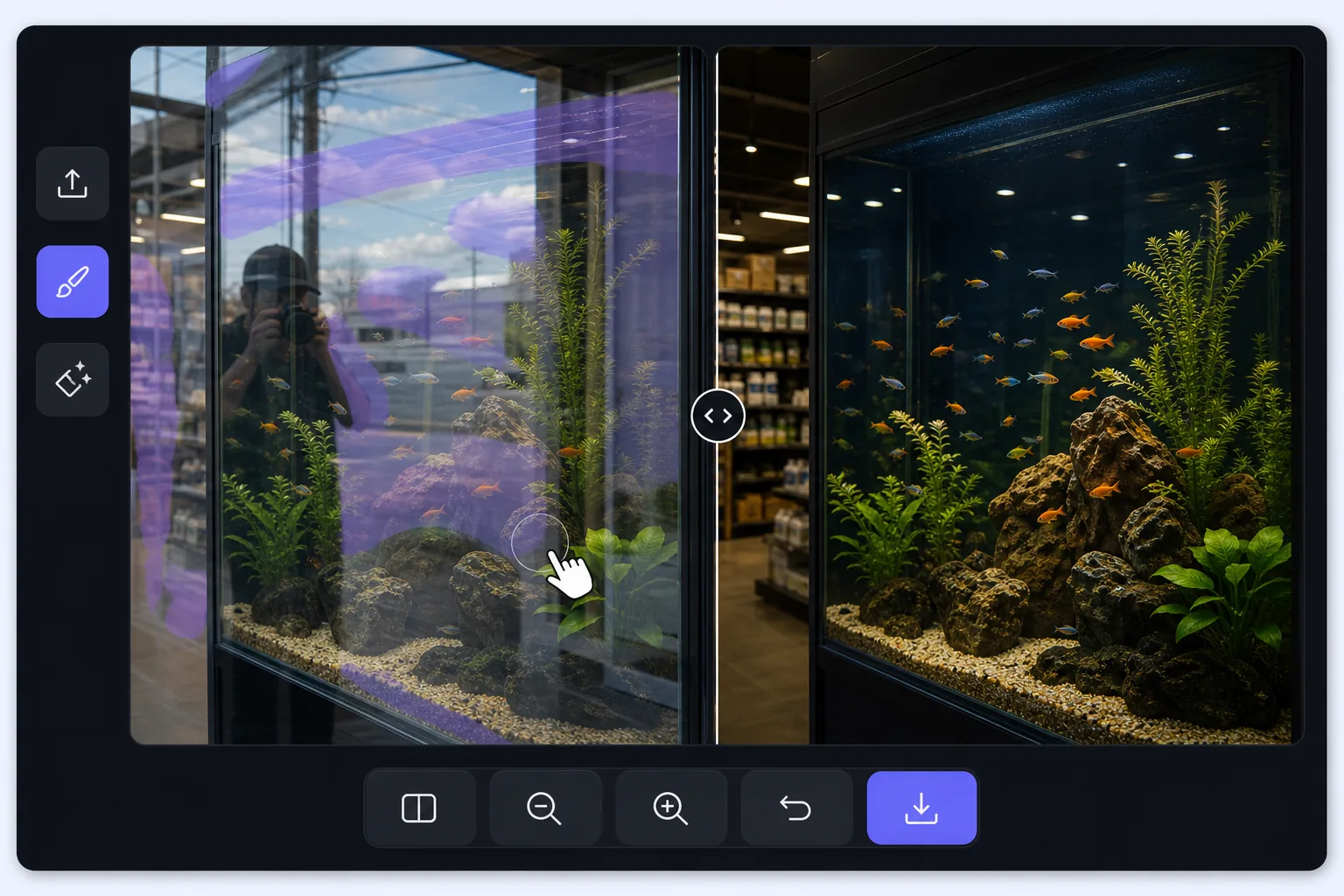
Shooting through glass is a layering problem — Magic Eraser
A window pane does two things at once: it lets you see through to what is behind it, and it reflects whatever is in front of it. When you photograph through it, the camera records both layers stacked together — the storefront mannequin and your own reflection, the aquarium octopus and the gallery lights behind you, the road ahead and the dashboard mirrored in the windshield. The reflected layer is usually brightest where the glass is darkest behind, which is exactly where your subject hides. A polarizing filter helps at capture time, but if the shot is already taken, the reflection is baked in. Magic Eraser approaches it differently: you mark the reflected streaks and shapes, and its AI inpainting reconstructs a plausible version of what was behind the glass using the surrounding visible detail. It is honest to say the result is a synthesized reconstruction, not literal recovery of pixels the reflection covered — but when the subject behind the pane is mostly visible and the reflection only veils part of it, the rebuild is convincing.
Before you start
단계별 안내
Start with 사진 업로드. The result preview above and tips below use this guide's existing content; no separate before-and-after proof is assumed.
- 1
사진 업로드
웹, iOS 또는 Android에서 Magic Eraser를 여세요. JPEG, PNG, HEIC, WebP 사진을 드래그 앤 드롭하세요. 계정 없이 시작 가능.
- 2
도구와 영역 선택
적절한 도구를 선택하고 처리할 영역을 지정하세요. AI가 자동으로 분석하고 몇 초 안에 변경 사항을 적용합니다.
- 3
결과 다운로드
결과를 미리 보고 편집된 사진을 다운로드하세요. 고품질 PNG 또는 JPEG로 내보내기 가능.
추천 대상
- Storefront and shop-window photos where your reflection or the street sits on top of the display behind the glass
- Car, train, and bus window shots where the dashboard, your face, or interior lights veil the view outside
- Aquarium and zoo-enclosure photos where gallery lighting and visitors reflect over the animals in the tank
- Museum display cases and glass cabinets where overhead spots reflect across the exhibit you are shooting
- Photos through office, gallery, or skyscraper windows where the indoor room reflects over the cityscape outside
최상의 결과를 위한 팁
The cleaner the original capture, the more convincing the rebuild: press the lens close to the glass and shoot at a slight angle to push your own reflection out of frame, and cup a hand or use a rubber lens hood against the pane to block stray light. When you do edit, work the reflection in patches rather than one giant selection — the AI has more surrounding subject to reference, so the reconstruction stays faithful to what is actually behind the glass. Watch the boundary between reflected and clear areas; that seam is where artifacts show, so a second light pass along it usually tidies things up. Be realistic about coverage: a reflection that only veils the subject lifts away cleanly, but a hot spec of glare that completely hides a section means the AI is inventing that patch, and on aquarium or storefront scenes with busy detail behind the glass, re-shooting from another angle often beats fighting a fully blocked area.
자주 묻는 질문
- How to remove window reflection from a photo 기능은 무료인가요?
- 네, Magic Eraser는 일일 무료 한도 내에서 How to remove window reflection from a photo이(가) 가능합니다. Pro로 업그레이드하면 무제한 처리와 고해상도 내보내기가 가능합니다.
- How to remove window reflection from a photo은(는) 얼마나 걸리나요?
- 몇 초면 됩니다. Magic Eraser의 AI는 사진을 빠르게 처리하며, 대부분 업로드 직후 결과를 확인할 수 있습니다.
- 모바일에서도 사용할 수 있나요?
- 네, Magic Eraser는 iOS, Android 및 모든 웹 브라우저에서 사용 가능합니다. 기기 간 자유롭게 전환할 수 있습니다.
- 이미지 품질이 저하되나요?
- 아니요, Magic Eraser는 원본 사진 품질을 유지합니다. AI가 세부 사항과 선명도를 보존하면서 스마트하게 처리합니다.