
Remove Multiple Emojis From a Photo in One Pass
Magic Eraser로 여러 이모지 제거하는 방법을 알아보세요. 무료 AI 도구를 사용한 간단한 단계별 가이드. 웹, iOS, Android에서 사용 가능.
Last updated
지금 사용해보기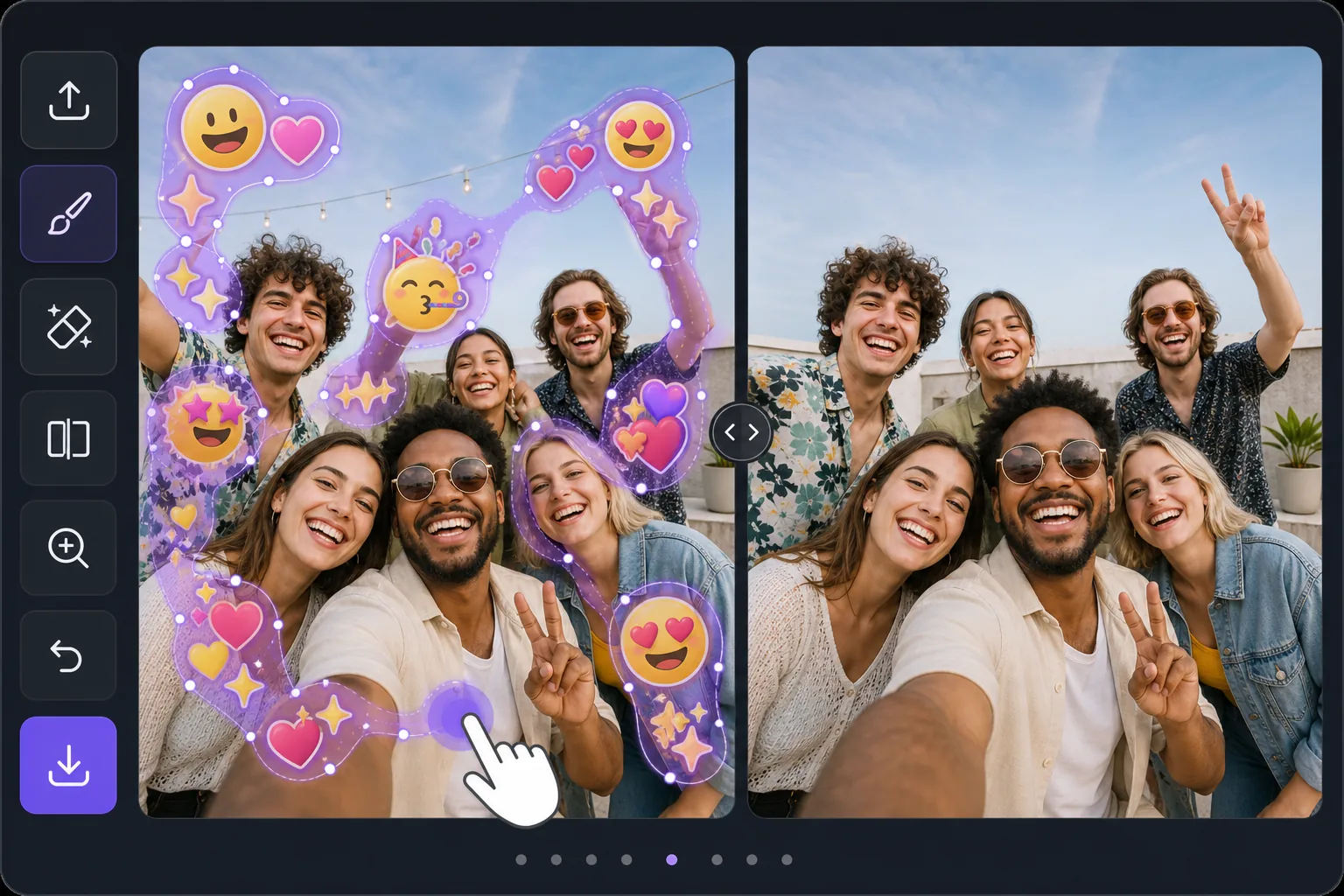
Batch-erase a photo covered in emojis — Magic Eraser
Some photos look like an emoji explosion: smiley faces, hearts, sparkles, and sticker packs piled across faces, backgrounds, and corners. Removing them individually means dozens of taps and re-renders. Magic Eraser is built for the opposite workflow — mark every emoji you want gone in one selection, then let the AI clear them together. Instead of treating each emoji as a separate job, you brush a continuous mask across the whole emoji-covered area, including overlapping stacks and scattered reactions, and process them in a single pass. The AI inpainting studies the surrounding pixels and synthesizes a believable fill for everything underneath at once, so textures like skin, sky, walls, and clothing flow naturally across the cleared zone. Be clear about what this does: it generates a plausible reconstruction of what was likely behind the emojis — it does not recover the literal original pixels or reveal any hidden face or identity. For a photo blanketed in emoji clutter, that one-pass batch approach is the fastest way from chaotic to clean.
Before you start
단계별 안내
Start with 사진 업로드. The result preview above and tips below use this guide's existing content; no separate before-and-after proof is assumed.
- 1
사진 업로드
웹, iOS 또는 Android에서 Magic Eraser를 여세요. JPEG, PNG, HEIC, WebP 사진을 드래그 앤 드롭하세요. 계정 없이 시작 가능.
- 2
도구와 영역 선택
적절한 도구를 선택하고 처리할 영역을 지정하세요. AI가 자동으로 분석하고 몇 초 안에 변경 사항을 적용합니다.
- 3
결과 다운로드
결과를 미리 보고 편집된 사진을 다운로드하세요. 고품질 PNG 또는 JPEG로 내보내기 가능.
추천 대상
- Group selfies or party photos plastered with friends' emoji and sticker reactions
- Screenshots where multiple emojis were stamped across faces and the background
- Memes or edits buried under sparkles, hearts, and laughing-face stacks
- Social posts covered in scattered emoji clutter you want cleared before reposting
- Cleaning up a single image with dozens of small emojis faster than erasing each one
최상의 결과를 위한 팁
Work in passes rather than chasing perfection in one go. First, mask the dense clusters and overlapping emoji stacks — these benefit most from being inpainted together so the AI keeps the background consistent across them. Then do a second pass for the small, scattered emojis in corners and edges. Zoom in for emojis that overlap a face or fine detail; a tighter brush leaves more real pixels for the AI to reference, which yields a more believable reconstruction. If a large emoji covered a busy area like a crowd or patterned fabric, expect the fill to be a plausible approximation, not the exact hidden detail — it never restores a true hidden face or identity. For photos that are almost entirely emoji, sometimes a generous single mask over the whole covered zone reconstructs more cohesively than many small separate edits.
자주 묻는 질문
- 여러 이모지 제거 기능은 무료인가요?
- 네, Magic Eraser는 일일 무료 한도 내에서 여러 이모지 제거이(가) 가능합니다. Pro로 업그레이드하면 무제한 처리와 고해상도 내보내기가 가능합니다.
- 여러 이모지 제거은(는) 얼마나 걸리나요?
- 몇 초면 됩니다. Magic Eraser의 AI는 사진을 빠르게 처리하며, 대부분 업로드 직후 결과를 확인할 수 있습니다.
- 모바일에서도 사용할 수 있나요?
- 네, Magic Eraser는 iOS, Android 및 모든 웹 브라우저에서 사용 가능합니다. 기기 간 자유롭게 전환할 수 있습니다.
- 이미지 품질이 저하되나요?
- 아니요, Magic Eraser는 원본 사진 품질을 유지합니다. AI가 세부 사항과 선명도를 보존하면서 스마트하게 처리합니다.