
Remove the Emoji Hiding One Face in Your Group Photo
Magic Eraser로 단체 사진에서 이모지 제거하는 방법을 알아보세요. 무료 AI 도구를 사용한 간단한 단계별 가이드. 웹, iOS, Android에서 사용 가능.
Last updated
지금 사용해보기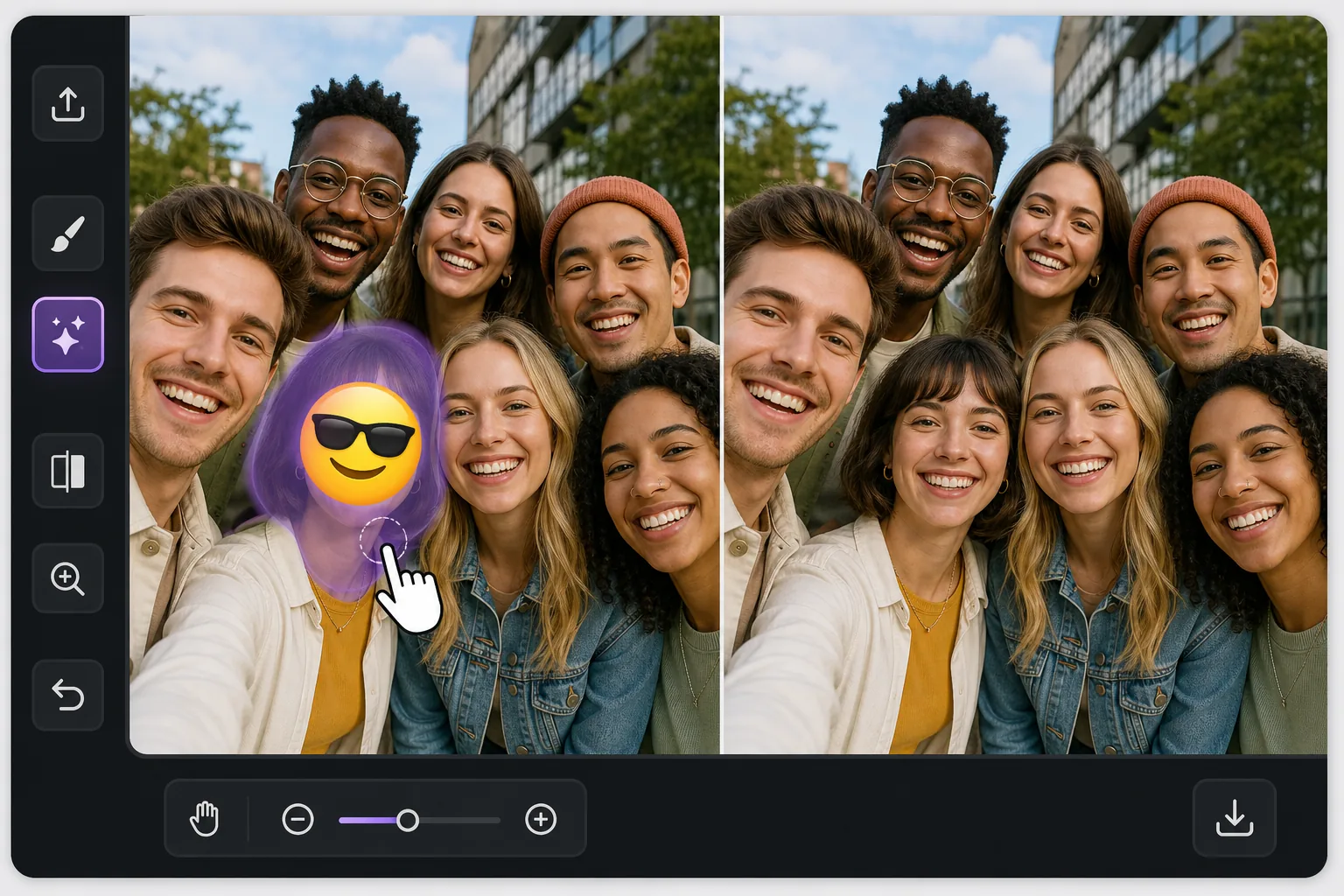
One face covered, everyone else fine — Magic Eraser
In a busy group photo, an emoji over a single person is awkward in a specific way: the rest of the shot is perfect, so the one covered face stands out even more. Magic Eraser is built for exactly this kind of pinpoint fix. You brush only the emoji sitting on that one person, and the AI inpaints the small area it covered — matching the surrounding skin tone, hair edges, and the shoulder of the person tucked in next to them. Be clear about what happens here: the AI does not recover the real hidden face. It synthesizes a plausible reconstruction of that region based on the rest of the image. In a tight group shot where the covered head is small and partly framed by neighbors, that often reads as natural at a glance. Magic Eraser works free on web, iOS, and Android with no watermark, so you can fix the group photo on whatever device the picture lives on.
Before you start
단계별 안내
Start with 사진 업로드. The result preview above and tips below use this guide's existing content; no separate before-and-after proof is assumed.
- 1
사진 업로드
웹, iOS 또는 Android에서 Magic Eraser를 여세요. JPEG, PNG, HEIC, WebP 사진을 드래그 앤 드롭하세요. 계정 없이 시작 가능.
- 2
도구와 영역 선택
적절한 도구를 선택하고 처리할 영역을 지정하세요. AI가 자동으로 분석하고 몇 초 안에 변경 사항을 적용합니다.
- 3
결과 다운로드
결과를 미리 보고 편집된 사진을 다운로드하세요. 고품질 PNG 또는 JPEG로 내보내기 가능.
추천 대상
- A friend stamped a laughing or sunglasses emoji on one person in a shared group selfie
- A privacy sticker was placed over a single face but you now have permission to show them
- A meme reply covered one person's face and you want the clean original group shot back
- Restoring a reunion or team photo where one head got hidden behind a reaction emoji
- Reposting a group picture and needing the one covered face to blend in with everyone else
최상의 결과를 위한 팁
The reconstruction is most convincing when the covered head is small relative to the group and partly bordered by neighbors — the AI has nearby skin, hair, and lighting to imitate. If the emoji covers a large front-and-center face, expect a softer, more invented result and consider cropping instead. Brush a touch beyond the emoji's edge so no colored fringe survives, but stop short of the people on either side. Match expectations honestly: this rebuilds the region plausibly, it does not restore the true expression or identity of the person who was hidden. For shared photos, get that person's okay before reposting a reconstructed version of their face.
자주 묻는 질문
- 단체 사진에서 이모지 제거 기능은 무료인가요?
- 네, Magic Eraser는 일일 무료 한도 내에서 단체 사진에서 이모지 제거이(가) 가능합니다. Pro로 업그레이드하면 무제한 처리와 고해상도 내보내기가 가능합니다.
- 단체 사진에서 이모지 제거은(는) 얼마나 걸리나요?
- 몇 초면 됩니다. Magic Eraser의 AI는 사진을 빠르게 처리하며, 대부분 업로드 직후 결과를 확인할 수 있습니다.
- 모바일에서도 사용할 수 있나요?
- 네, Magic Eraser는 iOS, Android 및 모든 웹 브라우저에서 사용 가능합니다. 기기 간 자유롭게 전환할 수 있습니다.
- 이미지 품질이 저하되나요?
- 아니요, Magic Eraser는 원본 사진 품질을 유지합니다. AI가 세부 사항과 선명도를 보존하면서 스마트하게 처리합니다.