
風景写真を印刷対応に
風景写真を300 DPIの大判印刷対応ファイルに変換します。このテンプレートは16x20インチ以上のプリント用に画像をスケールアップし、自然の景観を損なう電線、道路標識、フェンスなどの視覚的なノイズを除去します。色調補正はキャンバス、メタル、ファインアート用紙の素材に合わせて最適化されています。
このテンプレートを無料で試すPhotography template preview
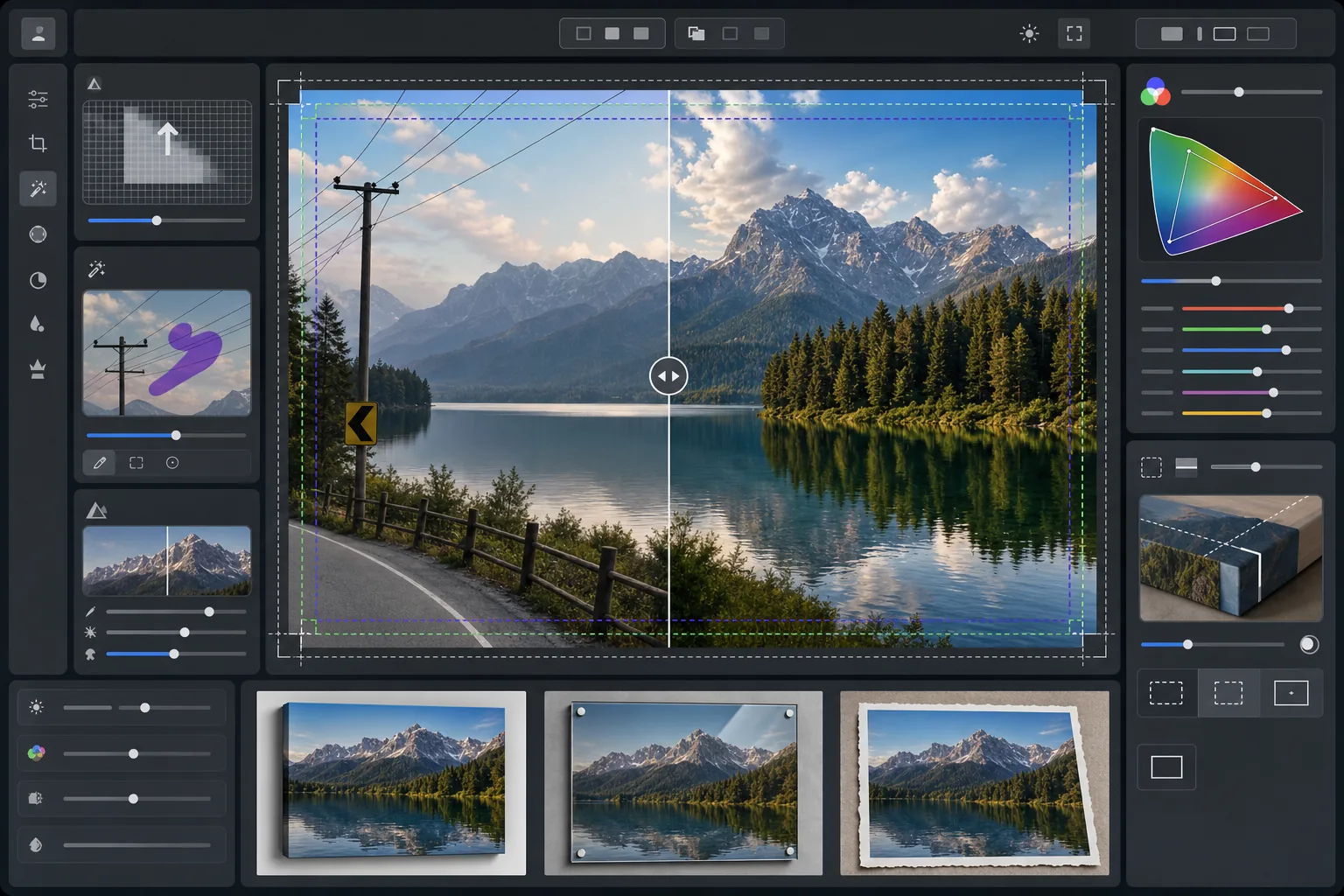
このテンプレートの機能
16x20インチ以上で300 DPIの要件を満たすよう解像度をスケールアップし、プロ仕様の大判印刷用に風景写真を準備します。AI Enhanceはノイズを発生させずにピクセル数を増やし、葉、水面の質感、雲の形状の細部を保持します。Magic Eraserは電線、電柱、道路標識、フェンスなど、自然な構図を妨げる人工的な要素を除去します。色はキャンバスラップ、アルミメタルプリント、ファインアートコットンラグ用紙のより広い色域とそれぞれ異なる反射特性に合わせて調整されます。
テンプレート設定
| スケールアップの目標 | 最小6000×4000px(20×13インチで300 DPI) |
| シャープニング | 印刷最適化アンシャープマスク(半径1.2、量80%) |
| カラープロファイル | ProPhoto RGB(ファインアート印刷向けの最大色域) |
| ダイナミックレンジ | シャドウ +0.8 EV、ハイライト復元 -0.3 EV |
| ノイズリダクション | 輝度を考慮(空の粒状感を保持し、葉を滑らかに) |
| 出力形式 | ICCプロファイルを埋め込んだ16ビットTIFF |
このテンプレートの使い方
風景写真をアップロード
どんなカメラやスマートフォンの風景写真でもアップロードできます。AIが元の解像度を分析し、目標の印刷サイズで300 DPIに達するために必要なスケールアップ倍率を計算します。1200万画素のスマートフォン写真でも16x20プリント用にきれいにスケールアップできます。
視覚的なノイズを除去
Magic Eraserは電線、電柱、道路標識、フェンス、ゴミなど、自然な景観から注意をそらす人工的な要素を識別して除去します。AIは除去した対象の背後にある空のグラデーション、樹木の縁、地形の質感を再構築します。
印刷出力向けに強化
AI Enhanceは印刷時の鑑賞距離に合わせてシャープにしながら、画像を目標解像度までスケールアップします。色はProPhoto RGB色域に変換され、一般的なsRGBでは切り取られてしまう緑、青、夕焼けの色調を余すことなく保持します。
印刷素材向けに書き出し
キャンバスラップ、メタルプリント、ファインアート用紙など、出力先に合わせたICCプロファイルを埋め込んだ16ビットTIFFとしてダウンロードします。ファイルには、ほとんどのプロ仕様印刷ラボで必要とされる裁ち落とし余白とトンボが含まれます。
最高の結果を得るためのプロのヒント
- ✓キャンバスラップの場合は、画像が主要な構図を切り取ることなくフレームバーを包み込めるよう、各辺に1.5インチの裁ち落としを追加してください。テンプレートには出力にギャラリーラップの安全領域ガイドが含まれています。
- ✓メタルプリントは光を反射してコントラストを強調するため、画面で見栄えの良い状態と比べてコントラストスライダーを10~15%下げてください。モニターでは細部が見えるシャドウも、アルミ素材では完全につぶれてしまうことがあります。
- ✓フレーム全体にまたがる長い電線を除去する場合、AIはそれらをセグメント単位で処理します。最もきれいな結果を得るには、複雑な雲の模様ではなく、線の背後の空が滑らかなグラデーションになっている元写真を使用してください。
- ✓現在の注文がより小さい場合でも、将来印刷する可能性のある最大サイズで処理してください。24x36ファイルを16x20にダウンサンプリングするのは無損失ですが、後で16x20ファイルを24x36にスケールアップすると品質が低下します。
よくある質問
スマートフォンの写真からどれくらい大きく印刷できますか?
+
1200万画素のスマートフォン写真(4032x3024)は8000x6000ピクセルまできれいにスケールアップでき、26x20インチで300 DPIの印刷に対応します。大判プリントの標準的な鑑賞距離(約1~1.2メートル)では、AIでスケールアップしたスマートフォンの元写真からでも24x36インチのプリントが鮮明に見えます。
電線を除去すると痕跡が残りますか?
+
AIは周囲のピクセルデータを使って、除去した電線の背後にある空のグラデーション、雲の縁、樹木を再構築します。空が滑らかな状況では、除去はほとんど検出できません。ドラマチックな雲のある複雑な空では、ごく近距離で見ると微妙な混ざりが見える場合がありますが、通常の印刷鑑賞距離では仕上がりはきれいです。
印刷ラボにはどのファイル形式を送るべきですか?
+
ほとんどのプロ仕様ラボは、このテンプレートのデフォルト出力であるICCプロファイルを埋め込んだ16ビットTIFFファイルを受け付けます。ラボがJPEGを要求する場合は、Adobe RGB色空間で品質100で書き出してください。大判印刷では、風景写真によくある鮮やかな緑や深い青を切り取ってしまうため、sRGBは避けてください。
あらゆるサイズで自信を持って風景写真を印刷
風景写真をアップロードして、電線を除去し、解像度をスケールアップし、キャンバス、メタル、ファインアート用紙向けに色を最適化した印刷対応ファイルを手に入れましょう。
無料で試す