
ファッション ルックブック写真
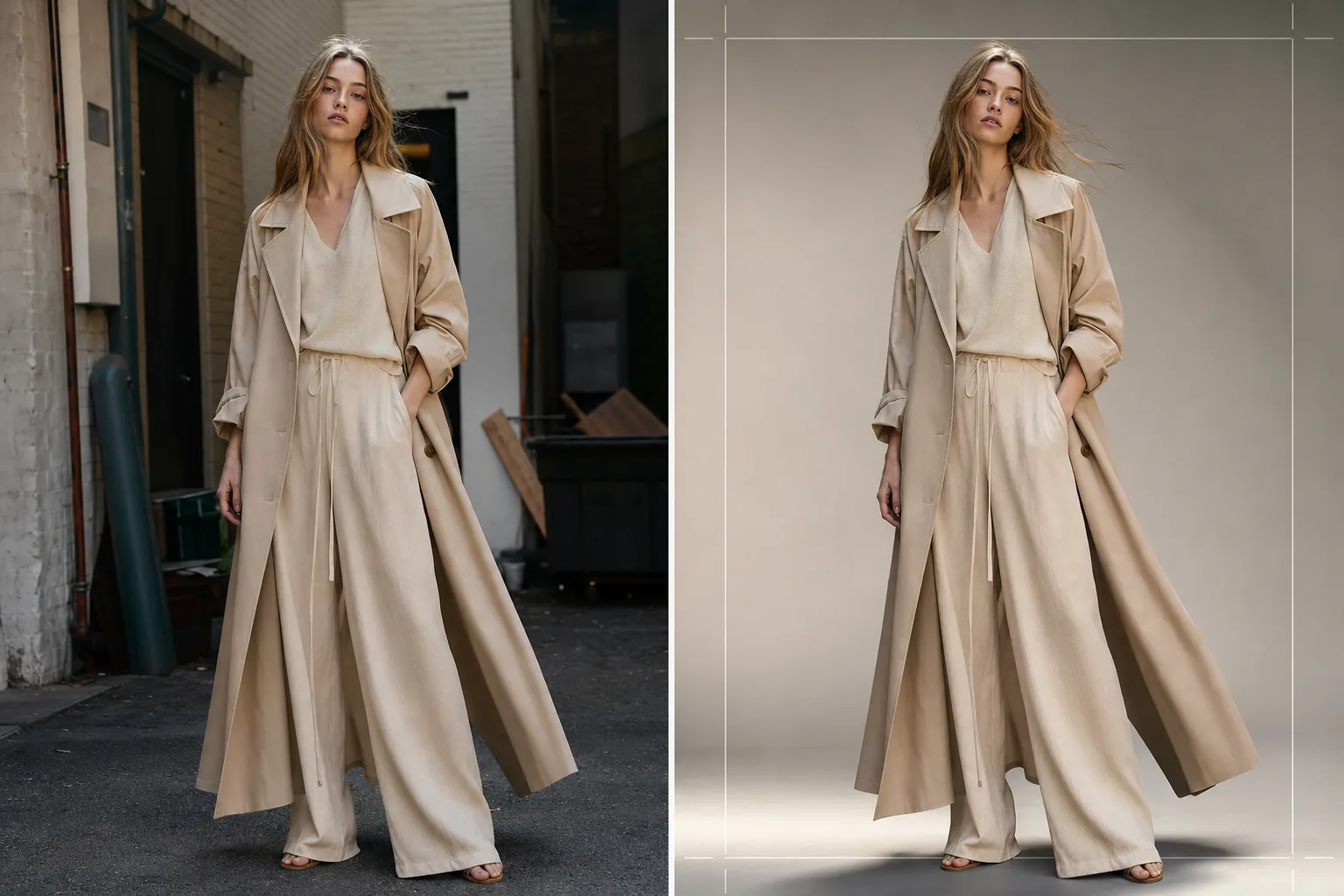
季節のコレクション、卸売プレゼンテーション、Eコマースキャンペーン向けに、編集品質のルックブック画像を制作します。このテンプレートはロケーションの背景を取り除き、清潔なスタジオ背景や厳選された編集環境に置き換え、生地を際立たせるファッショングレードのカラーグレーディングを適用し、衣服に焦点を保つ自然なレタッチで肌を整えます。
このテンプレートを無料で試すFashion template preview
このテンプレートの機能
ロケーションやスタジオでのRAW撮影から、洗練されたブランド一貫性のあるイメージまで、ルックブックの後処理パイプライン全体を効率化します。Background Eraser はあらゆる環境からモデルと衣服を切り出し、単色のスタジオカラー、グラデーションスイープ、またはコンクリートの壁、自然の緑、都会のストリートシーンなど厳選された編集背景への置き換えを提供します。AI Enhance は生地の種類に合わせたカラーグレーディングを適用し — アースカラーのリネンやウールには暖色系、デニムや機能性生地には寒色系 — 衣服の質感とドレープが視覚的な主役になるようにします。肌のレタッチは軽く編集的で、そばかすやほくろ、モデルを本物らしく見せる自然な特徴を取り除くことなく、一時的な不完全さを整えます。
テンプレート設定
| 背景スタイル | スタジオホワイト、シームレスグレー、グラデーションスイープ、または編集環境 |
| カラーグレーディング | ファッション編集(生地適応:天然素材には暖色、機能性素材には寒色) |
| 肌のレタッチ | 軽い編集(くすみ除去、トーン均一化、自然な特徴を保持) |
| 生地の強調 | 衣服のディテールを見せるための質感のシャープ化とドレープの強調 |
| トリミングとフレーミング | 全身、4分の3、またはクローズアップのトリミング(テキストオーバーレイ用の安全な余白付き) |
| 出力解像度 | 4000×6000px(縦向き、300 DPIで印刷対応) |
このテンプレートの使い方
ルックブック写真をアップロード
注目の衣服を着たモデルの全身または4分の3のショットをアップロードします。スタジオ撮影、屋外ロケーション、ショールームの写真すべてに対応します。テンプレートはRAW変換、JPEG、高解像度のTIFFを処理します。
背景の置き換えまたは調整
Background Eraser は、緩んだ生地の縁、なびく髪、シフォンのような透ける素材を保持できるほど精密なエッジ検出でモデルを切り出します。ブランドガイドラインに合ったスタジオカラーで背景を置き換えるか、コレクションの雰囲気を引き立てる編集環境を選びます。
カラーグレーディングと強調を適用
AI Enhance は衣服の生地の質感と本来の色を強調するカラーグレードを適用します。肌のレタッチは編集的な強度で適用され — 赤みや一時的なくすみを整えつつ、肌を平坦にしたり自然な特徴を取り除いたりしません。生地のシャープ化により、織りパターン、ステッチ、ドレープラインが際立ちます。
ルックブックとEコマース向けにエクスポート
印刷ルックブックやラインシートPDF用に4000×6000pxで、またはShopify、卸売ポータル、ソーシャルメディア向けにウェブ最適化サイズでダウンロードします。テンプレートはコレクション全体で一貫したトリミングを出力し、統一されたルックブックレイアウトを実現できます。
最良の結果を得るためのプロのヒント
- ✓可能な限りマネキンではなくモデルに衣服を着せて撮影しましょう。AIの背景除去と肌のレタッチは、実際の人体で最も自然な結果を生み出し、生地が体にどのようにドレープするかを示す画像にバイヤーはより好意的に反応します。
- ✓撮影中は、ヘアゴムやクリップで長い髪をトップスやジャケットの襟元から離しておきましょう。背景除去は乱れた髪をうまく処理しますが、襟のディテールやネックラインの構造を覆う髪は、バイヤーが評価しているまさにその特徴を隠してしまいます。
- ✓コレクション内のすべてのショットで一貫した照明の方向を保ちましょう。AIが同じカラーグレードを適用し、光の方向が一貫していると、ルックブックは異なる撮影の寄せ集めではなく、まとまりのある編集ストーリーとして読み取れます。
よくある質問
平置きの衣服ショットにこれを使えますか?
+
このテンプレートはモデル着用の撮影に最適化されています。テーブル上の平置きや吊り下げの衣服ショットには、Clothing Flat Lay Cleanup テンプレートの方が効果的です。体にドレープした生地ではなく、平らに置かれた生地のジオメトリを理解するためです。
シフォンのような透ける生地は保持されますか?
+
はい。Background Eraser のエッジ検出は半透明の生地の縁を保持します。置き換えた背景は、元の環境と同じように薄い素材を透して見え、衣服が意図したシルエットとレイヤリング効果を維持します。
背景をブランドの正確なHEXカラーに合わせられますか?
+
はい。単色背景の正確なHEXコードを指定でき、AIはモデルの足元に適切な影の落ち込みを加えて、接地感のあるリアルな見た目のシームレスな背景をその色で生成します。
あらゆる撮影場所から洗練されたルックブックを制作
モデルのショットをアップロードして、印刷、ウェブ、卸売プレゼンテーション向けに準備されたブランド一貫性のある編集品質のルックブック画像を入手しましょう。
無料で試す