
車両出品写真
出品写真であらゆる車をショールーム品質に見せます。このテンプレートは駐車場の雑然とした要素を取り除き、混合した屋外光の下でのペイント色の精度を補正し、ガラスやクリアコートの反射をきれいにし、AutoTrader、Cars.com、Carvana、Facebook Marketplace が推奨する寸法で書き出します。ディーラーでも個人売主でも対応します。
このテンプレートを無料で試すAutomotive template preview
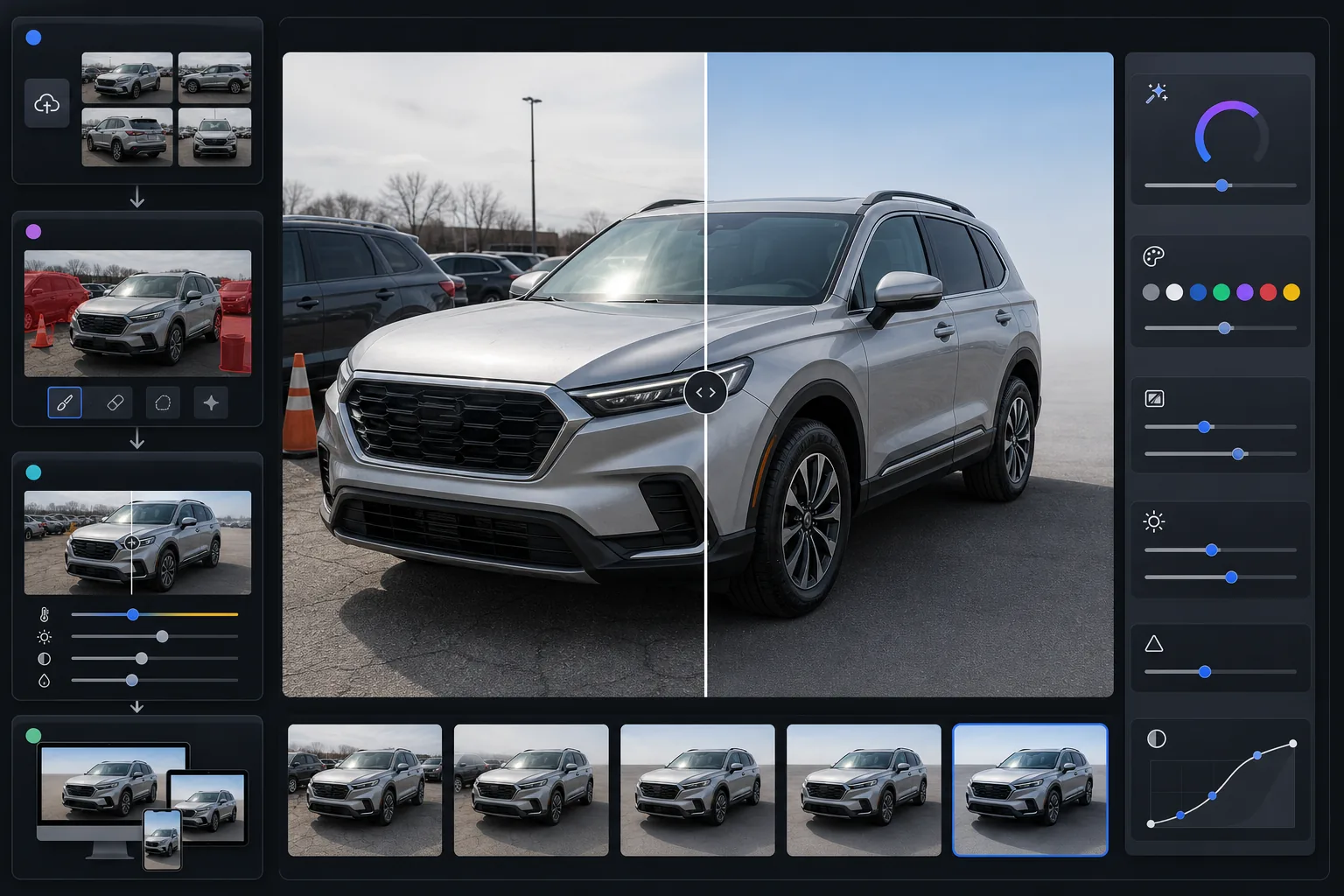
このテンプレートの機能
ありふれた駐車場や私道の写真を、プロフェッショナルな自動車出品画像に変換します。Magic Eraser は背景の車両、ロットの看板、ゴミ箱、その他の車をシーンから取り除きます。AI Enhance は曇り空、ナトリウム灯のロット照明、ゴールデンアワーのオレンジ色がかった色味によってずれて見えるペイント色を補正し、車両の実際のペイント色を画面上で正確に表示します。フロントガラスやボディパネルの反射が和らげられ、撮影者ではなく車両そのものが主役になります。
テンプレート設定
| 出力サイズ | 2400×1600px(3:2 横長、自動車出品の標準) |
| ペイント色補正 | メタリックを考慮したカラーマッピングによるニュートラルなホワイトバランス |
| 反射の低減 | ガラスとクリアコートのまぶしさを和らげる(ボディラインは維持) |
| 背景のクリーンアップ | 隣接する車両やロットの雑然とした要素を自動検出して除去 |
| ファイル形式 | JPEG 品質92%(出品プラットフォーム向けに5MB未満) |
| カラープロファイル | sRGB(出品サイト全体で画面表示が正確) |
このテンプレートの使い方
車両の写真をアップロード
車両を四隅すべて(前方3/4と後方3/4のアングル)から撮影し、さらに前面、背面、両側面の正面ショットも撮影します。内装、エンジンルーム、ホイール、コンディションの詳細も含めましょう。曇りの日は反射面に最も均一な照明をもたらします。
ロットと背景の雑然とした要素を除去
Magic Eraser は他の車両、ロット在庫、ショッピングカート、看板、電柱、出品車両から注意をそらすあらゆる背景要素を取り除きます。AI は駐車場の路面と空をきれいに延長して背景を埋めます。
ペイント色と反射を補正
AI Enhance は、カメラ上でのペイントの見え方を変えるロット照明、曇り空、ゴールデンアワーの太陽による色かぶりを中和します。メタリック、パール、マットの仕上げはそれぞれ特徴的な外観を保つために別々に処理されます。フロントガラスとボディパネルの反射は、自然な形状のハイライトを平坦にすることなく低減されます。
出品プラットフォーム向けに書き出し
すべての主要プラットフォームで最高品質を得るために2400×1600pxでダウンロードします。AutoTrader、Cars.com、CarGurus、Carvana、Facebook Marketplace はすべて横長フォーマットの写真を表示し、3:2 の比率はあらゆるプラットフォームのギャラリーレイアウトに適合します。
最良の結果を得るためのプロのヒント
- ✓曇りの日か開けた日陰で車両を撮影しましょう。直射日光はガラスやボディパネルに完全には補正しにくい強い反射を生み、車両の下に硬い影を作って背景のクリーンアップをシームレスにしにくくします。
- ✓メインの出品写真には前方3/4のアングルを使いましょう(運転席側のヘッドライトの位置に立ち、助手席側のテールライトに向かって撮影します)。このアングルは車両の表面積を最も多く見せ、自動車出品の業界標準です。
- ✓撮影前に車両の周りを歩き、外せるものは取り除きましょう — ディーラー名入りのナンバープレートフレーム、フロントガラスのステッカー、駐車許可証はデジタルよりも物理的に取り除く方が簡単で、結果もより自然に見えます。
- ✓走行距離計、VINプレート、各種グレードバッジのクローズアップを含めましょう。AI Enhance のディテールシャープニングは、スマートフォンの写真でもこれらを読み取りやすくし、検証が重要となる個人売買の出品で買い手の信頼を築きます。
よくある質問
編集後もペイント色は正確ですか?
+
このテンプレートの色補正は、環境による色かぶり(ナトリウム灯のオレンジ、曇り空の青、周囲の植物の緑)を除去することで車両の本当のペイント色を表示するように設計されています。メタリックとパールのペイントは、これらの仕上げを特徴づけるフレークと奥行きを保つ専用アルゴリズムで処理されます。
背景から他の車を除去できますか?
+
はい。Magic Eraser は背景の車両、看板、人、ロットの設備を処理します。AI は除去した対象物の背後にきれいな背景を再構築し、通常は駐車場の路面と空を延長します。最も自然な結果を得るには、撮影時に出品車両と隣接する車との間に少し間隔を空けてください。
オートバイやボートの出品にも使えますか?
+
このテンプレートは乗用車、トラック、SUV 向けに最適化されていますが、あらゆる車両で機能します。オートバイやボートも同じ背景のクリーンアップ、反射の低減、色補正の恩恵を受けます。3:2 の横長出力は車両の種類を問わずあらゆる主要出品プラットフォームに適合します。