
ビフォー & アフター スライダー
完璧に位置合わせされたビフォー・アフターの比較画像で、あなたの仕事のインパクトを伝えましょう。このテンプレートは、フレーミング、ライティングのバランス、寸法の一貫性を保ったデモ向けのペアを作成します。ビジュアルの変化が物語を語る、ポートフォリオ、事例紹介、社会的証明、製品マーケティングに最適です。
このテンプレートを無料で試すMarketing template preview
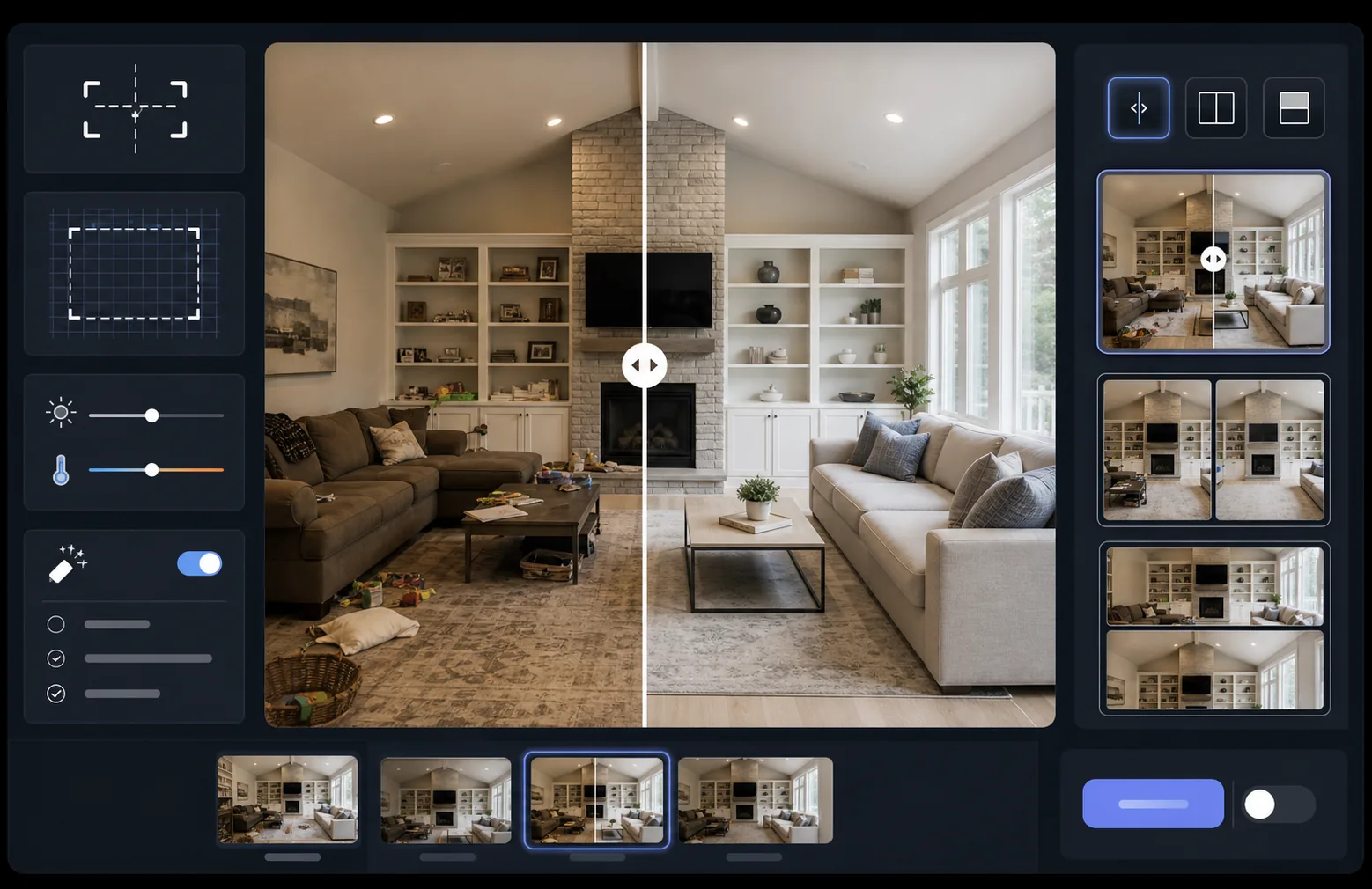
このテンプレートの機能
2枚の画像(ビフォーとアフター)を処理し、スライダーウィジェット、横並びレイアウト、アニメーション表示に対応した、完璧に位置合わせされた比較ペアに仕上げます。AI Enhance が2つのフレーム間の露出とホワイトバランスを均一化するため、ライティングの違いに惑わされることなく変化がはっきりと見えます。Magic Eraser を使えば、意図した変化に含まれない、どちらかのフレームの偶発的な邪魔物を取り除けます。
テンプレート設定
| レイアウト | スライダー対応ペア、横並び、または縦積み(選択可能) |
| 出力サイズ | フレームごとに1600×1200px(寸法を統一) |
| 位置合わせ | 自動レジストレーション — ショット間の遠近感とフレーミングを一致させます |
| ライティングの均一化 | ペア全体で露出とホワイトバランスを調整します |
| ラベルオーバーレイ | 位置をカスタマイズできる 'Before' / 'After' ラベル(オプション) |
| 境界線 | 1pxのニュートラルグレーの仕切り、またはシームレスなエッジ(選択可能) |
このテンプレートの使い方
ビフォー画像をアップロード
開始時の状態を示す、修正していないオリジナル写真をアップロードします。リフォーム前の部屋、加工前の製品、施術前の肌など、見せたいビジュアルの変化なら何でも構いません。
アフター画像をアップロード
完成した変化を示す結果写真をアップロードします。ビフォーのショットと同じ角度・距離から撮影するようにしてください。テンプレートがフレーミングや遠近感のわずかな違いを自動で位置合わせします。
均一化と位置合わせ
テンプレートが2枚の画像を自動でレジストレーションし、対応する要素がピクセル単位で揃います。露出とホワイトバランスが均一化されるため、撮影セッション間のライティングの違いが実際の変化から注意をそらすことはありません。
比較画像をエクスポート
出力形式を選びましょう — スライダーウィジェット用のマッチしたペア、SNS用の横並び合成、メールマーケティング用の縦積みなど。オプションでBefore/Afterのラベルを追加し、Web最適化または印刷品質の解像度でエクスポートできます。
最良の結果を得るためのプロのヒント
- ✓可能であれば、ビフォーとアフターをまったく同じ位置から撮影しましょう — 三脚の位置に印を付けるか、同じ場所に立ってください。AIが位置合わせを補正する必要が少ないほど、比較は鮮明になります。
- ✓両方のショットで同じ焦点距離を使い、位置合わせした比較が微妙にずれて見える原因となる遠近感の歪みの違いを避けましょう。
- ✓Magic Eraser を使って、ビフォーとアフターの間で無関係に変化したものを取り除きましょう — 植木が移動したり新しい物が現れたりした場合は、消去して視聴者が意図した変化に集中できるようにします。
- ✓Web用スライダーの埋め込みでは、両方の画像を同一の寸法でエクスポートし、ロスレスのPNGを使って、スライダーの仕切り線に沿った圧縮アーティファクトを防ぎましょう。
よくある質問
ビフォーとアフターの写真がわずかに異なる角度で撮影された場合はどうなりますか?
+
自動レジストレーションシステムは、カメラの角度、距離、フレーミングの中程度の違いに対応します。両方の画像で対応する基準点を特定し、一致するように変換します。最良の結果を得るには、角度の差は15度未満が望ましいです。
変化を示す動画のサムネイルにこれを使えますか?
+
はい。横並びの合成出力は、YouTubeやSNSの動画サムネイルに最適です。ラベル付きの分割画面レイアウトは、クリックを促す変化のストーリーを瞬時に伝えます。
ライティングの均一化は、表示される実際の結果を変えてしまいますか?
+
いいえ。ライティングの均一化は、両方のフレームが同じ条件で撮影されたように見えるよう、全体の露出とホワイトバランスを調整するだけです。実際の変化 — 被写体の変化 — は撮影されたとおりに正確に保持されます。
あなたの成果を、並べて見せましょう
ビフォーとアフターの写真をアップロードすれば、完璧に位置合わせされ、プロフェッショナルに仕上げられた比較画像が数秒で手に入ります。変化そのものに語らせましょう。
無料で試す