
食べ物の写真から背景を削除する方法
レストランのメニュー、フードデリバリーアプリ、マーケティング資料には、透明または白の背景できれいな食べ物の写真を撮ることが不可欠です。 Magic Eraser は、高精度の AI カットアウトにより、食器をあらゆるテーブルセッティングや環境から隔離します。
Last updated
食べ物の背景を削除する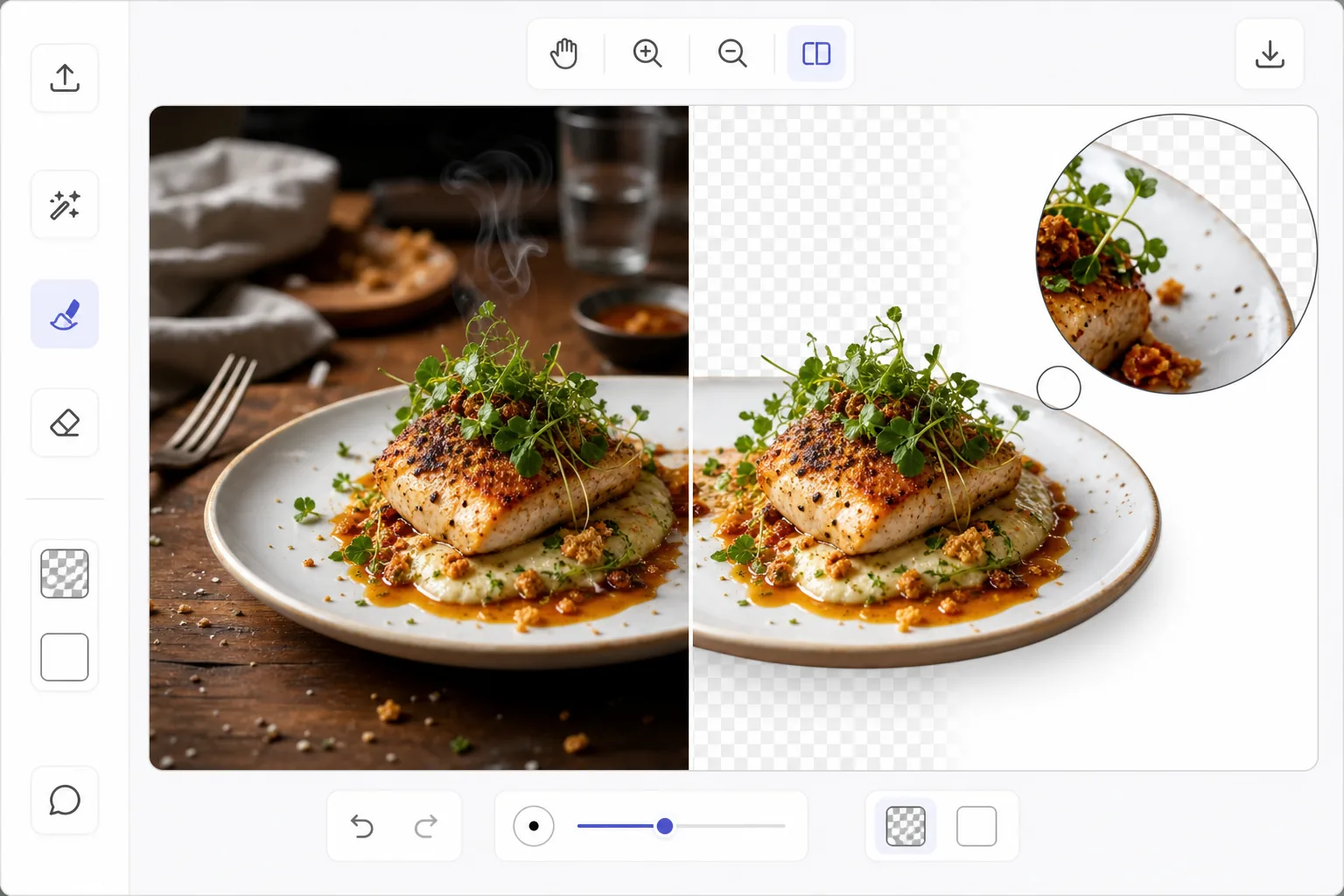
食品配達アプリにきれいな食べ物の写真が必要な理由
UberEats、DoorDash、Deliveroo などのフードデリバリー プラットフォームは、きれいな白または透明な背景にある食べ物の写真を強く好みます。アプリのグリッド レイアウトではプロフェッショナルに見え、読み込みが速く、さまざまなレストランのリスト間で視覚的な一貫性が維持されます。レストランのオーナーは、周囲の照明の下で雑然としたテーブルの上でしか写真を撮らないことがよくあります。 Photoshop で食べ物の皿を手動で切り抜くのは、皿には不規則な端があり、湯気、付け合わせ、ソースの滴りがあり、食べ物とテーブルの境界があいまいになるため、骨が折れます。 AI 背景除去は、食べ物を意味論的なカテゴリーとして理解し、料理を表面からインテリジェントに分離し、ハーブの付け合わせ、ソースの小雨、蒸気のしずくなどの繊細なディテールを保持します。
Before you start
3 つのステップで食べ物の写真の背景を削除します
Start with 料理の写真をアップロードする. The result preview above and tips below use this guide's existing content; no separate before-and-after proof is assumed.
- 1
料理の写真をアップロードする
Web、iOS、または Android で Magic Eraser を開き、Background Eraser を選択します。料理の写真をアップロードします。トップダウン (平置き) と 45 度の角度は両方ともうまく機能します。 AI は皿、ボウル、カップ、盛り付けの盛り付けを処理します。
- 2
テーブルや周囲を撤去する
AI は食べ物やお皿をテーブル、ナプキン、カトラリー、背景から瞬時に分離します。飾りの小枝、皿を越えて広がるソースの汚れ、パン粉、さらには蒸気が見える場合など、料理の詳細を保存します。プレートの縁の周囲のカットアウトの端がきれいであることを確認します。
- 3
背景を選択してエクスポートする
配信アプリのリストの場合は白、メニュー デザインの合成の場合は透明、またはブランドに一致するカスタム カラーに切り替えます。プラットフォームに必要な解像度でエクスポートします。ほとんどの配信アプリでは、少なくとも 1200×800 ピクセルを推奨します。
こんな方に最適
- UberEats、DoorDash、Deliveroo のリスティング用に料理の写真を準備しているレストランのオーナー
- 印刷メニューとデジタル メニューのきれいな背景に食べ物の画像が必要なメニュー デザイナー
- フードブロガーが一貫したプロ仕様のレシピ画像を作成
- マーケティングパンフレットやウェブサイトで料理を紹介するケータリング会社
- 食品会社がパッケージングとマーケティング写真を準備
最良の結果を得るためのヒント
対照的な表面で食べ物を撮影します。明るいテーブルに暗い皿、暗い表面に明るい皿を置くと、AI に最も明確な分離境界が与えられます。プレートの縁が明確な円形のエッジを作成するため、トップダウン角度を使用すると、最もきれいなカットアウトが作成されます。付け合わせが皿を超えている料理の場合、AI はこれらの詳細をデフォルトで保存します。それらが切り抜きに含まれていることを確認します。皿にグラスや飲み物が含まれている場合は、個別に取り外すのではなく、切り抜きに含めます。配信アプリの一貫性を保つため、すべてのメニュー項目の写真を同じ背景色と画像サイズで処理します。
よくある質問
- 蒸気を保ち、細部を飾りますか?
- はい。 AI はこれらを料理の盛り付けの一部として識別し、切り抜きに含めます。かすかな蒸気は出力内で部分的に透明になる場合がありますが、背景に配置すると自然に見えます。
- 配達アプリでは食べ物の写真のサイズはどのくらいにすべきですか?
- ほとんどのプラットフォームでは、JPEG または PNG 形式で少なくとも 1200 × 800 ピクセルを推奨します。背景を除去した後、元の解像度以上で書き出してください。このツールはプロセス全体を通じて最大の解像度を維持します。
- 食べ物の写真の背景削除は無料ですか?
- はい。バックグラウンドの削除は、1 日あたりの使用制限付きの無料枠で利用できます。プレミアムでは制限がなくなり、大量のメニューを処理するレストランには不可欠です。