
Miglioramento delle foto di matrimonio
Recupera le foto del ricevimento sottoesposte, rimuovi gli sfondi che distraggono e affina le tonalità della pelle per ottenere immagini di matrimonio degne di un album. Questo modello è pensato per le difficili condizioni di illuminazione di cerimonie e ricevimenti: sale poco illuminate, dominanti di colore miste dovute alle luci del DJ e sfondi disordinati che distolgono l'attenzione dagli sposi.
Prova gratis questo modelloEvents template preview
Cosa fa questo modello
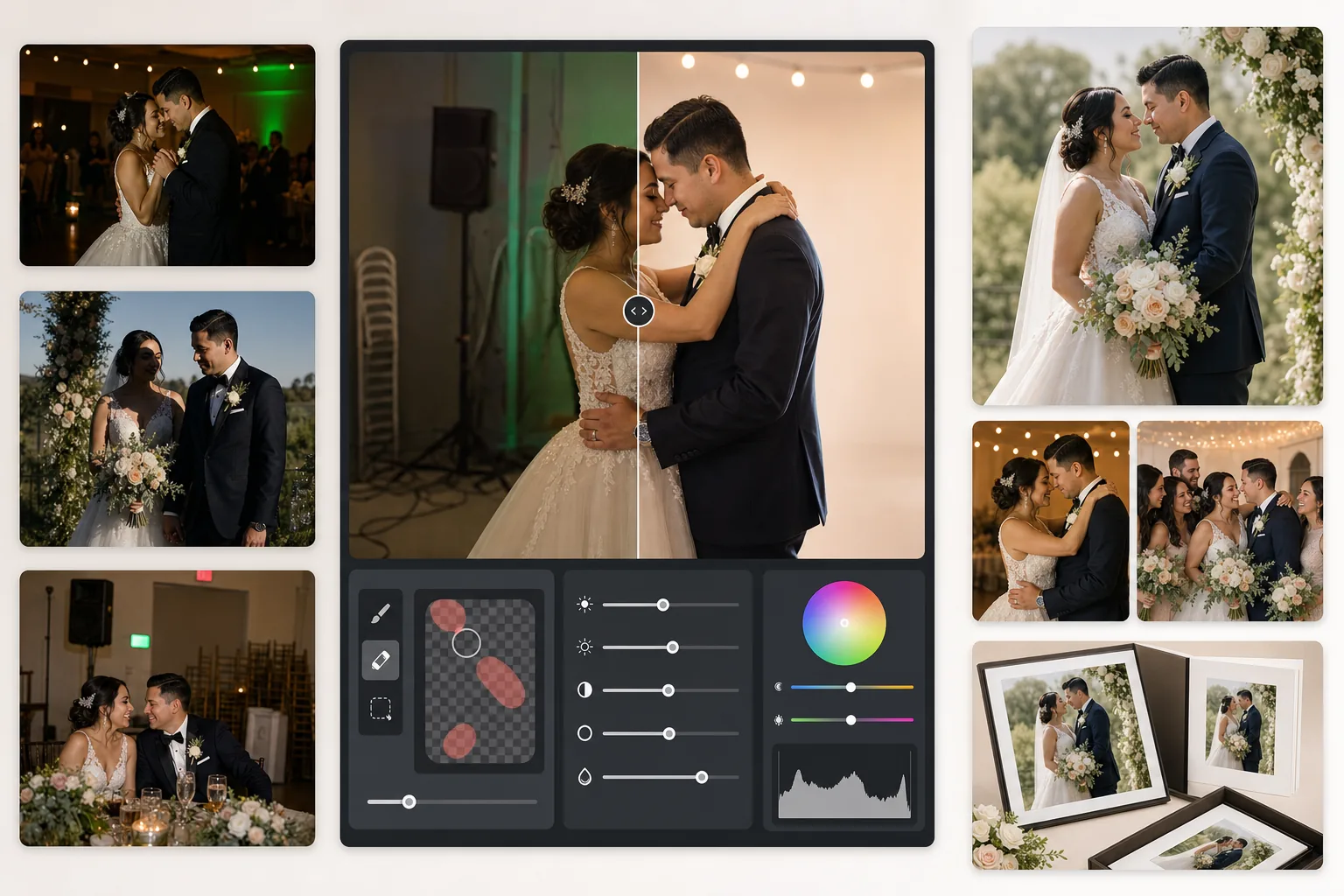
Corregge i problemi più comuni nella fotografia di matrimonio: scatti del ricevimento sottoesposti, dominanti arancioni del tungsteno o verdi dei neon, ombre dure del flash ed elementi di sfondo che distraggono come segnali di uscita, sedie impilate e attrezzature per il catering. AI Enhance recupera i dettagli dalle foto buie della pista da ballo e bilancia l'illuminazione mista, mentre Magic Eraser rimuove gli oggetti indesiderati senza lasciare tracce. Le tonalità della pelle vengono affinate per apparire naturali e calde senza un eccessivo effetto levigato.
Impostazioni del modello
| Recupero dell'esposizione | Schiarita delle ombre di +1,5 EV con preservazione delle alte luci |
| Bilanciamento del bianco | Correzione automatica della luce mista (tungsteno/fluorescente/luce diurna) |
| Modalità tonalità della pelle | Calore naturale (+5 calore, +3 levigatura, dettaglio preservato) |
| Risoluzione di output | 4000px sul lato lungo (pronto per la stampa a 300 DPI fino a 13×19) |
| Profilo colore | Adobe RGB (gamut più ampio per la stampa professionale) |
| Riduzione del rumore | Adattiva ad alti ISO (preserva i dettagli nelle ombre schiarite) |
Come usare questo modello
Carica le tue foto di matrimonio
Carica scatti del ricevimento, immagini della cerimonia o foto scattate dagli ospiti con lo smartphone. Il modello gestisce di tutto, dai JPEG esportati da RAW di una DSLR professionale alle foto compresse del telefono: l'IA adatta l'intensità del miglioramento in base alla qualità della sorgente.
Correggi luce e colore
AI Enhance schiarisce le scene buie del ricevimento, neutralizza le dominanti arancio-verdi dovute all'illuminazione mista della sala e bilancia i primi piani illuminati dal flash con gli sfondi in luce ambientale. Le tonalità della pelle vengono spostate verso un calore naturale senza alterare i bianchi dell'abito o i colori delle decorazioni.
Rimuovi le distrazioni
Magic Eraser rimuove segnali di uscita, estintori, sedie impilate, carrelli del catering, cavi elettrici sul pavimento e ospiti che si intrufolano sullo sfondo. L'IA ricostruisce in modo naturale il motivo dello sfondo dietro gli oggetti rimossi.
Esporta per album e stampe
Scarica a 4000px sul lato lungo in Adobe RGB per la stampa in laboratorio fotografico professionale, oppure in sRGB per la condivisione digitale e le gallerie online. L'output è dimensionato per stampe fino a 13×19 pollici a 300 DPI.
Consigli da professionista per risultati ottimali
- ✓Per gli scatti bui sulla pista da ballo, il modello può recuperare circa 1,5 stop di dettaglio nelle ombre. Se la foto originale è quasi completamente nera, il miglioramento può introdurre rumore: inizia con foto in cui riesci almeno a intravedere i soggetti.
- ✓La correzione della tonalità della pelle è calibrata sul calore della fotografia di matrimonio: leggermente più calda del neutro, il che valorizza la maggior parte delle tonalità della pelle con illuminazione mista. Per le foto di cerimonia all'aperto che hanno già una buona luce naturale, la correzione è discreta.
- ✓Quando rimuovi oggetti dallo sfondo, lavora su un'area alla volta per ottenere i risultati più naturali. Segnali di uscita, teste degli sprinkler e prese a muro sono abbastanza piccoli per una rimozione pulita in un solo passaggio. Per oggetti più grandi come le sedie impilate conviene rimuoverli a sezioni.
- ✓Elabora prima i ritratti degli sposi, poi le foto di gruppo e infine quelle spontanee. Questo ti permette di stabilire una base coerente di gradazione del colore sulle foto più importanti prima di passare alle immagini secondarie.
Strumenti
Domande frequenti
Può sistemare le foto sfocate del ricevimento?
+
AI Enhance può rendere più nitida una leggera mancanza di definizione dovuta a tempi di posa lenti e recuperare dettagli significativi nelle ombre, ma non può correggere un forte mosso in cui i soggetti appaiono visibilmente striati. Le foto con una lieve sfocatura da micromosso o una leggera morbidezza di messa a fuoco miglioreranno notevolmente.
L'abito bianco della sposa perderà dettaglio?
+
L'algoritmo di tone mapping protegge specificamente il dettaglio delle alte luci nei bianchi. La texture dell'abito, i motivi del pizzo e le pieghe del tessuto vengono preservati anche schiarendo le ombre nella stessa immagine. Il risultato mantiene una gamma completa, dai bianchi brillanti alle ombre profonde.
È abbastanza buono per gli album stampati?
+
Sì. L'output di 4000px a 300 DPI supporta stampe fino a 13×19 pollici. Il profilo colore Adobe RGB preserva il gamut più ampio usato dai laboratori fotografici professionali. Per le pagine di album standard da 8×10, la risoluzione supera di gran lunga quanto necessario per stampe nitide.
Trasforma ogni foto di matrimonio in un'immagine degna di un album
Carica le foto del ricevimento e della cerimonia e ottieni in pochi secondi immagini migliorate professionalmente e pronte per la stampa. Funziona sia con le foto di fotocamere professionali sia con quelle dello smartphone.
Provalo gratisRelated templates
More events templates for your workflow.