
Schiaritura delle foto di eventi
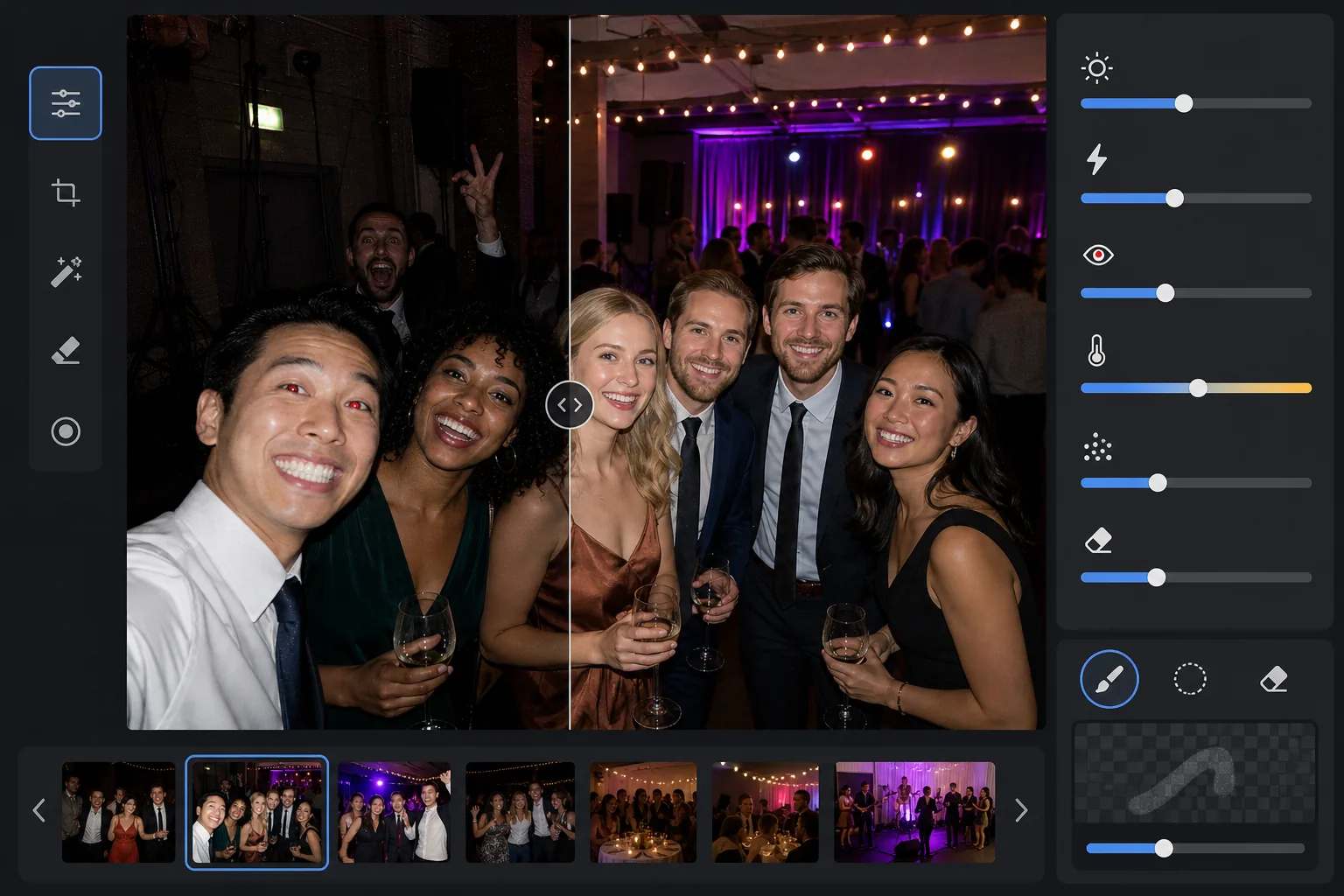
Recupera i dettagli dalle foto scattate in luoghi bui durante concerti, gala, feste di compleanno ed eventi aziendali. Questo modello solleva l'esposizione fino a +2 EV, corregge le ombre dure del flash, rimuove gli occhi rossi e valorizza l'atmosfera della scena originale, così le tue foto di eventi appaiono vivaci come il momento vissuto.
Prova gratis questo modelloEvents template preview
Cosa fa questo modello
Salva le foto di eventi scattate in ambienti difficili con poca luce: sale per banchetti poco illuminate, locali per concerti con luci da palco colorate, feste serali all'aperto e taverne nel seminterrato. AI Enhance recupera fino a due stop di dettaglio nelle ombre preservando l'atmosfera dell'illuminazione colorata e delle decorazioni. Gli artefatti del flash, comprese le ombre dure in primo piano, gli occhi rossi e i volti bruciati, vengono corretti automaticamente. Magic Eraser rimuove gli intrusi, i cartelli di uscita, le attrezzature accatastate e altre distrazioni comuni negli eventi.
Impostazioni del modello
| Sollevamento dell'esposizione | Recupero adattivo delle ombre a +2,0 EV con preservazione dell'atmosfera |
| Correzione del flash | Ammorbidimento delle ombre in primo piano, attenuazione delle alte luci sulla pelle illuminata dal flash |
| Rimozione degli occhi rossi | Rilevamento automatico e ricostruzione del colore dell'iride |
| Bilanciamento del bianco | Adattivo a sorgenti miste (luci da DJ, tungsteno, fluorescenti, candele) |
| Modalità atmosfera | Esaltazione calda dell'atmosfera (+8 di calore, +5 di vivacità sullo sfondo) |
Come usare questo modello
Carica le foto dell'evento
Carica foto di qualsiasi evento: concerti, matrimoni, feste di compleanno, gala aziendali o ritrovi in giardino. Il modello rileva automaticamente l'ambiente di illuminazione e regola l'intensità del miglioramento in base a quanto è sottoesposto l'originale.
Recupera l'esposizione e correggi il flash
AI Enhance solleva le aree d'ombra fino a +2 EV, rivelando volti e dettagli persi nell'oscurità. Le alte luci bruciate dal flash sui soggetti in primo piano vengono attenuate per recuperare la texture della pelle, e le dure ombre proiettate dietro i soggetti illuminati dal flash vengono ammorbidite per fondersi in modo naturale.
Rimuovi gli occhi rossi e le distrazioni
Gli occhi rossi dovuti al flash diretto vengono rilevati automaticamente e sostituiti con un colore dell'iride naturale. Magic Eraser rimuove gli estranei intrusi, le attrezzature visibili come le pile di casse e i cavi, i cartelli di uscita e ogni altro disordine che sminuisce il momento.
Esporta le foto migliorate
Scarica le foto di eventi schiarite alla risoluzione originale per la condivisione sui social, la stampa o l'archiviazione. Il risultato mantiene l'atmosfera della scena originale — il caldo bagliore delle candele, le colorate luci da palco o le lucine scintillanti — rendendo al contempo volti e dettagli chiaramente visibili.
Consigli da professionisti per risultati ottimali
- ✓Il recupero di +2 EV funziona meglio sulle foto in cui i soggetti sono almeno debolmente visibili nell'originale. Se la foto è completamente nera a parte qualche fonte di luce, le ombre recuperate conterranno un rumore notevole. Inizia con foto in cui riesci a distinguere le sagome.
- ✓Per le foto di concerti con una spettacolare illuminazione da palco colorata, la correzione del bilanciamento del bianco preserva la dominante di colore artistica invece di neutralizzarla. I bagni di luce blu e magenta del palco vengono mantenuti pur correggendo le tonalità della pelle dei soggetti vicini al palco.
- ✓Quando elabori un lotto di foto dello stesso evento, fai prima una prova su una foto buia rappresentativa e su una foto con flash. Questo ti permette di verificare che il livello di luminosità e il calore siano giusti prima di procedere con l'intero lotto.
- ✓La correzione degli occhi rossi funziona sia sugli occhi umani che su quelli degli animali. Per le foto di animali agli eventi, l'IA gestisce il riflesso verde o giallo degli occhi che gli animali producono con il flash della fotocamera, sostituendolo con una pupilla scura naturale.
Strumenti
Domande frequenti
Può correggere foto completamente nere?
+
Il modello recupera fino a +2 EV di dettaglio nelle ombre, il che equivale all'incirca a rendere una foto quattro volte più luminosa. Se la foto originale mostra almeno deboli contorni dei tuoi soggetti, il recupero produrrà risultati utilizzabili. I fotogrammi completamente neri in cui sono visibili solo sorgenti di luce puntiformi in genere non contengono dati del sensore sufficienti per recuperare dettagli significativi.
Schiarire renderà le foto sgranate?
+
Un po' di rumore è inevitabile quando si sollevano le ombre profonde, ma la riduzione del rumore adattiva si concentra specificamente sulle aree sollevate. I dettagli fini nelle parti ben illuminate dell'inquadratura vengono preservati mentre il rumore nelle ombre recuperate viene attenuato. Il risultato è nettamente migliore rispetto al semplice aumento della luminosità in un editor di foto di base.
Funziona sulle foto di concerti con illuminazione da palco?
+
Sì. Il modello è progettato per gestire illuminazione mista e colorata. I bagni di luce da palco in blu, rosso, magenta e verde vengono preservati come elementi artistici della scena anziché trattati come dominanti di colore da correggere. I volti dei soggetti vicini al palco ricevono una regolazione selettiva del bilanciamento del bianco mentre l'atmosfera dell'illuminazione di sfondo viene mantenuta.
Rendi ogni foto di evento degna di essere condivisa
Carica foto di eventi buie, bruciate dal flash o con occhi rossi e ottieni risultati luminosi e dall'aspetto naturale che catturano l'energia del momento.
Provalo gratisRelated templates
More events templates for your workflow.