
Foto banner Twitch
Progetta un banner di canale Twitch professionale che faccia sembrare il tuo stream già affermato fin dalla prima visita. Questo modello isola il tuo ritratto da qualsiasi sfondo, lo colloca su sfondi a tema di gioco o nei colori del tuo brand e lo esporta nelle dimensioni esatte del banner Twitch, con zone sicure per la sovrapposizione della foto profilo e gli elementi di navigazione del canale.
Prova questo modello gratisSocial Media template preview
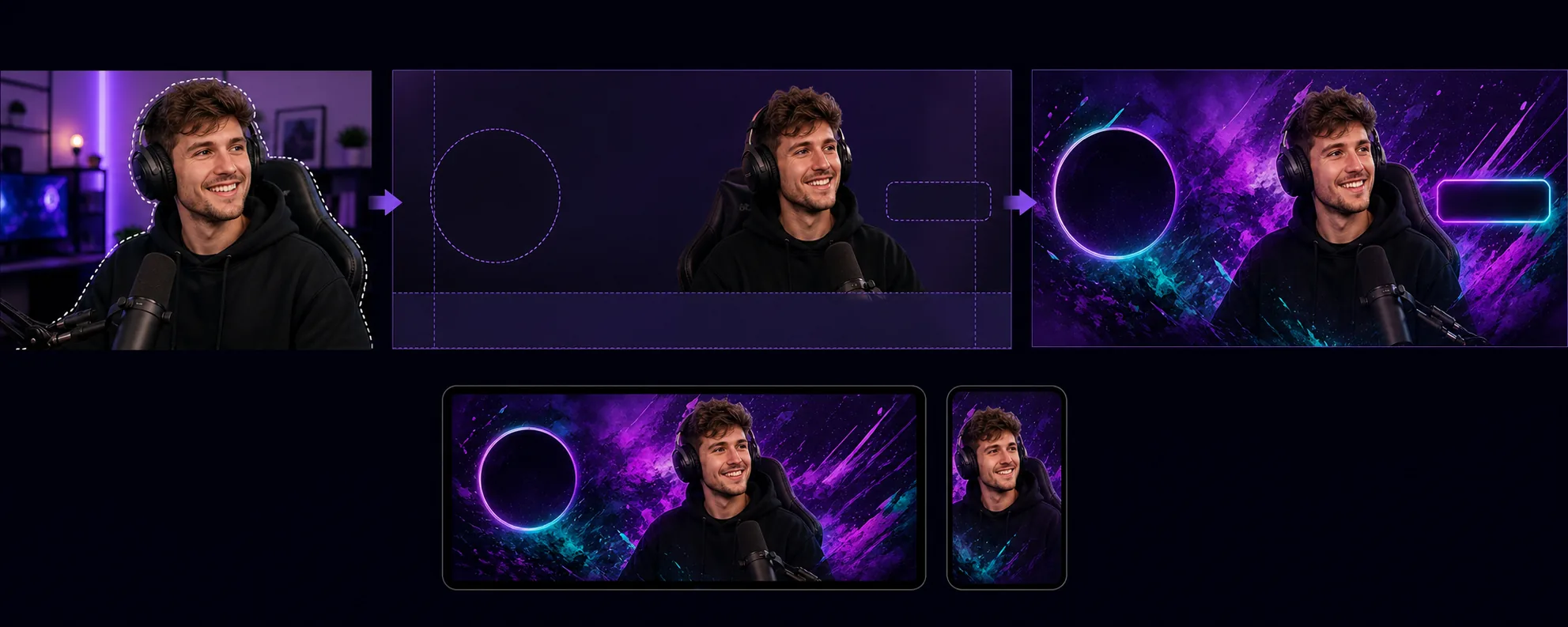
Cosa fa questo modello
Crea banner di canale ottimizzati per i requisiti di layout unici di Twitch, in cui la foto profilo, il pulsante segui e la navigazione del canale si sovrappongono ad aree specifiche del banner. Background Eraser isola il ritratto dello streamer o la foto del team da qualsiasi ambiente e lo colloca su uno sfondo che si abbina all'identità visiva del tuo canale: colori del brand a tinta unita, sfumature, temi di gioco astratti o motivi discreti. Il modello rispetta le zone sicure di Twitch in modo che i contenuti visivi importanti non vengano mai nascosti dietro il cerchio della foto profilo (lato sinistro) o i pulsanti punti canale/iscrizione (lato destro). L'output ha dimensioni di 1200×480px (la dimensione del banner consigliata) ed è ottimizzato per la visibilità sia nelle visualizzazioni del browser desktop sia nelle intestazioni dell'app mobile, dove il banner viene ritagliato in modo diverso.
Impostazioni del modello
| Dimensione del banner | 1200×480px (banner profilo consigliato da Twitch) |
| Zone sicure | Sinistra 250px (sovrapposizione profilo), destra 200px (pulsanti), in basso 80px (barra di navigazione) |
| Sfondo | Tinta unita, sfumatura, motivo di gioco astratto o immagine personalizzata |
| Posizionamento del ritratto | Centro-destra o centro, evitando la zona di sovrapposizione della foto profilo |
| Vivacità del colore | Potenziata per la visibilità sull'interfaccia viola scuro di Twitch |
Come usare questo modello
Carica la tua foto da streamer
Carica una foto di te stesso, della tua postazione di streaming o del tuo team. Gli scatti a mezzo busto con pose espressive funzionano meglio per i banner. Il modello gestisce acquisizioni da webcam, selfie da telefono e foto professionali.
Isola e posiziona
Background Eraser rimuove lo sfondo originale e posiziona il tuo ritratto all'interno delle zone sicure del banner. I 250 pixel di sinistra vengono lasciati liberi per la sovrapposizione del cerchio della foto profilo e gli 80 pixel inferiori evitano la barra di navigazione. La tua immagine viene collocata dove avrà il massimo impatto visivo sia su desktop sia su mobile.
Applica sfondo e branding
Scegli uno sfondo che si abbini all'identità del tuo canale. Sfumature audaci e motivi a tema di gioco risaltano bene sul cromo viola scuro di Twitch. Se il tuo canale ha colori di brand consolidati, usali per rafforzare il riconoscimento quando gli spettatori arrivano sulla pagina del tuo canale.
Esporta e carica
Scarica in 1200×480px ottimizzato per Twitch. Il file pesa meno di 10MB (il limite di Twitch) ed è compresso per caricarsi rapidamente per gli spettatori con connessioni più lente. Visualizza in anteprima come appare il banner con la foto profilo e la navigazione sovrapposte prima di caricarlo sul tuo canale.
Consigli da professionisti per risultati ottimali
- ✓Usa una foto con una posa espressiva o energica: indicare la fotocamera, festeggiare o sporgersi in avanti. Le pose statiche scompaiono nel formato stretto del banner, mentre le pose dinamiche creano un'energia visiva che invoglia gli spettatori a restare.
- ✓Prova il tuo banner sia su desktop sia su mobile. Twitch ritaglia il banner in modo diverso su mobile, mostrando principalmente la parte centrale. Colloca i tuoi contenuti visivi più importanti nei 700 pixel centrali per la compatibilità tra dispositivi.
- ✓Abbina i colori del tuo banner all'impostazione del colore di accento di Twitch. Quando la sfumatura del banner sfuma nello stesso colore di accento usato per il pulsante di iscrizione e il testo evidenziato del tuo canale, l'intera pagina risulta coerente e con un branding professionale.
Strumenti
Domande frequenti
Quali dimensioni richiede Twitch per i banner?
+
Twitch consiglia 1200×480 pixel per i banner del profilo. La dimensione massima del file è di 10MB. Il modello produce esattamente queste dimensioni con una compressione adeguata.
Posso includere del testo sul banner?
+
Il modello produce il layout visivo senza sovrapposizione di testo. Puoi aggiungere il nome del tuo canale, la programmazione o i tuoi handle social usando qualsiasi editor di immagini in seguito. Le guide delle zone sicure mostrano esattamente dove il testo rimarrà visibile e non verrà coperto dagli elementi dell'interfaccia di Twitch.
Funziona anche per le schermate offline di Twitch?
+
Il modello è dimensionato per il banner del profilo. Le immagini delle schermate offline di Twitch usano un rapporto d'aspetto 16:9 (1920×1080). Puoi usare un flusso di lavoro simile (isolare il ritratto, applicare lo sfondo), ma dovresti selezionare separatamente le dimensioni della schermata offline.
Fai sembrare il tuo canale Twitch affermato fin dal primo giorno
Carica una foto e ottieni un banner di canale professionale che rispetta il layout di Twitch e fa risaltare il tuo stream.
Provalo gratisRelated templates
More social media templates for your workflow.
Modello di ritaglio quadrato ottimizzato per Instagram a 1080×1080px. Sfondi puliti, colori vivaci e dettagli nitidi che risaltano nel feed.
Modello di banner YouTube a 2560×1440px con guide alle zone sicure. Rimozione pulita dello sfondo per le foto dei creatori, layout compatibile con il dispositivo e grafica del canale coerente con il marchio.
Modello di foto di copertina di Facebook a 820×312px per desktop e ritaglio mobile a 640×360px. Pulisci le immagini del marchio con zone sicure adeguate per la sovrapposizione dell'immagine del profilo e il posizionamento dei pulsanti CTA.
Crea immagini di intestazione Twitter/X professionali con l'esatta dimensione di 1500×500 px. Tiene conto della sovrapposizione delle immagini del profilo e funziona sia in modalità scura che in modalità luce.
Migliora le foto del profilo degli appuntamenti con levigatura naturale della pelle, pulizia dello sfondo, correzione dell'illuminazione e una delicata gradazione del colore che sembra autentica, senza filtri.
Crea immagini pin Pinterest che bloccano lo scorrimento con sfondi puliti, dimensioni verticali 2:3 ottimali, miglioramento dei colori vivaci e composizione pronta per le pin.