
Immagine pin Pinterest
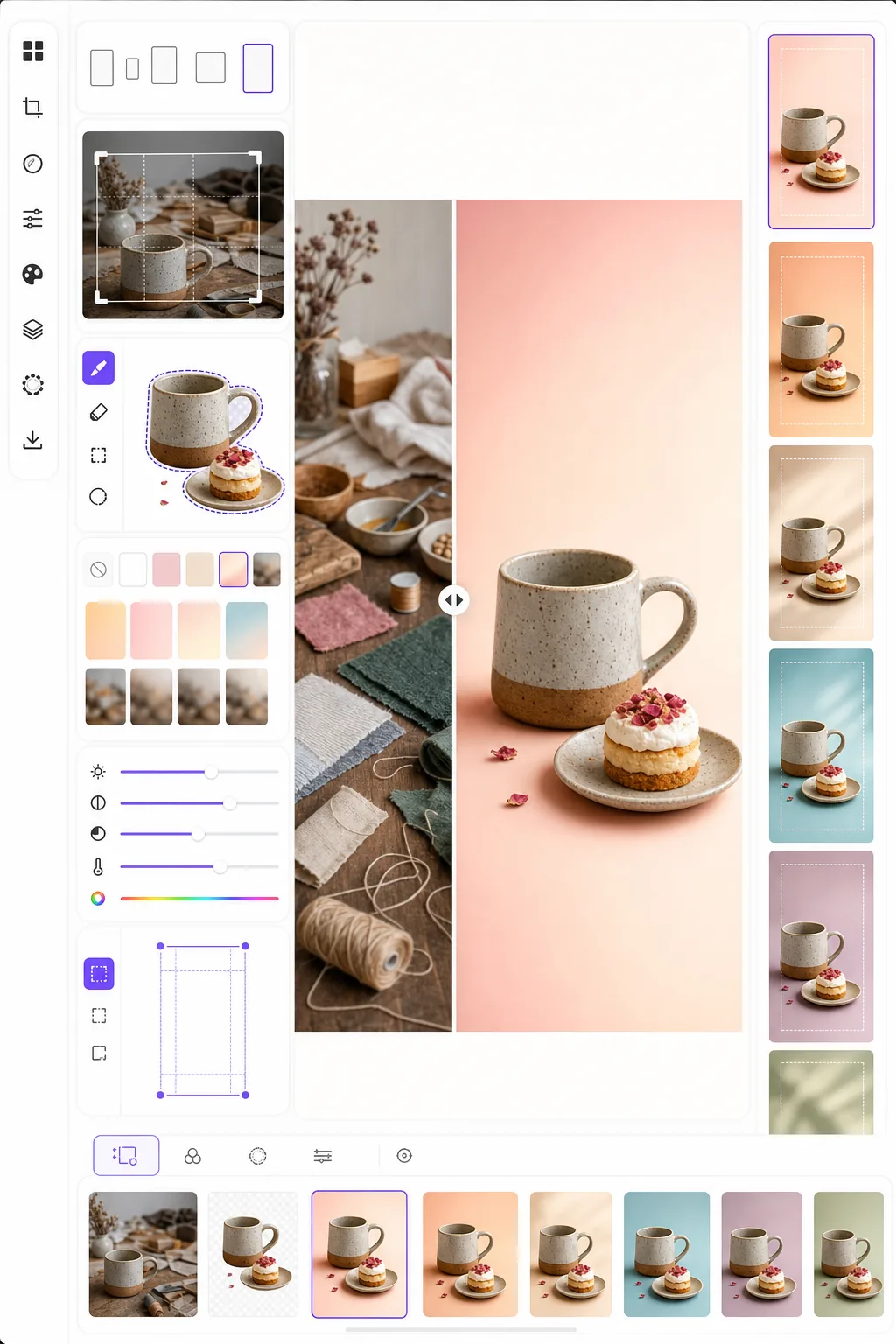
Crea immagini pin che bloccano lo scorrimento e generano salvataggi. Questo modello formatta le foto secondo il rapporto verticale 2:3 ottimale di Pinterest, rimuove gli sfondi affollati per composizioni pulite incentrate sul prodotto, aumenta la vivacità dei colori per il feed di Pinterest e produce immagini pronte per le pin che appaiono nitide sia su mobile che su desktop.
Prova gratis questo modelloSocial Media template preview
Cosa fa questo modello
Ottimizza le immagini per il massimo coinvolgimento su Pinterest, dove le pin alte e visivamente incisive superano le foto orizzontali standard di tre-cinque volte nel tasso di salvataggio. Background Eraser isola il tuo soggetto — prodotto, piatto di una ricetta, outfit o oggetto artigianale — e lo posiziona su uno sfondo pulito, colorato o sfumato che fa risaltare il soggetto in un feed affollato. La vivacità dei colori viene aumentata per assecondare la tendenza dell'algoritmo di Pinterest a favorire contenuti luminosi e saturi. Il modello produce immagini a 1000 × 1500 px, le dimensioni esatte che Pinterest consiglia per le pin standard.
Impostazioni del modello
| Rapporto d'aspetto | 2:3 verticale (1000 × 1500 px — standard Pinterest) |
| Opzioni di sfondo | Bianco pulito, colore pieno, sfumatura morbida o originale sfocato |
| Potenziamento del colore | +20% di saturazione per la visibilità nel feed (regolabile) |
| Inquadratura del soggetto | Centratura automatica con 10% di margine per lo spazio di sovrapposizione del testo |
| Formato di output | PNG (per sovrapposizione di testo) o JPEG (per caricamento diretto) |
Come usare questo modello
Carica la tua immagine sorgente
Carica una foto di prodotto, una foto di un piatto, una foto di un outfit o qualsiasi immagine che vuoi trasformare in una pin Pinterest. Il modello accetta immagini orizzontali, quadrate o verticali e le riformatta nel rapporto verticale 2:3 ottimale con un ritaglio intelligente che mantiene il soggetto centrato.
Sfondo e composizione
Background Eraser isola il tuo soggetto e lo posiziona su uno sfondo pulito. Scegli tra bianco puro, un colore di marca pieno, una sfumatura morbida o una versione sfocata dello sfondo originale. Il soggetto viene posizionato automaticamente in modo da lasciare spazio in alto e in basso per le sovrapposizioni di testo.
Ottimizzazione di colore e nitidezza
I colori vengono potenziati del 20% di saturazione per distinguersi nel feed di Pinterest, dove le immagini spente tendono a essere superate con lo scorrimento. La nitidezza viene migliorata per il soggetto mentre lo sfondo rimane morbido, creando una profondità visiva che attira l'occhio verso il soggetto principale.
Esporta la tua pin
Scarica a 1000 × 1500 px come PNG (se prevedi di aggiungere sovrapposizioni di testo in Canva o in un altro editor) o JPEG (per il caricamento diretto su Pinterest). Il profilo colore è impostato su sRGB per una visualizzazione accurata su tutti i dispositivi e browser.
Consigli da professionisti per risultati ottimali
- ✓Lascia il 20% superiore e il 15% inferiore della pin relativamente puliti per le sovrapposizioni di testo. Il modello posiziona il tuo soggetto in modo da lasciare questo spazio, ma scegliere uno sfondo pieno o sfumato in queste aree rende il testo più leggibile rispetto a uno sfondo fotografico affollato.
- ✓Usa sfondi dai toni caldi (rosa cipria, terracotta, crema) per le pin lifestyle e food, e neutri freddi (bianco, grigio chiaro, azzurro pallido) per le pin di prodotti e tecnologia. I dati sul coinvolgimento di Pinterest mostrano costantemente che le pin con palette di colori intenzionali superano quelle con sfondi casuali.
- ✓Crea più versioni di pin per lo stesso contenuto — stesso soggetto con diversi colori di sfondo e ritagli. Pinterest premia la varietà dei contenuti, e testare due o tre design di pin per ogni contenuto aiuta a identificare quale stile visivo risuona con il tuo pubblico.
Strumenti
Domande frequenti
Posso aggiungere testo alla pin?
+
Il modello produce un'immagine pulita ottimizzata per la sovrapposizione di testo, ma non aggiunge testo direttamente. Esporta come PNG e aggiungi il testo in Canva, Photoshop o qualsiasi strumento di design. Il soggetto è posizionato in modo da lasciare spazio per i titoli in alto e gli inviti all'azione in basso.
E per gli Idea Pins (video)?
+
Questo modello è per le pin statiche standard. Gli Idea Pins (precedentemente Story Pins) usano formati video e multipagina che richiedono strumenti diversi. Gli output del modello funzionano bene come fotogrammi di copertina per gli Idea Pins se hai bisogno di una miniatura statica.
Funziona per le pin in stile infografica?
+
Per le pin infografiche, il modello è ideale per preparare singole immagini o foto di prodotto che poi disponi in un layout infografico più alto (1000 × 2100 px o superiore). Ogni elemento può essere elaborato separatamente e poi combinato in uno strumento di design.
Crea pin Pinterest che bloccano lo scorrimento
Carica qualsiasi immagine e ottieni una composizione verticale pronta per le pin con sfondi puliti e colori ottimizzati per il massimo dei salvataggi e dei clic.
Provalo gratisRelated templates
More social media templates for your workflow.
Modello di ritaglio quadrato ottimizzato per Instagram a 1080×1080px. Sfondi puliti, colori vivaci e dettagli nitidi che risaltano nel feed.
Modello di banner YouTube a 2560×1440px con guide alle zone sicure. Rimozione pulita dello sfondo per le foto dei creatori, layout compatibile con il dispositivo e grafica del canale coerente con il marchio.
Modello di foto di copertina di Facebook a 820×312px per desktop e ritaglio mobile a 640×360px. Pulisci le immagini del marchio con zone sicure adeguate per la sovrapposizione dell'immagine del profilo e il posizionamento dei pulsanti CTA.
Crea immagini di intestazione Twitter/X professionali con l'esatta dimensione di 1500×500 px. Tiene conto della sovrapposizione delle immagini del profilo e funziona sia in modalità scura che in modalità luce.
Migliora le foto del profilo degli appuntamenti con levigatura naturale della pelle, pulizia dello sfondo, correzione dell'illuminazione e una delicata gradazione del colore che sembra autentica, senza filtri.
Crea accattivanti foto di copertina video TikTok con sfondi puliti, inquadrature del soggetto in grassetto e dimensioni verticali 9:16 ottimizzate per la coerenza della griglia del profilo.