
Modello di story per i social media
Progetta story verticali 9:16 ottimizzate per Instagram, TikTok, Snapchat e YouTube Shorts. Questo modello ritaglia e riposiziona le foto per il formato verticale allungato, rimuove o sostituisce gli sfondi per dare impatto visivo e garantisce che il soggetto sia collocato all'interno delle zone sicure per il testo, così che sovrapposizioni, adesivi e didascalie non coprano mai il punto focale.
Prova gratis questo modelloSocial Media template preview
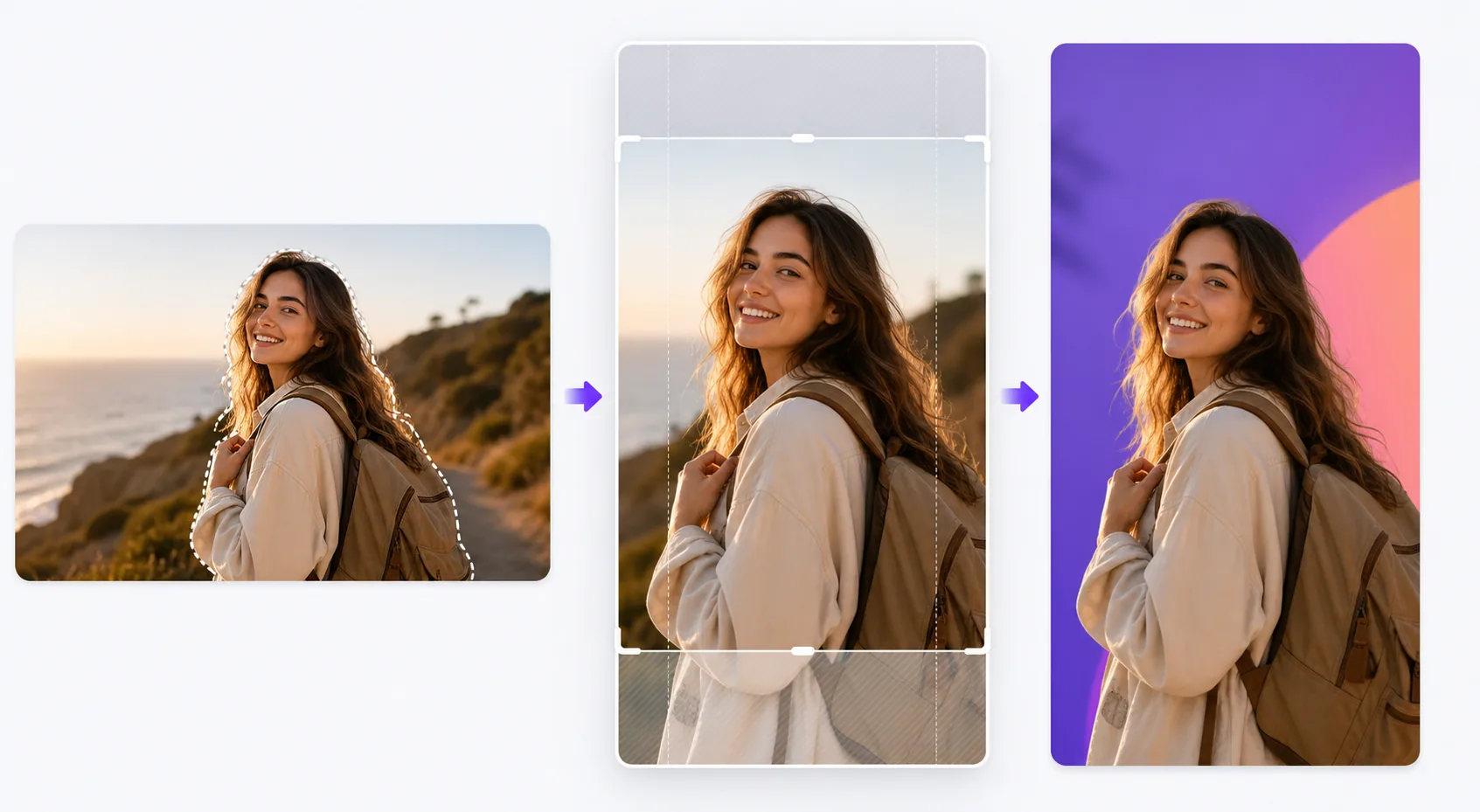
Cosa fa questo modello
Risolve la sfida della formattazione che riduce il coinvolgimento sulle piattaforme di story: foto orizzontali compresse in cornici verticali con barre nere, soggetti tagliati in punti scomodi e dettagli visivi importanti nascosti dietro gli elementi dell'interfaccia. Il modello ritaglia in modo intelligente la tua foto in 9:16, centra il soggetto e applica un riinquadramento basato sull'IA quando la composizione originale non si adatta bene al formato verticale. Background Eraser ti permette di collocare il soggetto su colori pieni vivaci, gradienti o sfondi ambientali sfocati che fanno risaltare la story nel feed. Le guide delle zone sicure assicurano che il 15% superiore (dove si trovano le icone del profilo e i timestamp) e il 20% inferiore (dove compaiono gli inviti a scorrere verso l'alto e le didascalie) rimangano liberi da contenuti visivi essenziali.
Impostazioni del modello
| Rapporto d'aspetto | 9:16 (1080×1920px) — nativo per le story di Instagram, TikTok e Snapchat |
| Stile dello sfondo | Colore pieno, gradiente, originale sfocato o immagine personalizzata |
| Posizionamento del soggetto | Riinquadramento con IA per centrare il soggetto nella zona sicura verticale |
| Zone sicure | Il 15% superiore e il 20% inferiore mantenuti liberi per gli elementi dell'interfaccia della piattaforma |
| Formato di output | JPEG al 95% di qualità o PNG con trasparenza per ulteriori modifiche |
Come usare questo modello
Carica la tua foto
Carica qualsiasi foto: orizzontale, verticale o quadrata. L'IA rileva il soggetto principale (persona, prodotto, punto focale della scena) e determina il miglior ritaglio verticale che mantiene il soggetto in evidenza e la composizione equilibrata nella cornice 9:16.
Scegli il trattamento dello sfondo
Mantieni lo sfondo originale (ritagliato per adattarsi), sostituiscilo con un colore pieno o un gradiente per un impatto grafico, oppure sfoca lo sfondo per creare separazione di profondità. Background Eraser fornisce uno scontorno pulito se vuoi comporre il soggetto su uno sfondo completamente nuovo.
Posiziona all'interno delle zone sicure
Il modello ti mostra dove gli elementi dell'interfaccia della piattaforma si sovrapporranno all'immagine: timestamp, icone del profilo in alto e inviti a scorrere verso l'alto o aree delle didascalie in basso. Il soggetto viene posizionato automaticamente nella zona sicura centrale e puoi regolare la posizione se necessario.
Esporta per la pubblicazione
Scarica a 1080×1920px, la risoluzione nativa per i formati story. Il file è ottimizzato per ridurre al minimo gli artefatti di compressione quando le piattaforme ricodificano il caricamento. L'esportazione in PNG è disponibile se vuoi aggiungere testo, adesivi o ulteriori modifiche in un'altra app prima di pubblicare.
Consigli da esperti per i migliori risultati
- ✓Usa colori di sfondo vivaci e contrastanti dietro i soggetti scontornati. Uno sfondo corallo brillante o blu elettrico fa risaltare visivamente un prodotto o una persona rispetto ai feed neutri che la maggior parte degli utenti scorre, aumentando la probabilità che si fermino sulla tua story.
- ✓Mantieni il 20% inferiore della cornice visivamente semplice. Su Instagram, la barra di risposta e il testo della didascalia si trovano in quest'area. Collocarvi contenuti visivi importanti garantisce che verranno coperti quando gli spettatori guarderanno la story.
- ✓Per le story a carosello, mantieni lo stesso colore di sfondo e la stessa posizione del soggetto in tutti i fotogrammi. La coerenza visiva fa sì che la serie appaia intenzionale e curata, aumentando il tasso di scorrimento.
Strumenti
Domande frequenti
Posso usare foto orizzontali in formato paesaggio?
+
Sì. L'IA riinquadra la composizione identificando il soggetto chiave e ritagliando una fetta verticale che mantiene l'impatto visivo. Per gli scatti panoramici molto larghi, il riinquadramento può ritagliare in modo significativo, quindi le immagini con un soggetto centrato funzionano meglio.
Funziona anche per le miniature dei video?
+
Il modello elabora immagini statiche. Tuttavia, puoi usare l'immagine esportata come fotogramma di copertina per una story video, che le piattaforme mostrano prima della riproduzione del video e nelle griglie delle story in evidenza.
Quali piattaforme usano il formato 9:16?
+
Instagram Stories e Reels, TikTok, Snapchat, YouTube Shorts, Facebook Stories, Pinterest Idea Pins e LinkedIn Stories usano tutti il formato verticale 9:16. L'output 1080×1920px è la risoluzione standard accettata da tutte queste piattaforme.
Rendi ogni story impossibile da scorrere oltre
Carica qualsiasi foto e ottieni in pochi secondi un'immagine di story verticale perfettamente formattata e ottimizzata per le piattaforme.
Provalo gratisRelated templates
More social media templates for your workflow.
Modello di ritaglio quadrato ottimizzato per Instagram a 1080×1080px. Sfondi puliti, colori vivaci e dettagli nitidi che risaltano nel feed.
Modello di banner YouTube a 2560×1440px con guide alle zone sicure. Rimozione pulita dello sfondo per le foto dei creatori, layout compatibile con il dispositivo e grafica del canale coerente con il marchio.
Modello di foto di copertina di Facebook a 820×312px per desktop e ritaglio mobile a 640×360px. Pulisci le immagini del marchio con zone sicure adeguate per la sovrapposizione dell'immagine del profilo e il posizionamento dei pulsanti CTA.
Crea immagini di intestazione Twitter/X professionali con l'esatta dimensione di 1500×500 px. Tiene conto della sovrapposizione delle immagini del profilo e funziona sia in modalità scura che in modalità luce.
Migliora le foto del profilo degli appuntamenti con levigatura naturale della pelle, pulizia dello sfondo, correzione dell'illuminazione e una delicata gradazione del colore che sembra autentica, senza filtri.
Crea immagini pin Pinterest che bloccano lo scorrimento con sfondi puliti, dimensioni verticali 2:3 ottimali, miglioramento dei colori vivaci e composizione pronta per le pin.