
Uncover the Image Behind an Emoji
Scopri come Scoprire l'immagine dietro l'emoji con Magic Eraser. Guida semplice passo passo con strumento AI gratuito. Funziona su web, iOS e Android.
Last updated
Prova ora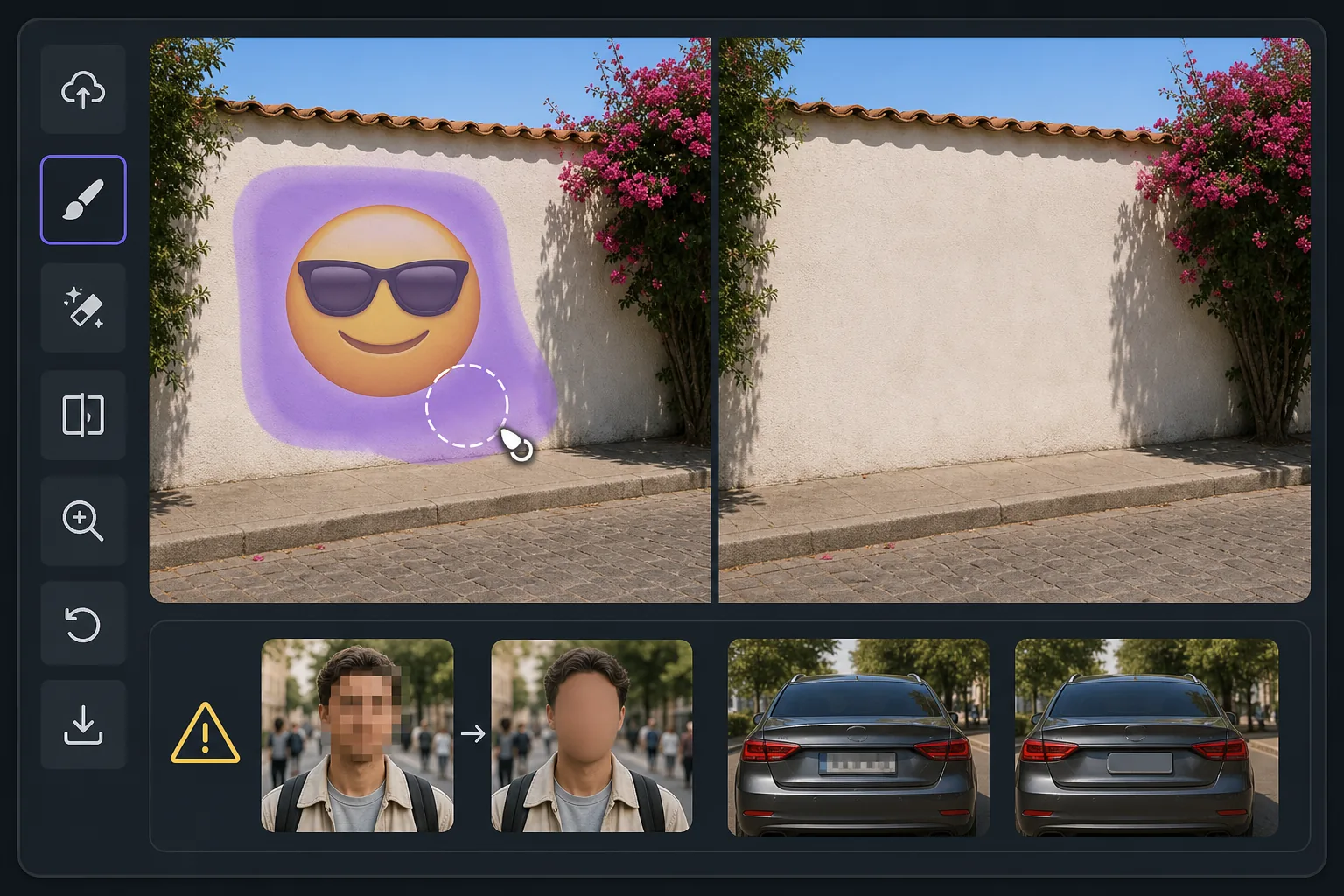
What "uncovering" an emoji really means con Magic Eraser
When someone covers part of a photo with an emoji, sticker, or smiley, the pixels underneath are gone — they were never saved in that file. So no tool, Magic Eraser included, can recover the true original content beneath the emoji. What Magic Eraser can do is far more useful than it sounds: its AI inpainting analyzes the surrounding image — colors, textures, lighting, and patterns — and synthesizes a clean, plausible reconstruction to fill the space the emoji occupied. The result is a seamless, emoji-free photo where the covered area blends naturally with everything around it. If the emoji was hiding a plain wall, a sky, grass, or fabric, the reconstruction is usually convincing because the AI has plenty of context to extend. If the emoji was covering a person's face, license plate, or specific text, the AI will invent something that fits the scene — it cannot reveal who or what was actually there. Going in with that expectation is the difference between being delighted and being disappointed. Magic Eraser works on the web and as a free iOS and Android app, with no watermark on the free tier, so you can try uncovering the area behind an emoji in seconds.
Before you start
Istruzioni passo passo
Start with carica la foto. The result preview above and tips below use this guide's existing content; no separate before-and-after proof is assumed.
- 1
Carica la foto
Apri Magic Eraser su web, iOS o Android. Trascina e rilascia la foto JPEG, PNG, HEIC o WebP. Nessun account necessario.
- 2
Seleziona lo strumento e l'area
Scegli lo strumento adatto e seleziona l'area da elaborare. L'AI analizza e applica le modifiche automaticamente in pochi secondi.
- 3
Scarica il risultato
Visualizza l'anteprima del risultato e scarica la foto modificata. Esporta in PNG o JPEG ad alta qualità.
Ideale per
- Seeing what a scenic background looks like once an emoji or smiley sticker is lifted off a landscape or skyline photo
- Cleaning up screenshots where an emoji was dropped over a plain wall, sky, or surface and you want the unobstructed view
- Reconstructing simple textures — grass, water, carpet, fabric — that an emoji partially covered
- Removing playful stickers from your own photos so the image reads clean without the cartoon overlay
- Anyone who understands the AI paints a believable fill rather than recovering the literal pixels a face or detail behind the emoji
Consigli per risultati migliori
The single most important tip: Magic Eraser reconstructs, it does not recover. If an emoji was deliberately placed to hide someone's identity, a phone number, or sensitive text, removing it will not reveal the real thing — the AI simply paints whatever fits the surrounding scene. Treat results over plain or repeating backgrounds as reliable, and results over faces or specific details as creative guesses. For the most natural reconstruction, give the brush a little extra room around the emoji's edges, work on the highest-resolution copy you have, and run a second pass if any seams or color mismatches remain. Because the free tier on web, iOS, and Android adds no watermark, you can experiment freely until the uncovered area looks right.
Domande frequenti
- La funzione Scoprire l'immagine dietro l'emoji è gratuita?
- Sì, Magic Eraser permette di Scoprire l'immagine dietro l'emoji gratuitamente con limiti giornalieri. Passa al piano Pro per elaborazione illimitata ed esportazioni ad alta risoluzione.
- Quanto tempo ci vuole per Scoprire l'immagine dietro l'emoji?
- Solo pochi secondi. L'AI di Magic Eraser elabora le foto rapidamente — la maggior parte dei risultati è disponibile immediatamente.
- Posso usarlo sul cellulare?
- Sì, Magic Eraser funziona su iOS, Android e tutti i browser web. Puoi passare da un dispositivo all'altro liberamente.
- La qualità dell'immagine viene compromessa?
- No, Magic Eraser preserva la qualità originale della foto. L'AI elabora in modo intelligente per mantenere dettagli e nitidezza.