
Come sostituire il cielo in una foto
Un cielo bianco e coperto rovina uno scatto altrimenti eccezionale: il grigio piatto e informe o il bianco spento sottraggono energia ai paesaggi, agli esterni degli immobili e alle foto di viaggio. L'intelligenza artificiale di Magic Eraser sostituisce il cielo regolando l'illuminazione in primo piano in modo che corrisponda, creando un composito naturale.
Last updated
Sostituisci il cielo adesso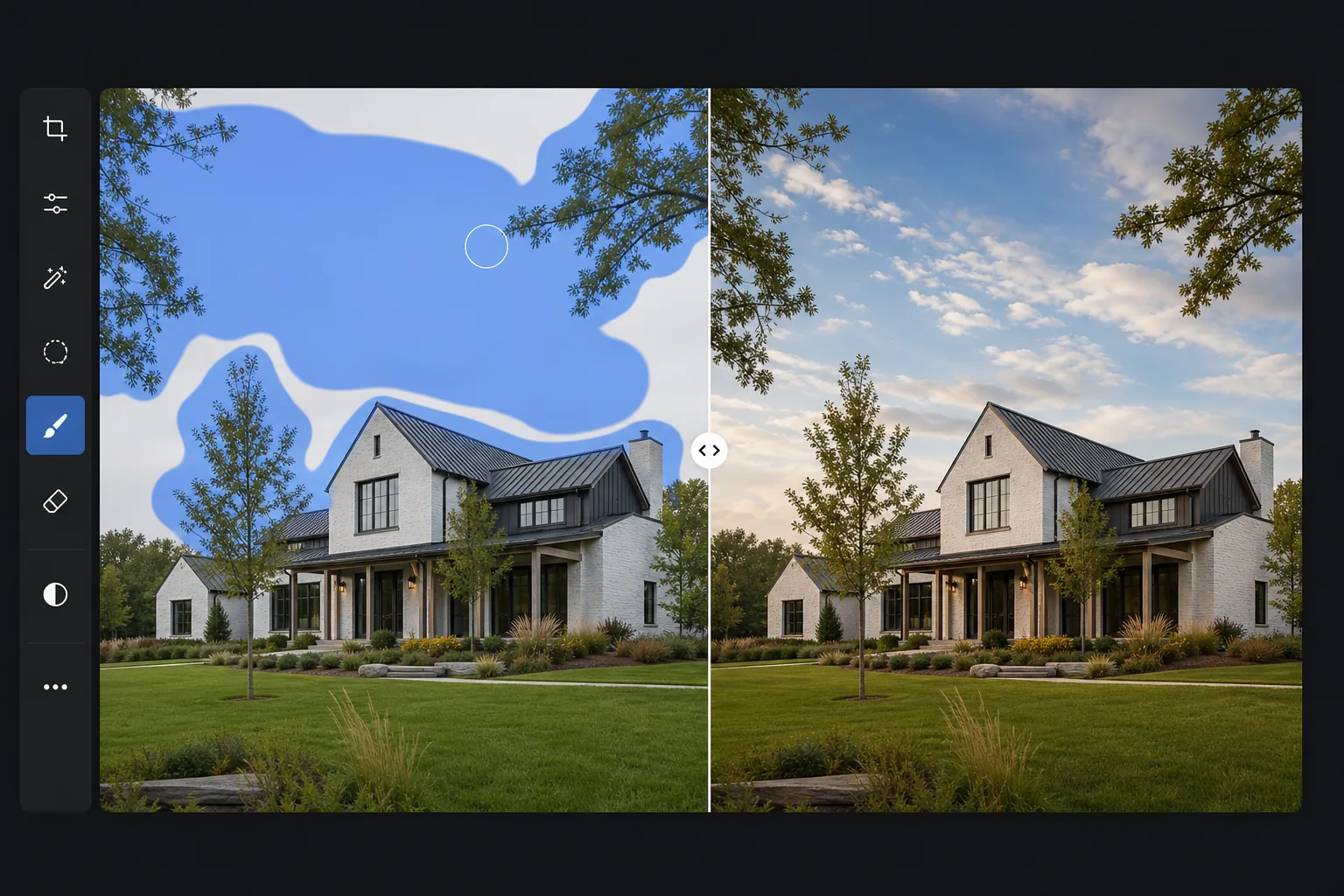
Perché la sostituzione del cielo richiede molto più del semplice scambio di pixel
Per sostituire il cielo in una foto, apri Magic Eraser sul web, su iOS o su Android, carica l'immagine, passa il brush sul cielo esistente e lascia che l'AI ne inserisca uno nuovo: cielo azzurro, nuvole d'effetto o luce dorata. È gratis e senza registrazione. Fa molto più che incollare pixel: l'AI ritaglia i dettagli più fini, come i rami degli alberi e il profilo dei tetti, e riscalda o raffredda il primo piano in modo che la luce del nuovo cielo si integri con la scena, senza l'effetto "incollato". Funziona al meglio con una linea dell'orizzonte ben definita; inoltre l'AI sceglie un cielo coerente con la scena, così non metterà un tramonto dietro un soggetto illuminato frontalmente. Il cielo non è isolato dal resto dell'immagine: illumina tutto ciò che si trova sotto di esso. Un cielo d'oro proietta una luce calda sugli edifici e sui volti. Un cielo coperto crea ombre morbide e diffuse. Quando sostituisci il cielo, l'illuminazione in primo piano deve cambiare per corrispondere, altrimenti il risultato sembrerà falso. La sostituzione manuale del cielo in Photoshop prevede il mascheramento del cielo (complesso attorno ai rami degli alberi, ai capelli e ai dettagli architettonici), il posizionamento del nuovo cielo, quindi la regolazione della temperatura del colore in primo piano, della luminosità e della direzione dell'ombra per adattarla all'illuminazione implicita del nuovo cielo: un processo che richiede 20-45 minuti per un risultato convincente. L'intelligenza artificiale di Magic Eraser gestisce l'intero processo: mascheramento preciso del cielo anche attorno ai dettagli più piccoli, sostituzione del cielo e regolazione automatica dell'illuminazione in primo piano.
Before you start
Sostituisci il cielo in tre passaggi
Start with carica la foto. The result preview above and tips below use this guide's existing content; no separate before-and-after proof is assumed.
- 1
Carica la foto
Apri Magic Eraser sul Web, iOS o Android. Carica la foto con il cielo che desideri sostituire: un paesaggio coperto, l'esterno di un immobile con il cielo bianco, una foto di viaggio con un cielo opaco o spento. Supportati JPEG, PNG, HEIC e WebP.
- 2
Spennellare l'area del cielo
Dipingi sul cielo. L'intelligenza artificiale rileva automaticamente il confine del cielo, gestendo bordi complessi come rami di alberi, sagome di edifici e dettagli dell'orizzonte. Non è necessario tracciare il confine con precisione: sfiora ampiamente l'area del cielo e l'intelligenza artificiale identifica il confine esatto.
- 3
Genera e rivedi
L'intelligenza artificiale sostituisce il cielo con un'alternativa contestualmente appropriata, in genere un cielo azzurro naturale con nuvole che corrisponde alla direzione dell'illuminazione della scena e all'ora del giorno. Il primo piano viene leggermente regolato per adattarsi all'illuminazione del nuovo cielo. Controlla la linea dell'orizzonte e i bordi degli alberi/edifici per individuare transizioni nette. Esporta alla massima risoluzione.
Meglio per
- Fotografia immobiliare in cui i cieli nuvolosi rendono gli esterni piatti e poco invitanti
- Fotografia di paesaggi e di viaggio in cui un cielo coperto o spento è privo di drammaticità
- Fotografia di eventi all'aperto in cui il cielo è bianco o informe negli scatti di gruppo
- Fotografia architettonica in cui un cielo drammatico esalta la composizione dell'edificio
- Marketing turistico e ricettivo dove i cieli azzurri trasmettono calore e fascino
Suggerimenti per ottenere i migliori risultati
L'intelligenza artificiale produce i risultati più naturali quando il cielo originale è chiaramente separato dal primo piano: una linea dell'orizzonte distinta con cielo sereno sopra e paesaggio/edifici sotto. Le sagome complesse (rami di alberi, gru edili, linee elettriche) sono gestite bene ma beneficiano di una pennellata pulita che copre l'intera area del cielo. Per le foto in cui il cielo è molto luminoso (bianco spento) e il primo piano è esposto correttamente, l'intelligenza artificiale ha un confine chiaro con cui lavorare. Per le foto in cui la luminosità del cielo si fonde gradualmente con il primo piano (orizzonti nebbiosi, nebbia), i risultati potrebbero richiedere un secondo passaggio vicino alla zona di transizione. L'intelligenza artificiale sceglie i tipi di cielo che corrispondono alla scena: non posizionerà un tramonto dietro una scena illuminata frontalmente.
Domande frequenti
- L'illuminazione in primo piano si regola automaticamente?
- SÌ. Quando l'intelligenza artificiale sostituisce un cielo grigio coperto con un cielo blu, riscalda leggermente i toni del primo piano per adattarli al cambiamento di illuminazione implicito. Questa regolazione automatica previene l'effetto di illuminazione non corrispondente che rende ovvio lo scambio manuale del cielo.
- Posso scegliere un cielo specifico?
- L'intelligenza artificiale genera un cielo contestualmente appropriato in base alla scena. Per stili di cielo specifici, lo strumento di riempimento generativo offre un maggiore controllo sul contenuto generato.
- Maneggia i rami degli alberi contro il cielo?
- SÌ. I dettagli più fini, come i singoli rami degli alberi, le foglie e gli elementi architettonici contro il cielo, vengono mascherati con precisione dall'intelligenza artificiale. Questa è una delle parti più difficili della sostituzione manuale del cielo e dove l’intelligenza artificiale eccelle.
- La sostituzione del cielo è gratuita?
- SÌ. La sostituzione del cielo tramite lo strumento pennello è disponibile nel livello gratuito con limiti di utilizzo giornaliero. Premium rimuove i limiti per i flussi di lavoro professionali nel settore immobiliare e paesaggistico.
- Come faccio a sostituire il cielo in una foto con l'AI dal telefono?
- Apri Magic Eraser in qualsiasi browser mobile oppure nell'app per iOS o Android, carica la foto dal rullino e passa il dito sul cielo esistente con il brush: fai pinch per ingrandire e ottenere bordi puliti attorno a tetti e rami. L'AI inserisce un nuovo cielo coerente e regola l'illuminazione del primo piano direttamente sul telefono, poi salva il risultato di nuovo nel rullino. Funziona esattamente come la versione desktop e, se usi il browser, non serve installare alcuna app: comodo per sistemare al volo una foto immobiliare o di viaggio con un cielo piatto.