
Come rimuovere un timestamp da una foto
Timbri datari arancioni di vecchie fotocamere digitali, timestamp di telecamere di sicurezza o sovrapposizioni temporali di screenshot: Magic Eraser rimuove i timbri di testo incorporati ricostruendo il contenuto dell'immagine dietro di essi.
Last updated
Rimuovi il timestamp ora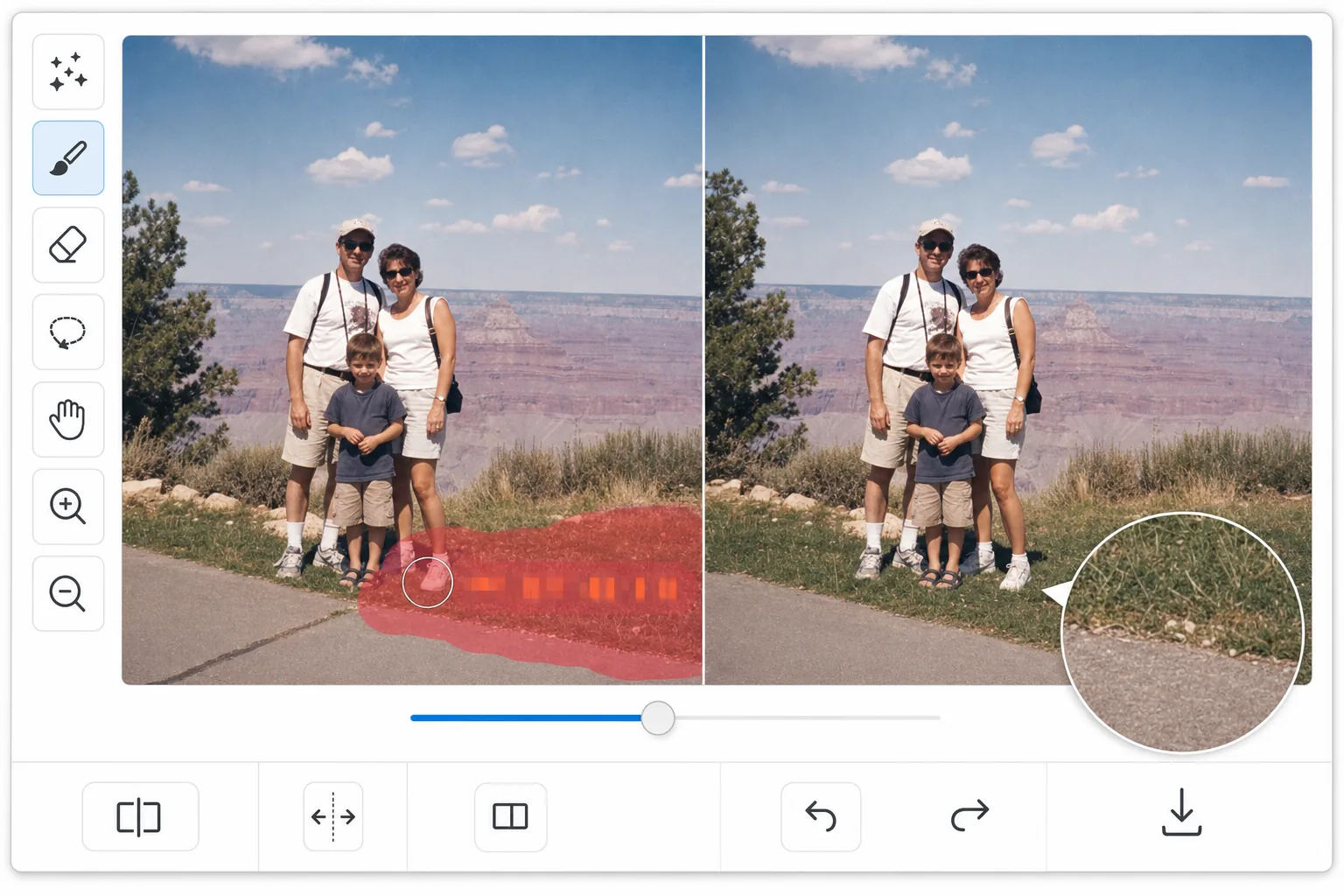
I timestamp erano utili allora, fastidiosi adesso
Per rimuovere una data o un timestamp da una foto, apri Magic Eraser sul web, su iOS o su Android, carica l'immagine, passa il brush sul testo della data o dell'ora e tocca Erase. L'AI ricostruisce la scena dietro la scritta — cielo, muro, erba o dettagli — in pochi secondi. È gratis, senza registrazione, e funziona con le vecchie date impresse dalle fotocamere, con le sovrimpressioni delle telecamere di sicurezza e con gli screenshot. Poiché la scritta è incisa nei pixel (a differenza dei dati EXIF, che puoi eliminare), non si può semplicemente disattivare: lo strumento ricostruisce ciò che c'era sotto. Le prime fotocamere digitali e le fotocamere usa e getta spesso masterizzavano data/ora direttamente nei pixel dell'immagine, una funzionalità che sembrava utile all'epoca ma che ora ingombra foto altrimenti preziose. Le telecamere di sicurezza incorporano timestamp continui. Gli screenshot catturano il testo dell'orologio e della barra di stato. A differenza dei metadati EXIF (che possono essere rimossi senza influenzare l'immagine), questi timestamp visivi fanno parte dei dati dei pixel e non possono essere disattivati. Per rimuoverli è necessario ridipingere: l'intelligenza artificiale deve capire come appare l'immagine dietro il testo e ricostruire quei pixel. Per i timestamp degli angoli su sfondi semplici (cielo, muro), questo è semplice. Per i timestamp su aree complesse (volti, modelli dettagliati), l'intelligenza artificiale utilizza la comprensione contestuale per generare contenuti plausibili.
Before you start
Rimuovi un timestamp in tre passaggi
Start with carica la foto. The result preview above and tips below use this guide's existing content; no separate before-and-after proof is assumed.
- 1
Carica la foto
Apri Magic Eraser sul Web, iOS o Android. Carica la foto con il timestamp o il testo sovrapposto che desideri rimuovere.
- 2
Spolvera il timestamp
Utilizza lo strumento pennello per dipingere sull'intero testo del timestamp. Copri tutti i personaggi, compreso qualsiasi sfondo colorato circostante aggiunto dalla fotocamera. Per i timestamp delle telecamere di sicurezza che coprono l'intera larghezza, utilizzare un pennello largo e dipingere in un unico tratto.
- 3
Rivedere la ricostruzione e l'esportazione
L'intelligenza artificiale riempie l'area del timestamp con contenuti appropriati: gradiente del cielo, trama del muro o qualsiasi cosa si trovi dietro il testo. Verificare che la ricostruzione si fonda perfettamente con le aree circostanti. Esporta la foto pulita.
Meglio per
- Ripulire le vecchie foto di fotocamere digitali con datari impressi per stamparli o condividerli
- Rimozione dei timestamp delle telecamere di sicurezza dalle immagini fisse dei filmati utilizzati nei report
- Pulizia degli screenshot rimuovendo il testo della barra di stato, l'orologio e le sovrapposizioni di notifica
- Ripristino delle scansioni di fotocamere usa e getta con datari incorporati
- Preparazione di foto d'archivio per album, stampe o presentazioni digitali
Suggerimenti per ottenere i migliori risultati
Copri l'intero timestamp con un margine: il testo parzialmente rimosso lascia frammenti di caratteri visibili che sono più difficili da rimuovere in un secondo passaggio. Per i classici datari arancioni negli angoli delle vecchie foto, lo sfondo è solitamente semplice (cielo, muro, terra) e l'intelligenza artificiale produce risultati impeccabili. I timestamp sui volti o sulle aree dettagliate richiedono che l'intelligenza artificiale generi più contenuti, quindi i risultati potrebbero richiedere un piccolo ritocco. Se la foto ha sia un timestamp che una filigrana, rimuovili separatamente per risultati più puliti. Per i filmati delle telecamere di sicurezza, elabora in batch più fotogrammi per rimuovere la sovrapposizione persistente dalla stessa posizione.
Domande frequenti
- Posso mantenere la data nei dati EXIF rimuovendo il timbro visivo?
- SÌ. La rimozione del timestamp visivo influisce solo sui dati dei pixel. Per impostazione predefinita, i metadati EXIF (data, informazioni sulla fotocamera) vengono conservati nel file esportato. Hai ancora le informazioni sulla data, ma non sono impresse nell'immagine.
- Funziona con i timestamp delle telecamere di sicurezza?
- SÌ. I timestamp delle telecamere di sicurezza sono generalmente costituiti da testo bianco o giallo su una barra scura. Spennella l'intera area del testo. L'intelligenza artificiale ricostruisce la scena dietro la sovrapposizione del timestamp.
- La rimozione del timestamp è gratuita?
- SÌ. Le funzionalità di rimozione degli oggetti sono disponibili nel livello gratuito con limiti di utilizzo giornaliero. Premium rimuove i limiti per l'elaborazione batch.
- Come rimuovo la data impressa su una foto dal mio telefono?
- Apri Magic Eraser in qualsiasi browser mobile oppure nell'app per iOS o Android, carica la foto dal rullino e fai pinch per ingrandire il testo della data. Passaci sopra il brush con il dito e tocca Erase. Lo zoom ti permette di coprire tutta la data — di solito una scritta arancione o bianca nell'angolo — senza colorare la foto intorno. Il risultato è identico a quello della versione desktop e viene salvato direttamente nelle tue foto.
- Rimuovendo la data resterà una macchia o una sbavatura nell'angolo?
- Non dovrebbe, se la scritta si trova su un'area semplice come cielo, erba o un muro — l'AI la riempie in modo quasi invisibile. Su dettagli più complessi ricostruisce un contenuto plausibile, che può risultare leggermente diverso dall'originale ma si fonde bene. Passa il brush su tutto il testo più un piccolo margine, poi porta lo zoom al 100% e controlla l'angolo; un rapido secondo passaggio uniforma qualsiasi bordo leggermente visibile.