
Come togliere gli occhiali da una foto
Abbagliamento sulle lenti, riflesso che nasconde gli occhi o vuoi semplicemente vedere come appari senza occhiali? Magic Eraser rimuove gli occhiali dai ritratti ricostruendo in modo naturale gli occhi, il ponte del naso e i lineamenti del viso circostanti.
Last updated
Togli gli occhiali adesso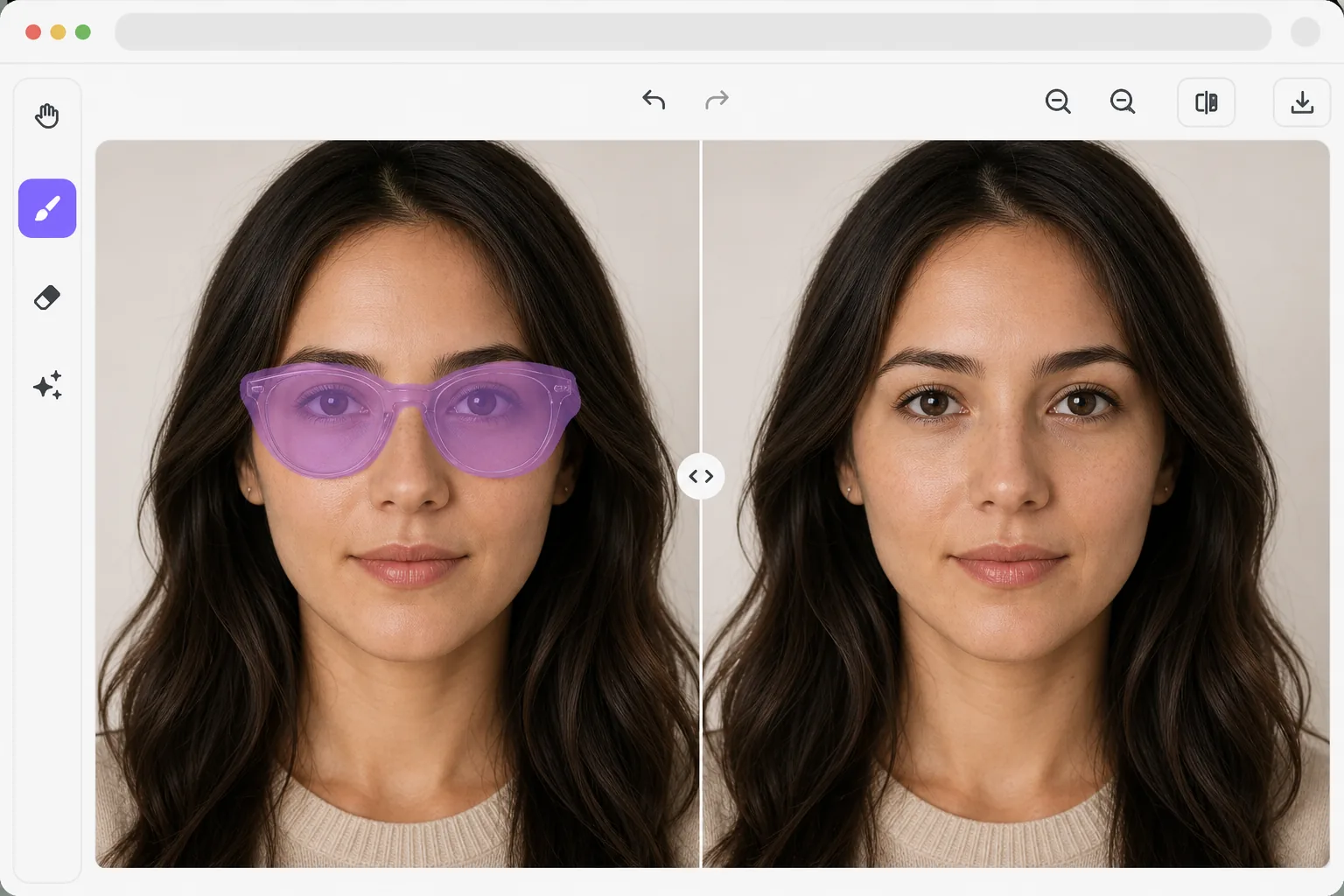
La sfida di togliere gli occhiali dalle foto
Per rimuovere gli occhiali da una foto, apri Magic Eraser sul web, su iOS o su Android, carica il ritratto, passa il brush su tutto il paio — montatura, lenti, aste e qualsiasi ombra proiettata — e tap Erase. L'AI ricostruisce gli occhi, le sopracciglia e il dorso del naso sottostanti, così il viso appare naturale senza occhiali. È gratis e senza registrazione. Funziona meglio con occhiali da vista trasparenti, dove gli occhi sono in parte visibili attraverso le lenti; con occhiali da sole scuri l'AI genera occhi plausibili partendo dalla forma del viso, che potrebbero non corrispondere al colore esatto dei tuoi occhi, quindi consideralo una somiglianza più che una rappresentazione fedele. Gli occhiali sono uno degli oggetti più difficili da rimuovere dai ritratti perché interagiscono con il viso in molteplici modi: le montature proiettano ombre, le lenti distorcono la pelle dietro di loro, i riflessi nascondono gli occhi e gli auricolari si sovrappongono ai capelli. La semplice cancellazione degli occhiali lascia evidenti spazi vuoti dove dovrebbero trovarsi gli occhi, le sopracciglia e il ponte del naso. La rimozione degli occhiali basata sull'intelligenza artificiale utilizza la comprensione facciale per ricostruire il volto completo dietro la montatura, generando occhi, sopracciglia e ponte nasale naturali che corrispondono alle caratteristiche reali della persona. La modella ha imparato da milioni di volti come dovrebbero apparire questi lineamenti una volta scoperti.
Before you start
Rimuovere gli occhiali in tre passaggi
Start with carica il ritratto. The result preview above and tips below use this guide's existing content; no separate before-and-after proof is assumed.
- 1
Carica il ritratto
Apri Magic Eraser sul Web, iOS o Android. Carica un ritratto in cui il soggetto indossa gli occhiali. I ritratti frontali e con una leggera angolazione funzionano meglio. L'intelligenza artificiale gestisce occhiali da vista, occhiali da sole e occhiali da lettura.
- 2
Seleziona gli occhiali
Spennellare tutti gli occhiali: montature, lenti e auricolari. Includi qualsiasi ombra visibile proiettata dalla montatura sulle guance e sul naso. Per gli occhiali da sole con lenti scure, coprire accuratamente l'intera area della lente.
- 3
Revisione della ricostruzione facciale ed esportazione
L'intelligenza artificiale ricostruisce gli occhi, le sopracciglia, il ponte del naso e l'area delle tempie che erano nascosti dietro gli occhiali. Verificare che i lineamenti ricostruiti corrispondano alla simmetria del viso e al tono della pelle. Esporta il ritratto senza occhiali.
Meglio per
- Fotografi ritrattisti che rimuovono abbagliamenti e riflessi dagli occhiali che oscurano gli occhi
- Persone curiose di sapere come si prenderebbero cura della LASIK o delle lenti a contatto
- Requisiti per passaporto e foto d'identità laddove alcune giurisdizioni limitano gli occhiali
- Fotografia di moda in cui gli occhiali non fanno parte dello stile previsto
- Utenti dei social media che desiderano una versione senza occhiali della loro foto del profilo
Suggerimenti per ottenere i migliori risultati
I risultati sono migliori quando una parte della zona degli occhi è visibile attraverso le lenti: occhiali da vista trasparenti con abbagliamento minimo offrono all'intelligenza artificiale il contesto più accurato per una ricostruzione oculare accurata. Per gli occhiali da sole scuri in cui gli occhi sono completamente nascosti, l'intelligenza artificiale genera occhi plausibili in base alla struttura del viso, ma potrebbero non corrispondere esattamente al colore o alla forma degli occhi originali. Includi le ombre delle cornici nella tua selezione per ottenere il risultato più pulito. Le foto frontali producono risultati più accurati rispetto ad angolazioni estreme in cui un occhio è significativamente occluso dal ponte del naso.
Domande frequenti
- Gli occhi ricostruiti corrisponderanno ai miei occhi reali?
- Per gli occhiali da vista trasparenti in cui gli occhi sono parzialmente visibili attraverso le lenti, l'intelligenza artificiale utilizza tali informazioni per una ricostruzione accurata. Per gli occhiali da sole opachi, l'intelligenza artificiale genera occhi plausibili che corrispondono al tono della pelle e alla struttura del viso, ma potrebbero differire dal colore e dalla forma esatti degli occhi.
- Gestisce i riflessi delle lenti?
- SÌ. I riflessi delle lenti vengono trattati come parte degli occhiali e rimossi durante la lavorazione. L'intelligenza artificiale ricostruisce la zona degli occhi nascosta dietro il riflesso.
- La rimozione degli occhiali è gratuita?
- SÌ. Le funzionalità di rimozione degli oggetti sono disponibili nel livello gratuito con limiti di utilizzo giornaliero. Premium rimuove i limiti per l'elaborazione batch.
- Come rimuovo gli occhiali da una foto su Android o iPhone?
- Apri Magic Eraser in un qualsiasi browser mobile oppure nell'app per iOS o Android, carica il ritratto dal rullino e fai pinch per ingrandire, così puoi tracciare con precisione montatura e lenti. Passa il dito sul brush su tutto il paio — inclusa l'ombra su guance e naso — e tap Erase. L'AI ricostruisce gli occhi e il dorso del naso direttamente sul tuo telefono e salva il risultato nel rullino. Funziona esattamente come la versione desktop e, se usi il browser, non serve installare alcuna app.
- Può rimuovere gli occhiali da sole scuri e mostrare gli occhi reali?
- Può rimuovere gli occhiali da sole, ma non può recuperare occhi che non ha mai visto. Quando le lenti sono completamente opache, l'AI non ha alcuna informazione sugli occhi reali sottostanti, quindi ne genera di plausibili adatti alla tonalità della pelle e alla struttura del viso — avranno un aspetto naturale, ma potrebbero differire dal colore e dalla forma reali dei tuoi occhi. Per un risultato che ti somigli, parti da una foto in cui almeno una parte dell'occhio è visibile attraverso la lente. Gli occhiali da vista trasparenti danno la ricostruzione più accurata.