
Remove the Emoji Hiding One Face in Your Group Photo
Scopri come Rimuovere emoji da foto di gruppo con Magic Eraser. Guida semplice passo passo con strumento AI gratuito. Funziona su web, iOS e Android.
Last updated
Prova ora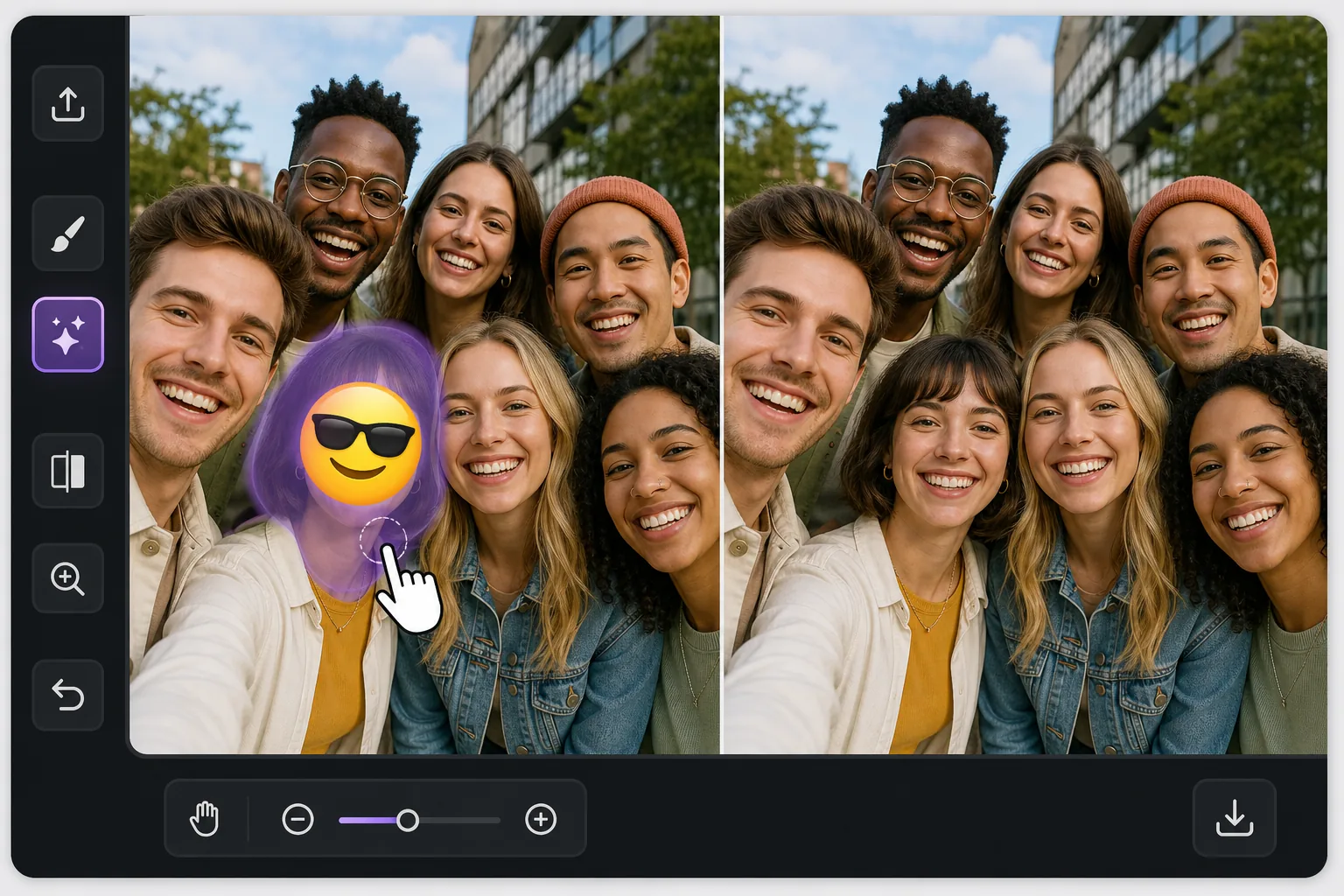
One face covered, everyone else fine con Magic Eraser
In a busy group photo, an emoji over a single person is awkward in a specific way: the rest of the shot is perfect, so the one covered face stands out even more. Magic Eraser is built for exactly this kind of pinpoint fix. You brush only the emoji sitting on that one person, and the AI inpaints the small area it covered — matching the surrounding skin tone, hair edges, and the shoulder of the person tucked in next to them. Be clear about what happens here: the AI does not recover the real hidden face. It synthesizes a plausible reconstruction of that region based on the rest of the image. In a tight group shot where the covered head is small and partly framed by neighbors, that often reads as natural at a glance. Magic Eraser works free on web, iOS, and Android with no watermark, so you can fix the group photo on whatever device the picture lives on.
Before you start
Istruzioni passo passo
Start with carica la foto. The result preview above and tips below use this guide's existing content; no separate before-and-after proof is assumed.
- 1
Carica la foto
Apri Magic Eraser su web, iOS o Android. Trascina e rilascia la foto JPEG, PNG, HEIC o WebP. Nessun account necessario.
- 2
Seleziona lo strumento e l'area
Scegli lo strumento adatto e seleziona l'area da elaborare. L'AI analizza e applica le modifiche automaticamente in pochi secondi.
- 3
Scarica il risultato
Visualizza l'anteprima del risultato e scarica la foto modificata. Esporta in PNG o JPEG ad alta qualità.
Ideale per
- A friend stamped a laughing or sunglasses emoji on one person in a shared group selfie
- A privacy sticker was placed over a single face but you now have permission to show them
- A meme reply covered one person's face and you want the clean original group shot back
- Restoring a reunion or team photo where one head got hidden behind a reaction emoji
- Reposting a group picture and needing the one covered face to blend in with everyone else
Consigli per risultati migliori
The reconstruction is most convincing when the covered head is small relative to the group and partly bordered by neighbors — the AI has nearby skin, hair, and lighting to imitate. If the emoji covers a large front-and-center face, expect a softer, more invented result and consider cropping instead. Brush a touch beyond the emoji's edge so no colored fringe survives, but stop short of the people on either side. Match expectations honestly: this rebuilds the region plausibly, it does not restore the true expression or identity of the person who was hidden. For shared photos, get that person's okay before reposting a reconstructed version of their face.
Domande frequenti
- La funzione Rimuovere emoji da foto di gruppo è gratuita?
- Sì, Magic Eraser permette di Rimuovere emoji da foto di gruppo gratuitamente con limiti giornalieri. Passa al piano Pro per elaborazione illimitata ed esportazioni ad alta risoluzione.
- Quanto tempo ci vuole per Rimuovere emoji da foto di gruppo?
- Solo pochi secondi. L'AI di Magic Eraser elabora le foto rapidamente — la maggior parte dei risultati è disponibile immediatamente.
- Posso usarlo sul cellulare?
- Sì, Magic Eraser funziona su iOS, Android e tutti i browser web. Puoi passare da un dispositivo all'altro liberamente.
- La qualità dell'immagine viene compromessa?
- No, Magic Eraser preserva la qualità originale della foto. L'AI elabora in modo intelligente per mantenere dettagli e nitidezza.