
Photo de couverture TikTok
Concevez des photos de couverture cohérentes et accrocheuses pour la grille vidéo de votre profil TikTok. Ce modèle supprime les arrière-plans chargés des images extraites de vos vidéos, optimise le cadrage pour l'affichage de couverture au format 9:16, renforce le contraste et la couleur pour une bonne visibilité en miniature, et crée une identité visuelle cohérente sur l'ensemble de votre profil.
Essayer ce modèle gratuitementSocial Media template preview
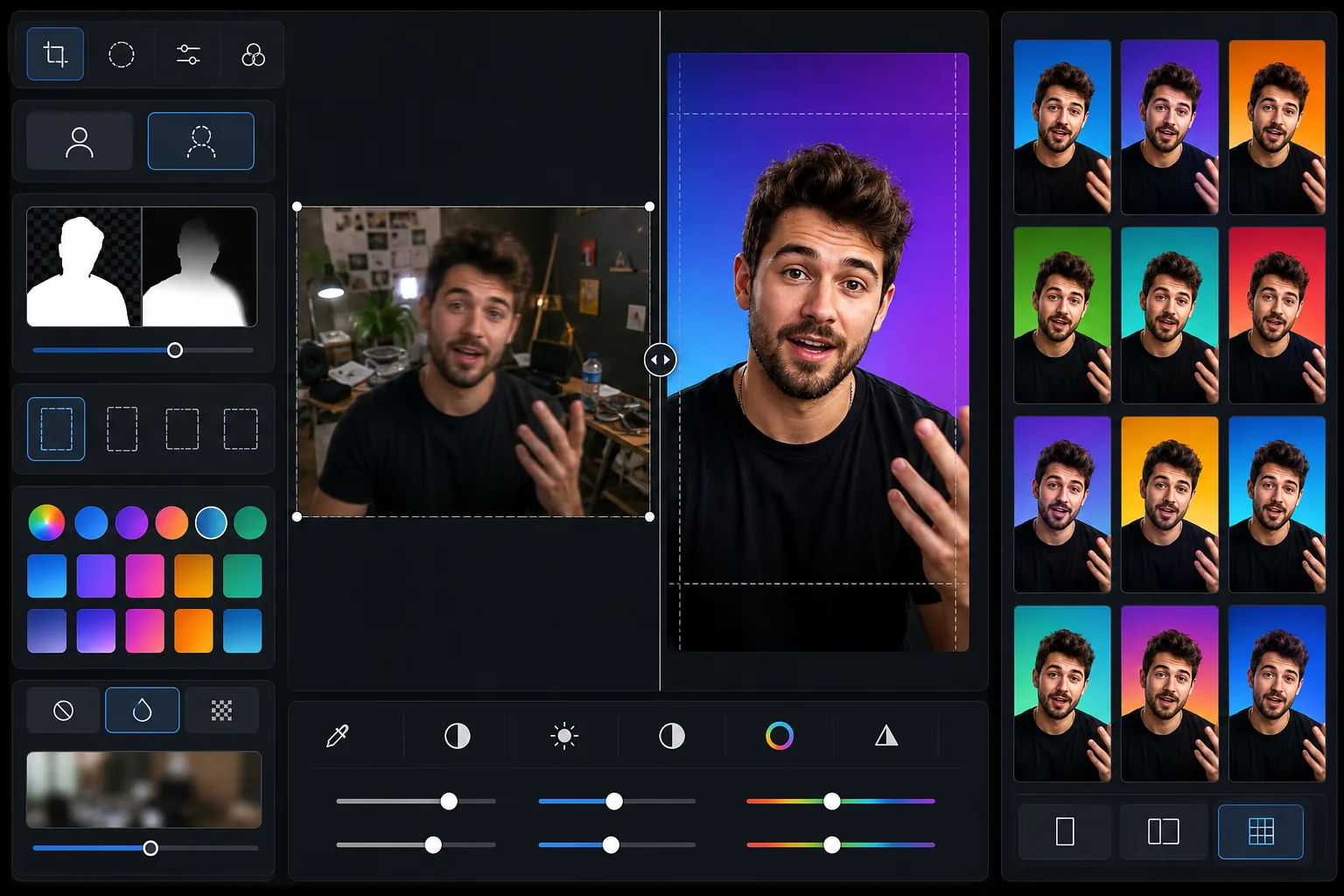
Ce que fait ce modèle
Crée des images de couverture soignées pour vos vidéos TikTok qui rendent la grille de votre profil professionnelle et cohérente. La plupart des créateurs conservent les couvertures générées automatiquement, ce qui donne une grille de profil chaotique et peu professionnelle qui décourage les abonnements. Ce modèle vous permet de prendre une image extraite de votre vidéo ou de téléverser une photo distincte, de supprimer l'arrière-plan, de vous placer sur un fond épuré ou aux couleurs de votre marque, et d'ajuster le cadrage pour que votre visage et les éléments visuels clés restent visibles même en taille miniature. Le renforcement du contraste et de la saturation garantit que vos couvertures ressortent parmi les miniatures voisines sur la page Pour toi et sur la grille de votre profil.
Paramètres du modèle
| Format d'image | Vertical 9:16 (1080 × 1920 px — natif TikTok) |
| Option d'arrière-plan | Couleur unie, dégradé ou version floutée de l'original |
| Optimisation de la miniature | Contraste +15 %, saturation +10 % pour la visibilité en petit format |
| Cadrage du sujet | Visage centré dans le tiers supérieur (visible en taille miniature dans la grille) |
| Format de sortie | JPEG à 95 % de qualité (optimisé pour le téléversement TikTok) |
Comment utiliser ce modèle
Téléversez une image vidéo ou une photo
Faites une capture d'écran de votre vidéo TikTok au moment le plus marquant visuellement, ou téléversez une photo distincte qui représente le contenu de la vidéo. Le modèle accepte tout format d'image en entrée et recadre en 9:16 grâce à un rognage intelligent.
Nettoyez l'arrière-plan
Background Eraser supprime l'arrière-plan d'origine et le remplace par une couleur unie, un dégradé ou une version légèrement floutée de la scène originale. Choisissez une couleur d'arrière-plan cohérente pour toutes vos couvertures afin de créer une grille de profil aux couleurs de votre marque, instantanément reconnaissable par les spectateurs.
Optimisez la visibilité en miniature
Le modèle cadre votre visage dans le tiers supérieur de l'image, où il reste visible dans la petite miniature de la grille. Le contraste et la saturation des couleurs sont renforcés pour que les éléments visuels clés restent distinguables même à 150 px de largeur sur une grille de profil mobile.
Exportez et téléversez sur TikTok
Téléchargez en 1080 × 1920 px au format JPEG. Dans TikTok, modifiez la vidéo publiée et sélectionnez « Modifier la couverture » pour téléverser l'image de couverture personnalisée. Ces dimensions correspondent à la résolution native de TikTok pour un affichage net sur tous les appareils.
Conseils de pro pour de meilleurs résultats
- ✓Choisissez une seule couleur d'arrière-plan ou un dégradé à deux couleurs et utilisez-le de façon cohérente sur toutes vos couvertures. Cela crée une grille de marque reconnaissable qui incite les visiteurs du profil à faire défiler votre contenu et à s'abonner.
- ✓Incluez votre visage dans la couverture dès que possible. L'algorithme de TikTok comme la psychologie humaine privilégient les visages — les couvertures avec un visage visible obtiennent de meilleurs taux de clic que celles ne comportant que du texte ou des objets.
- ✓Gardez le tiers inférieur de la couverture relativement simple, car TikTok y superpose le texte de description de la vidéo. Les éléments visuels importants (visage, produit clé, texte superposé) doivent être placés dans les deux tiers supérieurs.
- ✓Traitez les couvertures par lots de 10 à 20 vidéos à la fois pour rafraîchir rapidement votre profil. Une refonte cohérente de la grille peut augmenter le taux de conversion en abonnés de votre profil de 30 % ou plus par rapport à des couvertures générées automatiquement de façon aléatoire.
Questions fréquentes
Puis-je ajouter du texte à la couverture ?
+
Le modèle se concentre sur la composition de l'image et l'optimisation de l'arrière-plan. Pour les superpositions de texte, exportez l'image et ajoutez le texte dans un outil de conception comme Canva ou directement dans l'éditeur de couverture intégré de TikTok. Le modèle laisse un espace épuré au centre pour le texte.
TikTok autorise-t-il les couvertures personnalisées ?
+
Oui. Après avoir publié une vidéo, appuyez sur les trois points, sélectionnez « Modifier la couverture » et vous pouvez téléverser une image personnalisée depuis votre pellicule. La sortie en 1080 × 1920 px de ce modèle correspond exactement à la résolution native attendue par TikTok.
Dois-je utiliser le même style de couverture pour toutes les vidéos ?
+
Pour les marques personnelles et les entreprises, oui — un style de couverture cohérent crée une grille professionnelle qui encourage les abonnements. Pour les comptes de divertissement, un peu de variété est acceptable, mais conserver une palette de couleurs ou un motif de mise en page cohérent aide tout de même à la cohésion visuelle.
Créez une grille de profil TikTok qui attire des abonnés
Téléversez des images extraites de vos vidéos et obtenez des photos de couverture soignées et cohérentes qui rendent votre profil professionnel et incitent à le parcourir.
Essayer gratuitementRelated templates
More social media templates for your workflow.
Modèle de recadrage carré optimisé pour Instagram à 1080 × 1080px. Des arrière-plans épurés, des couleurs vives et des détails nets qui ressortent dans le flux.
Modèle de bannière YouTube à 2 560 × 1 440 px avec guides de zones de sécurité. Suppression nette de l'arrière-plan pour les photos des créateurs, mise en page adaptée à l'appareil et illustration de chaîne cohérente avec la marque.
Modèle de photo de couverture Facebook à 820 × 312 px pour ordinateur de bureau et recadrage mobile 640 × 360 px. Nettoyez les images de marque avec des zones de sécurité appropriées pour le chevauchement des photos de profil et le placement des boutons CTA.
Créez des images d'en-tête Twitter/X professionnelles à la dimension exacte de 1 500 × 500 px. Prend en compte le chevauchement des photos de profil et fonctionne à la fois en mode sombre et en mode clair.
Améliorez les photos de profil de rencontres avec un lissage naturel de la peau, un nettoyage de l’arrière-plan, une correction de l’éclairage et un étalonnage subtil des couleurs qui semble authentique – non filtré.
Créez des images d'épingles Pinterest à couper le souffle avec des arrière-plans épurés, des dimensions verticales 2:3 optimales, une amélioration des couleurs éclatantes et une composition prête à épingler.